
1. ആമുഖം
The Vonyx VMM-F701 is a versatile 7-channel mixer designed for various audio applications, including live performances and studio recording. It features multiple input options, an integrated effect processor, USB playback, and +48V phantom power for condenser microphones. This manual provides essential information for the safe and effective use of your VMM-F701 mixer.
2. സുരക്ഷാ നിർദ്ദേശങ്ങൾ
- Always read these instructions carefully before using the device. Keep this manual for future reference.
- വൈദ്യുതി വിതരണം വോള്യവുമായി പൊരുത്തപ്പെടുന്നുണ്ടെന്ന് ഉറപ്പാക്കുകtagഉപകരണത്തിൽ സൂചിപ്പിച്ചിരിക്കുന്നു.
- മഴയോ ഈർപ്പമോ ഉപകരണത്തെ തുറന്നുകാട്ടരുത്.
- ഇടിമിന്നൽ ഉണ്ടാകുമ്പോഴോ ദീർഘനേരം ഉപയോഗിക്കാതിരിക്കുമ്പോഴോ പവർ കോഡ് വിച്ഛേദിക്കുക.
- To reduce the risk of electric shock, do not remove the cover. There are no user-serviceable parts inside. Refer all servicing to qualified service personnel.
3. ഉൽപ്പന്നം കഴിഞ്ഞുview
The Vonyx VMM-F701 mixer offers a comprehensive set of features for audio mixing. It includes 5 mono microphone/line inputs (XLR/6.3mm Jack combo), 1 stereo line input (6.3mm Jack), and an integrated USB player. Each channel provides Hi, Mid, and Low equalization controls, along with FX, Pan, and AUX adjustments. The mixer also features a built-in effect processor with delay and repeat functions, +48V phantom power for condenser microphones, a balanced stereo main output, and a headphone output.
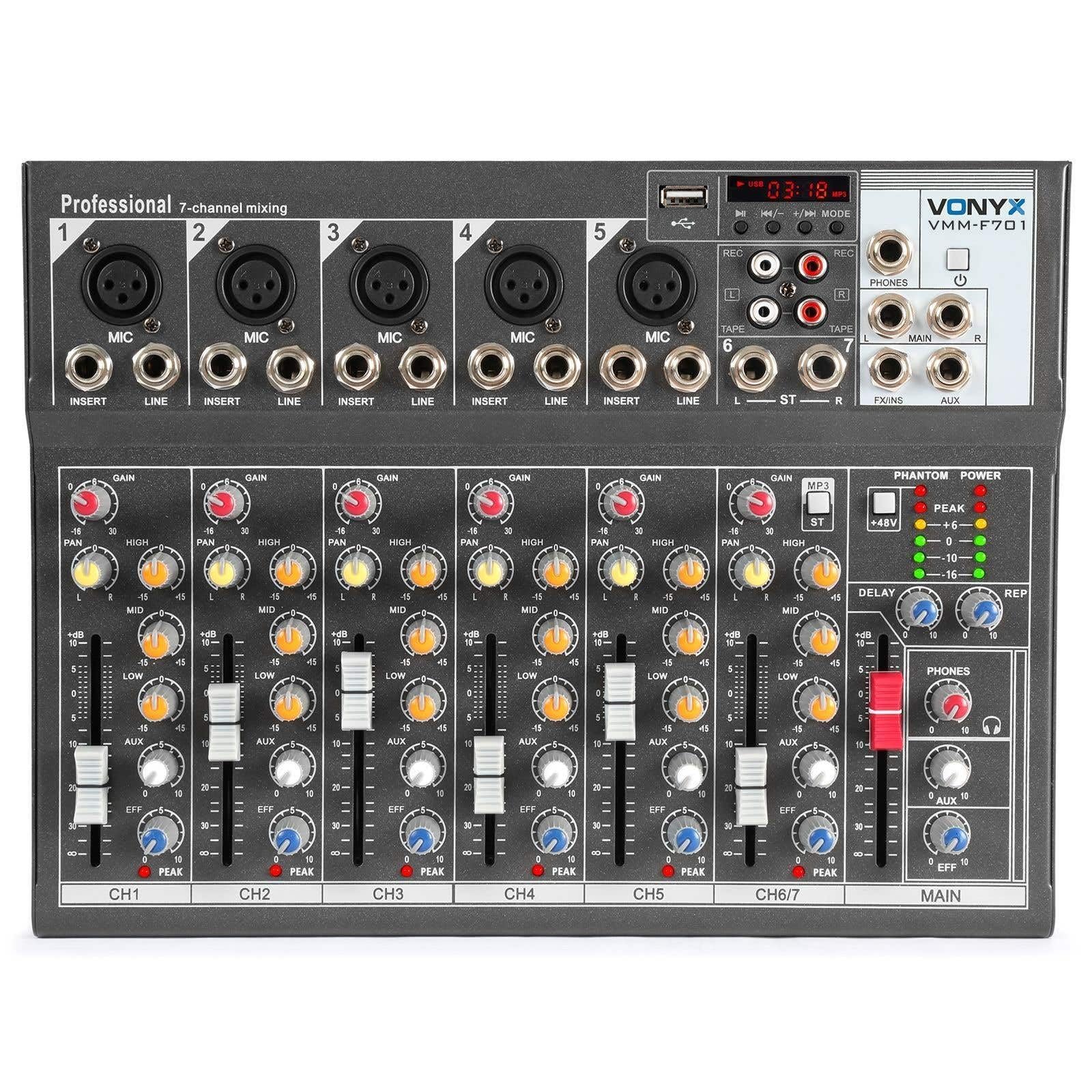
മൊത്തത്തിൽ view of the Vonyx VMM-F701 7-channel mixer, showcasing അതിന്റെ ഒതുക്കമുള്ള രൂപകൽപ്പനയും നിയന്ത്രണ ലേഔട്ടും.

ടോപ്പ് ഡൗൺ view of the Vonyx VMM-F701 mixer, highlighting the input channels, faders, and equalization knobs.

Close-up of the USB input and media player controls on the Vonyx VMM-F701 mixer, with a USB drive inserted.

Rear panel of the Vonyx VMM-F701 mixer, showing the power input and USB port for external power.
4. സജ്ജീകരണം
- പവർ കണക്ഷൻ: Connect the mixer to a 230Vac/50Hz power source using the provided power cable. The mixer can also be powered via USB (5V/1A) for certain functions.
- ഇൻപുട്ട് കണക്ഷനുകൾ:
- For microphones, use XLR or 6.3mm jack cables to connect to channels 1-5. Activate +48V phantom power for condenser microphones.
- For line-level instruments or devices, use 6.3mm jack cables to connect to channels 1-5 (line inputs) or the stereo line input (channels 6/7).
- ഔട്ട്പുട്ട് കണക്ഷനുകൾ: നിങ്ങളുടെ പ്രധാന സ്പീക്കറുകൾ ബന്ധിപ്പിക്കുക അല്ലെങ്കിൽ amplifier to the balanced stereo main output (6.3mm Jack).
- ഹെഡ്ഫോണുകൾ: Connect headphones to the dedicated headphone output for monitoring.

വിശദമായി view of the mains power input and a wiring diagram for microphone/line inputs on the Vonyx VMM-F701 mixer.
5. പ്രവർത്തന നിർദ്ദേശങ്ങൾ
- നിയന്ത്രണം നേടുക: Adjust the input sensitivity for each channel using the GAIN knob.
- ഇക്വലൈസേഷൻ (EQ): Use the HI, MID, and LOW knobs to adjust the treble, midrange, and bass frequencies for each channel.
- പാൻ നിയന്ത്രണം: Adjust the stereo positioning of each channel using the PAN knob.
- FX അയയ്ക്കുക: Use the FX knob to send a portion of the channel's signal to the internal effect processor.
- AUX Send: Use the AUX knob to send a portion of the channel's signal to an external effect unit or monitor mix (via FX Send/Return).
- ചാനൽ ഫേഡറുകൾ: Adjust the volume level for each individual channel.
- Main Fader: മിക്സറിന്റെ മൊത്തത്തിലുള്ള ഔട്ട്പുട്ട് വോളിയം നിയന്ത്രിക്കുക.
- Effect Processor: Adjust the DELAY and REP (Repeat) knobs to control the characteristics of the built-in delay effect.
- USB പ്ലെയർ: ഓഡിയോ പ്ലേ ചെയ്യാൻ USB പോർട്ടിലേക്ക് ഒരു USB ഡ്രൈവ് ഇടുക. files. Use the media player controls (play/pause, skip, mode) to navigate and control playback.
- ഫാന്റം പവർ: Press the +48V PHANTOM POWER button to supply power to condenser microphones. Ensure microphones are connected before activating.
6. പരിപാലനം
- വൃത്തിയാക്കൽ: Use a soft, dry cloth to clean the mixer's surface. Avoid liquid cleaners or solvents.
- സംഭരണം: നേരിട്ടുള്ള സൂര്യപ്രകാശവും കടുത്ത താപനിലയും ഏൽക്കാത്ത ഒരു തണുത്ത വരണ്ട സ്ഥലത്ത് മിക്സർ സൂക്ഷിക്കുക.
- വെൻ്റിലേഷൻ: അമിതമായി ചൂടാക്കുന്നത് തടയാൻ മിക്സറിന് ചുറ്റും ശരിയായ വായുസഞ്ചാരം ഉറപ്പാക്കുക.
7. പ്രശ്നപരിഹാരം
| പ്രശ്നം | സാധ്യമായ കാരണം | പരിഹാരം |
|---|---|---|
| ശബ്ദ ഔട്ട്പുട്ട് ഇല്ല | Power off; cables disconnected; faders down; incorrect input selection. | Check power connection; ensure all cables are securely connected; raise channel and main faders; verify correct input source. |
| വികലമായ ശബ്ദം | Input gain too high; output level too high; faulty cable. | Reduce GAIN knob; lower main fader; try a different cable. |
| മൈക്രോഫോൺ പ്രവർത്തിക്കുന്നില്ല | Phantom power off (for condenser mics); mic not connected; faulty mic. | Activate +48V PHANTOM POWER; check mic connection; test with another microphone. |
| യുഎസ്ബി പ്ലെയർ പ്രവർത്തിക്കുന്നില്ല | USB drive not recognized; unsupported file ഫോർമാറ്റ്. | Ensure USB drive is properly inserted; try a different USB drive; check file formats (e.g., MP3). |
8 സ്പെസിഫിക്കേഷനുകൾ
| ഫീച്ചർ | സ്പെസിഫിക്കേഷൻ |
|---|---|
| മോഡൽ നമ്പർ | VMM-F701 |
| ചാനലുകളുടെ എണ്ണം | 7 |
| ഫ്രീക്വൻസി റേഞ്ച് | 20 ഹെർട്സ് - 20 കിലോ ഹെർട്സ് |
| THD (ആകെ ഹാർമോണിക് ഡിസ്റ്റോർഷൻ) | <0.01% |
| സിഗ്നൽ-ടു-നോയിസ് അനുപാതം | >110dB |
| ഔട്ട്പുട്ട് ലെവൽ | ±1V |
| ലൈൻ ഇൻപുട്ട് സെൻസിറ്റിവിറ്റി | ±150mV |
| മൈക്രോഫോൺ ഇൻപുട്ട് സംവേദനക്ഷമത | ±1.5mV |
| കണക്ഷൻ വോളിയംtage | 230Vac / 50Hz (USB 5V/1A) |
| അളവുകൾ (L x W x H) | 230 x 312 x 45 മിമി (9.06 x 12.28 x 1.77 ഇഞ്ച്) |
| ഭാരം | 2.25 കി.ഗ്രാം (4.96 പൗണ്ട്) |
| കണക്റ്റിവിറ്റി ടെക്നോളജി | USB |
| ഓഡിയോ ഇൻപുട്ട് | XLR, 1/4 inch (6.3 mm) jack |
| ഔട്ട്പുട്ട് കണക്റ്റർ തരം | TRS 1/4" (balanced) |
9. വാറൻ്റിയും പിന്തുണയും
വാറൻ്റി: This product comes with a 2-year warranty on spare parts. For warranty claims, please retain your proof of purchase.
പിന്തുണ: For technical assistance, troubleshooting, or service inquiries, please contact your local Vonyx dealer or visit the official Vonyx webപിന്തുണാ ഉറവിടങ്ങൾക്കായുള്ള സൈറ്റ്.