
PureMate PM850
PureMate 43-inch Tower Fan Instruction Manual
മോഡൽ: PM850
1 സുരക്ഷാ വിവരങ്ങൾ
ഈ ഉപകരണം ഉപയോഗിക്കുന്നതിന് മുമ്പ് ദയവായി എല്ലാ നിർദ്ദേശങ്ങളും ശ്രദ്ധാപൂർവ്വം വായിക്കുകയും ഭാവിയിലെ റഫറൻസിനായി സൂക്ഷിക്കുകയും ചെയ്യുക. തീപിടുത്തം, വൈദ്യുതാഘാതം, വ്യക്തിപരമായ പരിക്കുകൾ എന്നിവ കുറയ്ക്കുന്നതിന് വൈദ്യുത ഉപകരണങ്ങൾ ഉപയോഗിക്കുമ്പോൾ എല്ലായ്പ്പോഴും അടിസ്ഥാന സുരക്ഷാ മുൻകരുതലുകൾ പാലിക്കുക.
- വൈദ്യുതി വിതരണം വോള്യവുമായി പൊരുത്തപ്പെടുന്നുണ്ടെന്ന് ഉറപ്പാക്കുകtagഇ റേറ്റിംഗ് ലേബലിൽ വ്യക്തമാക്കിയിരിക്കുന്നു.
- കേടായ കോർഡ് അല്ലെങ്കിൽ പ്ലഗ് ഉപയോഗിച്ച് ഫാൻ പ്രവർത്തിപ്പിക്കരുത്.
- Keep the fan away from water and moisture. Do not immerse in water or other liquids.
- ഫാൻ പ്രവർത്തിക്കുമ്പോൾ ഗ്രില്ലിനുള്ളിൽ വിരലുകളോ അന്യവസ്തുക്കളോ കടത്തരുത്.
- Unplug the fan from the power outlet when not in use, when moving it, or before cleaning.
- ഈ ഉപകരണം ഇൻഡോർ ഉപയോഗത്തിന് മാത്രമുള്ളതാണ്.
- കുട്ടികൾക്ക് ലഭ്യമാകാതെ സൂക്ഷിക്കുക.
2. ഉൽപ്പന്നം കഴിഞ്ഞുview
The PureMate 43-inch Tower Fan (Model PM850) is designed to provide efficient and comfortable air circulation for your home or office. It features multiple speed and wind modes, oscillation, a timer, and an aroma function for enhanced comfort.

Image: The PureMate 43-inch Tower Fan in black, showing its sleek design, the remote control, and an illustration of air movement.
പ്രധാന സവിശേഷതകൾ:
- 3 കാറ്റ് മോഡുകൾ: Normal, Natural, and Sleep for varied comfort.
- 3 വേഗത ക്രമീകരണങ്ങൾ: Low, Medium, and High to adjust airflow intensity.
- 70-Degree Oscillation: Provides widespread air distribution.
- 8-മണിക്കൂർ ടൈമർ: Allows for automatic shut-off.
- റിമോട്ട് കൺട്രോൾ: ദൂരെ നിന്ന് സൗകര്യപ്രദമായ പ്രവർത്തനത്തിന്.
- സുഗന്ധ പ്രവർത്തനം: Integrated tray for essential oils to diffuse fragrance.
- വായു ശുദ്ധീകരണി: Helps improve air quality.
- വലിയ LED ഡിസ്പ്ലേ: Clear indication of settings and room temperature.
- ശാന്തമായ പ്രവർത്തനം: Designed for low noise levels, ideal for bedrooms.

Image: Detailed diagram of the fan's control panel, illustrating the various buttons and their corresponding functions such as ON/OFF, Speed, Mode, and Oscillation.
3. സജ്ജീകരണം
The PureMate Tower Fan requires minimal assembly. Follow these steps to set up your fan:
- ഫാനിൽ നിന്നും അതിന്റെ ഘടകങ്ങളിൽ നിന്നും എല്ലാ പാക്കേജിംഗ് വസ്തുക്കളും ശ്രദ്ധാപൂർവ്വം നീക്കം ചെയ്യുക.
- Attach the base to the main fan unit. Align the screw holes on the base with those on the bottom of the fan.
- Secure the base using the provided screws. Typically, four screws are used to firmly attach the base.
- ഫാൻ ഒരു ഉറച്ച, നിരപ്പായ പ്രതലത്തിൽ വയ്ക്കുക.
- അനുയോജ്യമായ ഒരു ഇലക്ട്രിക്കൽ ഔട്ട്ലെറ്റിലേക്ക് പവർ കോർഡ് പ്ലഗ് ചെയ്യുക.
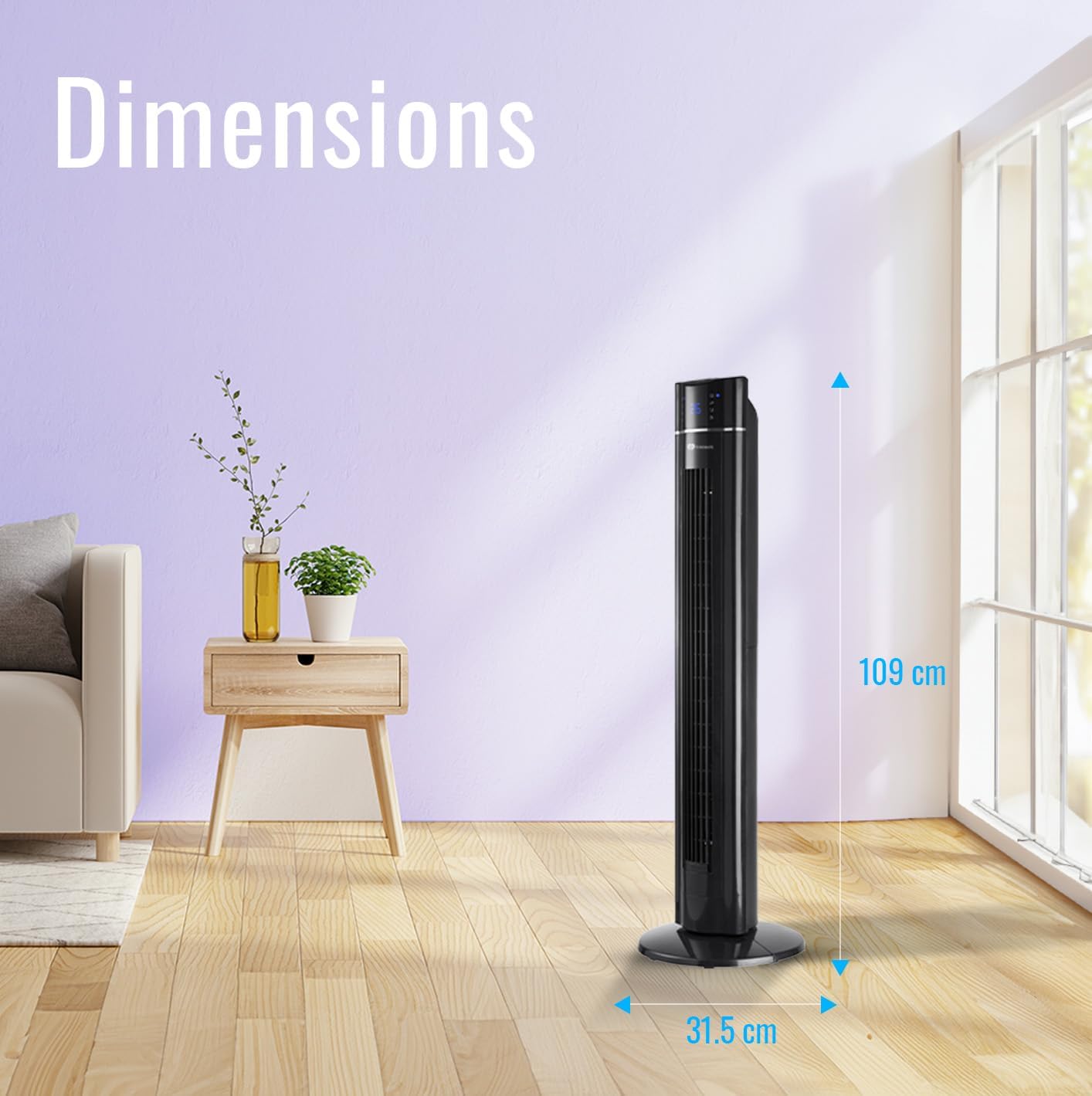
Image: The PureMate Tower Fan with its height (109 cm) and base width (31.5 cm) clearly marked, illustrating its compact and space-saving design.
4. പ്രവർത്തന നിർദ്ദേശങ്ങൾ
Your PureMate Tower Fan can be operated using the control panel on top of the unit or the included remote control.
4.1 പവർ ഓൺ/ഓഫ്
- അമർത്തുക ഓൺ/ഓഫ് ഫാൻ ഓണാക്കാനോ ഓഫാക്കാനോ കൺട്രോൾ പാനലിലോ റിമോട്ട് കൺട്രോളിലോ ഉള്ള ബട്ടൺ അമർത്തുക.
4.2 വേഗത ക്രമീകരിക്കൽ
- അമർത്തുക വേഗത button repeatedly to cycle through Low, Medium, and High settings. The current speed will be indicated on the LED display.
4.3 Selecting Wind Mode
- അമർത്തുക മോഡ് button repeatedly to select Normal, Natural, or Sleep wind mode.
- സാധാരണ മോഡ്: Provides a constant airflow.
- സ്വാഭാവിക മോഡ്: വ്യത്യസ്ത ഫാൻ വേഗതയിൽ പ്രകൃതിദത്തമായ കാറ്റിനെ അനുകരിക്കുന്നു.
- സ്ലീപ്പ് മോഡ്: Gradually decreases fan speed and dims the LED display for undisturbed sleep.
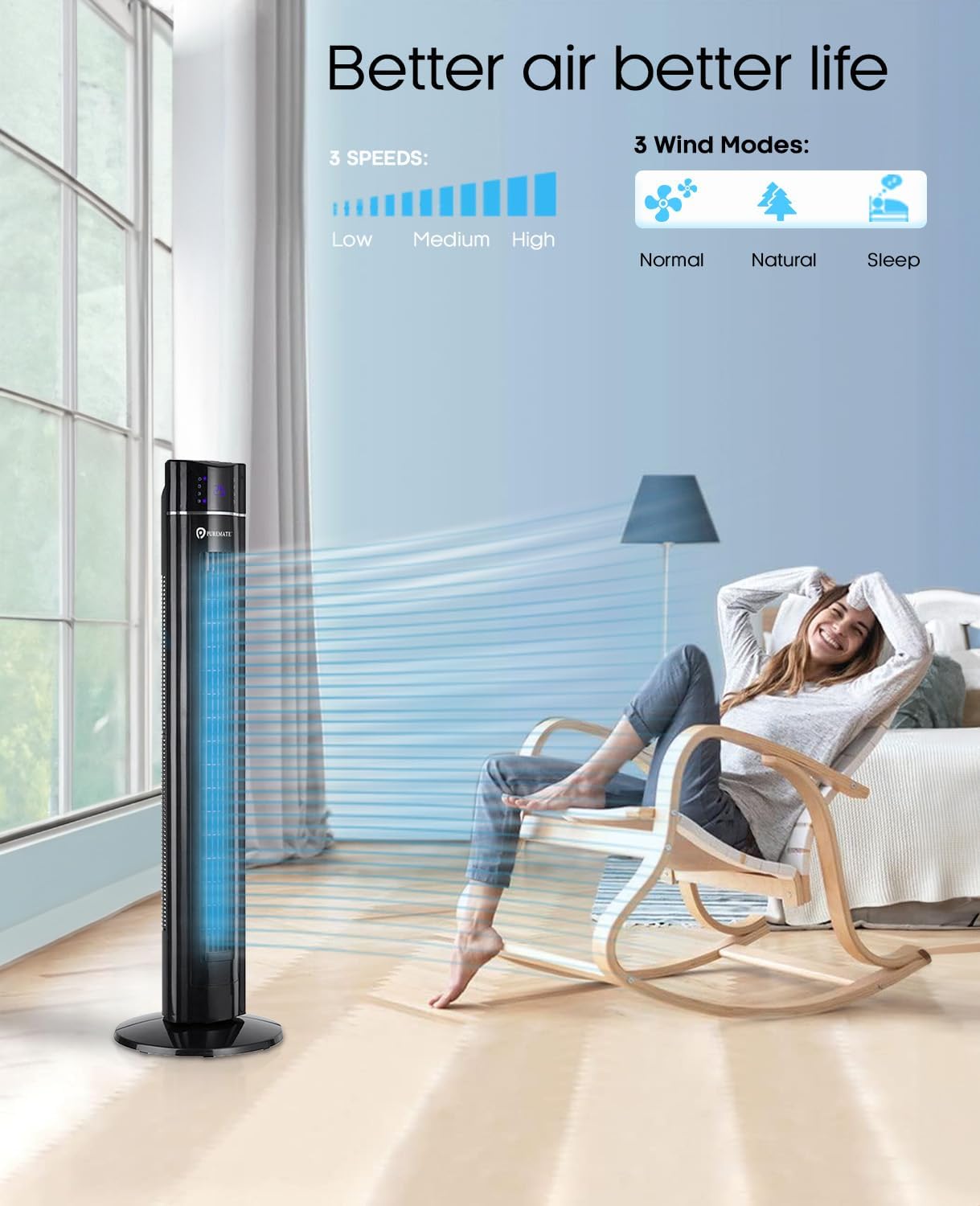
Image: The PureMate Tower Fan demonstrating its three speed settings (Low, Medium, High) and three wind modes (Normal, Natural, Sleep) for customized comfort.
4.4 ഓസിലേഷൻ ഫംഗ്ഷൻ
- അമർത്തുക OSC (Oscillation) button to activate or deactivate the 70-degree oscillation feature, which helps distribute air across a wider area.
4.5 ടൈമർ പ്രവർത്തനം
- അമർത്തുക ടൈമർ button repeatedly to set the desired operating time, from 1 to 8 hours, in 1-hour increments. The fan will automatically turn off after the set time.
4.6 Aroma Function
- Locate the aroma tray on the back or side of the fan.
- Pull out the tray and add a few drops of your preferred essential oil onto the sponge pad.
- Slide the tray back into its slot. The fan's airflow will diffuse the aroma.
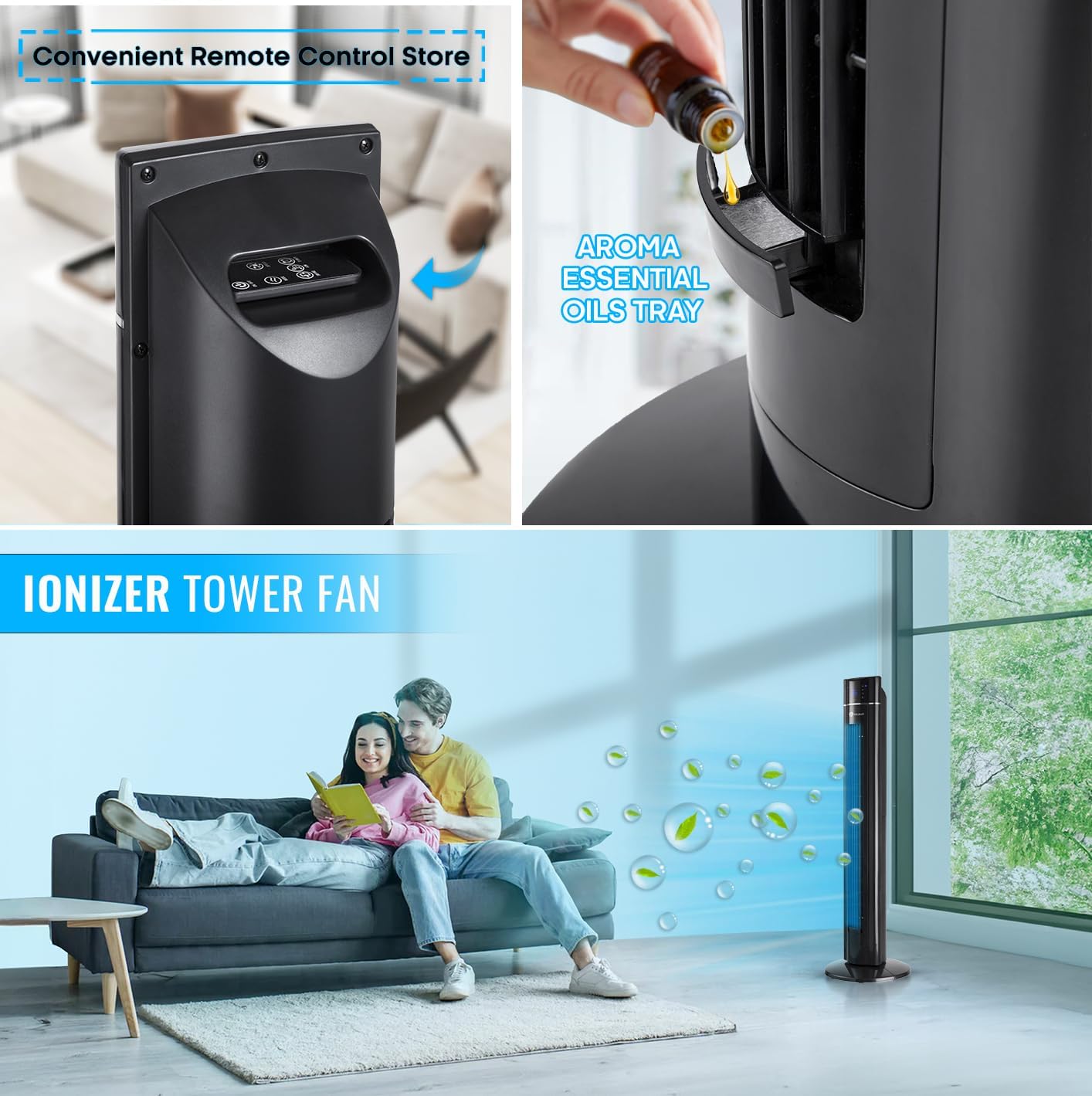
ചിത്രം: ഒരു ക്ലോസ്-അപ്പ് view of the PureMate Tower Fan's aroma essential oils tray, showing how to add drops of oil for fragrance diffusion.
4.7 വിദൂര നിയന്ത്രണം
- The remote control provides full functionality of the fan from a distance. Ensure batteries are correctly inserted.
- Store the remote control in the designated slot on the fan when not in use to prevent misplacement.
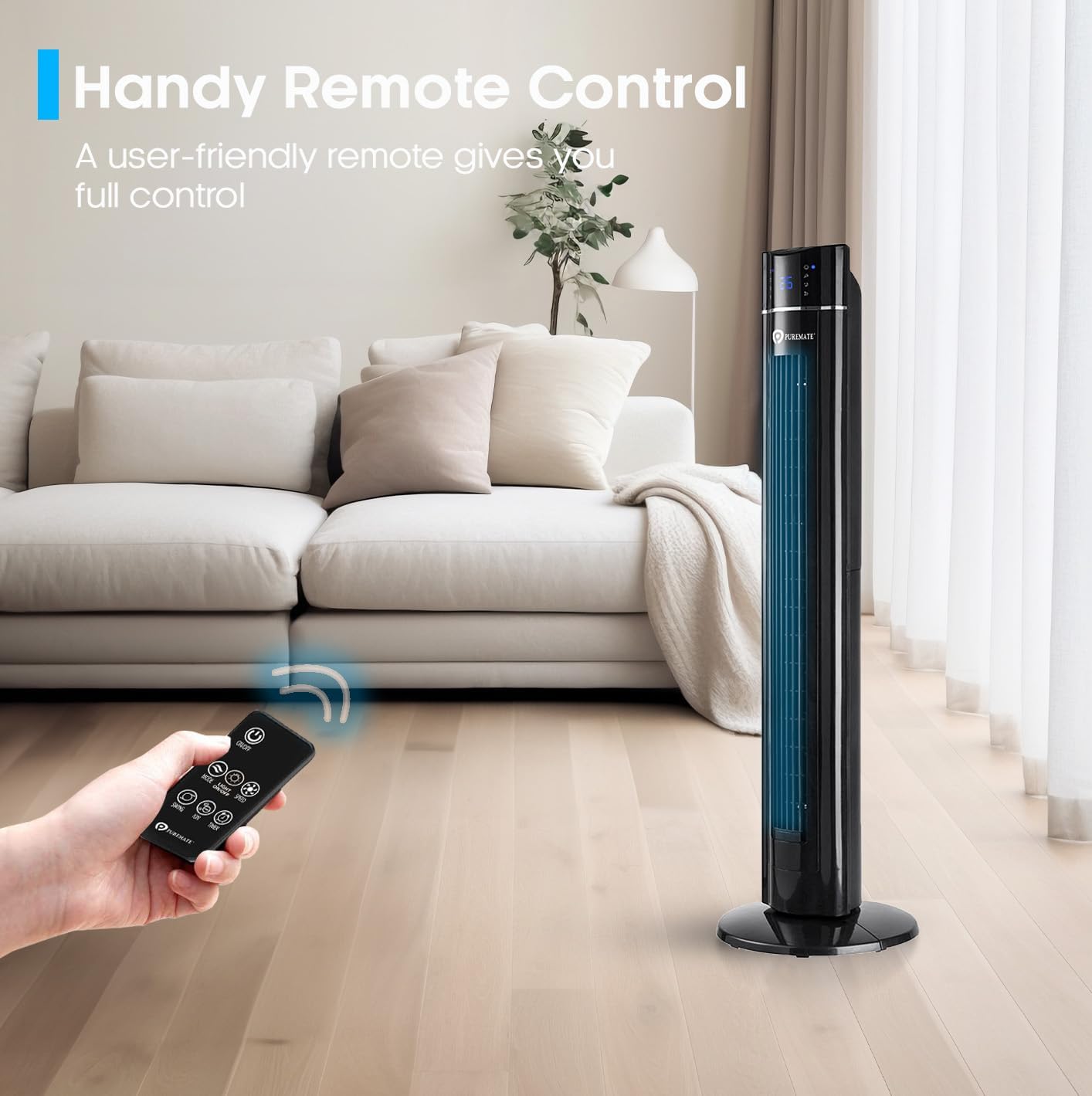
Image: A hand holding the remote control, demonstrating its use to operate the PureMate Tower Fan from a comfortable distance.
5. പരിപാലനം
Regular cleaning and maintenance will ensure the longevity and optimal performance of your PureMate Tower Fan.
- പുറം വൃത്തിയാക്കൽ: ഒരു മൃദുവായ, ഡി ഉപയോഗിച്ച് ബാഹ്യ പ്രതലങ്ങൾ തുടയ്ക്കുകamp തുണി. ഉരച്ചിലുകളുള്ള ക്ലീനറുകളോ ലായകങ്ങളോ ഉപയോഗിക്കരുത്.
- Cleaning the Air Inlet/Outlet: എയർ ഇൻലെറ്റിലെയും ഔട്ട്ലെറ്റിലെയും ഗ്രില്ലുകളിൽ നിന്ന് പൊടി നീക്കം ചെയ്യാൻ ബ്രഷ് അറ്റാച്ച്മെന്റുള്ള ഒരു വാക്വം ക്ലീനർ ഉപയോഗിക്കുക.
- അരോമ ട്രേ: Periodically clean the aroma tray and replace the sponge pad if it becomes discolored or worn.
- സംഭരണം: When not in use for extended periods, unplug the fan, clean it, and store it in a cool, dry place, preferably in its original packaging.
Caution: Always unplug the fan before cleaning or performing any maintenance.
6. പ്രശ്നപരിഹാരം
If you encounter issues with your PureMate Tower Fan, refer to the following common problems and solutions:
| പ്രശ്നം | സാധ്യമായ കാരണം | പരിഹാരം |
|---|---|---|
| ഫാൻ ഓണാകുന്നില്ല. | No power supply; Power button not pressed; Remote control batteries dead. | Check if the fan is plugged in and the outlet is working. Press the power button firmly. Replace remote control batteries. |
| ദുർബലമായ വായുസഞ്ചാരം. | Fan speed too low; Air inlets/outlets blocked by dust. | Increase fan speed. Clean the air inlets and outlets. |
| Fan makes unusual noise (rattling). | Loose components; Fan not on a level surface. | Ensure the base is securely attached. Place the fan on a stable, flat surface. If noise persists, contact customer support. |
| LED display is too bright at night. | Display light is active. | Use the 'Night Mode' or 'Light Off' button on the remote control or control panel to dim/turn off the display light. Note: Some models may reactivate the light upon power cycle. |
| Fan turns on/off unexpectedly. | Interference from other remote controls (e.g., TV remote). | Relocate the fan away from other devices that use infrared remote controls, or be mindful of other remote usage. |
| Loud beeping sound when changing settings. | Normal operational feedback. | This is a design feature. There is no option to disable the beeping sound. |
7 സ്പെസിഫിക്കേഷനുകൾ
| ഫീച്ചർ | വിശദാംശങ്ങൾ |
|---|---|
| ബ്രാൻഡ് | പ്യുർമേറ്റ് |
| മോഡൽ നമ്പർ | PM850 |
| നിറം | Tower_fan_black |
| ഉൽപ്പന്ന അളവുകൾ | 31.5 x 31.5 x 109 സെ.മീ |
| ഇനത്തിൻ്റെ ഭാരം | 4.3 കി.ഗ്രാം |
| പവർ / വാട്ട്tage | 60 വാട്ട്സ് |
| വാല്യംtage | 230 വോൾട്ട് |
| ശബ്ദ നില | 52 ഡി.ബി |
| ഓസിലേഷൻ | 70 ഡിഗ്രി |
| ടൈമർ | 8 മണിക്കൂർ വരെ |
| പ്രത്യേക സവിശേഷതകൾ | Aroma Function, Air purifier, Portable, Oscillating, Lightweight, Bladeless, Timer, Remote Controlled, Quiet Operation, Safety Certified |
8. വാറൻ്റിയും പിന്തുണയും
PureMate products are manufactured with durability and quality in mind. For specific warranty details and customer support, please refer to the warranty card included with your product or visit the official PureMate webസൈറ്റ്.
For further assistance, you may contact PureMate customer service through their official channels. You can also visit the PureMate Store on Amazon കൂടുതൽ വിവരങ്ങൾക്കും ഉൽപ്പന്ന രജിസ്ട്രേഷനും.
Ask a question about this manual
Ask about setup, troubleshooting, compatibility, parts, safety, or missing instructions. Manuals+ will review the question and use this page’s manual context to help answer it.