
ആമുഖം
Thank you for choosing the MeeTion K9310 Gaming Keyboard. This manual provides detailed instructions for setting up, operating, and maintaining your new keyboard. The K9310 is designed for an enhanced gaming experience with features such as multicolor backlighting, anti-ghosting, and dedicated shortcut keys.
പാക്കേജ് ഉള്ളടക്കം
- MeeTion K9310 Gaming Keyboard
- ഉപയോക്തൃ മാനുവൽ (ഈ പ്രമാണം)
സജ്ജമാക്കുക
Follow these steps to connect your MeeTion K9310 Gaming Keyboard to your computer:
- കീബോർഡ് അതിന്റെ പാക്കേജിംഗിൽ നിന്ന് അൺപാക്ക് ചെയ്യുക.
- നിങ്ങളുടെ കമ്പ്യൂട്ടറിൽ ലഭ്യമായ USB പോർട്ട് കണ്ടെത്തുക.
- കീബോർഡിന്റെ USB കണക്റ്റർ USB പോർട്ടിലേക്ക് പ്ലഗ് ചെയ്യുക.
- Your operating system (Windows XP/Vista/7/8/10) will automatically detect and install the necessary drivers. No additional software installation is typically required.
- The keyboard is ready for use once the drivers are installed.

ചിത്രം: മുകളിൽ view of the MeeTion K9310 Gaming Keyboard with its USB cable, ready for connection.
പ്രവർത്തന നിർദ്ദേശങ്ങൾ
പ്രധാന സവിശേഷതകൾ
- Multicolor Key Backlit: The keyboard features vibrant multicolor backlighting for enhanced visibility and aesthetic appeal, especially in low-light conditions.
- Comfortable and Soft Keys: Designed with membrane keys offering tactile feedback, providing a comfortable typing and gaming experience.
- 19 കീകൾ ആന്റി-ഗോസ്റ്റിംഗ്: This feature ensures that up to 19 keys can be pressed simultaneously without any input loss, crucial for complex gaming commands.
- Win Lock Function with LED Indication: Prevents accidental presses of the Windows key during gameplay, which can interrupt your game. An LED indicator shows when this function is active.
- 12 FN Shortcut Buttons: Access various multimedia and system functions quickly using the Function (FN) key in combination with the F1-F12 keys.
ബാക്ക്ലൈറ്റ് നിയന്ത്രണം
The K9310 keyboard features a multicolor backlight. Specific key combinations may be used to adjust brightness or switch lighting modes. Refer to the keyboard's markings for dedicated backlight control keys, often indicated by a sun or light bulb icon, or through FN key combinations.
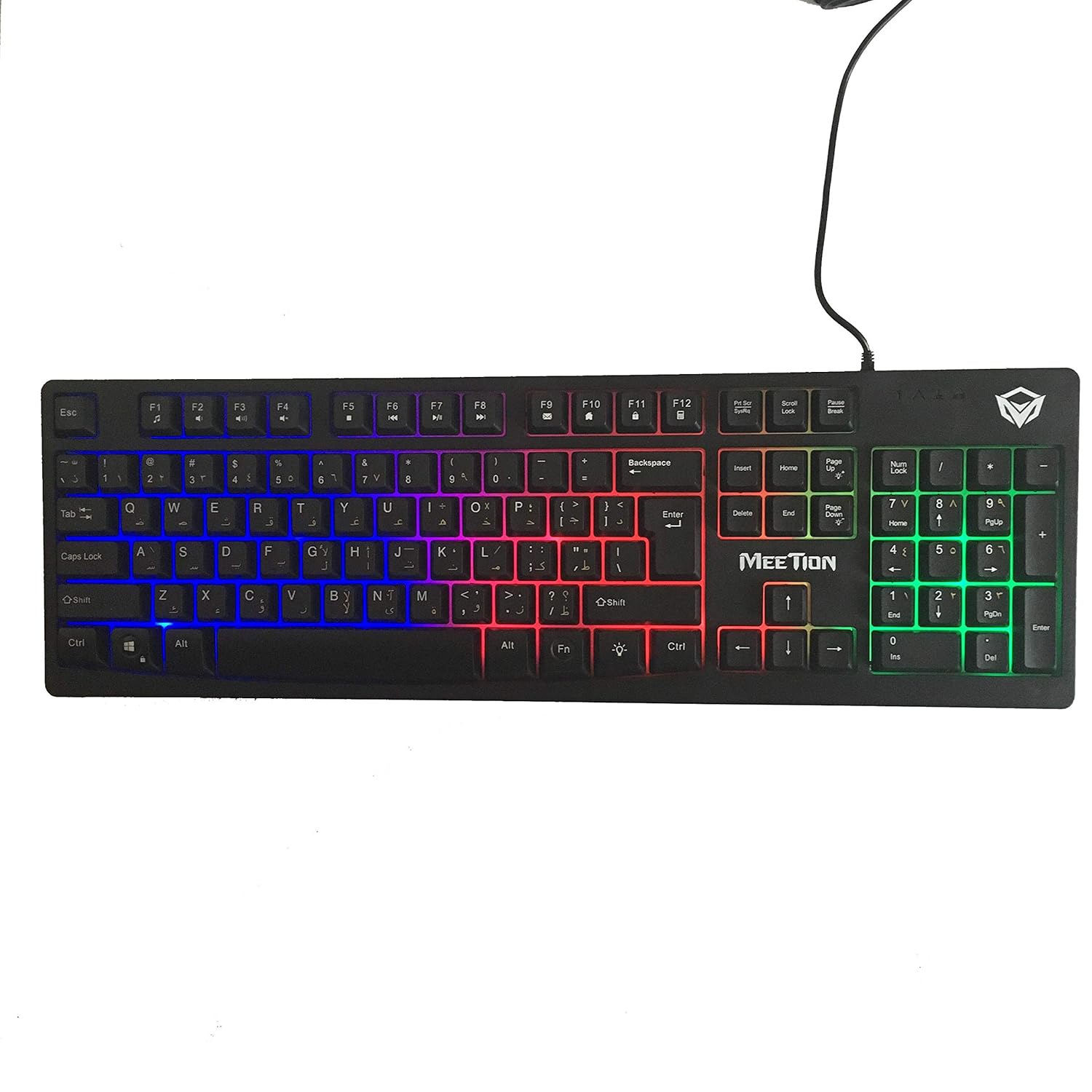
ചിത്രം: മുകളിൽ view of the MeeTion K9310 Gaming Keyboard with its multicolor backlighting illuminated.
FN Shortcut Functions
The keyboard includes 12 FN (Function) shortcut buttons. To activate these functions, press and hold the FN key, then press the desired F-key (F1-F12).
| കീ കോമ്പിനേഷൻ | ഫംഗ്ഷൻ |
|---|---|
| FN + F1 | മീഡിയ പ്ലെയർ |
| FN + F2 | വോളിയം ഡൗൺ |
| FN + F3 | വോളിയം കൂട്ടുക |
| FN + F4 | നിശബ്ദമാക്കുക |
| FN + F5 | നിർത്തുക |
| FN + F6 | മുമ്പത്തെ ട്രാക്ക് |
| FN + F7 | പ്ലേ/താൽക്കാലികമായി നിർത്തുക |
| FN + F8 | അടുത്ത ട്രാക്ക് |
| FN + F9 | ഇമെയിൽ |
| FN + F10 | Web ബ്രൗസർ |
| FN + F11 | എൻ്റെ കമ്പ്യൂട്ടർ |
| FN + F12 | കാൽക്കുലേറ്റർ |
Win Lock Function
To activate or deactivate the Windows key lock function, press FN + വിൻ കീ. When active, the Windows key will be disabled, preventing accidental presses during gaming. An LED indicator on the keyboard will typically illuminate to show the Win Lock status.
മെയിൻ്റനൻസ്
ശരിയായ അറ്റകുറ്റപ്പണി നിങ്ങളുടെ കീബോർഡിന്റെ ദീർഘായുസ്സും മികച്ച പ്രകടനവും ഉറപ്പാക്കുന്നു.
- വൃത്തിയാക്കൽ: Use a soft, dry cloth to wipe the surface of the keyboard. For deeper cleaning, a slightly damp cloth with mild soap can be used, ensuring no liquid enters the key switches or internal components.
- പൊടി നീക്കം: താക്കോലുകൾക്കിടയിൽ നിന്ന് പൊടിയും അവശിഷ്ടങ്ങളും നീക്കം ചെയ്യാൻ കംപ്രസ് ചെയ്ത വായു ഉപയോഗിക്കുക.
- ദ്രാവകങ്ങൾ ഒഴിവാക്കുക: Do not spill liquids on the keyboard. If a spill occurs, immediately disconnect the keyboard from the computer and allow it to dry completely before reconnecting.
- സംഭരണം: ദീർഘനേരം ഉപയോഗിക്കാത്തപ്പോൾ, നേരിട്ടുള്ള സൂര്യപ്രകാശത്തിൽ നിന്നും കടുത്ത താപനിലയിൽ നിന്നും അകന്ന്, തണുത്തതും വരണ്ടതുമായ സ്ഥലത്ത് കീബോർഡ് സൂക്ഷിക്കുക.

ചിത്രം: താഴെ view of the MeeTion K9310 Gaming Keyboard, showing the product label and rubber feet.
ട്രബിൾഷൂട്ടിംഗ്
If you encounter issues with your MeeTion K9310 Gaming Keyboard, refer to the following troubleshooting steps:
- കീബോർഡ് പ്രതികരിക്കുന്നില്ല:
- നിങ്ങളുടെ കമ്പ്യൂട്ടറിലെ പ്രവർത്തിക്കുന്ന ഒരു USB പോർട്ടിലേക്ക് USB കേബിൾ സുരക്ഷിതമായി പ്ലഗ് ചെയ്തിട്ടുണ്ടെന്ന് ഉറപ്പാക്കുക.
- കീബോർഡ് മറ്റൊരു USB പോർട്ടിലേക്ക് പ്ലഗ് ചെയ്യാൻ ശ്രമിക്കുക.
- നിങ്ങളുടെ കമ്പ്യൂട്ടർ പുനരാരംഭിക്കുക.
- പ്രശ്നം കീബോർഡിലാണോ അതോ കമ്പ്യൂട്ടറിലാണോ എന്ന് നിർണ്ണയിക്കാൻ മറ്റൊരു കമ്പ്യൂട്ടറിൽ കീബോർഡ് പരിശോധിക്കുക.
- Keys Not Working (e.g., 'W' key):
- Check for any debris or foreign objects lodged under the affected key. Use compressed air to clear it.
- If only specific keys are not responding, and the keyboard is otherwise functional, it might indicate a hardware issue.
- Backlight Not Working or Flickering:
- കീബോർഡ് ശരിയായി ബന്ധിപ്പിച്ചിട്ടുണ്ടെന്ന് ഉറപ്പാക്കുക.
- Check if the backlight brightness is set to minimum or turned off via FN key combinations.
- If the issue persists, it may indicate a hardware malfunction.
- Win Lock Function Not Working:
- Ensure you are using the correct key combination (FN + Win Key) to toggle the function.
- Check the LED indicator for Win Lock status.
സ്പെസിഫിക്കേഷനുകൾ
| ഫീച്ചർ | വിശദാംശങ്ങൾ |
|---|---|
| ബ്രാൻഡ് | മീറ്റിംഗ് |
| മോഡൽ | K9310 |
| കീബോർഡ് തരം | ഗെയിമിംഗ് കീബോർഡ് |
| പ്രധാന കോൺടാക്റ്റ് | Membrane with tactile feedback |
| ലേഔട്ട് | Cyrillic alphabet layout (Windows Keys) |
| ആൻ്റി-ഗോസ്റ്റിംഗ് | 19 കീകൾ |
| ബാക്ക്ലൈറ്റ് | മൾട്ടികളർ കീ ബാക്ക്ലിറ്റ് |
| Win Lock Function | അതെ, LED സൂചനയോടെ |
| FN Shortcut Buttons | 12 |
| Error-Free Running Time | More than 10 million strokes |
| OS അനുയോജ്യത | Windows XP/Vista/7/8/10 |
| അളവുകൾ | 17.5 × 5.5 x 1.5 inches (approximate) |
| ഭാരം | 1.2 പൗണ്ട് (ഏകദേശം) |
| അനുയോജ്യമായ ഉപകരണങ്ങൾ | Laptop (and Desktop PCs) |
വാറൻ്റിയും പിന്തുണയും
For warranty information or technical support, please refer to the documentation provided at the time of purchase or visit the official MEETION webസൈറ്റ്. ഏതെങ്കിലും വാറന്റി ക്ലെയിമുകൾക്ക് നിങ്ങളുടെ വാങ്ങലിന്റെ തെളിവ് സൂക്ഷിക്കുക.