
1. ഉൽപ്പന്നം കഴിഞ്ഞുview
The Panasonic DVD Player DVD-S700 is designed to enhance your home entertainment experience by up-converting standard DVDs to 1080p Full-HD resolution. It supports a variety of media formats and offers versatile connectivity options, including USB playback. Enjoy clear visuals and rich audio with Dolby Digital sound.
പ്രധാന സവിശേഷതകൾ:
- 1080p Up-Conversion: Elevates DVD video quality to Full-HD 1080p, providing smooth, detailed images.
- Dolby Digital Sound: Delivers superior audio performance from DVDs and CDs.
- യുഎസ്ബി പ്ലേബാക്ക്: അനുവദിക്കുന്നു viewing content directly from USB memory devices.
- മൾട്ടി-ഫോർമാറ്റ് പ്ലേബാക്ക്: Supports various disc formats for broad compatibility.
- Dust Proof Design: Helps maintain optimal performance and longevity.
- പവർ റെസ്യൂം: Resumes playback from where it left off after a power interruption.

ചിത്രം 1: മുൻഭാഗം view of the Panasonic DVD-S700 DVD player, showcasing അതിന്റെ മിനുസമാർന്ന കറുത്ത ഡിസൈൻ.
2. ഉൽപ്പന്ന ഘടകങ്ങൾ
Your Panasonic DVD-S700 package includes the following items:
- Panasonic DVD Player DVD-S700 Unit
- റിമോട്ട് കൺട്രോൾ
- പവർ കോർഡ്
- RCA Audio/Video Cables (Red, White, Yellow)
- ഇൻസ്ട്രക്ഷൻ മാനുവൽ

ചിത്രം 2: മുൻ-ഇടത് view of the Panasonic DVD-S700 DVD player, showing the disc tray and control buttons.

ചിത്രം 3: മുൻ-വലത് view of the Panasonic DVD-S700 DVD player, highlighting the USB port and control buttons.
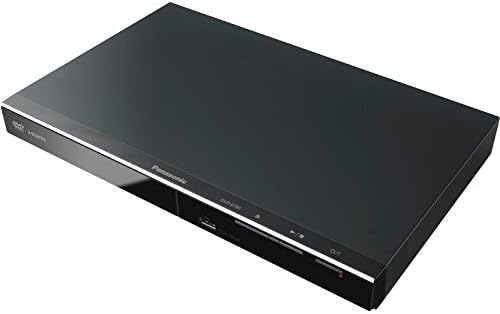
ചിത്രം 4: മുകളിൽ നിന്ന് താഴേക്ക് കോണുള്ളത് view of the Panasonic DVD-S700 DVD player, showing its slim profile.
3. സജ്ജീകരണ നിർദ്ദേശങ്ങൾ
3.1 നിങ്ങളുടെ ടെലിവിഷനുമായി ബന്ധിപ്പിക്കൽ
The DVD-S700 offers both HDMI and RCA connectivity for video and audio output.
- HDMI Connection (Recommended for 1080p Upscaling):
- Ensure your television has an available HDMI input.
- Connect one end of an HDMI cable (not included) to the HDMI OUT port on the DVD player.
- Connect the other end of the HDMI cable to an HDMI input on your television.
- Select the corresponding HDMI input on your TV using its remote control.
- RCA Connection (Standard Definition):
- Connect the yellow video cable to the VIDEO OUT port on the DVD player and the yellow video input on your television.
- Connect the red audio cable to the AUDIO R (right) port on the DVD player and the red audio input on your television.
- Connect the white audio cable to the AUDIO L (left) port on the DVD player and the white audio input on your television.
- Select the corresponding AV input on your TV using its remote control.
3.2 പവർ കണക്ഷൻ
Plug the power cord into the AC IN socket on the rear of the DVD player, then plug the other end into a standard electrical outlet (120V AC, 60Hz).
4. പ്രവർത്തന നിർദ്ദേശങ്ങൾ
4.1 അടിസ്ഥാന ഡിസ്ക് പ്ലേബാക്ക്
- അമർത്തുക പവർ button on the front panel or remote control to turn on the player.
- അമർത്തുക തുറക്കുക/അടയ്ക്കുക button (▲) to open the disc tray.
- Place a DVD or CD disc gently onto the disc tray with the label side facing up.
- അമർത്തുക തുറക്കുക/അടയ്ക്കുക button (▲) again to close the disc tray. The player will begin loading the disc.
- Playback should start automatically. If a menu appears, use the arrow buttons on the remote to navigate and the OK തിരഞ്ഞെടുക്കാനുള്ള ബട്ടൺ.
- ഉപയോഗിക്കുക പ്ലേ/താൽക്കാലികമായി നിർത്തുക (►/⏸⏸), നിർത്തുക (■), ഒഴിവാക്കുക (◀◀/►►), and EJECT (▲) buttons for control.
4.2 യുഎസ്ബി മീഡിയ പ്ലേബാക്ക്
The DVD-S700 features a front USB port for playing media files from a USB memory device.
- Insert your USB memory device into the USB port on the front of the DVD player.
- The player should automatically detect the USB device and display a menu. If not, press the USB റിമോട്ട് കൺട്രോളിലെ ബട്ടൺ.
- Use the navigation buttons on the remote to browse through your files (e.g., MP3, MP4, JPEG).
- ആവശ്യമുള്ളത് തിരഞ്ഞെടുക്കുക file ഒപ്പം അമർത്തുക OK പ്ലേബാക്ക് ആരംഭിക്കാൻ.
5. പരിപാലനം
5.1 യൂണിറ്റ് വൃത്തിയാക്കൽ
- Always unplug the DVD player from the power outlet before cleaning.
- യൂണിറ്റിൻ്റെ പുറംഭാഗം തുടയ്ക്കാൻ മൃദുവായതും ഉണങ്ങിയതുമായ തുണി ഉപയോഗിക്കുക.
- Do not use liquid cleaners, aerosol sprays, or strong chemical solvents, as these may damage the finish.
5.2 ക്ലീനിംഗ് ഡിസ്കുകൾ
- Wipe discs from the center outwards with a soft, lint-free cloth.
- Avoid using abrasive cleaners or solvents that could scratch the disc surface.
- Store discs in their cases to prevent dust and scratches.
6. പ്രശ്നപരിഹാരം
If you encounter issues with your DVD player, refer to the following common solutions:
| പ്രശ്നം | സാധ്യമായ കാരണം | പരിഹാരം |
|---|---|---|
| ശക്തിയില്ല | പവർ കോർഡ് ബന്ധിപ്പിച്ചിട്ടില്ല; ഔട്ട്ലെറ്റ് സജീവമല്ല | Ensure power cord is securely plugged into the unit and a working electrical outlet. |
| ചിത്രമോ ശബ്ദമോ ഇല്ല | Incorrect input selected on TV; cables loose or damaged | Select the correct input source on your TV. Check all video and audio cable connections. |
| ഡിസ്ക് പ്ലേ ചെയ്യുന്നില്ല | Disc is dirty, scratched, or incompatible format | ഡിസ്ക് വൃത്തിയാക്കുക. വ്യത്യസ്തമായ ഒരു ഡിസ്ക് പരീക്ഷിക്കുക. ഡിസ്ക് ഫോർമാറ്റ് പ്ലെയർ പിന്തുണയ്ക്കുന്നുണ്ടെന്ന് ഉറപ്പാക്കുക. |
| റിമോട്ട് കൺട്രോൾ പ്രവർത്തിക്കുന്നില്ല | Batteries are dead or inserted incorrectly; obstruction between remote and player | Replace batteries. Ensure correct polarity. Remove any obstructions and point remote directly at the player. |
7 സ്പെസിഫിക്കേഷനുകൾ
| ഫീച്ചർ | വിശദാംശങ്ങൾ |
|---|---|
| ബ്രാൻഡ് | പാനസോണിക് |
| മോഡൽ നമ്പർ | DVD-S700 |
| ഇനത്തിൻ്റെ ഭാരം | 2.43 പൗണ്ട് |
| ഉൽപ്പന്ന അളവുകൾ | 8 x 12.25 x 1.5 ഇഞ്ച് |
| നിറം | കറുപ്പ് |
| മീഡിയ തരം | ഡിവിഡി |
| റെസലൂഷൻ | 1920x1080 (1080p Up-Conversion) |
| കണക്റ്റർ തരം | എച്ച്ഡിഎംഐ, ആർസിഎ |
| കണക്റ്റിവിറ്റി ടെക്നോളജി | എച്ച്ഡിഎംഐ, ആർസിഎ, യുഎസ്ബി |
| ഓഡിയോ put ട്ട്പുട്ട് മോഡ് | സ്റ്റീരിയോ |
| ബാറ്ററികൾ ആവശ്യമാണ് | 2 AAA ബാറ്ററികൾ (റിമോട്ടിന്) |
8. വാറൻ്റിയും പിന്തുണയും
This Certified Refurbished product is tested and certified to look and work like new. It comes with a minimum 90-day warranty. For detailed warranty information, technical support, or service inquiries, please refer to the warranty card included in your product packaging or visit the official Panasonic support webസൈറ്റ്.
No relevant official product videos from the seller were found for this specific model.