
AUNA 00819885021020US
AUNA Roadie KIDS Boombox User Manual
മോഡൽ: 00819885021020US
ആമുഖം
The AUNA Roadie KIDS Boombox is a versatile and portable audio system designed for children, offering multiple playback options including CD, Bluetooth, USB, and AM/FM radio. It features integrated multi-color LED lights that synchronize with the music, enhancing the listening experience. This manual provides detailed instructions for the safe and effective use of your boombox.
പ്രധാനപ്പെട്ട സുരക്ഷാ നിർദ്ദേശങ്ങൾ
ഈ ഉൽപ്പന്നം ഉപയോഗിക്കുന്നതിന് മുമ്പ് ദയവായി എല്ലാ സുരക്ഷാ നിർദ്ദേശങ്ങളും വായിച്ച് മനസ്സിലാക്കുക. ഭാവിയിലെ റഫറൻസിനായി ഈ മാനുവൽ സൂക്ഷിക്കുക.
- തീയോ വൈദ്യുതാഘാതമോ തടയാൻ യൂണിറ്റ് മഴയിലോ ഈർപ്പത്തിലോ തുറന്നുകാട്ടരുത്.
- വെന്റിലേഷൻ തുറസ്സുകളൊന്നും തടയരുത്. നിർമ്മാതാവിന്റെ നിർദ്ദേശങ്ങൾക്കനുസൃതമായി ഇൻസ്റ്റാൾ ചെയ്യുക.
- റേഡിയറുകൾ, ഹീറ്റ് രജിസ്റ്ററുകൾ, സ്റ്റൗകൾ, അല്ലെങ്കിൽ മറ്റ് ഉപകരണങ്ങൾ (ഉൾപ്പെടെ) പോലെയുള്ള താപ സ്രോതസ്സുകൾക്ക് സമീപം ഇൻസ്റ്റാൾ ചെയ്യരുത്. ampലൈഫയറുകൾ) ചൂട് ഉത്പാദിപ്പിക്കുന്നത്.
- പ്രത്യേകിച്ച് പ്ലഗുകൾ, കൺവീനിയൻസ് റെസെപ്റ്റക്കിളുകൾ, ഉപകരണത്തിൽ നിന്ന് പുറത്തുകടക്കുന്ന ഇടം എന്നിവയിൽ നടക്കുകയോ നുള്ളുകയോ ചെയ്യുന്നതിൽ നിന്ന് പവർ കോർഡ് സംരക്ഷിക്കുക.
- നിർമ്മാതാവ് വ്യക്തമാക്കിയ അറ്റാച്ച്മെൻ്റുകൾ/ആക്സസറികൾ മാത്രം ഉപയോഗിക്കുക.
- മിന്നൽ കൊടുങ്കാറ്റുകളുടെ സമയത്തോ ദീർഘനേരം ഉപയോഗിക്കാത്ത സമയത്തോ ഈ ഉപകരണം അൺപ്ലഗ് ചെയ്യുക.
- യോഗ്യതയുള്ള സേവന ഉദ്യോഗസ്ഥർക്ക് എല്ലാ സേവനങ്ങളും റഫർ ചെയ്യുക. ഉപകരണം ഏതെങ്കിലും വിധത്തിൽ കേടുവരുമ്പോൾ സർവീസ് ആവശ്യമാണ്.
പാക്കേജ് ഉള്ളടക്കം
പാക്കേജ് തുറക്കുമ്പോൾ എല്ലാ ഇനങ്ങളും ഉണ്ടെന്ന് ഉറപ്പാക്കുക:
- 1 x AUNA Roadie KIDS Boombox
- 1 x എസി പവർ കേബിൾ
- 1 x User Manual (English, German, French)
ഉൽപ്പന്നം കഴിഞ്ഞുview
Familiarize yourself with the various parts and controls of your AUNA Roadie KIDS Boombox.

ചിത്രം 1: മുൻഭാഗം view of the AUNA Roadie KIDS Boombox, showcasing the main unit with illuminated speakers and central display.
ഫ്രണ്ട് പാനലും ഡിസ്പ്ലേയും

ചിത്രം 2: വിശദമായി view of the boombox's front, highlighting the digital display, USB port, and power/FM ST indicators.
- ഡിജിറ്റൽ ഡിസ്പ്ലേ: Shows track number, radio frequency, and mode.
- USB പോർട്ട്: MP3/WMA പ്ലേബാക്കിനായി USB ഫ്ലാഷ് ഡ്രൈവുകൾ ബന്ധിപ്പിക്കുന്നതിന്.
- Power/FM ST Indicators: Lights indicating power status and FM stereo reception.
- LED ലൈറ്റുകൾ: Multi-color LEDs integrated into the speaker grilles, changing with the music.
Top Panel and CD Compartment

Figure 3: The top-loading CD compartment, shown open for disc insertion.
- സിഡി കമ്പാർട്ട്മെന്റ്: Top-loading tray for Audio CDs, CD-R, CD-RW, and MP3-CDs.
- നിയന്ത്രണ ബട്ടണുകൾ: Play/Pause, Stop, Skip/Search (forward/backward), Program, Repeat, Mode.
Side and Rear Panels

ചിത്രം 4: വശം view illustrating the volume control knob and the function selector switch.
- വോളിയം നോബ്: Analog control for adjusting audio output level.
- ഫംഗ്ഷൻ സ്വിച്ച്: Selects between AM, FM, CD/USB, Bluetooth, and AUX modes.
- ലൈറ്റ് സ്വിച്ച്: On/Off switch for the LED lights.
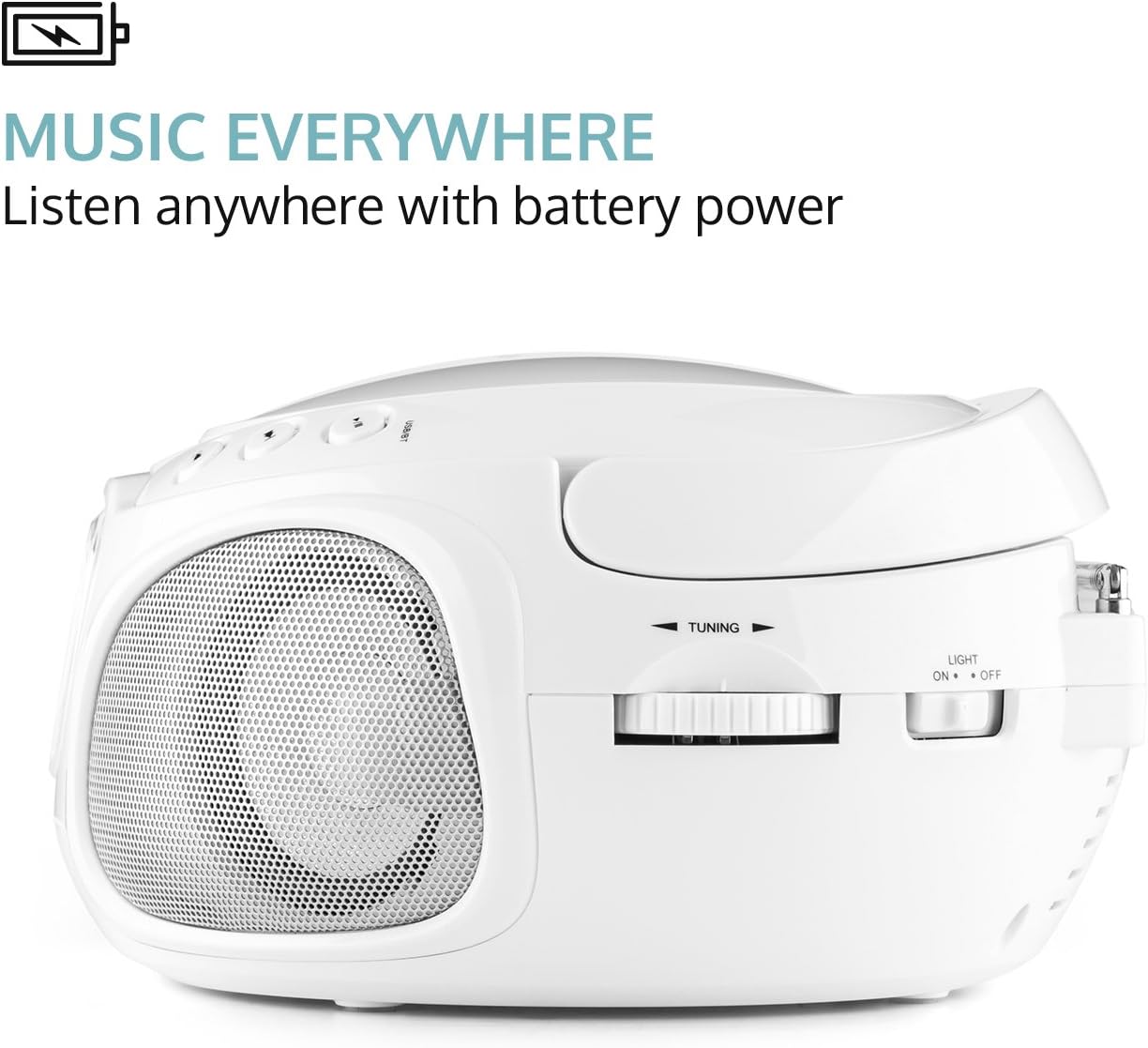
ചിത്രം 5: പിൻഭാഗം view displaying the extendable antenna, AUX input, headphone output, and AC power input.
- വിപുലീകരിക്കാവുന്ന ആന്റിന: മെച്ചപ്പെട്ട റേഡിയോ സ്വീകരണത്തിനായി.
- AUX ഇൻപുട്ട് (3.5mm): ബാഹ്യ ഓഡിയോ ഉപകരണങ്ങൾ ബന്ധിപ്പിക്കുന്നതിന്.
- ഹെഡ്ഫോൺ ഔട്ട്പുട്ട് (3.5 മിമി): സ്വകാര്യ ശ്രവണത്തിനായി.
- എസി പവർ ഇൻപുട്ട്: ഉൾപ്പെടുത്തിയിരിക്കുന്ന പവർ കേബിൾ ബന്ധിപ്പിക്കുന്നതിന്.
- ബാറ്ററി കമ്പാർട്ട്മെൻ്റ്: Located on the bottom, for 6 x C-type batteries (not included).
സജ്ജമാക്കുക
ബൂംബോക്സിന് പവർ നൽകുന്നു
The AUNA Roadie KIDS Boombox can be powered by either AC power or batteries.
എസി പവർ (സ്റ്റേഷണറി ഉപയോഗത്തിന് ശുപാർശ ചെയ്യുന്നു)
- ബൂംബോക്സ് ഓഫാക്കിയിട്ടുണ്ടെന്ന് ഉറപ്പാക്കുക.
- Insert the included AC power cable into the AC power input jack on the rear of the boombox.
- Plug the other end of the power cable into a standard 110-120V ~ / 50-60Hz wall outlet.
ബാറ്ററി പവർ (പോർട്ടബിൾ ഉപയോഗത്തിന്)
- Ensure the boombox is switched off and disconnected from AC power.
- യൂണിറ്റിന്റെ അടിയിൽ ബാറ്ററി കമ്പാർട്ട്മെന്റ് കണ്ടെത്തുക.
- ബാറ്ററി കമ്പാർട്ട്മെൻ്റ് കവർ തുറക്കുക.
- Insert 6 x C-type batteries (not included), ensuring correct polarity (+/-) as indicated inside the compartment.
- ബാറ്ററി കമ്പാർട്ട്മെൻ്റ് കവർ സുരക്ഷിതമായി അടയ്ക്കുക.
Note: Remove batteries if the unit will not be used for an extended period to prevent leakage and damage.
പ്രവർത്തന നിർദ്ദേശങ്ങൾ
പൊതു പ്രവർത്തനം
- പവർ ഓൺ/ഓഫ്: Use the on/off switch located on the left outer side of the unit.
- മോഡ് തിരഞ്ഞെടുക്കൽ: Use the function switch on the side to select desired mode (AM, FM, CD/USB, BT/AUX).
- വോളിയം ക്രമീകരണം: Rotate the analog volume knob on the side to increase or decrease the sound level.
- LED ലൈറ്റുകൾ: Use the "Light On/Off" switch on the rear to control the multi-color LED lights.
സിഡി പ്ലേബാക്ക്
- Switch the function selector to "CD/USB" mode.
- Open the CD compartment cover on the top of the unit.
- Place an Audio CD, CD-R, CD-RW, or MP3-CD onto the spindle with the label side facing up.
- സിഡി കമ്പാർട്ട്മെന്റ് കവർ അടയ്ക്കുക. ഡിസ്പ്ലേ മൊത്തം ട്രാക്കുകളുടെ എണ്ണം കാണിക്കും.
- അമർത്തുക പ്ലേ/താൽക്കാലികമായി നിർത്തുക പ്ലേബാക്ക് ആരംഭിക്കുന്നതിനുള്ള ബട്ടൺ.
- ഉപയോഗിക്കുക ഒഴിവാക്കുക/തിരയുക ട്രാക്കുകൾക്കിടയിൽ നാവിഗേറ്റ് ചെയ്യാൻ ബട്ടണുകൾ. വേഗത്തിൽ മുന്നോട്ട്/റിവൈൻഡ് ചെയ്യാൻ അമർത്തിപ്പിടിക്കുക.
- അമർത്തുക നിർത്തുക പ്ലേബാക്ക് നിർത്താനുള്ള ബട്ടൺ.
- പ്രോഗ്രാം പ്ലേബാക്ക്: അമർത്തുക പ്രോഗ്രാം button to create a playlist of up to 20 tracks for CDs or 99 tracks for MP3-CDs.
- ആവർത്തന പ്രവർത്തനങ്ങൾ: അമർത്തുക ആവർത്തിക്കുക button to cycle through repeat modes (repeat one, repeat all, repeat folder for MP3-CDs).
- Random Playback: അമർത്തുക റാൻഡം button for shuffled playback.
ബ്ലൂടൂത്ത് കണക്റ്റിവിറ്റി
നിങ്ങളുടെ സ്മാർട്ട്ഫോണിൽ നിന്നോ ടാബ്ലെറ്റിൽ നിന്നോ വയർലെസ് ആയി സംഗീതം സ്ട്രീം ചെയ്യുക.
- Switch the function selector to "BT/AUX" mode. The unit will enter Bluetooth pairing mode, indicated by a flashing Bluetooth icon on the display.
- നിങ്ങളുടെ ബ്ലൂടൂത്ത് പ്രവർത്തനക്ഷമമാക്കിയ ഉപകരണത്തിൽ, ബ്ലൂടൂത്ത് പ്രവർത്തനക്ഷമമാക്കി ലഭ്യമായ ഉപകരണങ്ങൾക്കായി തിരയുക.
- Select "AUNA Roadie" from the list of devices.
- Once paired, the Bluetooth icon will stop flashing, and you can play music from your device through the boombox.
USB പ്ലേബാക്ക്

Figure 6: USB port with a flash drive inserted, ready for media playback.
The boombox supports MP3 and WMA file types from USB flash drives.
- Switch the function selector to "CD/USB" mode.
- മുൻ പാനലിലെ USB പോർട്ടിലേക്ക് ഒരു USB ഫ്ലാഷ് ഡ്രൈവ് തിരുകുക.
- The unit will automatically detect and begin playing supported audio files.
- ഉപയോഗിക്കുക പ്ലേ/താൽക്കാലികമായി നിർത്തുക, നിർത്തുക, ഒപ്പം ഒഴിവാക്കുക/തിരയുക നിയന്ത്രണത്തിനുള്ള ബട്ടണുകൾ.
റേഡിയോ പ്രവർത്തനം (AM/FM)
- Switch the function selector to "AM" or "FM" mode.
- Extend the telescopic antenna on the rear of the unit for optimal FM reception. For AM, rotate the unit for best reception.
- ഉപയോഗിക്കുക ട്യൂണിംഗ് knob on the side to manually tune to your desired radio station.
AUX ഇൻപുട്ട്
Connect external audio devices using a 3.5mm audio cable (not included).
- Switch the function selector to "BT/AUX" mode.
- Connect one end of a 3.5mm audio cable to the AUX input jack on the rear of the boombox.
- മറ്റേ അറ്റം നിങ്ങളുടെ ബാഹ്യ ഉപകരണത്തിന്റെ (ഉദാ: MP3 പ്ലെയർ, സ്മാർട്ട്ഫോൺ) ഹെഡ്ഫോൺ ജാക്കുമായോ ഓഡിയോ ഔട്ട്പുട്ടുമായോ ബന്ധിപ്പിക്കുക.
- Audio from the external device will now play through the boombox speakers. Control playback from your external device.
ഹെഡ്ഫോൺ ഔട്ട്പുട്ട്
For private listening, connect headphones to the 3.5mm headphone output jack on the rear of the unit. The speakers will automatically mute when headphones are connected.
മെയിൻ്റനൻസ്
- വൃത്തിയാക്കൽ: യൂണിറ്റിന്റെ പുറംഭാഗം വൃത്തിയാക്കാൻ മൃദുവായതും ഉണങ്ങിയതുമായ തുണി ഉപയോഗിക്കുക. അബ്രസീവ് ക്ലീനറുകളോ ലായകങ്ങളോ ഉപയോഗിക്കരുത്.
- സിഡി ലെൻസ് കെയർ: If the CD player experiences reading errors, use a commercially available CD lens cleaner disc to clean the lens.
- സംഭരണം: ദീർഘനേരം ഉപയോഗിക്കാത്തപ്പോൾ, ബൂംബോക്സ് തണുത്തതും വരണ്ടതുമായ സ്ഥലത്ത് സൂക്ഷിക്കുക, നേരിട്ടുള്ള സൂര്യപ്രകാശത്തിൽ നിന്നും കടുത്ത താപനിലയിൽ നിന്നും അകറ്റി നിർത്തുക. ദീർഘനേരം സൂക്ഷിച്ചാൽ ബാറ്ററികൾ നീക്കം ചെയ്യുക.
ട്രബിൾഷൂട്ടിംഗ്
| പ്രശ്നം | സാധ്യമായ കാരണം | പരിഹാരം |
|---|---|---|
| ശക്തിയില്ല | Power cable not connected; Batteries depleted or incorrectly inserted; Power switch off. | Ensure AC cable is securely plugged in; Replace batteries or check polarity; Turn the power switch to "On". |
| ശബ്ദമില്ല | Volume too low; Headphones connected; Incorrect mode selected; Mute function active on connected Bluetooth device. | Increase volume; Disconnect headphones; Select the correct mode (CD, BT, USB, AM, FM, AUX); Check volume/mute on connected device. |
| സിഡി പ്ലേ ചെയ്യുന്നില്ല/ഒഴിവാക്കുന്നു | CD dirty or scratched; CD inserted incorrectly; Unsupported CD format. | Clean CD with a soft cloth; Insert CD with label side up; Ensure CD is Audio CD, CD-R, CD-RW, or MP3-CD. |
| ബ്ലൂടൂത്ത് ജോടിയാക്കുന്നില്ല | Boombox not in pairing mode; Bluetooth disabled on device; Device too far from boombox. | Ensure boombox is in "BT/AUX" mode; Enable Bluetooth on your device; Move device closer to the boombox (within 10 meters). |
| മോശം റേഡിയോ സ്വീകരണം | ആന്റിന നീട്ടിയിട്ടില്ല; ദുർബലമായ സിഗ്നൽ. | Fully extend the telescopic antenna; Try repositioning the unit for better reception. |
സ്പെസിഫിക്കേഷനുകൾ
| ബ്രാൻഡ് | ഔന |
| മോഡൽ | 00819885021020 യുഎസ് |
| അളവുകൾ (W x H x D) | 9.4 x 5.1 x 7.9 ഇഞ്ച് (ഏകദേശം) |
| ഭാരം | 3.4 പൗണ്ട് (ഏകദേശം) |
| പവർ സപ്ലൈ (എസി) | 110-120 V ~ / 50-60 Hz |
| പവർ സപ്ലൈ (ബാറ്ററി) | 6 x C-type batteries (9 V DC, not included) |
| സ്പീക്കർ ഔട്ട്പുട്ട് | 2 x 1.5 W |
| Compatible CD Formats | Audio CD, CD-R, CD-RW, MP3-CDs |
| പിന്തുണയുള്ള USB File തരങ്ങൾ | MP3, WMA |
| ബ്ലൂടൂത്ത് പതിപ്പ് | 2.1 + EDR |
| ബ്ലൂടൂത്ത് പ്രോfiles | A2DP, AVRCP |
| കണക്റ്റിവിറ്റി | Bluetooth, Auxiliary (3.5mm), USB, AM/FM Radio |
വാറൻ്റിയും പിന്തുണയും
For warranty information or technical support, please refer to the contact details provided with your purchase or visit the official AUNA website. This product includes a user manual in English, German, and French.
Ask a question about this manual
Ask about setup, troubleshooting, compatibility, parts, safety, or missing instructions. Manuals+ will review the question and use this page’s manual context to help answer it.