
ആമുഖം
Thank you for choosing the Awei B923BL Wireless Magnetic Sports Bluetooth Earphones. This manual provides essential information for setting up, operating, maintaining, and troubleshooting your new earphones. Please read it carefully before use to ensure optimal performance and longevity of your device.
പാക്കേജ് ഉള്ളടക്കം
പാക്കേജിൽ ഇനിപ്പറയുന്ന ഇനങ്ങൾ ഉണ്ടോ എന്ന് പരിശോധിക്കുക:
- Awei B923BL Wireless Magnetic Sports Bluetooth Earphones
- യുഎസ്ബി ചാർജിംഗ് കേബിൾ
- ഒന്നിലധികം വലിപ്പത്തിലുള്ള ചെവി നുറുങ്ങുകൾ
- ഉപയോക്തൃ മാനുവൽ
ഉൽപ്പന്നം കഴിഞ്ഞുview
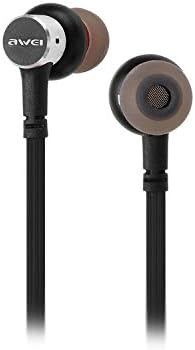
The Awei B923BL earphones are designed for active lifestyles, featuring a wireless Bluetooth connection and a magnetic design for convenient storage around your neck when not in use. They include an integrated microphone for hands-free calling.

സജ്ജമാക്കുക
1. ഇയർഫോണുകൾ ചാർജ് ചെയ്യുന്നു
Before first use, fully charge your earphones. Connect the provided USB charging cable to the charging port on the earphones and the other end to a USB power source (e.g., computer USB port, wall adapter). The indicator light will show charging status and turn off or change color when fully charged.
2. ബ്ലൂടൂത്ത് ജോടിയാക്കൽ
- ഇയർഫോണുകൾ ഓഫാക്കിയിട്ടുണ്ടെന്ന് ഉറപ്പാക്കുക.
- Press and hold the multi-function button (usually the power button) until the indicator light flashes red and blue alternately, indicating pairing mode.
- On your mobile phone or Bluetooth-enabled device, go to the Bluetooth settings and enable Bluetooth.
- ഇതിനായി തിരയുക available devices. You should see "Awei B923BL" or a similar name in the list.
- Select "Awei B923BL" to connect. Once connected, the indicator light will usually flash blue slowly or turn off, and you may hear a confirmation tone.
- പാസ്വേഡ് ആവശ്യപ്പെടുകയാണെങ്കിൽ, "0000" എന്ന് നൽകുക.
Once paired, the earphones will automatically connect to the last paired device when turned on, if the device's Bluetooth is active and within range.
പ്രവർത്തന നിർദ്ദേശങ്ങൾ
പവർ ഓൺ/ഓഫ്
- പവർ ഓൺ: നീല ഇൻഡിക്കേറ്റർ ലൈറ്റ് മിന്നുന്നത് വരെ മൾട്ടി-ഫംഗ്ഷൻ ബട്ടൺ ഏകദേശം 3 സെക്കൻഡ് അമർത്തിപ്പിടിക്കുക.
- പവർ ഓഫ്: ചുവന്ന ഇൻഡിക്കേറ്റർ ലൈറ്റ് മിന്നിമറയുന്നതുവരെ മൾട്ടി-ഫംഗ്ഷൻ ബട്ടൺ ഏകദേശം 5 സെക്കൻഡ് അമർത്തിപ്പിടിക്കുക, തുടർന്ന് ഓഫാകും.
സംഗീത പ്ലേബാക്ക്
- പ്ലേ/താൽക്കാലികമായി നിർത്തുക: മൾട്ടി-ഫംഗ്ഷൻ ബട്ടൺ ഒരിക്കൽ അമർത്തുക.
- അടുത്ത ട്രാക്ക്: വോളിയം + ബട്ടൺ അമർത്തിപ്പിടിക്കുക.
- മുമ്പത്തെ ട്രാക്ക്: വോളിയം ബട്ടൺ അമർത്തിപ്പിടിക്കുക.
കോൾ മാനേജുമെന്റ്
- ഉത്തരം/അവസാന കോൾ: മൾട്ടി-ഫംഗ്ഷൻ ബട്ടൺ ഒരിക്കൽ അമർത്തുക.
- കോൾ നിരസിക്കുക: മൾട്ടി-ഫംഗ്ഷൻ ബട്ടൺ ഏകദേശം 2 സെക്കൻഡ് അമർത്തിപ്പിടിക്കുക.
- അവസാന നമ്പർ വീണ്ടും ഡയൽ ചെയ്യുക: മൾട്ടി-ഫംഗ്ഷൻ ബട്ടൺ രണ്ടുതവണ അമർത്തുക.
വോളിയം നിയന്ത്രണം
- വോളിയം വർദ്ധിപ്പിക്കുക: വോളിയം + ബട്ടൺ അമർത്തുക.
- വോളിയം കുറയ്ക്കുക: വോളിയം ബട്ടൺ അമർത്തുക.
മെയിൻ്റനൻസ്
- Clean the earphones regularly with a soft, dry cloth. Do not use harsh chemicals or abrasive materials.
- ചെവിയുടെ അറ്റങ്ങൾ നീക്കം ചെയ്ത് ആവശ്യമെങ്കിൽ നേരിയ സോപ്പും വെള്ളവും ഉപയോഗിച്ച് വൃത്തിയാക്കുക, വീണ്ടും ഘടിപ്പിക്കുന്നതിന് മുമ്പ് അവ പൂർണ്ണമായും ഉണങ്ങിയെന്ന് ഉറപ്പാക്കുക.
- നേരിട്ടുള്ള സൂര്യപ്രകാശത്തിൽ നിന്നും കടുത്ത താപനിലയിൽ നിന്നും മാറി തണുത്തതും വരണ്ടതുമായ സ്ഥലത്ത് ഇയർഫോണുകൾ സൂക്ഷിക്കുക.
- Avoid exposing the earphones to water or excessive moisture.
- ഇയർഫോണുകൾ ഡിസ്അസംബ്ലിംഗ് ചെയ്യാനോ പരിഷ്ക്കരിക്കാനോ ശ്രമിക്കരുത്, കാരണം ഇത് വാറന്റി അസാധുവാക്കും.
ട്രബിൾഷൂട്ടിംഗ്
- ഇയർഫോണുകൾ ഓണാകുന്നില്ല: ഇയർഫോണുകൾ പൂർണ്ണമായും ചാർജ് ചെയ്തിട്ടുണ്ടെന്ന് ഉറപ്പാക്കുക.
- ഉപകരണവുമായി ജോടിയാക്കാൻ കഴിയില്ല:
- Make sure the earphones are in pairing mode (flashing red and blue).
- നിങ്ങളുടെ ഉപകരണത്തിൽ ബ്ലൂടൂത്ത് പ്രവർത്തനക്ഷമമാക്കിയിട്ടുണ്ടെന്ന് ഉറപ്പാക്കുക.
- ഇയർഫോണുകൾ നിങ്ങളുടെ ഉപകരണത്തിന് അടുത്തേക്ക് നീക്കുക.
- Try restarting both the earphones and your device.
- നിങ്ങളുടെ ഉപകരണത്തിൽ വളരെയധികം ബ്ലൂടൂത്ത് കണക്ഷനുകൾ ഉണ്ടെങ്കിൽ, അവ മായ്ക്കുക.
- ശബ്ദമില്ല അല്ലെങ്കിൽ കുറഞ്ഞ ശബ്ദം:
- ഇയർഫോണുകളിലും കണക്റ്റുചെയ്ത ഉപകരണത്തിലും വോളിയം ലെവലുകൾ പരിശോധിക്കുക.
- ഇയർഫോണുകൾ നിങ്ങളുടെ ഉപകരണവുമായി ശരിയായി ബന്ധിപ്പിച്ചിട്ടുണ്ടെന്ന് ഉറപ്പാക്കുക.
- വ്യത്യസ്ത ഓഡിയോ ഉറവിടങ്ങൾ പ്ലേ ചെയ്യാൻ ശ്രമിക്കുക.
- കോൾ നിലവാര പ്രശ്നങ്ങൾ:
- മൈക്രോഫോൺ തടസ്സപ്പെട്ടിട്ടില്ലെന്ന് ഉറപ്പാക്കുക.
- ഇടപെടൽ കുറവുള്ള പ്രദേശത്തേക്ക് നീങ്ങുക.
സ്പെസിഫിക്കേഷനുകൾ
| ഫീച്ചർ | വിശദാംശങ്ങൾ |
|---|---|
| ബ്രാൻഡ് നാമം | അവേയ് |
| മോഡൽ നമ്പർ | ബി923ബിഎൽ |
| നിറം | കറുപ്പ് |
| ഹെഡ്ഫോൺ ഫോം ഫാക്ടർ | ചെവിയിൽ |
| കണക്റ്റിവിറ്റി ടെക്നോളജി | വയർലെസ് |
| വയർലെസ് കമ്മ്യൂണിക്കേഷൻ ടെക്നോളജി | വയർലെസ് |
| പ്രായ പരിധി വിവരണം | മുതിർന്നവർ |
| മെറ്റീരിയൽ | റബ്ബർ |
| അനുയോജ്യമായ ഉപകരണങ്ങൾ | മൊബൈൽ ഫോണുകൾ |
| കേബിൾ സവിശേഷത | കേബിൾ ഇല്ലാതെ |
| നിയന്ത്രണ രീതി | സ്പർശിക്കുക |
| ഇനങ്ങളുടെ എണ്ണം | 1 |
| നിർമ്മാതാവ് | അവേയ് |
| പ്രത്യേക സവിശേഷതകൾ | Microphone Included (Note: This model does not feature active noise cancellation as per product description.) |
വാറൻ്റിയും പിന്തുണയും
വാറൻ്റി വിവരങ്ങൾ
This product comes with a 1-year manufacturer's warranty from the date of purchase. For warranty claims or service, please contact the manufacturer or their authorized service agent. For further details, you may also contact the retailer where the product was purchased.
ഉപഭോക്തൃ പിന്തുണ
If you encounter any issues not covered in this manual or require further assistance, please refer to the contact information provided with your product packaging or visit the official Awei webപിന്തുണാ ഉറവിടങ്ങൾക്കായുള്ള സൈറ്റ്.