
1. ആമുഖം
The EPEVER VS6048AU is a 60A common positive Pulse Width Modulation (PWM) solar charge controller designed for 12V, 24V, 36V, and 48V solar panel power systems. It incorporates advanced digital techniques to ensure efficient and reliable battery charging and load management. This controller is suitable for various applications, including solar home systems, traffic signals, solar street lights, and solar garden lamps.
പ്രധാന സവിശേഷതകൾ:
- 3-എസ്tagഇ ഇന്റലിജന്റ് പിഡബ്ല്യുഎം ചാർജിംഗ്: ബൾക്ക്, ബൂസ്റ്റ്/ഇക്വലൈസ്, ഫ്ലോട്ട്.
- Supports three battery charging options: Sealed, Gel, and Flooded.
- Integrated LCD display for dynamic monitoring of operating data and working conditions.
- Dual USB output ports (Max. 5VDC/2.4A) for charging electronic devices.
- User-friendly button settings for comfortable and convenient operation.
- Multiple load control modes for versatile application.
- Energy statistics function.
- ബാറ്ററി താപനില നഷ്ടപരിഹാര പ്രവർത്തനം.
- Extensive electronic protections for system safety.

Image 1.1: The EPEVER VS6048AU Solar Charge Controller shown in various application settings, including home power supply, street lighting, monitoring, and green energy solutions.
2 സുരക്ഷാ വിവരങ്ങൾ
ഇൻസ്റ്റാളേഷനും പ്രവർത്തനത്തിനും മുമ്പ് എല്ലാ നിർദ്ദേശങ്ങളും മുന്നറിയിപ്പുകളും ശ്രദ്ധാപൂർവ്വം വായിക്കുക. ഈ നിർദ്ദേശങ്ങൾ പാലിക്കുന്നതിൽ പരാജയപ്പെടുന്നത് വൈദ്യുതാഘാതം, തീപിടുത്തം അല്ലെങ്കിൽ ഗുരുതരമായ പരിക്കിന് കാരണമായേക്കാം.
- കൺട്രോളറിനും മറ്റ് ഘടകങ്ങൾക്കും കേടുപാടുകൾ സംഭവിക്കാതിരിക്കാൻ എല്ലാ വയറിംഗും ശരിയായി പോളറൈസ് ചെയ്തിട്ടുണ്ടെന്നും സുരക്ഷിതമായി ബന്ധിപ്പിച്ചിട്ടുണ്ടെന്നും ഉറപ്പാക്കുക.
- Always disconnect the solar panel and battery power before installing or adjusting the controller.
- Install the controller in a well-ventilated area, away from flammable gases, moisture, and direct sunlight.
- Use appropriate circuit breakers or fuses for the solar panel, battery, and load circuits.
- Do not disassemble or attempt to repair the controller yourself. Contact qualified personnel for service.
- Wear appropriate personal protective equipment, including eye protection, when working with batteries.
- കുട്ടികളെ സൗരോർജ്ജ സംവിധാനത്തിന്റെ ഘടകങ്ങളിൽ നിന്ന് അകറ്റി നിർത്തുക.
Electronic Protections: The VS6048AU controller includes comprehensive electronic protections:
- പിവി റിവേഴ്സ് പോളാരിറ്റി സംരക്ഷണം
- ബാറ്ററി ഓവർ വോളിയംtagഇ സംരക്ഷണം
- ഡിസ്ചാർജ് സംരക്ഷണത്തിന് മുകളിലുള്ള ബാറ്ററി
- ബാറ്ററി റിവേഴ്സ് പോളാരിറ്റി സംരക്ഷണം
- ബാറ്ററി അമിത ചൂടാക്കൽ സംരക്ഷണം
- ലോഡ് ഓവർലോഡ് പരിരക്ഷണം
- ഷോർട്ട് സർക്യൂട്ട് സംരക്ഷണം ലോഡ് ചെയ്യുക
- കൺട്രോളർ അമിത ചൂടാക്കൽ സംരക്ഷണം

Image 2.1: Visual representation of the electronic protections integrated into the controller and a basic solar power system connection diagram.
3. ഉൽപ്പന്നം കഴിഞ്ഞുview
Familiarize yourself with the components and interface of your EPEVER VS6048AU solar charge controller.

ചിത്രം 3.1: മുൻഭാഗം view of the EPEVER VS6048AU controller with key components labeled.
- LCD ഡിസ്പ്ലേ: Shows system status, parameters, and error codes.
- മെനു ബട്ടൺ: Used to navigate through different display interfaces and enter/exit setting modes.
- SET ബട്ടൺ: Used to confirm selections, modify parameters, and clear data.
- USB Output Ports (5VDC/2.4A): ബാഹ്യ ഇലക്ട്രോണിക് ഉപകരണങ്ങൾ ചാർജ് ചെയ്യുന്നതിന്.
- Temp. Sensor Port (RTS Port): Connects to the optional remote temperature sensor for accurate battery temperature compensation.
- PV Terminals: Connect to the solar panel array.
- ബാറ്ററി ടെർമിനലുകൾ: ബാറ്ററി ബാങ്കുമായി ബന്ധിപ്പിക്കുക.
- Load Terminals: ഡിസി ലോഡുകളിലേക്ക് ബന്ധിപ്പിക്കുക.
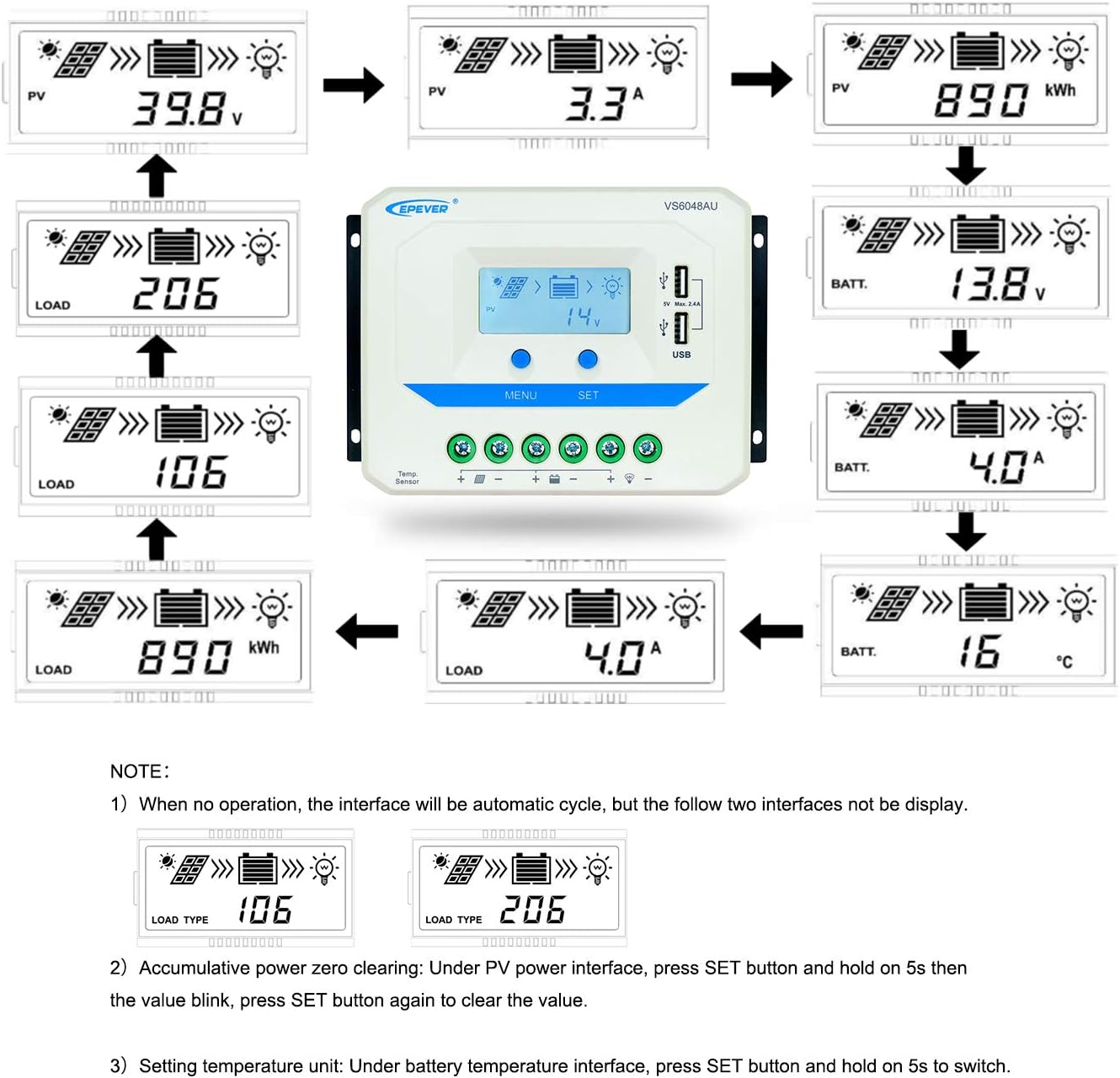
Image 3.2: Dimensions of the EPEVER VS6048AU Solar Charge Controller (approximately 21.4 cm x 12.87 cm x 7.22 cm).
LCD Display Status Description
The LCD display provides visual feedback on the system's operational status. Refer to the table below for icon meanings:

Image 3.3: Detailed description of the icons displayed on the VS6048AU LCD screen.
4. സജ്ജീകരണവും ഇൻസ്റ്റാളേഷനും
Follow these steps for proper installation of your solar charge controller. Ensure all power sources are disconnected before making any connections.
വയറിംഗ് ക്രമം:
- ബാറ്ററി ബന്ധിപ്പിക്കുക: Connect the battery to the controller's battery terminals. Ensure correct polarity (positive to positive, negative to negative). The controller will detect the battery voltage.
- ലോഡ് ബന്ധിപ്പിക്കുക: കൺട്രോളറിന്റെ ലോഡ് ടെർമിനലുകളുമായി DC ലോഡ് ബന്ധിപ്പിക്കുക. ശരിയായ പോളാരിറ്റി ഉറപ്പാക്കുക.
- സോളാർ പാനൽ ബന്ധിപ്പിക്കുക: Connect the solar panel array to the controller's PV terminals. Ensure correct polarity.
പ്രധാനപ്പെട്ടത്: Always connect the battery first, then the solar panel, and finally the load. Disconnect in the reverse order: load, then solar panel, then battery.
ഇൻസ്റ്റലേഷൻ വീഡിയോ ഗൈഡ്:
Video 4.1: An official EPEVER video demonstrating the connection process for the solar charge controller, including battery and load connections. This visual guide can assist with proper installation.
5. പ്രവർത്തന നിർദ്ദേശങ്ങൾ
The EPEVER VS6048AU controller features an intuitive LCD display and button interface for monitoring and configuration.
LCD Display Navigation:
When no operation is performed, the LCD interface will automatically cycle through various display screens, showing real-time data such as PV voltage, current, battery voltage, ലോഡ് സ്റ്റാറ്റസ് എന്നിവ.
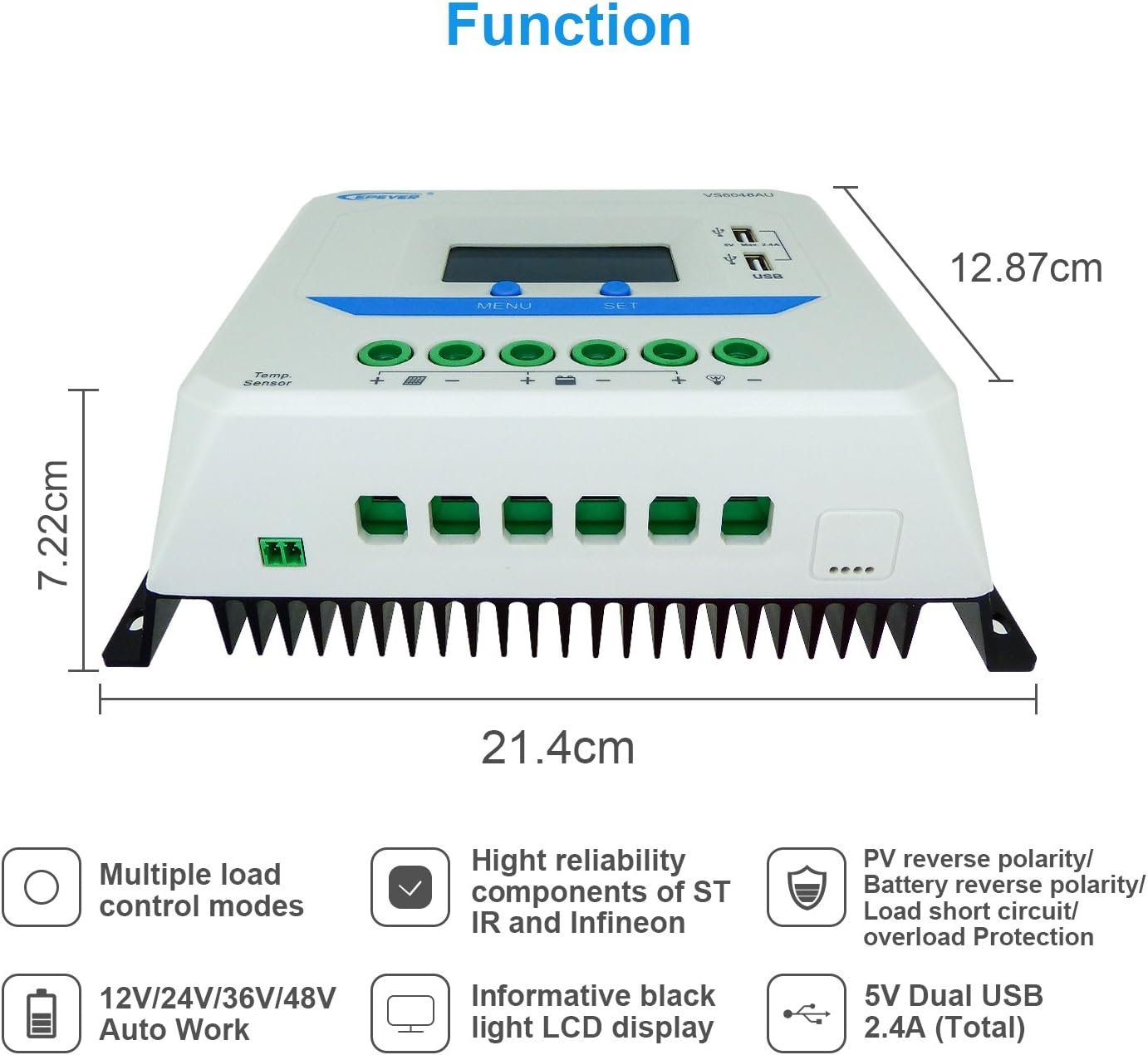
Image 5.1: Illustration of the automatic cycling interfaces on the VS6048AU LCD display.
- അമർത്തുക മെനു button to manually cycle through the display interfaces.
- അമർത്തിപ്പിടിക്കുക മെനു button to enter or exit the parameter setting mode.
- In parameter setting mode, use the സെറ്റ് button to adjust values or confirm selections.
പ്രത്യേക പ്രവർത്തനങ്ങൾ:
- Accumulative Power Clearing: Under the PV power interface, press and hold the സെറ്റ് button for 5 seconds until the value blinks, then press സെറ്റ് again to clear the accumulative power value.
- താപനില യൂണിറ്റ് ക്രമീകരിക്കുക: Under the battery temperature interface, press and hold the സെറ്റ് button for 5 seconds to switch between Celsius (°C) and Fahrenheit (°F).
ചാർജിംഗ് മോഡുകൾ:
കൺട്രോളർ ഒരു 3-സെക്കൻഡ് ഉപയോഗിക്കുന്നുtage intelligent PWM charging algorithm:
- ബൾക്ക് ചാർജിംഗ്: ബാറ്ററി അതിന്റെ വോള്യം വരെ പരമാവധി കറന്റിൽ ചാർജ് ചെയ്യപ്പെടും.tage ബൂസ്റ്റ് വോളിയത്തിൽ എത്തുന്നുtage.
- Boost/Equalize Charging: The battery is charged at a constant voltage. An Equalize charge is typically performed once a month to balance battery cells.
- ഫ്ലോട്ട് ചാർജിംഗ്: ബാറ്ററി വോള്യംtage is maintained at the Float voltage, and the charging current is reduced to a trickle to keep the battery fully charged.
The controller supports charging for Sealed, Gel, and Flooded battery types. Ensure the correct battery type is selected in the settings for optimal charging performance.
USB ഔട്ട്പുട്ട്:
The dual USB ports provide a maximum output of 5VDC/2.4A for charging compatible electronic devices.
6. പരിപാലനം
Regular maintenance ensures the longevity and optimal performance of your EPEVER VS6048AU solar charge controller.
- ശുചിത്വം: കൺട്രോളർ വൃത്തിയായും പൊടിയും അവശിഷ്ടങ്ങളും ഇല്ലാതെയും സൂക്ഷിക്കുക. വൃത്തിയാക്കാൻ ഉണങ്ങിയ തുണി ഉപയോഗിക്കുക.
- കണക്ഷനുകൾ: എല്ലാ വയറിംഗ് കണക്ഷനുകളുടെയും ഇറുകിയതും നാശവും ഇടയ്ക്കിടെ പരിശോധിക്കുക. അയഞ്ഞ കണക്ഷനുകൾ അമിത ചൂടിനും കേടുപാടുകൾക്കും കാരണമാകും.
- വെൻ്റിലേഷൻ: Ensure the installation area has adequate ventilation to prevent overheating of the controller.
- പരിശോധന: Inspect the controller and wiring for any signs of damage, such as frayed cables or cracked casing. Replace damaged components immediately.
- ബാറ്ററി ആരോഗ്യം: ബാറ്ററി വോളിയം നിരീക്ഷിക്കുകtage and performance regularly. Ensure the battery type setting in the controller matches your battery.
7. പ്രശ്നപരിഹാരം
നിങ്ങളുടെ സോളാർ ചാർജ് കൺട്രോളറിൽ നിങ്ങൾ നേരിട്ടേക്കാവുന്ന സാധാരണ പ്രശ്നങ്ങളെ ഈ വിഭാഗം അഭിസംബോധന ചെയ്യുന്നു.
| പ്രശ്നം | സാധ്യമായ കാരണം | പരിഹാരം |
|---|---|---|
| LCD-യിൽ ഡിസ്പ്ലേ ഇല്ല | ബാറ്ററി കണക്റ്റുചെയ്തിട്ടില്ല അല്ലെങ്കിൽ കുറഞ്ഞ വോളിയംtage; reverse polarity. | ബാറ്ററി കണക്ഷനുകളും പോളാരിറ്റിയും പരിശോധിക്കുക. ബാറ്ററി വോളിയം ഉറപ്പാക്കുക.tage 9V ന് മുകളിലാണ്. |
| ബാറ്ററി ചാർജ് ചെയ്യുന്നില്ല | PV panels not connected; PV reverse polarity; insufficient sunlight; PV open circuit voltagഇ വളരെ കുറവാണ്. | പിവി കണക്ഷനുകളും പോളാരിറ്റിയും പരിശോധിക്കുക. ആവശ്യത്തിന് സൂര്യപ്രകാശം ഉറപ്പാക്കുക. പിവി ഓപ്പൺ സർക്യൂട്ട് വോളിയം പരിശോധിക്കുക.tagഇ സ്പെസിഫിക്കേഷനുകൾക്കുള്ളിലാണ്. |
| ലോഡ് പ്രവർത്തിക്കുന്നില്ല. | Load disconnected; load short circuit; load overload; battery low voltagഇ വിച്ഛേദിക്കുക. | Check load connections. Remove short circuit. Reduce load. Recharge battery. |
| കൺട്രോളർ അമിത ചൂടാക്കൽ | Poor ventilation; excessive ambient temperature; prolonged high current operation. | Ensure proper ventilation. Relocate controller to a cooler environment. Reduce load if possible. |
| യുഎസ്ബി ഔട്ട്പുട്ട് പ്രവർത്തിക്കുന്നില്ല. | Device not compatible; controller fault. | Try another USB device. If issue persists, contact support. |
8 സ്പെസിഫിക്കേഷനുകൾ
Detailed technical specifications for the EPEVER VS6048AU Solar Charge Controller.

Image 8.1: Comprehensive technical specifications table for the EPEVER VS-AU series, including the VS6048AU model.
| പരാമീറ്റർ | Value (VS6048AU) |
|---|---|
| മോഡൽ | VS6048AU |
| നോമിനൽ സിസ്റ്റം വോളിയംtage | 12V/24V/36V/48V Auto Work |
| ബാറ്ററി ഇൻപുട്ട് വോളിയംtagഇ റേഞ്ച് | 9 വി ~ 64 വി |
| റേറ്റുചെയ്ത ചാർജ്/ഡിസ്ചാർജ് കറൻ്റ് | 60എ |
| പരമാവധി. പിവി ഓപ്പൺ സർക്യൂട്ട് വോളിയംtage | 96V |
| ബാറ്ററി തരം | Sealed (Default) / Gel / Flooded |
| ബൂസ്റ്റ് ചാർജിംഗ് വോളിയംtage | Sealed: 14.4V, Gel: 14.2V, Flooded: 14.6V |
| ചാർജിംഗ് വോളിയം തുല്യമാക്കുകtage | Sealed: 14.6V, Gel: No, Flooded: 14.8V |
| ഫ്ലോട്ട് ചാർജിംഗ് വോളിയംtage | സീൽഡ്/ജെൽ/ഫ്ളഡ്ഡ്: 13.8V |
| കുറഞ്ഞ വോളിയംtagഇ റീകണക്ട് വോളിയംtage | സീൽഡ്/ജെൽ/ഫ്ളഡ്ഡ്: 12.6V |
| കുറഞ്ഞ വോളിയംtagഇ വിച്ഛേദിക്കുക വോളിയംtage | സീൽഡ്/ജെൽ/ഫ്ളഡ്ഡ്: 11.1V |
| സ്വയം ഉപഭോഗം | ≤10mA (12V), ≤18mA (24V) |
| താപനില നഷ്ടപരിഹാരം | -3mV/°C/2V (77°F) |
| ഗ്രൗണ്ടിംഗ് | പൊതുവായ പോസിറ്റീവ് |
| USB ഔട്ട്പുട്ട് | 5VDC/2.4A (ആകെ) |
| മൊത്തത്തിലുള്ള അളവ് | 214x128.7x72.2 മി.മീ |
| ടെർമിനലുകൾ | 3AWG (25mm²) |
| മൊത്തം ഭാരം | 1.02 കി.ഗ്രാം |
| എൻക്ലോഷർ | IP30 |
| പ്രവർത്തന പരിസ്ഥിതി താപനില | -25°C ~ +55°C |
| ഈർപ്പം പരിധി | ≤95% (N.C.) |
9. വാറൻ്റിയും പിന്തുണയും
EPEVER products are designed for reliability and performance. For technical assistance or warranty inquiries, please refer to the following:
- സാങ്കേതിക സഹായം: EPEVER provides technical support through its local service centers. For assistance, please contact the authorized dealer or service center in your region.
- വാറൻ്റി വിവരങ്ങൾ: Please refer to the warranty card included with your product or visit the official EPEVER webവിശദമായ വാറന്റി നിബന്ധനകൾക്കും വ്യവസ്ഥകൾക്കും സൈറ്റ്.
- Free Solar System Design: EPEVER's service centers may offer free solar system design assistance to help you optimize your setup.