
1. ആമുഖം
Thank you for choosing the TechniSat HD-C 232 Digital Cable Receiver. This compact DVB-C receiver is designed for receiving unencrypted digital television and radio programs via cable. It offers high-definition (HDTV) picture quality and features an integrated USB media player and an Electronic Program Guide (EPG). This manual provides essential information for setting up, operating, and maintaining your device.
പ്രധാന സവിശേഷതകൾ:
- Compact DVB-C receiver for unencrypted digital TV and radio.
- High-Definition Television (HDTV) support.
- Integrated USB media player for video, music, and image files.
- Electronic Program Guide (EPG) with up to 7 days of program preview.
- Remote control with 4 programmable learning keys.
- HDMI and Scart connectivity for versatile TV connections.
2 സുരക്ഷാ വിവരങ്ങൾ
ഉപകരണം ഉപയോഗിക്കുന്നതിന് മുമ്പ് എല്ലാ സുരക്ഷാ നിർദ്ദേശങ്ങളും ശ്രദ്ധാപൂർവ്വം വായിക്കുക. ഭാവി റഫറൻസിനായി ഈ മാനുവൽ സൂക്ഷിക്കുക.
- വൈദ്യുതി വിതരണം: Use only the provided external power supply. Ensure the voltage matches your local power grid.
- വെൻ്റിലേഷൻ: വെന്റിലേഷൻ തുറസ്സുകൾ തടയരുത്. അമിതമായി ചൂടാകുന്നത് തടയാൻ ഉപകരണത്തിന് ചുറ്റും മതിയായ വായുസഞ്ചാരം ഉറപ്പാക്കുക.
- ഈർപ്പം: Do not expose the device to rain, moisture, or liquids.
- വൃത്തിയാക്കൽ: വൃത്തിയാക്കുന്നതിന് മുമ്പ് വൈദ്യുതി ബന്ധം വിച്ഛേദിക്കുക. ഉണങ്ങിയതും മൃദുവായതുമായ തുണി ഉപയോഗിക്കുക. ലിക്വിഡ് അല്ലെങ്കിൽ എയറോസോൾ ക്ലീനറുകൾ ഉപയോഗിക്കരുത്.
- സേവനം: ഈ ഉൽപ്പന്നം സ്വയം സേവിക്കാൻ ശ്രമിക്കരുത്. യോഗ്യതയുള്ള സേവന ഉദ്യോഗസ്ഥർക്ക് എല്ലാ സേവനങ്ങളും റഫർ ചെയ്യുക.
- പ്ലേസ്മെൻ്റ്: Place the device on a stable, flat surface. Avoid placing it near heat sources or in direct sunlight.
3. പാക്കേജ് ഉള്ളടക്കം
പാക്കേജിൽ എല്ലാ ഇനങ്ങളും ഉണ്ടെന്ന് ഉറപ്പാക്കുക:
- TechniSat HD-C 232 Digital Cable Receiver
- Remote Control with 4 learning keys
- ബാഹ്യ വൈദ്യുതി വിതരണം
- വിദൂര നിയന്ത്രണത്തിനുള്ള ബാറ്ററികൾ
- ഉപയോക്തൃ മാനുവൽ
4. ഉൽപ്പന്നം കഴിഞ്ഞുview
4.1 ഫ്രണ്ട് പാനൽ
The front panel of the HD-C 232 features essential controls and indicators.

ചിത്രം 4.1: ഫ്രണ്ട് view of the TechniSat HD-C 232 receiver. It shows the HDMI logo, a USB port, a green indicator light, a 4-digit display, and channel/power buttons.
- USB Port (Front): For connecting USB storage devices for media playback.
- ഡിസ്പ്ലേ: A 4-digit segment display shows the current channel number or time in standby mode.
- ഇൻഡിക്കേറ്റർ ലൈറ്റ്: പവർ സ്റ്റാറ്റസ് സൂചിപ്പിക്കുന്നു.
- നിയന്ത്രണ ബട്ടണുകൾ: Channel up/down and power on/off buttons.
4.2 പിൻ പാനൽ
The rear panel provides all necessary connection ports for your television and cable network.

ചിത്രം 4.2: പിൻഭാഗം view of the TechniSat HD-C 232 receiver, showing various connection ports. From left to right: RF In, RF Out, S/PDIF (digital electrical audio out), HDMI Out, Scart (TV/Scart), and Power Input.
- ആർഎഫ് ഇതിൽ: നിങ്ങളുടെ കേബിൾ വാൾ ഔട്ട്ലെറ്റിലേക്ക് ബന്ധിപ്പിക്കുന്നു.
- RF Out (LoopThrough): Allows passing the cable signal to another receiver or TV.
- S/PDIF (Digital Electrical Audio Out): For connecting to an audio ampലൈഫയർ അല്ലെങ്കിൽ ഹോം സിനിമാ സംവിധാനം.
- HDMI Outട്ട്: Connects to your television for high-definition video and audio.
- Scart (TV/Scart): For connecting to older televisions or VCRs.
- പവർ ഇൻപുട്ട്: Connects to the external power supply.
4.3 വിദൂര നിയന്ത്രണം
The included remote control provides full functionality for your receiver, including 4 programmable learning keys.
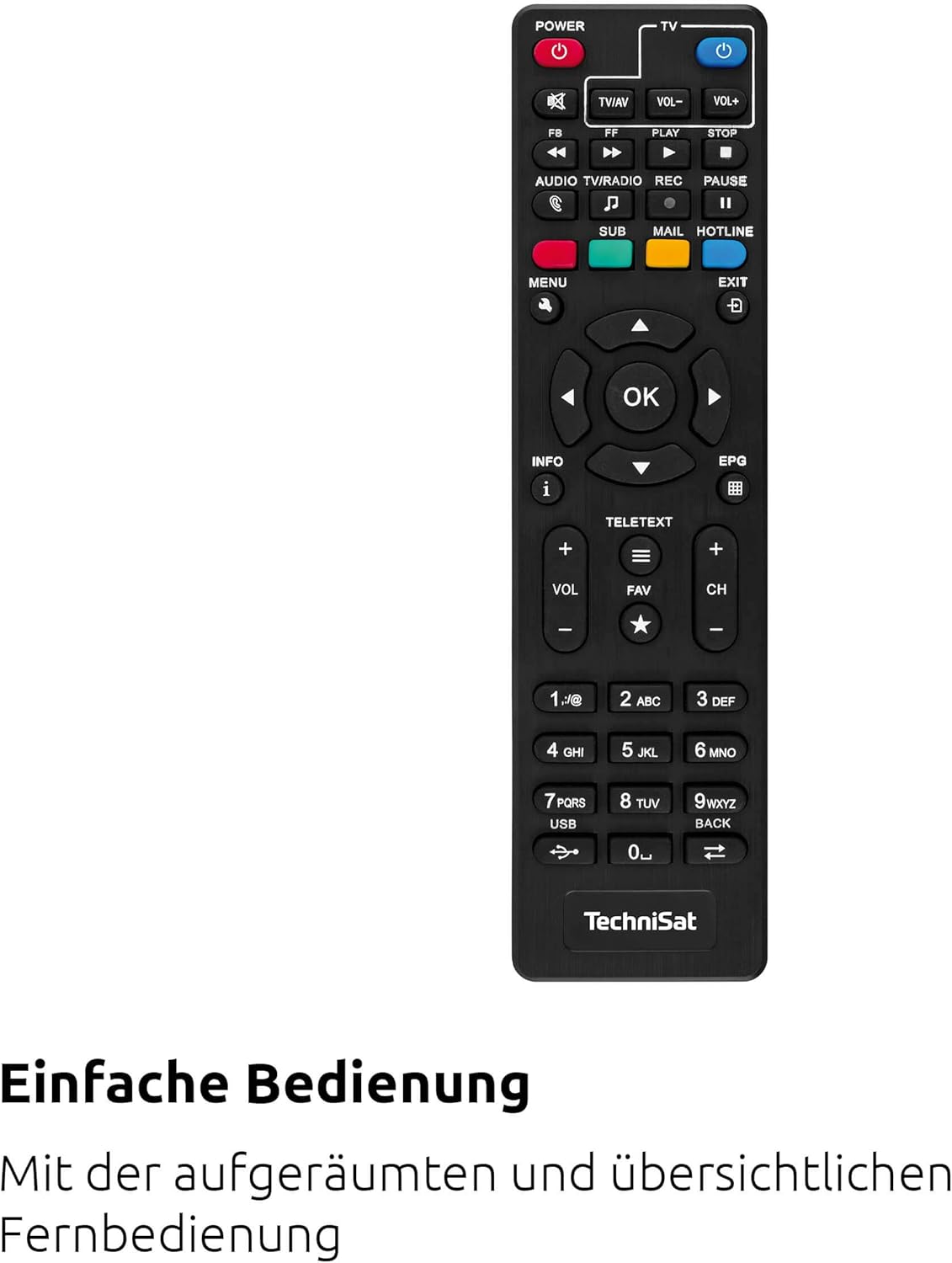
ചിത്രം 4.3: The remote control for the TechniSat HD-C 232 receiver, featuring various buttons for power, volume, channel, menu navigation, EPG, and media playback.
Refer to the remote control section in Operating Instructions for details on its functions and how to use the learning keys.
5. സജ്ജീകരണം
Follow these steps to connect your TechniSat HD-C 232 receiver and perform the initial setup.
5.1 റിസീവറിനെ ബന്ധിപ്പിക്കുന്നു
- കേബിൾ കണക്ഷൻ: Connect your cable network's antenna cable to the ആർഎഫ് ഇൻ റിസീവറിന്റെ പിൻഭാഗത്തുള്ള പോർട്ട്.
ചിത്രം 5.1: Illustration showing a cable connected to a receiver, representing the cable network connection.
- TV Connection (HDMI): Connect an HDMI cable (not included) from the HDMI ഔട്ട് port on the receiver to an HDMI input on your television.
- TV Connection (Scart - Optional): If your TV does not have an HDMI input, connect a Scart cable from the സ്കാർട്ട് port on the receiver to the Scart input on your television.
- ഓഡിയോ സിസ്റ്റം കണക്ഷൻ (ഓപ്ഷണൽ): For enhanced audio, connect an S/PDIF cable from the എസ്/പിഡിഐഎഫ് port on the receiver to your audio ampലൈഫയർ അല്ലെങ്കിൽ ഹോം സിനിമാ സംവിധാനം.
- പവർ കണക്ഷൻ: Connect the external power supply to the പവർ ഇൻപുട്ട് on the receiver, then plug the power supply into a wall outlet.
5.2 പ്രാരംഭ സജ്ജീകരണവും ചാനൽ സ്കാനും
- Turn on your television and select the correct HDMI or Scart input source.
- Turn on the TechniSat HD-C 232 receiver using the power button on the front panel or the remote control.
- The receiver will likely guide you through an initial setup wizard. Follow the on-screen instructions.
- During the setup, you will be prompted to perform a channel scan. Select "Automatic Channel Scan" to find all available unencrypted digital cable channels. This process may take several minutes.
- Once the scan is complete, save the channels. Your receiver is now ready for use.
6. പ്രവർത്തന നിർദ്ദേശങ്ങൾ
6.1 ബേസിക് ടിവി Viewing
- ചാനൽ തിരഞ്ഞെടുക്കൽ: ഉപയോഗിക്കുക CH+ ഒപ്പം CH- buttons on the remote control or front panel to change channels. You can also enter channel numbers directly using the numeric keypad on the remote.
- വോളിയം നിയന്ത്രണം: ഉപയോഗിക്കുക VOL+ ഒപ്പം വോൾ- വോളിയം ക്രമീകരിക്കുന്നതിന് വിദൂര നിയന്ത്രണത്തിലെ ബട്ടണുകൾ.
- നിശബ്ദമാക്കുക: അമർത്തുക നിശബ്ദമാക്കുക ഓഡിയോ താൽക്കാലികമായി നിശബ്ദമാക്കാൻ ബട്ടൺ.
6.2 Using the Electronic Program Guide (EPG)
The EPG provides a detailed overview of current and upcoming programs for up to seven days.

ചിത്രം 6.1: Icon representing the Electronic Program Guide (EPG) feature.
- അമർത്തുക ഇ.പി.ജി button on your remote control to access the Electronic Program Guide.
- Navigate through channels and program times using the arrow keys.
- ഒരു പ്രോഗ്രാം തിരഞ്ഞെടുക്കുക view detailed information (if available).
- അമർത്തുക പുറത്ത് to leave the EPG.
6.3 USB Media Player
The integrated USB media player allows you to play video, music, and image fileകണക്റ്റുചെയ്ത ഒരു USB സംഭരണ ഉപകരണത്തിൽ നിന്നുള്ളത്.

ചിത്രം 6.2: Icons representing the USB media player's capabilities for playing video, music, and image files.
- Insert a USB storage device (e.g., USB stick, external hard drive) into the USB port on the front panel of the receiver.
- Access the media player function via the main menu or a dedicated button on the remote control (if available).
- നിങ്ങളുടെ വഴി നാവിഗേറ്റ് ചെയ്യുക files and folders using the remote control.
- എ തിരഞ്ഞെടുക്കുക file to play. The receiver supports common video (MPEG-2, H.264), audio, and image formats.
6.4 Remote Control Learning Function
The remote control has 4 programmable learning keys that can be assigned functions from another remote control (e.g., your TV remote's power, volume, or input selection).
To program a learning key:
- Place the TechniSat remote control and the remote control to be learned from head-to-head (infrared emitters facing each other) at a distance of about 1-3 cm.
- Enter the learning mode on the TechniSat remote (refer to your remote's specific instructions, usually by holding a specific button for a few seconds).
- Press the learning key on the TechniSat remote that you wish to program.
- Press the corresponding button on the other remote control whose function you want to copy.
- The TechniSat remote will indicate successful learning (e.g., an LED flashes). Repeat for other keys.
- Exit the learning mode.
7. പരിപാലനം
Proper care ensures the longevity of your TechniSat HD-C 232 receiver.
- വൃത്തിയാക്കൽ: Disconnect the receiver from the power outlet before cleaning. Use a soft, dry, lint-free cloth to wipe the exterior. Do not use abrasive cleaners, waxes, or solvents.
- വെൻ്റിലേഷൻ: വെന്റിലേഷൻ സ്ലോട്ടുകളിൽ പൊടിയോ അവശിഷ്ടങ്ങളോ തടസ്സപ്പെടുന്നില്ലെന്ന് പതിവായി പരിശോധിക്കുക.
- സംഭരണം: ഉപകരണം ദീർഘനേരം സൂക്ഷിക്കുകയാണെങ്കിൽ, അത് വൈദ്യുതിയിൽ നിന്ന് വിച്ഛേദിച്ച് തണുത്തതും വരണ്ടതുമായ സ്ഥലത്ത് സൂക്ഷിക്കുക.
8. പ്രശ്നപരിഹാരം
നിങ്ങളുടെ റിസീവറുമായി ബന്ധപ്പെട്ട് പ്രശ്നങ്ങൾ നേരിടുകയാണെങ്കിൽ, ഇനിപ്പറയുന്ന പൊതുവായ പ്രശ്നങ്ങളും പരിഹാരങ്ങളും പരിശോധിക്കുക.
| പ്രശ്നം | സാധ്യമായ കാരണം | പരിഹാരം |
|---|---|---|
| ശക്തിയില്ല | Power cable not connected; power outlet faulty; power supply unit faulty. | Check power cable connection. Try a different power outlet. Ensure the external power supply is correctly connected. |
| ചിത്രമോ ശബ്ദമോ ഇല്ല | Incorrect TV input selected; HDMI/Scart cable loose or faulty; no signal from cable network. | Select the correct HDMI/Scart input on your TV. Check all cable connections. Ensure the cable network is active and connected to the receiver's RF In. Perform a channel scan. |
| റിമോട്ട് കൺട്രോൾ പ്രവർത്തിക്കുന്നില്ല | Batteries depleted or incorrectly inserted; infrared sensor blocked; remote control faulty. | Replace batteries. Ensure batteries are inserted with correct polarity. Remove any obstructions between the remote and receiver. |
| USB മീഡിയ പ്ലേ ചെയ്യുന്നില്ല | USB device not recognized; file format not supported; USB device faulty. | Ensure the USB device is properly inserted. Check if the file format is supported (MPEG-2, H.264 for video). Try a different USB device. |
| മോശം ചിത്ര നിലവാരം | Weak cable signal; faulty cable connection; TV settings. | Check cable connections. Contact your cable provider if signal strength is consistently low. Adjust TV picture settings. |
9 സ്പെസിഫിക്കേഷനുകൾ
| ഫീച്ചർ | വിശദാംശങ്ങൾ |
|---|---|
| ബ്രാൻഡ് | ടെക്നിസാറ്റ് |
| മോഡൽ | HD-C 232 |
| മോഡൽ നമ്പർ | 0000/4830 |
| നിറം | കറുപ്പ് |
| ട്യൂണർ തരം | DVB-C (Digital Cable) |
| വീഡിയോ എൻകോഡിംഗ് | MPEG-2 MP@HL/ML, H.264/MPEG-4 AVC |
| കണക്ഷനുകൾ | 1x HDMI Out, 1x Scart, 1x USB 2.0 (front), 1x RF In, 1x RF Out (LoopThrough), 1x S/PDIF (Digital Electrical Audio Out) |
| മൊത്തം USB പോർട്ടുകൾ | 1 |
| ആകെ HDMI പോർട്ടുകൾ | 1 |
| പ്രത്യേക സവിശേഷതകൾ | Electronic Program Guide (EPG), USB Media Player, Remote Control with Learning Function |
| അനുയോജ്യമായ ഉപകരണങ്ങൾ | ടെലിവിഷൻ |
| ഓഡിയോ put ട്ട്പുട്ട് മോഡ് | Surround (5.1, 7.1 channel configuration) |
| അളവുകൾ (W x H x D) | 16.9 സെ.മീ x 4 സെ.മീ x 10.3 സെ.മീ |

ചിത്രം 9.1: Diagram showing the dimensions of the TechniSat HD-C 232 receiver: 16.9 cm width, 4 cm height, and 10.3 cm depth.
10. വാറൻ്റിയും പിന്തുണയും
For warranty information and customer support, please refer to the warranty card included with your product or visit the official TechniSat webസൈറ്റ്. ഏതെങ്കിലും വാറന്റി ക്ലെയിമുകൾക്ക് നിങ്ങളുടെ വാങ്ങലിന്റെ തെളിവ് സൂക്ഷിക്കുക.
നിർമ്മാതാവ്: ടെക്നിസാറ്റ് ഡിജിറ്റൽ ജിഎംബിഎച്ച്
മാതൃരാജ്യം: ഫ്രാൻസ്