
UHURU WM-02Z
UHURU WM-02Z Wireless Gaming Mouse User Manual
Model: WM-02Z
ആമുഖം
The UHURU WM-02Z is a 2.4G wireless rechargeable gaming mouse designed for enhanced performance and comfort. It features 6 programmable buttons, 5 adjustable DPI levels up to 4800 DPI, and 7 colorful LED lights, making it suitable for various gaming and work environments. This manual provides detailed instructions for setting up, operating, and maintaining your mouse to ensure optimal performance and longevity.
സുരക്ഷാ വിവരങ്ങൾ
- മൗസിനെ തീവ്രമായ താപനിലയിലോ ഈർപ്പത്തിലോ തുറന്നുകാട്ടരുത്.
- ശക്തമായ ആഘാതങ്ങൾക്ക് മൗസ് വീഴ്ത്തുകയോ വിധേയമാക്കുകയോ ചെയ്യരുത്.
- Keep the mouse away from water and other liquids.
- Do not attempt to disassemble or repair the mouse yourself. Contact customer support for assistance.
- പ്രാദേശിക ചട്ടങ്ങൾ അനുസരിച്ച് ബാറ്ററി കളയുക.
പാക്കേജ് ഉള്ളടക്കം
- 1 x UHURU WM-02Z Wireless Gaming Mouse
- 1 x USB Charging Cable (59-inch)
- 1 x USB നാനോ റിസീവർ
- 1 x ഉപയോക്തൃ മാനുവൽ
ഉൽപ്പന്നം കഴിഞ്ഞുview
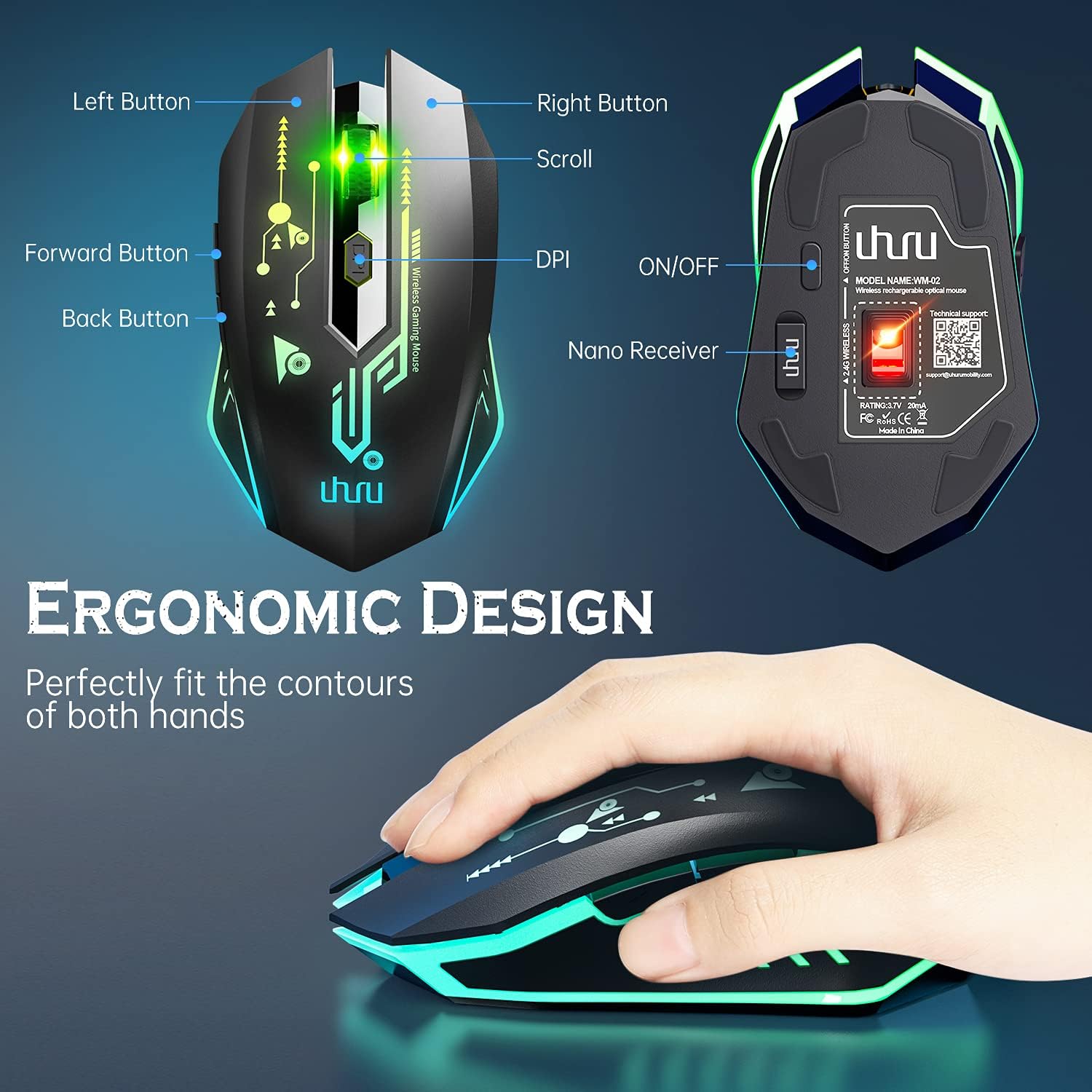
Figure 1: UHURU WM-02Z Wireless Gaming Mouse with labeled components.
The UHURU WM-02Z mouse features an ergonomic design for comfortable use. Key components include:
- ഇടത് ബട്ടൺ: സ്റ്റാൻഡേർഡ് ഇടത്-ക്ലിക്ക് പ്രവർത്തനം.
- വലത് ബട്ടൺ: സ്റ്റാൻഡേർഡ് റൈറ്റ്-ക്ലിക്ക് ഫംഗ്ഷൻ.
- സ്ക്രോൾ വീൽ: സ്ക്രോളിംഗിനും മിഡിൽ-ക്ലിക്ക് ഫംഗ്ഷനും.
- DPI ബട്ടൺ: Adjusts mouse sensitivity (DPI).
- ഫോർവേഡ് ബട്ടൺ: മുന്നോട്ട് നാവിഗേറ്റ് ചെയ്യുന്നു web ബ്രൗസറുകൾ അല്ലെങ്കിൽ ആപ്ലിക്കേഷനുകൾ.
- ബാക്ക് ബട്ടൺ: പിന്നിലേക്ക് നാവിഗേറ്റ് ചെയ്യുന്നു web ബ്രൗസറുകൾ അല്ലെങ്കിൽ ആപ്ലിക്കേഷനുകൾ.
- ഓൺ/ഓഫ് സ്വിച്ച്: Located on the bottom of the mouse to power on or off.
- Nano Receiver Storage: A compartment on the bottom of the mouse to store the USB nano receiver when not in use.
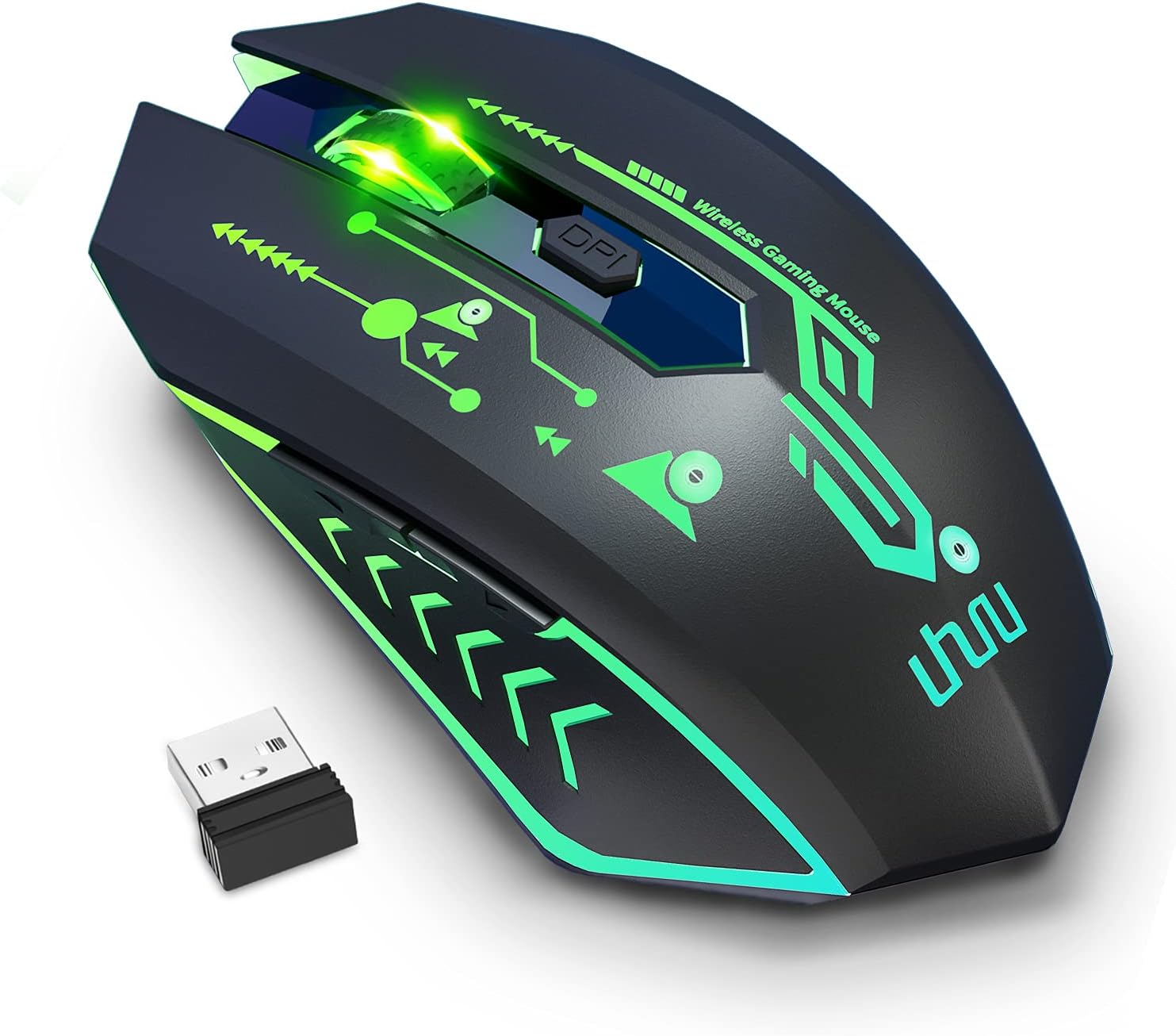
Figure 2: The UHURU WM-02Z Wireless Gaming Mouse and its compact USB nano receiver.
സജ്ജമാക്കുക
1. മൗസ് ചാർജ് ചെയ്യുന്നു
Before first use, it is recommended to fully charge the mouse. Connect the provided USB charging cable to the charging port on the front of the mouse and the other end to a USB power source (e.g., computer USB port, USB wall adapter). The mouse features a built-in rechargeable battery, eliminating the need for disposable batteries.

Figure 3: Charging the UHURU WM-02Z Wireless Gaming Mouse.
2. Connecting the USB Nano Receiver
Locate the USB nano receiver stored in the compartment on the bottom of the mouse. Remove the receiver and plug it into an available USB port on your computer (Notebook, PC, Mac). The mouse will automatically connect to the receiver.
3. പവർ ഓൺ/ഓഫ്
Slide the ON/OFF switch on the bottom of the mouse to the 'ON' position to power it on. To conserve battery life, slide the switch to the 'OFF' position when the mouse is not in use for an extended period.
4. Driver Installation (Windows Only)
For full functionality, including programming the 6 buttons and accessing the 4800 DPI level, driver software is required. This software is compatible with Windows operating systems only. Please refer to the included mini-CD or the manufacturer's webഡ്രൈവർ ഡൗൺലോഡ് ചെയ്യുന്നതിനും ഇൻസ്റ്റലേഷൻ നിർദ്ദേശങ്ങൾക്കുമുള്ള സൈറ്റ്.
പ്രവർത്തന നിർദ്ദേശങ്ങൾ
1. ഡിപിഐ ക്രമീകരണം
The mouse offers 5 adjustable DPI levels: 800, 1200, 1600, 2400, and 4800 DPI. Press the DPI button located behind the scroll wheel to cycle through these sensitivity levels. The current DPI setting affects the mouse's moving speed on the screen.

Figure 4: Adjustable DPI levels for precise control.
2. പ്രോഗ്രാം ചെയ്യാവുന്ന ബട്ടണുകൾ
The UHURU WM-02Z features 6 programmable buttons. By installing the dedicated driver software (Windows only), you can customize the function of each button to suit your gaming or productivity needs. This allows for personalized control and macro assignments.

Figure 5: Software interface for programming mouse buttons.
3. RGB ലൈറ്റിംഗ് മോഡുകൾ
The mouse features 7 colorful LED lights that change automatically, providing a dynamic and immersive gaming atmosphere. These lights are an integral part of the mouse's design and enhance its aesthetic appeal.

Figure 6: The mouse displaying its vibrant RGB lighting.
4. പവർ സേവിംഗ് മോഡ്
To optimize battery life, the gaming mouse will automatically enter sleep mode if it remains inactive for 8 minutes. To wake the mouse, simply move it or click any button.
മെയിൻ്റനൻസ്
- വൃത്തിയാക്കൽ: മൗസിന്റെ പ്രതലം വൃത്തിയാക്കാൻ മൃദുവായതും ഉണങ്ങിയതുമായ ഒരു തുണി ഉപയോഗിക്കുക. കഠിനമായ അഴുക്കിന്, അല്പം ഡി.amp തുണി ഉപയോഗിക്കാം, പക്ഷേ ഈർപ്പം മൗസിനുള്ളിൽ കടക്കുന്നില്ലെന്ന് ഉറപ്പാക്കുക.
- ബാറ്ററി കെയർ: While the mouse has a built-in rechargeable battery, avoid completely draining it frequently. Charge the mouse when the battery indicator suggests low power.
- സംഭരണം: When not in use for extended periods, store the mouse in a cool, dry place. Ensure the ON/OFF switch is in the 'OFF' position.
ട്രബിൾഷൂട്ടിംഗ്
| പ്രശ്നം | സാധ്യമായ കാരണം | പരിഹാരം |
|---|---|---|
| മൗസ് പ്രതികരിക്കുന്നില്ല | Low battery; Receiver not connected; Mouse powered off; Driver issue. | Charge the mouse; Ensure USB nano receiver is securely plugged in; Turn the mouse ON; Reinstall drivers (Windows). |
| DPI ക്രമീകരണം പ്രവർത്തിക്കുന്നില്ല | Software conflict; Hardware issue. | Ensure no conflicting mouse software is running; Try on a different computer. |
| പ്രോഗ്രാം ചെയ്യാവുന്ന ബട്ടണുകൾ പ്രവർത്തിക്കുന്നില്ല | Driver not installed or corrupted; Not compatible with Mac/Linux. | Install or reinstall the driver software (Windows only); Ensure you are using a Windows OS for programming. |
| ലൈറ്റുകൾ പ്രവർത്തിക്കുന്നില്ല | Mouse is off or in sleep mode; Hardware issue. | Turn the mouse on or wake it from sleep; Contact support if issue persists. |
| Poor tracking performance | Dirty sensor; Unsuitable surface. | Clean the optical sensor on the bottom of the mouse; Use on a clean, non-reflective surface. |
സ്പെസിഫിക്കേഷനുകൾ
- മോഡൽ: WM-02Z
- കണക്റ്റിവിറ്റി: 2.4GHz വയർലെസ് (USB നാനോ റിസീവർ)
- DPI ലെവലുകൾ: 800/1200/1600/2400/4800 DPI
- ബട്ടണുകൾ: 6 പ്രോഗ്രാം ചെയ്യാവുന്ന ബട്ടണുകൾ
- ലൈറ്റിംഗ്: 7 Colorful LED Lights (Automatic Changing)
- ബാറ്ററി: ബിൽറ്റ്-ഇൻ റീചാർജ് ചെയ്യാവുന്ന ലിഥിയം പോളിമർ ബാറ്ററി
- ചാർജിംഗ് കേബിൾ നീളം: 59 ഇഞ്ച് (ഏകദേശം 1.5 മീറ്റർ)
- അനുയോജ്യത: Windows 7 / 8 / 10 / XP, Vista 7 / 8, Mac, Linux (Note: Driver software for programming is Windows only)
- ഉൽപ്പന്ന അളവുകൾ: 4.92 x 2.75 x 0.04 ഇഞ്ച്
- ഇനത്തിൻ്റെ ഭാരം: 6.7 ഔൺസ്
വാറൻ്റിയും പിന്തുണയും
Your UHURU WM-02Z Wireless Gaming Mouse comes with a manufacturer's warranty. For specific warranty terms and conditions, please refer to the product packaging or contact UHURU customer support directly. If you encounter any issues or have questions regarding your product, please reach out to our support team for assistance. Contact information can typically be found on the product packaging or the official UHURU webസൈറ്റ്.
Ask a question about this manual
Ask about setup, troubleshooting, compatibility, parts, safety, or missing instructions. Manuals+ will review the question and use this page’s manual context to help answer it.