
1. ഉൽപ്പന്നം കഴിഞ്ഞുview
The ANRAN 4-Channel 1080p Wi-Fi NVR Surveillance System is designed for comprehensive home and property monitoring. This system includes a Network Video Recorder (NVR) with a pre-installed 1TB hard drive and four 2MP waterproof IP cameras. It offers wireless connectivity between the cameras and the NVR, simplifying installation. Key features include remote access via mobile application, motion detection with email alerts, and automatic pairing for ease of use.

ചിത്രം 1.1: ഓവർview of the ANRAN Wi-Fi NVR surveillance system, showing the NVR unit, four cameras, and a 1TB hard drive.
2. സിസ്റ്റം ഘടകങ്ങൾ
The ANRAN surveillance system consists of the following main components:
- എൻവിആർ (നെറ്റ്വർക്ക് വീഡിയോ റെക്കോർഡർ): The central unit for recording and managing video footage. It features a built-in Wi-Fi router and two wireless antennas for strong signal transmission.
- IP Cameras (4x 2MP): Waterproof cameras designed for both indoor and outdoor use, providing 1080p video resolution. Each camera requires a 12V DC power adapter.
- 1TB ഹാർഡ് ഡ്രൈവ്: Pre-installed in the NVR for local video storage.
- പവർ അഡാപ്റ്ററുകൾ: NVR-നും ഓരോ ക്യാമറയ്ക്കും.
- USB മൗസ്: NVR പ്രവർത്തനത്തിനായി.
- HDMI/VGA Cable (optional, not always included): For connecting NVR to a monitor.

Figure 2.1: Diagram illustrating the NVR's ports (WiFi Antenna, USB Port, Power Supply, Net Port, HDMI Port, VGA Port) and its dimensions (150mm diameter, 230mm height).
3. സജ്ജീകരണ ഗൈഡ്
3.1 പ്രാരംഭ സജ്ജീകരണം
- NVR ബന്ധിപ്പിക്കുക:
- Connect the NVR to a power outlet using its DC adapter.
- Connect the NVR to a monitor or TV via HDMI or VGA cable. Ensure the display resolution is at least 1920x1080 pixels for optimal viewing.
- NVR-ന്റെ USB പോർട്ടിലേക്ക് USB മൗസ് ബന്ധിപ്പിക്കുക.
- ക്യാമറകൾ പവർ ഓൺ ചെയ്യുക: Connect each camera to a 12V DC power outlet. The cameras will automatically pair with the NVR.
- സിസ്റ്റം ബൂട്ട്-അപ്പ്: The NVR system will boot up, and live video feeds from the cameras should appear on the connected monitor.

Figure 3.1: Illustration showing a camera connected to a power outlet and wirelessly communicating with the NVR, emphasizing that no video cable is needed between them.
3.2 Camera Placement and Signal Range
The system features an auto-pairing function. The NVR has a built-in router, and cameras automatically connect. The Wi-Fi signal can reach up to 100ft in open areas, 50ft with one wall, and 30ft with two walls. Actual distance may vary based on environmental factors.

Figure 3.2: Diagram illustrating the auto-pairing system, showing the NVR's central placement and cameras wirelessly connected around a house, indicating signal reach.
3.3 Internet Connection (Optional for Remote Access)
While the system functions without an internet connection for local viewing and recording, an internet connection is required for remote access via smartphone, tablet, or PC.
- Connect the NVR to your home router using an Ethernet cable via the NVR's "Net Port".
4. പ്രവർത്തന നിർദ്ദേശങ്ങൾ
4.1 ലോക്കൽ Viewഇംഗും പ്ലേബാക്കും
Once the NVR is connected to a monitor, you can view തത്സമയ ഫീഡുകളും പ്ലേബാക്കും റെക്കോർഡുചെയ്ത footage using the connected USB mouse to navigate the NVR's interface.
4.2 മൊബൈൽ ആപ്പ് വഴിയുള്ള റിമോട്ട് ആക്സസ്
To access your surveillance system remotely:
- അപ്ലിക്കേഷൻ ഡൗൺലോഡുചെയ്യുക: ഇതിനായി തിരയുക the official ANRAN app on your smartphone's app store (e.g., Google Play Store for Android, Apple App Store for iOS).
- Scan or Input Cloud ID: Open the app and follow the instructions to scan the QR code displayed on your NVR's monitor or manually input the Cloud ID.
- View ക്യാമറകൾ: കണക്റ്റുചെയ്തുകഴിഞ്ഞാൽ, നിങ്ങൾക്ക് കഴിയും view live streams, playback recordings, and manage settings from your mobile device.
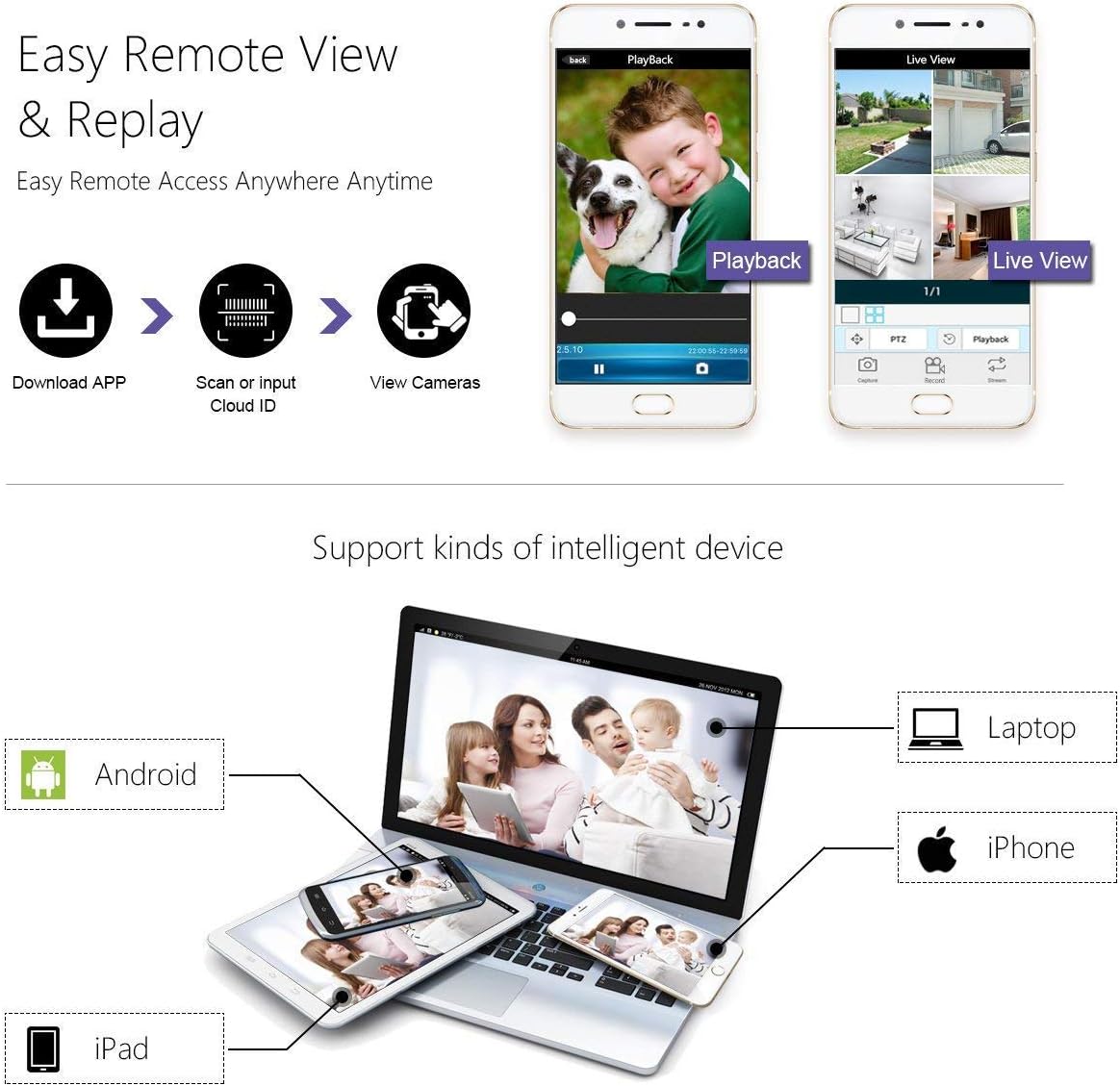
Figure 4.1: Flowchart showing steps to download the app, scan Cloud ID, and view cameras, with screenshots of the app interface for live view and playback. Compatible with Android, iPhone, iPad, and Laptops.
4.3 മോഷൻ ഡിറ്റക്ഷനും ഇമെയിൽ അലേർട്ടുകളും
The system supports intelligent motion detection and can send email alerts upon detecting activity.
- Configure Motion Detection Area: Through the NVR interface or mobile app, you can define specific areas within the camera's view for motion detection. This helps minimize false alarms.
- സംവേദനക്ഷമത ക്രമീകരിക്കുക: Customize the sensitivity of the motion detection to suit your environment.
- Set Up Email Notifications: Configure your email settings within the NVR system to receive instant alerts when motion is detected.
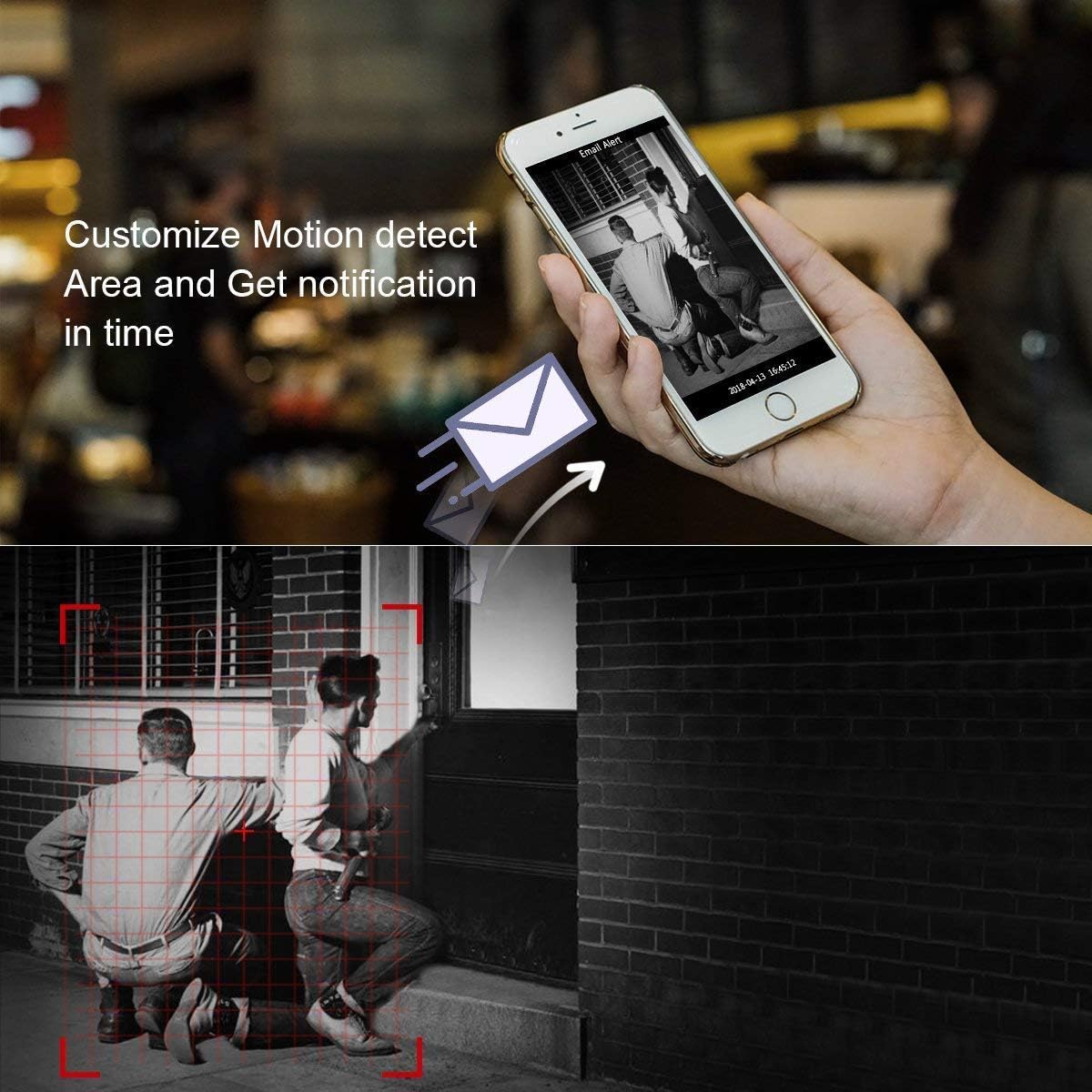
Figure 4.2: Image depicting a smartphone receiving an email alert and a visual representation of customizing motion detection zones with a red grid overlay.
5. പരിപാലനം
5.1 പൊതു പരിചരണം
- Keep the NVR unit in a well-ventilated area, away from direct sunlight and excessive heat.
- ക്യാമറ ലെൻസുകൾ പതിവായി മൃദുവായ, ഡി-ക്ലിപ്പർ ഉപയോഗിച്ച് വൃത്തിയാക്കുക.amp വ്യക്തമായ ഇമേജ് ഗുണനിലവാരം ഉറപ്പാക്കാൻ തുണി.
- എല്ലാ വൈദ്യുതി കണക്ഷനുകളും സുരക്ഷിതമാണെന്നും കേടുപാടുകൾ കൂടാതെയാണെന്നും ഉറപ്പാക്കുക.
5.2 ഹാർഡ് ഡ്രൈവ് മാനേജ്മെന്റ്
The 1TB hard drive will automatically overwrite the oldest recordings when full. If you need to preserve specific footage, back it up to an external device (e.g., USB drive) before it is overwritten.
5.3 ഫേംവെയർ അപ്ഡേറ്റുകൾ
Periodically check the ANRAN official website or app for firmware updates to ensure optimal performance and security of your system.
6. പ്രശ്നപരിഹാരം
- No Video Feed from Camera:
- Ensure the camera is properly powered. Check the power adapter and outlet.
- Verify the camera is within the NVR's Wi-Fi range. Relocate the camera or NVR if necessary.
- Check if the camera has lost its pairing with the NVR. Refer to the NVR's manual for re-pairing instructions if needed.
- Poor Image Quality / Signal Loss:
- Check for obstructions (thick walls, metal objects) between the camera and NVR.
- Ensure camera lens is clean.
- Consider using a Wi-Fi repeater if the distance is too great or signal is weak.

Figure 6.1: Image highlighting the camera's night vision capabilities and weatherproof design, and the NVR's strong signal for reliable connection.
- വിദൂര ആക്സസ് പ്രവർത്തിക്കുന്നില്ല:
- Confirm the NVR is connected to the internet via Ethernet cable.
- നിങ്ങളുടെ മൊബൈൽ ഉപകരണത്തിന് സ്ഥിരമായ ഇന്റർനെറ്റ് കണക്ഷൻ ഉണ്ടെന്ന് ഉറപ്പാക്കുക.
- Verify the Cloud ID or QR code was entered correctly in the app.
- Check your router's firewall settings if you are experiencing connection issues.
- Motion Detection Not Triggering / Too Many False Alarms:
- ചലന കണ്ടെത്തൽ സംവേദനക്ഷമത ക്രമീകരിക്കുക.
- Refine the motion detection area to exclude irrelevant zones (e.g., moving trees, busy roads).
7 സ്പെസിഫിക്കേഷനുകൾ
| ഫീച്ചർ | സ്പെസിഫിക്കേഷൻ |
|---|---|
| മോഡൽ നമ്പർ | BS-K04W5684 |
| ബ്രാൻഡ് | അൻറാൻ |
| വീഡിയോ റെക്കോർഡിംഗ് റെസല്യൂഷൻ | 1080p |
| ചാനലുകളുടെ എണ്ണം | 4 |
| സംഭരണ ശേഷി | 1 TB (pre-installed) |
| കണക്റ്റിവിറ്റി ടെക്നോളജി | വയർലെസ്, വയർഡ് |
| പവർ ഉറവിടം | DC Adapter Powered |
| പ്രത്യേക സവിശേഷതകൾ | Dual Antenna Enhance, Motion Detection, Night Vision, Weatherproof Cameras |
| NVR Dimensions (L x W x H) | 30.5 x 26 x 21 cm (approx. 150mm diameter, 230mm height for cylindrical NVR) |
| ഭാരം | 4.8 കിലോഗ്രാം |
| അനുയോജ്യമായ ഉപകരണങ്ങൾ | പേഴ്സണൽ കമ്പ്യൂട്ടർ, ടാബ്ലെറ്റ്, സ്മാർട്ട്ഫോൺ |

Figure 7.1: Collage showing various application scenarios for the cameras: indoor, outdoor, waterproof capability, and night vision.
8. വാറൻ്റിയും പിന്തുണയും
ANRAN provides support for its products. If you encounter any issues or have questions after purchase, please contact ANRAN customer service via email. The product description mentions that new replacement parts will be provided free of charge if needed.
For further assistance, please refer to the contact information provided with your product packaging or visit the official ANRAN support webസൈറ്റ്.