
ആമുഖം
This manual provides instructions for the RGBZONE DC 5V USB RGB LED Controller with 17-Key RF Wireless Remote Control. This controller is designed for use with 4-PIN RGB LED strip lights (5050, 3528, 2835 types) that operate on a 5V DC power supply. Please read this manual carefully before installation and operation to ensure proper use and longevity of your product.
പാക്കേജിൽ ഉൾപ്പെടുന്നു:
- 1 x RF LED Controller
- 1 x RF റിമോട്ട് കൺട്രോൾ
- 1 x ഉപയോക്തൃ മാനുവൽ
സജ്ജീകരണ നിർദ്ദേശങ്ങൾ
Follow these steps to correctly set up your RGBZONE LED Controller and LED strip lights.
1 പവർ ആവശ്യകതകൾ
Ensure that both your LED strip light and the power supply are rated for DC 5V. ഇൻപുട്ട് വോളിയംtage must match the output voltage (5V Input = 5V Output). Using an incorrect voltage can damage the LED strip or controller.
2. റിമോട്ട് കൺട്രോൾ ബാറ്ററി ഇൻസ്റ്റാളേഷൻ
The remote control requires one CR2025 battery, which is typically included. Before first use, pull out the plastic tab from the battery compartment to activate the battery.

3. Connecting the LED Strip and Controller
The controller is designed for simple plug-and-play connection. It features a USB connector on one end for power and a 4-PIN connector on the other for the LED strip.
- Connect the 4-PIN plug of your LED strip light to the 4-PIN connector on the controller. Ensure the pins are aligned correctly.
- Plug the USB connector of the controller into a 5V USB power source. This can be a USB socket, laptop USB jack, cell phone charger, power bank, or desktop computer USB jack.



പ്രവർത്തന നിർദ്ദേശങ്ങൾ
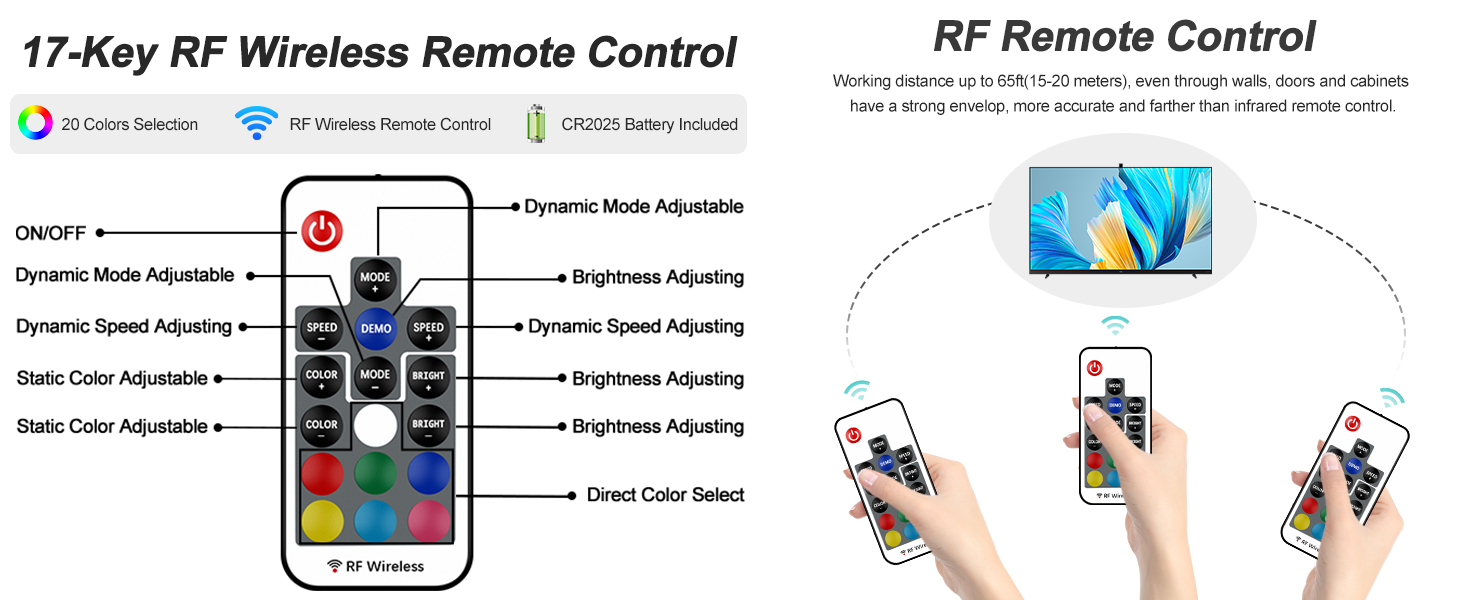
The 17-key RF wireless remote control allows for easy management of your LED strip lights. The remote has a control distance of up to 10 meters (approximately 33 feet) and does not require direct line-of-sight due to its RF wireless technology.

വിദൂര നിയന്ത്രണ പ്രവർത്തനങ്ങൾ:
- ഓൺ/ഓഫ് ബട്ടൺ: Powers the LED strip on or off.
- MODE+ / MODE- Buttons: Cycles through 5 dynamic light patterns: Flash, Strobe, Fade, RGB Smooth-change, and Static.
- SPEED+ / SPEED- Buttons: Adjusts the speed of dynamic light patterns (16 speed levels).
- COLOR+ / COLOR- Buttons: Adjusts the static color. There are 16 available colors.
- BRIGHT+ / BRIGHT- Buttons: ലൈറ്റുകളുടെ തെളിച്ചം ക്രമീകരിക്കുന്നു.
- Direct Color Select Buttons: Dedicated buttons for common colors (Red, Green, Blue, White, Yellow, Cyan, Purple, etc.) for quick selection.
- ഡെമോ ബട്ടൺ: Activates a demonstration mode that cycles through various colors and effects.
മെയിൻ്റനൻസ്
To ensure optimal performance and longevity of your RGBZONE LED Controller, follow these maintenance guidelines:
- വൃത്തിയാക്കൽ: Use a dry, soft cloth to clean the controller and remote control. Avoid using liquid cleaners or solvents.
- സംഭരണം: Store the controller and remote in a cool, dry place when not in use for extended periods.
- ബാറ്ററി മാറ്റിസ്ഥാപിക്കൽ: If the remote control's range or responsiveness decreases, replace the CR2025 battery. Refer to the battery installation section for guidance.
- പരിസ്ഥിതി വ്യവസ്ഥകൾ: This product is designed for indoor use only. Avoid exposure to moisture, extreme temperatures, or direct sunlight.
ട്രബിൾഷൂട്ടിംഗ്
If you encounter issues with your RGBZONE LED Controller, refer to the following common problems and solutions:
Problem: Lights are dim or only display red color.
പരിഹാരം: This often indicates a voltage mismatch. Verify that both your LED strip light and the power supply are DC 5V. The controller is specifically designed for 5V systems. If the voltage is incorrect, the lights may not function properly or only partially illuminate.
Problem: Remote control does not respond or colors are incorrect.
പരിഹാരങ്ങൾ:
- ബാറ്ററി പരിശോധിക്കുക: Ensure the remote control battery (CR2025) is correctly installed and has sufficient charge. Replace if necessary.
- Re-synchronize Colors: The line order of RGB LED strips can vary between manufacturers. If the colors on your remote do not correspond to the colors displayed by the strip, follow these steps to re-synchronize:
- Turn off the LED strip using the remote control.
- Press the button in the lower right corner of the remote (often a white or 'W' button, or a specific reset button if available). The strip light should flash.
- Press the Red, Green, and Blue (RGB) buttons on the remote in sequence to adjust until the colors correspond correctly. Repeat a few times if necessary.
- കണക്ഷൻ പരിശോധന: Ensure all connections (USB power, 4-PIN connector) are secure and properly seated.
സ്പെസിഫിക്കേഷനുകൾ
| ഫീച്ചർ | വിശദാംശങ്ങൾ |
|---|---|
| ബ്രാൻഡ് | RGBZONE |
| മോഡൽ നമ്പർ | FB1189 |
| വർക്കിംഗ് വോളിയംtage | DC 5V |
| ഔട്ട്പുട്ട് കറൻ്റ് | 3x2A (Peak Output Current) |
| നിയന്ത്രണ രീതി | RF വയർലെസ് റിമോട്ട് കൺട്രോൾ |
| വിദൂര നിയന്ത്രണ കീകൾ | 17 കീകൾ |
| റിമോട്ട് കൺട്രോൾ ദൂരം | 10 മീറ്റർ വരെ (33 അടി) |
| പ്രകാശ സ്രോതസ്സ് തരം | LED (compatible with 5050, 3528, 2835 RGB LED strips) |
| ഇളം നിറം | RGB (16 നിറങ്ങൾ) |
| ഡൈനാമിക് മോഡുകൾ | Flash, Strobe, Fade, RGB Smooth-change, Static (5 patterns) |
| വേഗത നിയന്ത്രണം | 16-Speeds for dynamic modes |
| മെറ്റീരിയൽ | പ്ലാസ്റ്റിക് |
| ഇൻഡോർ/ഔട്ട്ഡോർ ഉപയോഗം | ഇൻഡോർ |
| റിമോട്ട് ബാറ്ററി തരം | 1 x CR2025 (ആവശ്യമാണ്) |
| ഉൽപ്പന്ന അളവുകൾ | 7 x 4 x 1 inches (Controller) |
| ഇനത്തിൻ്റെ ഭാരം | 1.44 ഔൺസ് |


വാറൻ്റി വിവരങ്ങൾ
Specific warranty details for this product are not provided in the available information. For warranty inquiries, please refer to the product packaging or contact the manufacturer directly.
ഉപഭോക്തൃ പിന്തുണ
If you require further assistance or have questions not covered in this manual, please contact RGBZONE customer support through their official website or the platform where the product was purchased. Always provide your product model number (FB1189) and a detailed description of your issue for efficient support.