
ആമുഖം
This manual provides detailed instructions for the proper setup, operation, and maintenance of your Technical Pro RX45BT Home Theater Receiver and Rockville REQ20 Graphic Equalizer. Please read this manual thoroughly before using the products to ensure optimal performance and safety.
പ്രധാനപ്പെട്ട സുരക്ഷാ നിർദ്ദേശങ്ങൾ
Always follow basic safety precautions when using electronic equipment to reduce the risk of fire, electric shock, and injury.
- ഈ ഉപകരണം മഴയിലോ ഈർപ്പത്തിലോ തുറന്നുകാട്ടരുത്.
- കവർ നീക്കം ചെയ്യരുത്. ഉപയോക്തൃ-സേവനയോഗ്യമായ ഭാഗങ്ങൾ ഉള്ളിൽ പാടില്ല. യോഗ്യതയുള്ള ഉദ്യോഗസ്ഥരെ സർവീസ് ചെയ്യാൻ റഫർ ചെയ്യുക.
- ശരിയായ വായുസഞ്ചാരം ഉറപ്പാക്കുക. വായുസഞ്ചാര ദ്വാരങ്ങൾ തടയരുത്.
- Connect only to a grounded AC power outlet.
- പവർ കോർഡ് നടക്കുകയോ നുള്ളുകയോ ചെയ്യുന്നതിൽ നിന്ന് സംരക്ഷിക്കുക.
- മിന്നൽ കൊടുങ്കാറ്റുകളുടെ സമയത്തോ ദീർഘകാലത്തേക്ക് ഉപയോഗിക്കാത്ത സമയത്തോ യൂണിറ്റ് അൺപ്ലഗ് ചെയ്യുക.
- Do not operate near heat sources such as radiators, heat registers, stoves, or other apparatus that produce heat.
പാക്കേജ് ഉള്ളടക്കം
എല്ലാ ഇനങ്ങളും നിങ്ങളുടെ പാക്കേജിൽ ഉൾപ്പെടുത്തിയിട്ടുണ്ടെന്ന് ഉറപ്പാക്കുക:
- Technical Pro RX45BT Home Theater Receiver
- Rockville REQ20 19" Rack Mount Pro Dual 10 Band Graphic Equalizer
- Remote Control for RX45BT
- Power Cable for REQ20
- Rack Mount Brackets for REQ20 (2 pcs)
- Mounting Screws for Brackets
Technical Pro RX45BT Receiver Overview
ഫ്രണ്ട് പാനൽ നിയന്ത്രണങ്ങളും സവിശേഷതകളും
The front panel of the RX45BT receiver provides access to various controls and input options.

ചിത്രം: മുൻഭാഗം view of the Technical Pro RX45BT Home Theater Receiver, showing the main display, input selection buttons, microphone volume, master volume, and various tone controls. The included remote control is also visible next to the receiver.

ചിത്രം: കോണാകൃതിയിലുള്ള മുൻഭാഗം view of the Technical Pro RX45BT Home Theater Receiver, highlighting the illuminated blue display and control knobs.
- പവർ ബട്ടൺ: യൂണിറ്റ് ഓണാക്കുകയോ ഓഫാക്കുകയോ ചെയ്യുന്നു.
- മൈക്രോഫോൺ വോളിയം: Adjusts the volume for connected microphones.
- മാസ്റ്റർ വോളിയം: മൊത്തത്തിലുള്ള ഔട്ട്പുട്ട് വോളിയം നിയന്ത്രിക്കുന്നു.
- ഇൻപുട്ട് സെലക്ടറുകൾ: Buttons for Tuner, DVD, AUX/MP3, SD/USB, Bluetooth.
- ഡിസ്പ്ലേ: Digital fluorescent output display meter showing current status and audio levels.
- Echo, Mic Treble, Mic Bass: Controls for microphone effects and tone.
- Bass, Treble, Balance: Tone controls for main audio output.
- MIC1, MIC2 Inputs: 1/4" microphone input jacks.
- USB പോർട്ട്: യുഎസ്ബി ഫ്ലാഷ് ഡ്രൈവുകൾ ബന്ധിപ്പിക്കുന്നതിന്.
- SD കാർഡ് സ്ലോട്ട്: For inserting SD cards.
- ഹെഡ്ഫോൺ ഔട്ട്പുട്ട്: 1/8'' jack for headphones.
പിൻ പാനൽ കണക്ഷനുകൾ
The rear panel provides all necessary audio input and output connections, along with power input.
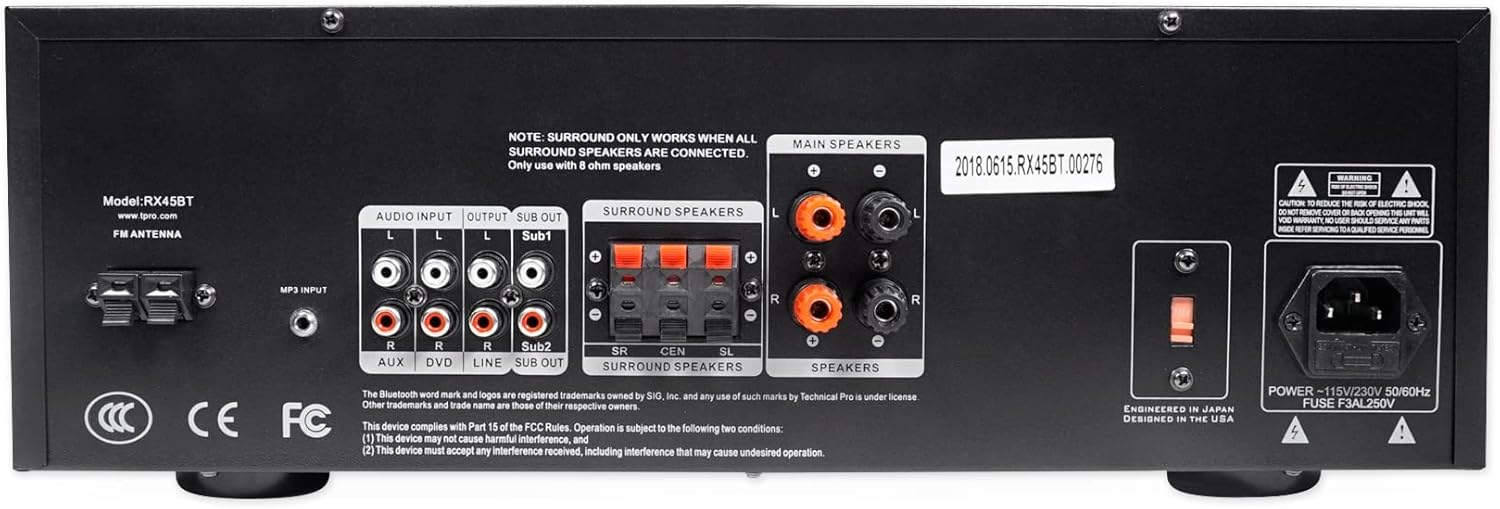
ചിത്രം: പിൻഭാഗം view of the Technical Pro RX45BT Home Theater Receiver, showing RCA audio inputs (AUX, DVD), audio outputs (Line Out, Sub Out), speaker terminals (Main, Surround), FM antenna input, and power input with voltagഇ സെലക്ടർ.
- എഫ്എം ആന്റിന: എഫ്എം ആന്റിനയ്ക്കുള്ള കണക്ഷൻ.
- AUDIO INPUT (RCA): Two sets of RCA inputs for audio sources (AUX, DVD).
- OUTPUT (RCA): Line Out and two Mono RCA Subwoofer Outputs (Sub1, Sub2).
- സറൗണ്ട് സ്പീക്കർമാർ: Push-button terminals for surround speakers. Note: Surround sound only works when all surround speakers are connected and only with 8 ohm speakers.
- പ്രധാന പ്രഭാഷകർ: Banana binding post terminals for main speakers.
- വൈദ്യുതി ഇൻപുട്ട്: AC power inlet with voltagഇ സെലക്ടർ (110/220V).
Rockville REQ20 Graphic Equalizer Overview
The Rockville REQ20 is a dual 10-band graphic equalizer designed to fine-tune your audio system's frequency response.
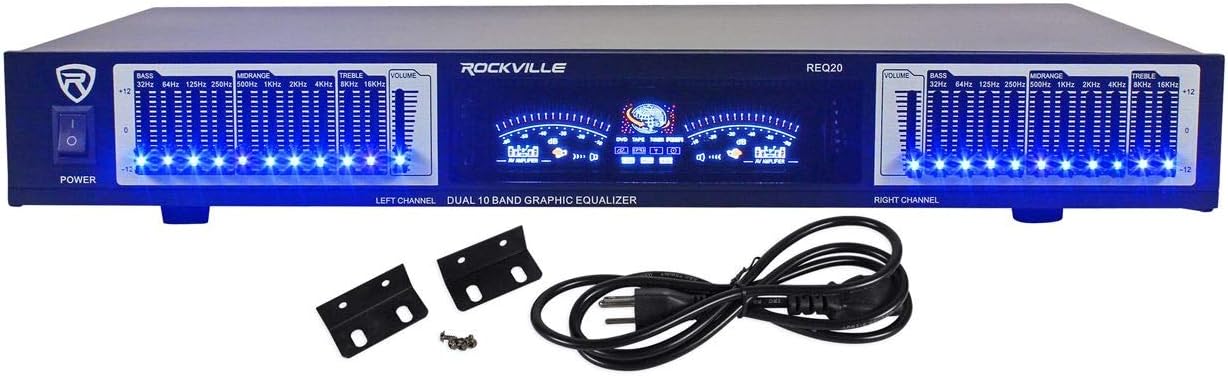
ചിത്രം: മുൻഭാഗം view of the Rockville REQ20 19" Rack Mount Pro Dual 10 Band Graphic Equalizer, featuring blue LED illuminated slide controls for each frequency band, dual VU meters, and power switch.

Image: The Rockville REQ20 Graphic Equalizer shown with its included rack mount brackets and power cable.
- വൈദ്യുതി സ്വിച്ച്: യൂണിറ്റ് ഓണാക്കുകയോ ഓഫാക്കുകയോ ചെയ്യുന്നു.
- Equalizer Slide Controls: Dual 10-band controls (20 bands total) with blue LEDs for adjusting specific frequency ranges (e.g., 32Hz, 64Hz, 125Hz, 250Hz, 500Hz, 1KHz, 2KHz, 4KHz, 8KHz, 16KHz).
- VU മീറ്ററുകൾ: Dual meters to monitor left and right channel audio levels.
- Volume Gain Control: Separate left/right channel volume gain controls.
- ആർസിഎ ലൈൻ ഇൻപുട്ട്: Stereo RCA input for connecting audio sources.
- RCA ലൈൻ ഔട്ട്പുട്ട്: Stereo RCA output for connecting to an ampലൈഫയർ അല്ലെങ്കിൽ റിസീവർ.
- RCA Line Output for Record: Additional stereo RCA output for recording purposes.
സജ്ജീകരണ നിർദ്ദേശങ്ങൾ
Follow these steps to properly set up your Technical Pro RX45BT Receiver and Rockville REQ20 Equalizer.
1. പ്ലേസ്മെന്റ്
- Place the receiver and equalizer on a stable, flat surface with adequate ventilation.
- Ensure there is enough space around the units for proper airflow to prevent overheating.
- The REQ20 is designed for 19" rack mounting. Use the included brackets and screws if rack mounting.
2. Connecting Speakers to RX45BT
Connect your speakers to the appropriate terminals on the rear panel of the RX45BT receiver.
- പ്രധാന പ്രഭാഷകർ: Use banana plugs or bare wire to connect your main left and right speakers to the "MAIN SPEAKERS" binding posts. Ensure correct polarity (+ to + and - to -).
- സറൗണ്ട് സ്പീക്കറുകൾ: Connect your surround speakers to the "SURROUND SPEAKERS" push-button terminals. Note that surround sound functionality requires all surround speakers to be connected and they must be 8 ohm speakers.
3. Connecting Audio Sources to RX45BT
Connect your external audio devices to the RCA input jacks on the rear panel.
- Use RCA cables to connect devices like DVD players, CD players, or other audio sources to the "DVD" or "AUX" input jacks.
- For MP3 players or other devices with a 3.5mm output, use an appropriate adapter cable to connect to the "AUX/MP3" input on the front panel.
4. Connecting the Rockville REQ20 Equalizer
To integrate the REQ20 equalizer into your audio system, connect it between your audio source and the RX45BT receiver, or between the receiver's line out and an external amplifier if you are using one.
Typical Connection (Equalizer between source and receiver):
- Connect your audio source (e.g., CD player) to the "RCA Line Input" of the REQ20 using RCA cables.
- Connect the "RCA Line Output" of the REQ20 to one of the "AUDIO INPUT" (e.g., DVD or AUX) jacks on the rear of the RX45BT receiver using RCA cables.
Alternative Connection (Equalizer in a tape loop or processor loop, if available on your receiver):
If your receiver has a dedicated processor loop or tape monitor loop, you can connect the equalizer there. The RX45BT has a "Line Out" which can be used to feed an external amplifier, but not a dedicated processor loop for an equalizer to be inserted directly into the main signal path for all inputs. The recommended method is to place it between a specific source and the receiver.
5. പവർ കണക്ഷൻ
- Ensure both the RX45BT and REQ20 are switched off.
- Connect the power cords of both units to a standard AC power outlet.
- വോളിയം പരിശോധിക്കുകtage selector on the RX45BT rear panel is set correctly for your region (110V or 220V).
Operating Instructions - RX45BT Receiver
1. അടിസ്ഥാന പ്രവർത്തനം
- അമർത്തുക ശക്തി button to turn on the receiver.
- Select your desired audio source using the ഇൻപുട്ട് സെലക്ടർ buttons on the front panel (Tuner, DVD, AUX/MP3, SD/USB, Bluetooth).
- Adjust the overall volume using the മാസ്റ്റർ വോളിയം മുട്ട്.
- ഉപയോഗിക്കുക ബാസ്, ട്രിബിൾ, ഒപ്പം ബാലൻസ് controls to fine-tune the audio output.
2. ബ്ലൂടൂത്ത് ജോടിയാക്കൽ
- അമർത്തുക ബ്ലൂടൂത്ത് input selector button on the front panel. The display will indicate "Bluetooth" or a pairing mode.
- നിങ്ങളുടെ മൊബൈൽ ഉപകരണത്തിൽ (സ്മാർട്ട്ഫോൺ, ടാബ്ലെറ്റ് മുതലായവ) ബ്ലൂടൂത്ത് പ്രവർത്തനക്ഷമമാക്കുക.
- ഇതിനായി തിരയുക available devices and select "RX45BT" from the list.
- Once paired, you can stream audio from your device to the receiver.
3. USB/SD Card Playback & Recording
The RX45BT supports playback of .mp3, .wav, and .wma files from USB drives and SD cards (up to 32GB).
പ്ലേബാക്ക്:
- Insert a USB flash drive or SD card into the respective slot on the front panel.
- തിരഞ്ഞെടുക്കുക SD/USB input. The unit will automatically begin playing compatible audio files.
- Use the playback controls (Repeat/Random) on the unit or remote.
റെക്കോർഡിംഗ്:
The unit can record .wav files (128 kbps / 32 KHz sampling rate) onto a USB Flash Drive or SD Card from the Tuner or RCA inputs.
- ഒരു USB ഫ്ലാഷ് ഡ്രൈവ് അല്ലെങ്കിൽ SD കാർഡ് ഇടുക.
- Select the desired input source (Tuner or an RCA input like DVD/AUX).
- അമർത്തുക രേഖപ്പെടുത്തുക button (if available on the unit or remote) to start recording. Press again to stop.
4. മൈക്രോഫോൺ നിയന്ത്രണങ്ങൾ
Connect up to two microphones to the MIC1 and MIC2 1/4" input jacks on the front panel.
- ഉപയോഗിച്ച് മൈക്രോഫോൺ വോളിയം ക്രമീകരിക്കുക മൈക്രോഫോൺ വോളിയം മുട്ട്.
- Apply echo effect using the എക്കോ നിയന്ത്രണം.
- Adjust microphone tone with മൈക്ക് ട്രെബിൾ ഒപ്പം മൈക്ക് ബാസ് നിയന്ത്രണങ്ങൾ.
5. FM Tuner Operation
Connect the FM antenna to the rear panel for optimal reception.
- തിരഞ്ഞെടുക്കുക ട്യൂണർ ഇൻപുട്ട്.
- Use the manual tuning controls (or remote) to find desired FM radio stations.
6. റിമോട്ട് കൺട്രോൾ
The included remote control provides convenient access to most receiver functions from a distance.
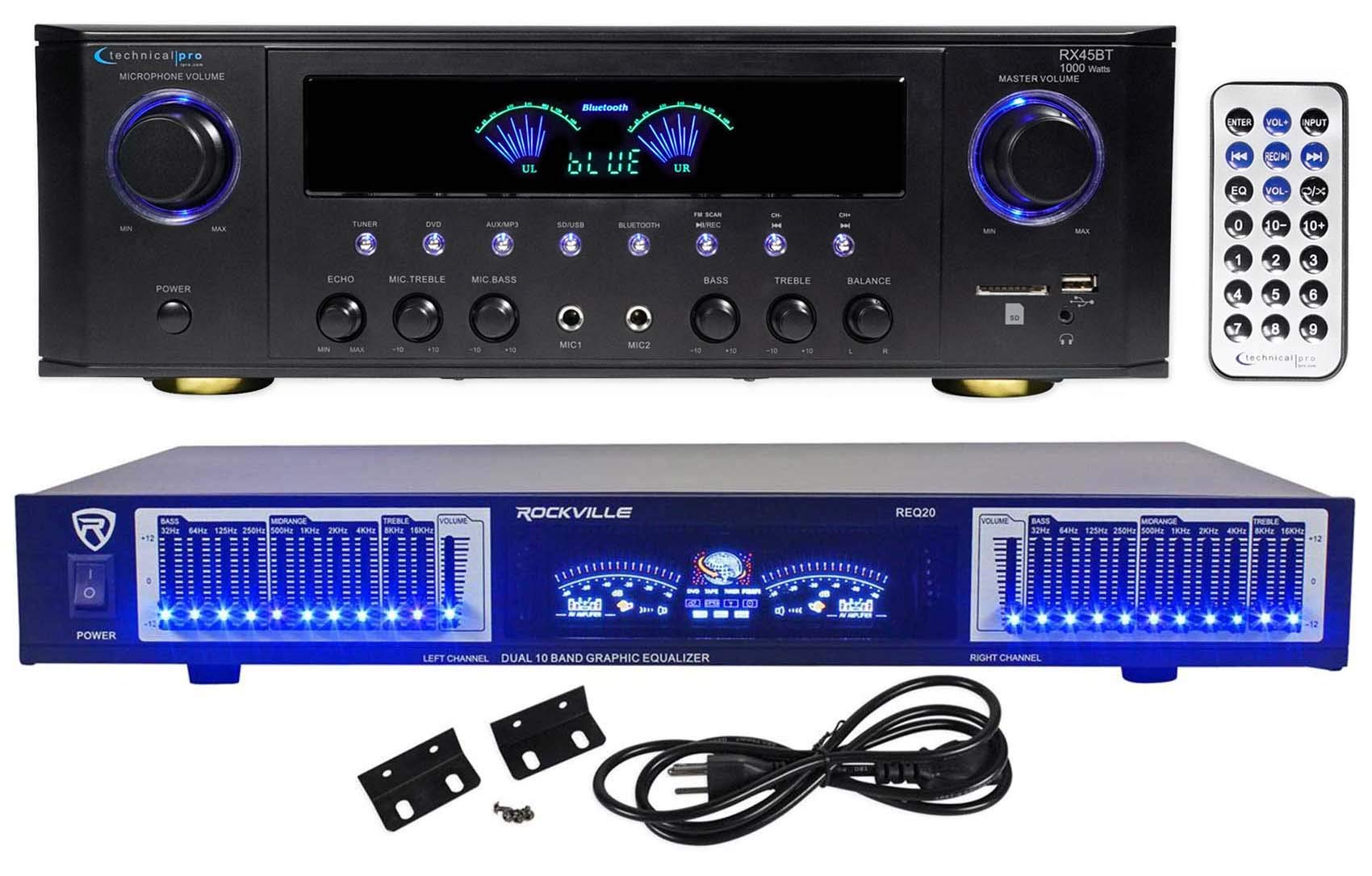
Image: Close-up of the Technical Pro RX45BT remote control, showing buttons for power, input selection, volume, EQ, number pad, and playback controls.
Refer to the button labels on the remote for specific functions such as input selection, volume adjustment, EQ presets, and media playback controls.
Operating Instructions - REQ20 Equalizer
1. Equalizer Controls
The REQ20 features dual 10-band graphic equalization for precise audio shaping.
- Use the individual slide controls for each frequency band (32Hz to 16KHz) to boost or cut specific frequencies.
- Adjust the left and right channels independently for stereo equalization.
- The blue LEDs on each slider indicate the active status.
2. VU മീറ്റർ
The dual VU meters provide a visual representation of the audio signal level for both the left and right channels.
- Monitor the meters to ensure your audio levels are not clipping (too high) or too low.
- Adjust the separate Left/Right Channel Volume gain controls to optimize signal levels.
മെയിൻ്റനൻസ്
- വൃത്തിയാക്കൽ: യൂണിറ്റുകളുടെ പുറംഭാഗം വൃത്തിയാക്കാൻ മൃദുവായതും ഉണങ്ങിയതുമായ തുണി ഉപയോഗിക്കുക. ലിക്വിഡ് ക്ലീനറുകളോ എയറോസോളുകളോ ഉപയോഗിക്കരുത്.
- വെൻ്റിലേഷൻ: വെന്റിലേഷൻ ഓപ്പണിംഗുകൾ പൊടിയും അവശിഷ്ടങ്ങളും ഇല്ലാത്തതാണെന്ന് ഉറപ്പാക്കുക.
- സംഭരണം: If storing the units for an extended period, disconnect them from power and store in a cool, dry place.
ട്രബിൾഷൂട്ടിംഗ്
| പ്രശ്നം | സാധ്യമായ കാരണം | പരിഹാരം |
|---|---|---|
| ശക്തിയില്ല | പവർ കോർഡ് ബന്ധിപ്പിച്ചിട്ടില്ല; പവർ ഔട്ട്ലെറ്റ് തകരാറിലായി; വോളിയംtage selector incorrect (RX45BT). | Check power cord connection; Try a different outlet; Verify RX45BT voltage selector setting. |
| സ്പീക്കറുകളിൽ നിന്ന് ശബ്ദമില്ല | Incorrect input selected; Speaker wires loose or incorrectly connected; Volume too low; Mute activated. | Select correct input; Check speaker connections and polarity; Increase Master Volume; Deactivate Mute. |
| ബ്ലൂടൂത്ത് ജോടിയാക്കുന്നില്ല | RX45BT not in Bluetooth mode; Device too far; Device already paired with another unit. | Ensure RX45BT is in Bluetooth mode; Move device closer; Disconnect from other devices and try again. |
| USB/SD കാർഡ് പ്ലേ ചെയ്യുന്നില്ല | പിന്തുണയ്ക്കുന്നില്ല file format; Card/drive not inserted correctly; Card/drive capacity too large. | ഉറപ്പാക്കുക files are .mp3, .wav, or .wma; Reinsert card/drive; Use card/drive up to 32GB. |
| Equalizer has no effect | REQ20 not powered on; Incorrect connection; EQ sliders at neutral position. | Ensure REQ20 is powered on; Verify RCA connections between source/receiver and REQ20; Adjust EQ sliders. |
സ്പെസിഫിക്കേഷനുകൾ
Technical Pro RX45BT Home Theater Receiver
- പവർ ഔട്ട്പുട്ട്: 150 watts RMS (both channels driven @ 1.0% THD @ 8 ohms), 1000 watts peak power
- ഇൻപുട്ടുകൾ: RCA (2 audio sources), USB, SD Card, MP3 (AUX)
- ഔട്ട്പുട്ടുകൾ: Banana binding post (2 speakers), Push Button (surround speakers), RCA (Line Out), 2 Mono RCA (Subwoofer Out)
- USB & SD Card Max Size: 32 ജിബി
- പിന്തുണച്ചു File തരങ്ങൾ: .mp3, .wav, .wma
- റെക്കോർഡിംഗ് ഫോർമാറ്റ്: .wav (128 kbps / 32 KHz sampലിംഗ് നിരക്ക്)
- ഫ്രീക്വൻസി പ്രതികരണം: 20Hz-20KHz
- നിയന്ത്രണങ്ങൾ: Bass, Treble, Balance, Dual Mic Inputs with Volume, Echo, Tone
- ട്യൂണർ: FM manual tuner
- ഹെഡ്ഫോൺ ഔട്ട്പുട്ട്: 1/8''
- വാല്യംtage: 110/220v Switchable
- അളവുകൾ (ഉൽപ്പന്നം): 16.9" എൽ x 11.3" W x 5.8" എച്ച്
- Weight (Unit): 9.26 പൗണ്ട്
Rockville REQ20 Graphic Equalizer
- തരം: Dual 10 Band Graphic Equalizer (20 Bands Total)
- ഫ്രീക്വൻസി പ്രതികരണം: 20Hz - 20KHz
- നിയന്ത്രണങ്ങൾ: Blue LED on each Equalizer Slide Control, Separate Left/Right Channel Volume gain control
- ഡിസ്പ്ലേ: Dual VU Meters Level Monitor, Vacuum Fluorescent Display
- ഇൻപുട്ടുകൾ: Stereo RCA Line Input
- ഔട്ട്പുട്ടുകൾ: Stereo RCA Line Output, Stereo RCA Line Output for Record
- സിഗ്നൽ ടു നോയിസ് റേഷ്യോ: >88dB
- ഇൻപുട്ട് പവർ: AC ~ 110V 60Hz / 220V 50Hz (Switchable)
- അളവുകൾ: 19" (rack mountable)
- ഏകദേശ ഭാരം: 7.3 പൗണ്ട്
വാറൻ്റിയും പിന്തുണയും
വാറന്റി വിവരങ്ങൾക്കും സാങ്കേതിക പിന്തുണയ്ക്കും, ദയവായി നിർമ്മാതാവിന്റെ ഉദ്യോഗസ്ഥനെ കാണുക. webസൈറ്റിൽ ബന്ധപ്പെടുക അല്ലെങ്കിൽ അവരുടെ ഉപഭോക്തൃ സേവന വിഭാഗവുമായി ബന്ധപ്പെടുക. വാങ്ങിയതിന്റെ തെളിവായി നിങ്ങളുടെ വാങ്ങൽ രസീത് സൂക്ഷിക്കുക.
നിർമ്മാതാവ്: സാങ്കേതിക പ്രോ
മോഡൽ നമ്പർ: RX45BT+REQ20