
ആമുഖം
Thank you for choosing the Auna TT-30 BT Turntable. This manual provides essential information for the safe and efficient operation of your new device. Please read it thoroughly before use and keep it for future reference.
The Auna TT-30 BT is a belt-driven turntable designed for playing vinyl records, featuring an integrated Bluetooth receiver for wireless audio streaming from compatible devices.
സുരക്ഷാ നിർദ്ദേശങ്ങൾ
- ഉപകരണം പ്രവർത്തിപ്പിക്കുന്നതിന് മുമ്പ് എല്ലാ നിർദ്ദേശങ്ങളും ശ്രദ്ധാപൂർവ്വം വായിക്കുക.
- ഭാവി റഫറൻസിനായി മാനുവൽ സൂക്ഷിക്കുക.
- തീയോ വൈദ്യുതാഘാതമോ തടയാൻ ഉപകരണം മഴയിലോ ഈർപ്പത്തിലോ തുറന്നുകാട്ടരുത്.
- ശരിയായ വായുസഞ്ചാരം ഉറപ്പാക്കുക. വായുസഞ്ചാര ദ്വാരങ്ങളൊന്നും തടയരുത്.
- ഉപകരണം സുസ്ഥിരവും നിരപ്പും ഉള്ള പ്രതലത്തിൽ സ്ഥാപിക്കുക.
- നിർമ്മാതാവ് വ്യക്തമാക്കിയ അറ്റാച്ച്മെൻ്റുകൾ/ആക്സസറികൾ മാത്രം ഉപയോഗിക്കുക.
- ഇടിമിന്നലുള്ള സമയത്തോ ദീർഘനേരം ഉപയോഗിക്കാത്ത സമയത്തോ ഉപകരണം അൺപ്ലഗ് ചെയ്യുക.
- എല്ലാ സേവനങ്ങളും യോഗ്യതയുള്ള സേവന ഉദ്യോഗസ്ഥർക്ക് റഫർ ചെയ്യുക.
പാക്കേജ് ഉള്ളടക്കം
താഴെ പട്ടികപ്പെടുത്തിയിരിക്കുന്ന എല്ലാ ഇനങ്ങളും പാക്കേജിംഗിൽ ഉണ്ടെന്ന് ദയവായി പരിശോധിക്കുക:
- Auna TT-30 BT Turntable Unit
- Platter (Metal)
- പൊടി കവർ
- പവർ അഡാപ്റ്റർ
- പ്രവർത്തന നിർദ്ദേശങ്ങൾ (ഈ മാനുവൽ)
ഉൽപ്പന്നം കഴിഞ്ഞുview
The Auna TT-30 BT Turntable features a robust design with a metal platter for stable playback. Key components include the tonearm with cartridge and stylus, speed selector, cueing lever, and an integrated Bluetooth receiver.
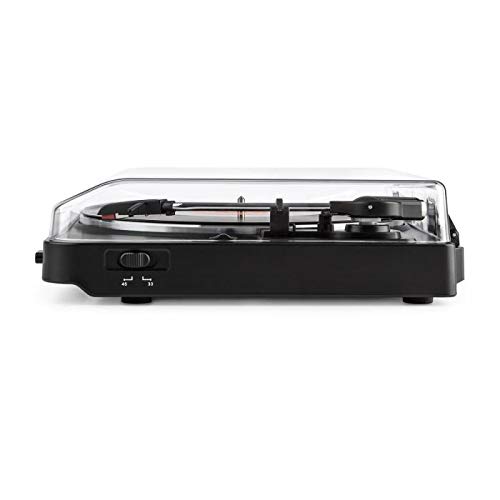
Image of the Auna TT-30 BT Turntable, showcasing അതിന്റെ രൂപകൽപ്പനയും ഘടകങ്ങളും.
സജ്ജമാക്കുക
1. പ്ലേസ്മെന്റ്
Place the turntable on a flat, stable, and vibration-free surface away from direct sunlight, heat sources, and strong magnetic fields. Ensure there is enough space around the unit for proper ventilation and operation of the dust cover.
2. Platter Assembly
- Carefully place the metal platter onto the center spindle.
- Locate the drive belt (usually pre-installed or found separately). Stretch the belt around the motor pulley and the inner rim of the platter.
- Place the felt mat (if included) on top of the platter.
3. പവർ കണക്ഷൻ
Connect the power adapter to the DC input on the rear of the turntable, then plug the adapter into a suitable wall outlet.
4. Stylus Protection
Remove the stylus protector from the cartridge before playing any records. Ensure the tonearm is properly balanced and the tracking force is set according to the cartridge manufacturer's recommendations (if adjustable).
പ്രവർത്തന നിർദ്ദേശങ്ങൾ
1. Playing Records
- പൊടി കവർ തുറക്കുക.
- പ്ലേറ്ററിൽ ഒരു റെക്കോർഡ് സ്ഥാപിക്കുക.
- Select the correct speed (33 1/3 or 45 RPM) using the speed selector switch. For 45 RPM records, place the 45 RPM adapter over the spindle if needed.
- ടോൺ ആം ലോക്ക് വിടുക.
- ക്യൂയിംഗ് ലിവർ ഉപയോഗിച്ച് ടോൺആം ഉയർത്തുക.
- റെക്കോർഡിന്റെ ആവശ്യമുള്ള സ്റ്റാർട്ടിംഗ് ഗ്രൂവിന് മുകളിലൂടെ ടോൺആം നീക്കുക.
- Gently lower the tonearm using the cueing lever. The stylus will make contact with the record, and playback will begin.
- At the end of the record, the turntable may feature an auto-stop function, which will stop the platter rotation. Lift the tonearm and return it to its rest, then engage the tonearm lock.
2. Bluetooth Playback (Receiving Audio)
The Auna TT-30 BT Turntable features an integrated Bluetooth receiver, allowing you to stream audio wirelessly from your smartphone, tablet, or other Bluetooth-enabled devices to the turntable's output (e.g., connected speakers).
- ടർടേബിൾ ഓണാണെന്ന് ഉറപ്പാക്കുക.
- Activate Bluetooth on your external audio device (e.g., smartphone).
- ഇതിനായി തിരയുക available Bluetooth devices. The turntable should appear as "Auna TT-30 BT" or similar.
- Select the turntable from the list to pair. Once paired, audio from your device will be routed through the turntable's audio output.
കുറിപ്പ്: The turntable acts as a Bluetooth receiver, meaning it receives audio from other devices. It does not transmit audio wirelessly to Bluetooth headphones or speakers.
മെയിൻ്റനൻസ്
1. Cleaning the Turntable
- വൃത്തിയാക്കുന്നതിന് മുമ്പ് എല്ലായ്പ്പോഴും പവർ ഔട്ട്ലെറ്റിൽ നിന്ന് ടർടേബിൾ അഴിക്കുക.
- Use a soft, dry cloth to wipe the exterior surfaces. Do not use abrasive cleaners or solvents.
- For the dust cover, use a soft cloth and a mild, non-abrasive cleaner if necessary.
- Regularly dust the stylus with a soft brush, moving from back to front.
2. സ്റ്റൈലസ് മാറ്റിസ്ഥാപിക്കൽ
The stylus (needle) is a delicate component and will wear out over time, typically after 300-500 hours of playback. A worn stylus can damage your records and degrade sound quality. Consult your retailer or Auna support for information on replacement styli compatible with your TT-30 BT turntable.
ട്രബിൾഷൂട്ടിംഗ്
| പ്രശ്നം | സാധ്യമായ കാരണം | പരിഹാരം |
|---|---|---|
| ശക്തിയില്ല | പവർ അഡാപ്റ്റർ ബന്ധിപ്പിച്ചിട്ടില്ല; ഔട്ട്ലെറ്റ് സജീവമല്ല. | പവർ കണക്ഷനുകൾ പരിശോധിക്കുക; മറ്റൊരു ഔട്ട്ലെറ്റ് പരീക്ഷിക്കുക. |
| ശബ്ദമോ കുറഞ്ഞ വോളിയമോ ഇല്ല | ബാഹ്യ amplifier/speakers not connected or turned on; volume too low; stylus dirty or damaged. | Ensure audio cables are connected; turn on amplifier/speakers and adjust volume; clean or replace stylus. |
| ശബ്ദം ഒഴിവാക്കൽ അല്ലെങ്കിൽ വികലമാക്കൽ | Record dirty or damaged; stylus dirty or worn; turntable not level; excessive vibration. | Clean record; clean or replace stylus; ensure turntable is on a level, stable surface; reduce vibrations. |
| ബ്ലൂടൂത്ത് ജോടിയാക്കൽ പരാജയം | ടേൺടേബിൾ ജോടിയാക്കൽ മോഡിൽ അല്ല; ഉപകരണം വളരെ അകലെയാണ്; ഇടപെടൽ. | Ensure turntable is discoverable; move device closer; restart both devices. |
സ്പെസിഫിക്കേഷനുകൾ
| ബ്രാൻഡ് | ഔന |
| മോഡൽ നമ്പർ | TTS10-2300-plat |
| അളവുകൾ (L x W x H) | 45.5 x 43 x 16.5 സെ.മീ |
| ഭാരം | 3.7 കി.ഗ്രാം |
| മെറ്റീരിയൽ | ലോഹം |
| പ്രത്യേക ഫീച്ചർ | സംയോജിത ബ്ലൂടൂത്ത് റിസീവർ |
| കണക്റ്റർ തരം | USB (for connectivity, not necessarily for audio output) |
ശ്രദ്ധിക്കുക: മുൻകൂർ അറിയിപ്പ് കൂടാതെ സ്പെസിഫിക്കേഷനുകൾ മാറ്റത്തിന് വിധേയമാണ്.
വാറൻ്റിയും പിന്തുണയും
For warranty information, please refer to the warranty card included with your product or contact your retailer. For technical support or service inquiries, please visit the official Auna webസൈറ്റിൽ ബന്ധപ്പെടുകയോ അവരുടെ ഉപഭോക്തൃ സേവന വിഭാഗവുമായി ബന്ധപ്പെടുകയോ ചെയ്യുക. ഏതെങ്കിലും വാറന്റി ക്ലെയിമുകൾക്കായി നിങ്ങളുടെ വാങ്ങലിന്റെ തെളിവ് സൂക്ഷിക്കുക.
Auna Official Webസൈറ്റ്: www.auna.de (ഉദാamp(ലിങ്ക്, യഥാർത്ഥ ലിങ്ക് പ്രദേശത്തിനനുസരിച്ച് വ്യത്യാസപ്പെടാം)