
ആമുഖം
This manual provides instructions for the proper use and maintenance of your AW B990BL Neckband Wireless Bluetooth Earphones. Please read this manual thoroughly before using the product to ensure optimal performance and longevity.
The AW B990BL Neckband Wireless Bluetooth Earphones offer a convenient audio solution with a neckband design. Featuring Bluetooth V4.2 connectivity, these earphones provide up to 6 hours of talk or music time on a 1-hour charge. They are designed for wide compatibility with various devices, offering a reliable wireless experience.
പാക്കേജ് ഉള്ളടക്കം
- AW B990BL Neckband Wireless Bluetooth Earphones
- യുഎസ്ബി ചാർജിംഗ് കേബിൾ
- ചെവിയുടെ അഗ്രഭാഗങ്ങൾ (വിവിധ വലുപ്പങ്ങൾ)
- ഉപയോക്തൃ മാനുവൽ

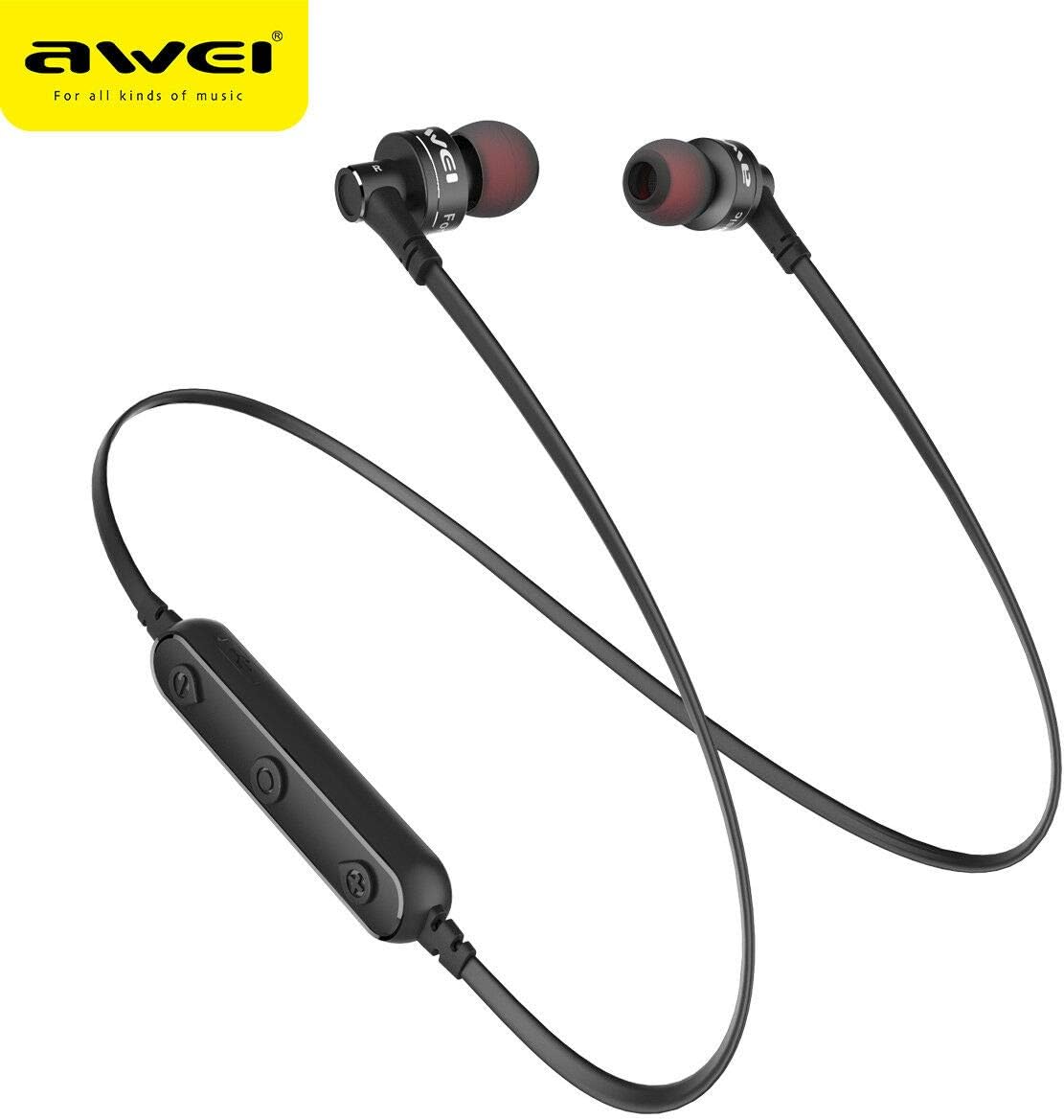
Image: The AW B990BL Neckband Wireless Bluetooth Earphones, showcasing the neckband design, earbuds, and inline control panel.
സജ്ജമാക്കുക
1. ഇയർഫോണുകൾ ചാർജ് ചെയ്യുന്നു
- Connect the micro-USB end of the charging cable to the charging port on the earphone's control unit.
- Connect the USB-A end of the charging cable to a USB power source (e.g., computer USB port, wall adapter).
- The indicator light will illuminate during charging. Once fully charged (approximately 1 hour), the indicator light will change or turn off.
- ചാർജിംഗ് പൂർത്തിയായിക്കഴിഞ്ഞാൽ ചാർജിംഗ് കേബിൾ വിച്ഛേദിക്കുക.
കുറിപ്പ്: ഒപ്റ്റിമൽ ബാറ്ററി പ്രകടനത്തിനായി ആദ്യ ഉപയോഗത്തിന് മുമ്പ് ഇയർഫോണുകൾ പൂർണ്ണമായും ചാർജ്ജ് ചെയ്തിട്ടുണ്ടെന്ന് ഉറപ്പാക്കുക.
2. ബ്ലൂടൂത്ത് ജോടിയാക്കൽ
- ഇയർഫോണുകൾ ഓഫാക്കിയിട്ടുണ്ടെന്ന് ഉറപ്പാക്കുക.
- Press and hold the Multi-function button (usually the center button on the control unit) for approximately 5-7 seconds until the indicator light flashes red and blue alternately. This indicates pairing mode.
- നിങ്ങളുടെ ഉപകരണത്തിൽ (സ്മാർട്ട്ഫോൺ, ടാബ്ലെറ്റ് മുതലായവ), ബ്ലൂടൂത്ത് പ്രവർത്തനക്ഷമമാക്കി ലഭ്യമായ ഉപകരണങ്ങൾക്കായി തിരയുക.
- Select "B990BL" from the list of found devices.
- Once successfully paired, the indicator light will flash blue slowly, and you may hear a confirmation tone.
- പാസ്വേഡ് ആവശ്യപ്പെടുകയാണെങ്കിൽ, "0000" എന്ന് നൽകുക.
കുറിപ്പ്: ഇയർഫോണുകൾ ഓണാക്കുമ്പോൾ അവസാനം ജോടിയാക്കിയ ഉപകരണത്തിലേക്ക് വീണ്ടും കണക്റ്റുചെയ്യാൻ ശ്രമിക്കും.
ചിത്രം: ഒരു ക്ലോസ്-അപ്പ് view of the AW B990BL earphones, highlighting the inline control panel with its buttons and charging port.
പ്രവർത്തന നിർദ്ദേശങ്ങൾ
അടിസ്ഥാന പ്രവർത്തനങ്ങൾ
- പവർ ഓൺ: മൾട്ടി-ഫംഗ്ഷൻ ബട്ടൺ 3 സെക്കൻഡ് അമർത്തിപ്പിടിക്കുക.
- പവർ ഓഫ്: മൾട്ടി-ഫംഗ്ഷൻ ബട്ടൺ 3 സെക്കൻഡ് അമർത്തിപ്പിടിക്കുക.
- പ്ലേ/താൽക്കാലികമായി നിർത്തുക: മൾട്ടി-ഫംഗ്ഷൻ ബട്ടൺ ഒരിക്കൽ അമർത്തുക.
- വോളിയം കൂട്ടുക: "+" ബട്ടൺ അമർത്തുക.
- വോളിയം താഴേക്ക്: "-" ബട്ടൺ അമർത്തുക.
- അടുത്ത ട്രാക്ക്: "+" ബട്ടൺ അമർത്തിപ്പിടിക്കുക.
- മുമ്പത്തെ ട്രാക്ക്: "-" ബട്ടൺ അമർത്തിപ്പിടിക്കുക.
കോൾ മാനേജുമെന്റ്
- മറുപടി കോൾ: മൾട്ടി-ഫംഗ്ഷൻ ബട്ടൺ ഒരിക്കൽ അമർത്തുക.
- കോൾ അവസാനിപ്പിക്കുക: ഒരു കോൾ സമയത്ത് മൾട്ടി-ഫംഗ്ഷൻ ബട്ടൺ ഒരിക്കൽ അമർത്തുക.
- കോൾ നിരസിക്കുക: മൾട്ടി-ഫംഗ്ഷൻ ബട്ടൺ 2 സെക്കൻഡ് അമർത്തിപ്പിടിക്കുക.
- അവസാന നമ്പർ വീണ്ടും ഡയൽ ചെയ്യുക: മൾട്ടി-ഫംഗ്ഷൻ ബട്ടൺ ഇരട്ട-അമർത്തുക.
മെയിൻ്റനൻസ്
- Keep the earphones dry. Avoid exposure to extreme temperatures, humidity, or corrosive materials.
- Clean the earphones regularly with a soft, dry cloth. Do not use harsh chemicals or abrasive cleaners.
- ഉപയോഗത്തിലില്ലാത്തപ്പോൾ ഇയർഫോണുകൾ വൃത്തിയുള്ളതും വരണ്ടതുമായ സ്ഥലത്ത് സൂക്ഷിക്കുക.
- ഇയർഫോണുകൾ താഴെയിടുകയോ ശക്തമായ ആഘാതങ്ങൾക്ക് വിധേയമാക്കുകയോ ചെയ്യുന്നത് ഒഴിവാക്കുക.
- Do not attempt to disassemble or modify the earphones, as this will void the warranty and may cause damage.
ട്രബിൾഷൂട്ടിംഗ്
- ഉപകരണവുമായി ജോടിയാക്കാൻ കഴിയില്ല:
- Ensure the earphones are in pairing mode (red and blue indicator light flashing alternately).
- Ensure Bluetooth is enabled on your device and it is within 10 meters of the earphones.
- Turn off and restart both the earphones and your device, then attempt pairing again.
- ആവശ്യമെങ്കിൽ നിങ്ങളുടെ ഉപകരണത്തിലെ മുൻ ബ്ലൂടൂത്ത് കണക്ഷനുകൾ മായ്ക്കുക.
- ശബ്ദമില്ല അല്ലെങ്കിൽ കുറഞ്ഞ ശബ്ദം:
- ഇയർഫോണുകളിലും കണക്റ്റുചെയ്ത ഉപകരണത്തിലും വോളിയം ലെവലുകൾ പരിശോധിക്കുക.
- ഇയർഫോണുകൾ നിങ്ങളുടെ ഉപകരണവുമായി ശരിയായി ബന്ധിപ്പിച്ചിട്ടുണ്ടെന്ന് ഉറപ്പാക്കുക.
- മീഡിയയിലെ ഒരു പ്രശ്നം ഒഴിവാക്കാൻ വ്യത്യസ്ത ഓഡിയോ ഉറവിടങ്ങൾ പ്ലേ ചെയ്യാൻ ശ്രമിക്കുക. file.
- ഇയർഫോണുകൾ ചാർജ് ചെയ്യുന്നില്ല:
- ചാർജിംഗ് കേബിൾ ഇയർഫോണുകളിലേക്കും പവർ സ്രോതസ്സിലേക്കും സുരക്ഷിതമായി ബന്ധിപ്പിച്ചിട്ടുണ്ടെന്ന് ഉറപ്പാക്കുക.
- Try a different USB charging cable or power source.
- ഏതെങ്കിലും അവശിഷ്ടങ്ങളോ കേടുപാടുകളോ ഉണ്ടോയെന്ന് ചാർജിംഗ് പോർട്ട് പരിശോധിക്കുക.
സ്പെസിഫിക്കേഷനുകൾ
| ഫീച്ചർ | വിശദാംശങ്ങൾ |
|---|---|
| മോഡലിൻ്റെ പേര് | ബി990ബിഎൽ |
| ബ്ലൂടൂത്ത് പതിപ്പ് | V4.2 |
| ചാർജിംഗ് സമയം | 1 മണിക്കൂർ |
| സംസാര സമയം | 6 മണിക്കൂർ |
| സംഗീത സമയം | 6 മണിക്കൂർ |
| കണക്റ്റിവിറ്റി ടെക്നോളജി | വയർലെസ് |
| സംവേദനക്ഷമത | 96 ഡി.ബി |
| ഉൽപ്പന്ന അളവുകൾ | 4 x 10 x 16.5 സെ.മീ |
| ഭാരം | 4.54 ഗ്രാം |
| നിർമ്മാതാവ് | അവേയ് |
വാറൻ്റിയും പിന്തുണയും
വാറന്റി വിവരങ്ങൾക്കോ സാങ്കേതിക പിന്തുണയ്ക്കോ, നിങ്ങളുടെ വാങ്ങലിനൊപ്പം നൽകിയിരിക്കുന്ന ഡോക്യുമെന്റേഷൻ പരിശോധിക്കുകയോ ഉൽപ്പന്നം വാങ്ങിയ റീട്ടെയിലറെ ബന്ധപ്പെടുകയോ ചെയ്യുക. വാറന്റി ക്ലെയിമുകൾക്കായി നിങ്ങളുടെ വാങ്ങിയതിന്റെ തെളിവ് സൂക്ഷിക്കുക.