
ഉൽപ്പന്നം കഴിഞ്ഞുview
The Marathon 100 Minute Digital Timer is designed for precise timekeeping in various environments, including kitchens, offices, labs, and schools. It features a large, easy-to-read LCD display and a loud ring alarm for clear notification.
- ഡിജിറ്റൽ ടൈമർ: Capable of counting down from a set time or counting up to track elapsed time.
- വലിയ LCD ഡിസ്പ്ലേ: High-contrast display ensures easy readability from a distance.
- ഉച്ചത്തിലുള്ള റിംഗ് അലാറം: Audible alert designed to be heard across a room.
- ഇരട്ട പ്രവർത്തനക്ഷമത: Supports both countdown and count-up modes, up to 99 minutes and 59 seconds.
- ബഹുമുഖ മൗണ്ടിംഗ്: Equipped with a magnetic back for metal surfaces and a clip that doubles as a stand.
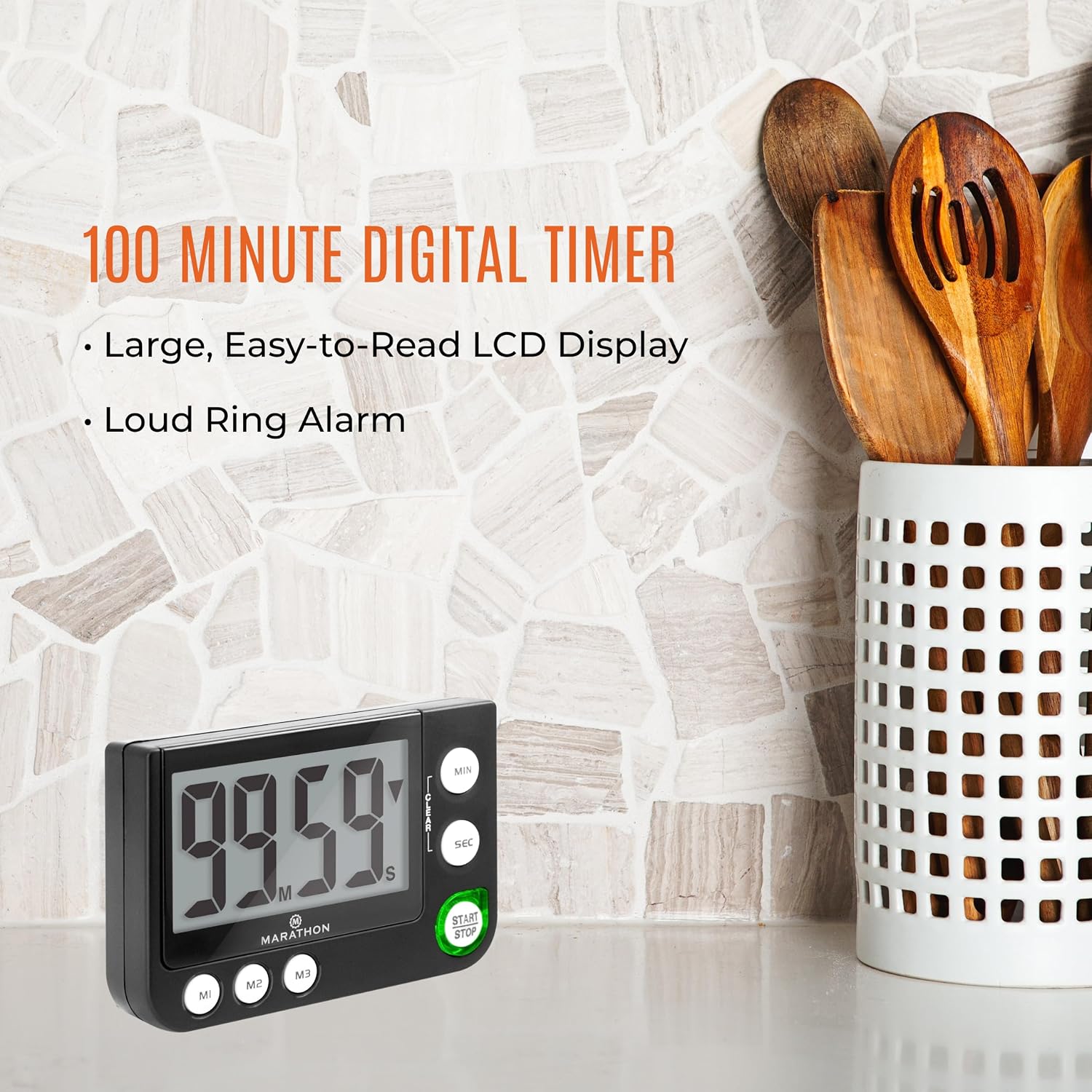
Image: The Marathon 100 Minute Digital Timer displayed on a kitchen counter, highlighting its compact size and clear display.
ആമുഖം
ബാറ്ററി ഇൻസ്റ്റാളേഷൻ
Your timer requires one AAA battery (included). To install:
- ടൈമറിന്റെ പിൻഭാഗത്ത് ബാറ്ററി കമ്പാർട്ട്മെന്റ് കവർ കണ്ടെത്തുക.
- കവർ തുറക്കുക.
- കമ്പാർട്ടുമെന്റിനുള്ളിൽ സൂചിപ്പിച്ചിരിക്കുന്നതുപോലെ ശരിയായ പോളാരിറ്റി (+/-) ഉറപ്പാക്കിക്കൊണ്ട് ഒരു AAA ബാറ്ററി ഇടുക.
- ബാറ്ററി കമ്പാർട്ട്മെന്റ് കവർ സുരക്ഷിതമായി മാറ്റിസ്ഥാപിക്കുക.
പ്രാരംഭ പവർ ഓൺ
Once the battery is installed, the timer will automatically power on and display '00:00'.
പ്രവർത്തന നിർദ്ദേശങ്ങൾ
ടൈമർ സജ്ജീകരിക്കുന്നു (കൌണ്ട്ഡൗൺ)
ഒരു കൗണ്ട്ഡൗൺ സമയം സജ്ജമാക്കാൻ:
- അമർത്തുക MIN button to set the desired minutes. Each press increases the minutes by one. Hold to rapidly advance.
- അമർത്തുക എസ്.ഇ.സി button to set the desired seconds. Each press increases the seconds by one. Hold to rapidly advance.
- To clear the set time, press the ക്ലിയർ ബട്ടൺ.
- അമർത്തുക ആരംഭിക്കുക/നിർത്തുക കൗണ്ട്ഡൗൺ ആരംഭിക്കാൻ ബട്ടൺ അമർത്തുക.
- To pause the countdown, press ആരംഭിക്കുക/നിർത്തുക വീണ്ടും. പുനരാരംഭിക്കാൻ ഒരിക്കൽ കൂടി അതിൽ അമർത്തുക.
- When the countdown reaches zero, the alarm will sound, and the timer will begin counting up to show elapsed time since the alarm.
Count-Up Function
To use the timer as a stopwatch (count-up):
- Ensure the display shows '00:00'. If not, press the ക്ലിയർ ബട്ടൺ.
- അമർത്തുക ആരംഭിക്കുക/നിർത്തുക എണ്ണാൻ തുടങ്ങാനുള്ള ബട്ടൺ.
- കൗണ്ട്-അപ്പ് താൽക്കാലികമായി നിർത്താൻ, ആരംഭിക്കുക/നിർത്തുക വീണ്ടും. പുനരാരംഭിക്കാൻ ഒരിക്കൽ കൂടി അതിൽ അമർത്തുക.
- To reset the count-up timer to '00:00', press the ക്ലിയർ button while the timer is paused.
Memory Function (M1, M2, M3)
The timer includes three memory presets (M1, M2, M3) for frequently used times:
- To Save a Time: Set the desired time using the MIN ഒപ്പം എസ്.ഇ.സി buttons. While the time is displayed and not running, press and hold one of the memory buttons (M1, M2, അല്ലെങ്കിൽ M3) until the display flashes, indicating the time is saved.
- To Recall a Time: Press the desired memory button (M1, M2, അല്ലെങ്കിൽ M3) to load the saved time onto the display.
- Once a memory time is recalled, press ആരംഭിക്കുക/നിർത്തുക കൗണ്ട്ഡൗൺ ആരംഭിക്കാൻ.
അലാറം സവിശേഷതകൾ
When the countdown reaches zero, the timer will emit a loud audible alarm. Additionally, a visual indicator (often a blinking red light) will activate to provide a silent alert, which is useful in noisy environments or when an audible alarm is not desired.

ചിത്രം: വിശദമായത് view of the timer's control buttons for setting and operating the device.
മൗണ്ടിംഗ് ഓപ്ഷനുകൾ
The Marathon Digital Timer offers flexible placement options:
- മാഗ്നെറ്റിക് ബാക്ക്: The timer features a strong magnetic back, allowing it to be securely attached to metal surfaces such as refrigerators, whiteboards, or oven doors.
- Clip/Stand: A built-in clip on the back can be used to attach the timer to a belt, pocket, or apron. This clip also functions as a foldable stand, enabling the timer to sit upright on a countertop or desk for easy viewing.

Image: Visual representation of the timer's versatile features, including its magnetic back and integrated stand/clip.
പരിചരണവും പരിപാലനവും
To ensure the longevity and optimal performance of your Marathon Digital Timer:
- വൃത്തിയാക്കൽ: Wipe the timer with a soft, dry cloth. Avoid using abrasive cleaners or solvents, as these can damage the display or casing.
- ബാറ്ററി മാറ്റിസ്ഥാപിക്കൽ: When the display dims or the timer functions erratically, replace the AAA battery. Follow the battery installation steps outlined in the 'Getting Started' section.
- സംഭരണം: Store the timer in a cool, dry place when not in use. Avoid extreme temperatures or direct sunlight.
ട്രബിൾഷൂട്ടിംഗ്
If you encounter issues with your timer, refer to the following common solutions:
- ടൈമർ പ്രതികരിക്കുന്നില്ല: Check if the battery is correctly installed and has sufficient power. Replace the battery if necessary.
- ഡിസ്പ്ലേ മങ്ങിയതോ ശൂന്യമോ ആണ്: This usually indicates a low battery. Replace the AAA battery.
- Alarm Not Audible: Ensure there are no obstructions blocking the speaker. If the timer has a volume setting (this model does not explicitly state one, but some timers do), ensure it is not set to mute or a very low volume.
- Timer Does Not Turn Off: This model is designed to always display the time (like a clock) and does not have an explicit 'off' switch to conserve battery. The display will remain active.
- LED Light is Too Bright/Distracting: The LED indicator is an integral part of the timer's functionality for visual alerts and cannot be turned off independently.
സ്പെസിഫിക്കേഷനുകൾ
| ഫീച്ചർ | വിശദാംശങ്ങൾ |
|---|---|
| ബ്രാൻഡ് | മാരത്തൺ |
| മോഡൽ നമ്പർ | TI030016 |
| നിറം | കറുപ്പ് |
| മെറ്റീരിയൽ | ലോഹം |
| ഇനത്തിൻ്റെ ഭാരം | 3.2 ഔൺസ് |
| ക്രമീകരണങ്ങളുടെ എണ്ണം | 3 (മെമ്മറി പ്രീസെറ്റുകൾ) |
| യു.പി.സി | 063442000311 |

Image: Dimensions of the timer, indicating a width of 3.5 inches (8.9 cm) and a height of 2.3 inches (5.9 cm).
വാറൻ്റിയും പിന്തുണയും
നിർമ്മാതാവിൻ്റെ വാറൻ്റി: This product is covered by a 2-year warranty from the date of purchase, covering manufacturing defects.
For technical support, warranty claims, or further assistance, please contact MARATHON customer service through their official webഉൽപ്പന്നം വാങ്ങിയ സൈറ്റ് അല്ലെങ്കിൽ റീട്ടെയിലർ.