
ആമുഖം
The Mitel 6920W is a powerful, feature-rich IP phone designed for business communication. Equipped with Wi-Fi connectivity, it offers flexibility in deployment and ensures reliable voice communication. This manual provides comprehensive instructions for setting up, operating, maintaining, and troubleshooting your Mitel 6920W IP Phone.
പാക്കേജ് ഉള്ളടക്കം
ആരംഭിക്കുന്നതിന് മുമ്പ്, നിങ്ങളുടെ പാക്കേജിൽ ഇനിപ്പറയുന്ന ഇനങ്ങൾ അടങ്ങിയിട്ടുണ്ടെന്ന് ദയവായി പരിശോധിക്കുക:
- Mitel 6920W IP Phone Unit
- ഹാൻഡ്സെറ്റ്
- ഹാൻഡ്സെറ്റ് കോർഡ്
- ഫോൺ സ്റ്റാൻഡ്
- ഇഥർനെറ്റ് കേബിൾ
- Power Adapter (if not using Power over Ethernet - PoE)
- ക്വിക്ക് സ്റ്റാർട്ട് ഗൈഡ് (ഉൾപ്പെടുത്തിയിട്ടുണ്ടെങ്കിൽ)
സജ്ജമാക്കുക
1. Attaching the Phone Stand
The phone stand allows you to position your phone at an optimal viewing angle. Align the tabs on the stand with the slots on the back of the phone and push firmly until it clicks into place.
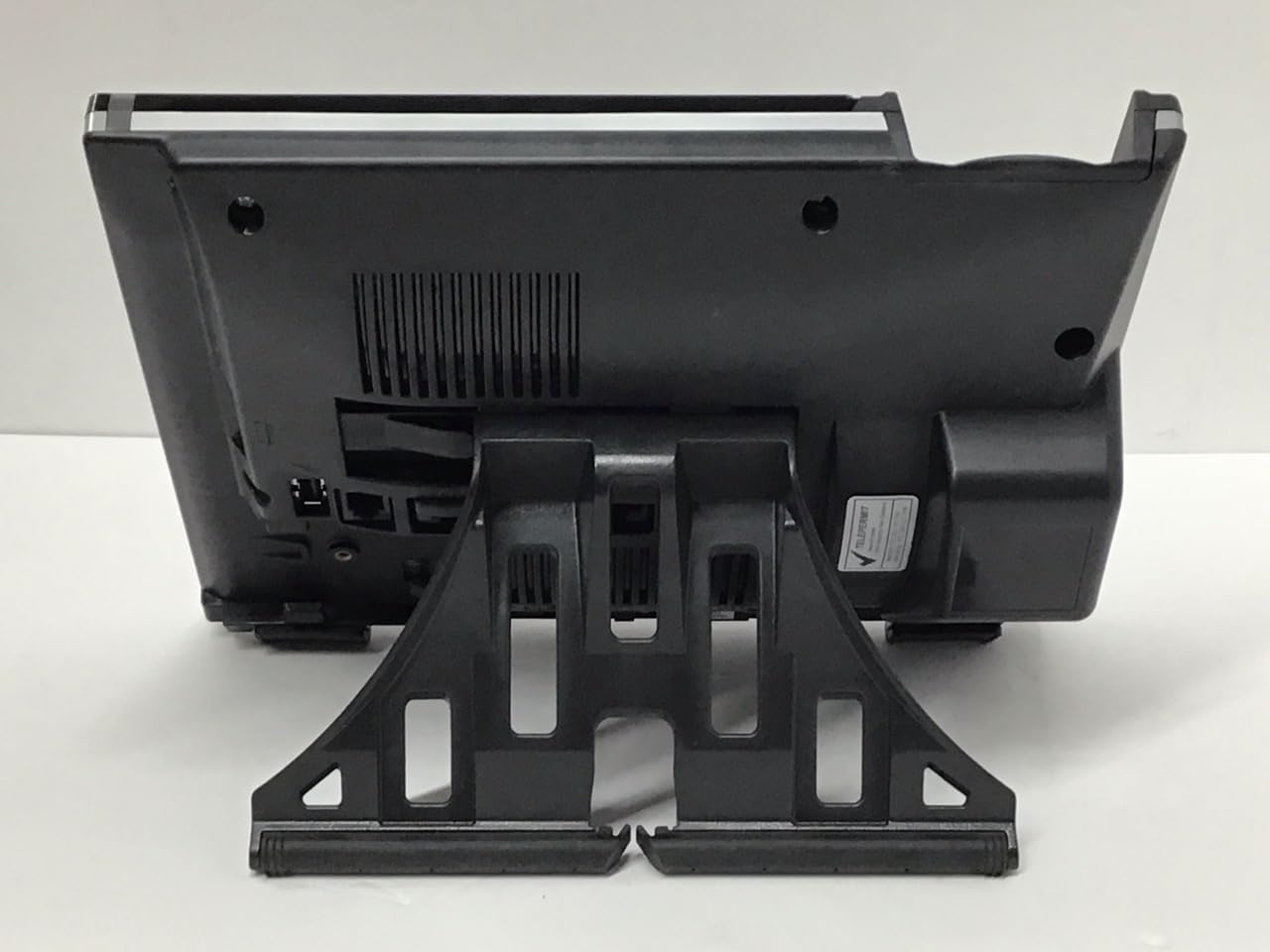
ചിത്രം: തിരികെ view of the Mitel 6920W IP Phone with its stand attached, showing the connection points and the angled support.
2. Connecting the Handset and Headset
- Connect one end of the coiled handset cord to the handset and the other end to the handset port on the back of the phone (usually marked with a handset icon).
- If using a headset, connect it to the dedicated headset port (usually marked with a headset icon).
3. Connecting to the Network and Power
- ഇഥർനെറ്റ് കണക്ഷൻ: Connect one end of the Ethernet cable to the LAN port on the back of the phone and the other end to your network switch or router. If your network provides Power over Ethernet (PoE), the phone will power on automatically.
- Power Adapter (if no PoE): If PoE is not available, connect the power adapter to the power port on the back of the phone and then plug it into a wall outlet.

ചിത്രം: ഫ്രണ്ട് view of the Mitel 6920W IP Phone, displaying its screen, physical keypad, and programmable soft keys.
4. പ്രാരംഭ പവർ-ഓണും കോൺഫിഗറേഷനും
Once powered on, the phone will boot up and attempt to connect to your network. It may automatically download configuration settings from your VoIP system. Follow any on-screen prompts for initial setup, such as language selection or time zone.
5. Wi-Fi കണക്ഷൻ സജ്ജീകരണം
To connect your 6920W to a Wi-Fi network:
- അമർത്തുക ക്രമീകരണങ്ങൾ button (gear icon) on the phone.
- നാവിഗേറ്റ് ചെയ്യുക നെറ്റ്വർക്ക് ക്രമീകരണങ്ങൾ or Wi-Fi ക്രമീകരണങ്ങൾ.
- Enable Wi-Fi and select your desired network from the list of available networks.
- Enter the Wi-Fi password (if required) using the keypad and on-screen prompts.
- Confirm the connection. The phone should display a Wi-Fi icon indicating a successful connection.
Operating Your Mitel 6920W IP Phone
അടിസ്ഥാന കോൾ പ്രവർത്തനങ്ങൾ
- ഒരു കോൾ ചെയ്യുന്നു: ഹാൻഡ്സെറ്റ് എടുക്കുക അല്ലെങ്കിൽ അമർത്തുക സ്പീക്കർഫോൺ ബട്ടൺ. നമ്പർ ഡയൽ ചെയ്ത് അമർത്തുക ഡയൽ ചെയ്യുക or അയക്കുക സോഫ്റ്റ് കീ.
- ഒരു കോളിന് മറുപടി നൽകുന്നു: ഹാൻഡ്സെറ്റ് എടുക്കുക, അമർത്തുക സ്പീക്കർഫോൺ ബട്ടൺ, അല്ലെങ്കിൽ അമർത്തുക ഉത്തരം സോഫ്റ്റ് കീ.
- ഒരു കോൾ അവസാനിപ്പിക്കുന്നു: ഹാൻഡ്സെറ്റ് തൂക്കിയിടുക അല്ലെങ്കിൽ അമർത്തുക കോൾ അവസാനിപ്പിക്കുക സോഫ്റ്റ് കീ.
Keypad and Navigation
The phone features a standard 12-button dial pad. Use the navigation cluster (up, down, left, right arrows, and select button) to move through menus and options on the display.
Display and Soft Keys
The phone's display shows call information, menus, and status indicators. The soft keys located directly below the display change their function based on the current context (e.g., during a call, in a menu). Their current function is indicated on the display above each key.
വോയ്സ്മെയിൽ ആക്സസ്
To access your voicemail, press the വോയ്സ്മെയിൽ button (envelope icon) and follow the audio prompts.
വിപുലമായ കോൾ സവിശേഷതകൾ
- പിടിക്കുക: ഒരു സജീവ കോൾ സമയത്ത്, അമർത്തുക പിടിക്കുക soft key. Press it again to resume the call.
- കൈമാറ്റം: ഒരു സജീവ കോൾ സമയത്ത്, അമർത്തുക കൈമാറ്റം soft key. Dial the number to transfer to, and once connected, press കൈമാറ്റം again (consultative transfer) or hang up (blind transfer).
- സമ്മേളനം: ഒരു സജീവ കോൾ സമയത്ത്, അമർത്തുക സമ്മേളനം soft key. Dial the number of the third party, and once connected, press സമ്മേളനം വീണ്ടും എല്ലാ പാർട്ടികളിലും ചേരാൻ.
- സ്പീക്കർഫോൺ: അമർത്തുക സ്പീക്കർഫോൺ സ്പീക്കർഫോൺ മോഡ് ഓൺ അല്ലെങ്കിൽ ഓഫ് ആക്കാനുള്ള ബട്ടൺ.
- നിശബ്ദമാക്കുക: അമർത്തുക നിശബ്ദമാക്കുക കോളിനിടയിൽ നിങ്ങളുടെ മൈക്രോഫോൺ മ്യൂട്ട് ചെയ്യാൻ ബട്ടൺ അമർത്തുക. അൺമ്യൂട്ട് ചെയ്യാൻ വീണ്ടും അമർത്തുക.
മെയിൻ്റനൻസ്
ഫോൺ വൃത്തിയാക്കുന്നു
To keep your phone clean, gently wipe the surfaces with a soft, damp, lint-free cloth. Avoid using abrasive cleaners, solvents, or aerosol sprays, as these can damage the phone's finish and internal components.
സോഫ്റ്റ്വെയർ അപ്ഡേറ്റുകൾ
Your Mitel 6920W IP Phone may receive software updates periodically to improve performance and add new features. These updates are typically managed by your system administrator. Do not attempt to manually update the firmware unless instructed by your IT department or Mitel support.
ട്രബിൾഷൂട്ടിംഗ്
പൊതുവായ പ്രശ്നങ്ങളും പരിഹാരങ്ങളും
| ഇഷ്യൂ | സാധ്യമായ പരിഹാരം |
|---|---|
| ഡയൽ ടോൺ ഇല്ല | Check all cable connections (Ethernet, power, handset). Ensure the phone is powered on. Contact your system administrator if the issue persists. |
| വൈഫൈയിലേക്ക് കണക്റ്റുചെയ്യാൻ കഴിയില്ല | Verify Wi-Fi password. Ensure the phone is within range of the Wi-Fi access point. Restart the phone and try again. Check network settings. |
| പ്രദർശനം പ്രവർത്തിക്കുന്നില്ല | Check power connection. Restart the phone. If the display remains blank or faulty, contact support. |
| മോശം കോൾ നിലവാരം | Check network connection stability (wired or Wi-Fi signal strength). Ensure no other devices are heavily using network bandwidth. |
ഫാക്ടറി റീസെറ്റ്
A factory reset will erase all custom settings and return the phone to its default state. This should only be performed as a last resort and typically under the guidance of your system administrator or Mitel support. Consult your system administrator for the specific procedure for your deployment.
സ്പെസിഫിക്കേഷനുകൾ
| ഫീച്ചർ | വിശദാംശങ്ങൾ |
|---|---|
| ബ്രാൻഡ് | മിറ്റെൽ |
| മോഡൽ | 6920W |
| ASIN | B07DD9BW2Z |
| നിറം | കറുപ്പ് |
| ടെലിഫോൺ തരം | കോർഡഡ് |
| മെറ്റീരിയൽ | പ്ലാസ്റ്റിക് |
| പവർ ഉറവിടം | കോർഡഡ് ഇലക്ട്രിക് |
| ഡയലർ തരം | ഒറ്റ കീപാഡ് |
| ഉത്തരം നൽകുന്ന സിസ്റ്റം തരം | ഡിജിറ്റൽ |
| അനുയോജ്യമായ ഉപകരണങ്ങൾ | Computer Systems, VoIP Services, Telephone Networks |
| മൾട്ടിലൈൻ പ്രവർത്തനം | മൾട്ടി-ലൈൻ പ്രവർത്തനം |
| വിളിക്കുന്നയാളുടെ തിരിച്ചറിയൽ | അതെ |
| പാക്കേജ് അളവുകൾ | 10.71 x 7.91 x 3.66 ഇഞ്ച് |
| ഇനത്തിൻ്റെ ഭാരം | 2.38 പൗണ്ട് |
| നിർമ്മാതാവ് | മിറ്റെൽ |
| ആദ്യ തീയതി ലഭ്യമാണ് | ഡിസംബർ 20, 2022 |
വാറൻ്റിയും പിന്തുണയും
The Mitel 6920W IP Phone comes with a standard manufacturer's warranty. For specific warranty terms and conditions, please refer to the documentation provided with your purchase or visit the official Mitel webസൈറ്റ്.
For technical support, troubleshooting assistance, or warranty claims, please contact your system administrator or authorized Mitel reseller. You can also find additional resources and contact information on the official Mitel support webസൈറ്റ്: www.mitel.com/support