
1. ആമുഖം
വാങ്ങിയതിന് നന്ദി.asing the AIRCRAFT QY66-D1 Drone. This quadcopter is equipped with a 6-axis gyro for enhanced stability, a 2.4GHz remote control for anti-interference operation, and features such as 360-degree rollover, headless mode, and one-key return. Please read this manual thoroughly before operating the drone to ensure safe and optimal performance.
This manual covers essential information regarding setup, operation, maintenance, and troubleshooting for your QY66-D1 drone.
2. ഘടകങ്ങൾ കഴിഞ്ഞുview
Familiarize yourself with the main components of your AIRCRAFT QY66-D1 Drone and its remote control.

Figure 2.1: The AIRCRAFT QY66-D1 drone (beige) with its four propellers and protective guards, alongside the black remote control with orange joysticks and buttons.
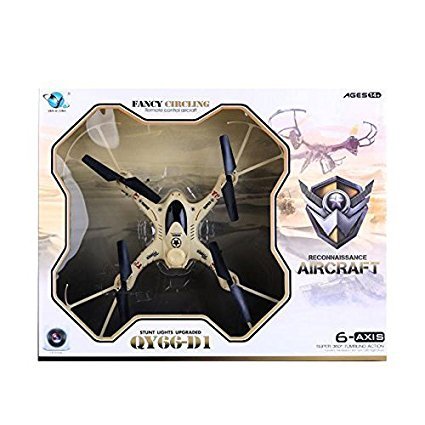
Figure 2.2: The retail packaging for the AIRCRAFT QY66-D1 drone, showcasing the drone inside a clear plastic mold within a cardboard box.
Drone Components:
- പ്രൊപ്പല്ലറുകൾ: Four rotating blades that provide lift and thrust.
- മോട്ടോർ: Powers the propellers.
- Protective Guards: Shields around the propellers to prevent damage.
- ലാൻഡിംഗ് ഗിയർ: Provides stable support for landing.
- ബാറ്ററി കമ്പാർട്ട്മെൻ്റ്: Location for the drone's rechargeable battery.
- LED ലൈറ്റുകൾ: ഡ്രോൺ സ്റ്റാറ്റസും ഓറിയന്റേഷനും സൂചിപ്പിക്കുക.
Remote Control Components:
- ഇടത് ജോയിസ്റ്റിക്: Controls throttle (ascend/descend) and yaw (rotate left/right).
- വലത് ജോയിസ്റ്റിക്: Controls pitch (forward/backward) and roll (left/right sideward flight).
- ബട്ടണുകൾ ട്രിം ചെയ്യുക: Adjust drone's drift for stable hovering.
- പ്രത്യേക പ്രവർത്തന ബട്ടണുകൾ: Activate features like Headless Mode, 3D Flips, and One Key Return.
- വൈദ്യുതി സ്വിച്ച്: റിമോട്ട് കൺട്രോൾ ഓൺ/ഓഫ് ചെയ്യുന്നു.
- ബാറ്ററി കമ്പാർട്ട്മെൻ്റ്: Location for remote control batteries.
3. സജ്ജീകരണം
3.1 ബാറ്ററി ഇൻസ്റ്റാളേഷൻ
- ഡ്റോൺ ബാറ്ററി:
- ഡ്രോൺ ഓഫ് ചെയ്തിട്ടുണ്ടെന്ന് ഉറപ്പാക്കുക.
- ഡ്രോണിന്റെ അടിഭാഗത്ത് ബാറ്ററി കമ്പാർട്ട്മെന്റ് കണ്ടെത്തുക.
- Carefully insert the fully charged drone battery, ensuring correct polarity.
- ബാറ്ററി കമ്പാർട്ട്മെൻ്റ് സുരക്ഷിതമായി അടയ്ക്കുക.
- റിമോട്ട് കൺട്രോൾ ബാറ്ററികൾ:
- റിമോട്ട് കൺട്രോളിന്റെ പിൻഭാഗത്തുള്ള ബാറ്ററി കവർ തുറക്കുക.
- Insert the required batteries (e.g., AA batteries, not included) according to the polarity markings.
- ബാറ്ററി കവർ സുരക്ഷിതമായി അടയ്ക്കുക.
3.2 പ്രീ-ഫ്ലൈറ്റ് ചെക്ക്ലിസ്റ്റ്
- Ensure both drone and remote control batteries are fully charged.
- എല്ലാ പ്രൊപ്പല്ലറുകളും സുരക്ഷിതമായി ഘടിപ്പിച്ചിട്ടുണ്ടെന്നും കേടുപാടുകൾ സംഭവിച്ചിട്ടില്ലെന്നും പരിശോധിക്കുക.
- Verify that the protective guards are properly installed.
- Choose an open, clear area for flight, free from obstacles, people, and animals.
- ശക്തമായ കാറ്റിലോ പ്രതികൂല കാലാവസ്ഥയിലോ പറക്കുന്നത് ഒഴിവാക്കുക.
4. പ്രവർത്തന നിർദ്ദേശങ്ങൾ
4.1 ഡ്രോണും റിമോട്ട് കൺട്രോളും ജോടിയാക്കൽ
- ഡ്രോൺ പരന്നതും ലെവൽ ഉപരിതലത്തിൽ വയ്ക്കുക.
- Turn on the drone's power switch. The LED lights on the drone will flash.
- റിമോട്ട് കൺട്രോളിന്റെ പവർ സ്വിച്ച് ഓണാക്കുക.
- Push the left joystick (throttle) all the way up, then pull it all the way down. You will hear a beep, and the drone's LED lights will become solid, indicating successful pairing.
4.2 ടേക്ക് ഓഫും ലാൻഡിംഗും
- മാനുവൽ ടേക്ക് ഓഫ്: After pairing, slowly push the left joystick (throttle) upwards. The propellers will start spinning, and the drone will ascend.
- മാനുവൽ ലാൻഡിംഗ്: Slowly pull the left joystick (throttle) downwards until the drone lands gently. Once on the ground, pull the joystick all the way down to stop the motors.
4.3 അടിസ്ഥാന ഫ്ലൈറ്റ് നിയന്ത്രണങ്ങൾ
- കയറ്റം/ഇറക്കം: Push the left joystick up to ascend, pull down to descend.
- മുന്നോട്ട്/പിന്നോട്ട്: Push the right joystick up to fly forward, pull down to fly backward.
- Left/Right Sideward Flight: Push the right joystick left to fly left, push right to fly right.
- ഇടത്തോട്ടോ വലത്തോട്ടോ തിരിയുക (യാവ്): Push the left joystick left to rotate left, push right to rotate right.
4.4 വിപുലമായ സവിശേഷതകൾ
- തലയില്ലാത്ത മോഡ്: Press the Headless Mode button. In this mode, the drone's orientation is relative to the pilot, regardless of the drone's actual front. This simplifies control for beginners.
- 3D Flips and Rolls: Press the 3D Flip button, then quickly push the right joystick in any direction (forward, backward, left, or right) to perform a 360-degree flip.
- ഒരു കീ റിട്ടേൺ: Press the One Key Return button. The drone will attempt to fly back towards its take-off point. Note: This feature is based on the drone's initial orientation and is not GPS-guided.
5. പരിപാലനം
5.1 വൃത്തിയാക്കൽ
- Regularly clean the drone body with a soft, dry cloth.
- Remove any dust or debris from the motors and propellers to ensure smooth operation.
- Avoid using water or liquid cleaners directly on the drone's electronic components.
5.2 പ്രൊപ്പല്ലർ മാറ്റിസ്ഥാപിക്കൽ
- If a propeller is damaged or bent, replace it immediately.
- Ensure you use the correct replacement propellers (A and B types) and install them on the corresponding motor arms.
- Carefully remove the old propeller and firmly attach the new one.
5.3 ബാറ്ററി പരിചരണവും സംഭരണവും
- Always use the original charger provided with the drone.
- ബാറ്ററി അമിതമായി ചാർജ് ചെയ്യുകയോ ഡിസ്ചാർജ് ചെയ്യുകയോ ചെയ്യരുത്.
- Store the drone and remote control in a cool, dry place away from direct sunlight and extreme temperatures.
- Remove batteries from the remote control if not in use for extended periods.
6. പ്രശ്നപരിഹാരം
| പ്രശ്നം | സാധ്യമായ കാരണം | പരിഹാരം |
|---|---|---|
| ഡ്രോൺ റിമോട്ട് കൺട്രോളിനോട് പ്രതികരിക്കുന്നില്ല. | Not paired; low battery; remote control off. | Ensure drone and remote are on and paired correctly. Charge/replace batteries. |
| ഡ്രോൺ ക്രമരഹിതമായി പറക്കുന്നു അല്ലെങ്കിൽ ഒഴുകുന്നു. | Uncalibrated gyro; damaged propeller; strong wind. | Recalibrate the gyro (refer to remote control instructions). Replace damaged propellers. Fly in calm conditions. |
| ചെറിയ ഫ്ലൈറ്റ് സമയം. | ബാറ്ററി പൂർണ്ണമായും ചാർജ് ചെയ്തിട്ടില്ല; കാലഹരണപ്പെട്ട ബാറ്ററി. | Ensure battery is fully charged before each flight. Consider replacing old batteries. |
| പ്രൊപ്പല്ലറുകൾ കറങ്ങുന്നില്ല. | Not paired; motor issue; obstacle. | Ensure proper pairing. Check for any obstructions around motors/propellers. |
7 സ്പെസിഫിക്കേഷനുകൾ
| ഫീച്ചർ | വിശദാംശങ്ങൾ |
|---|---|
| മോഡലിൻ്റെ പേര് | QY66 D1 |
| ബ്രാൻഡ് | എയർക്രാഫ്റ്റ് |
| നിയന്ത്രണ തരം | Remote Control (2.4GHz) |
| ഗൈറോ | 6-ആക്സിസ് ഗൈറോ |
| പ്രത്യേക സവിശേഷതകൾ | 360-degree Flip, Headless Mode, One Key Return, Rechargeable |
| പരമാവധി പരിധി | 40 മീറ്റർ വരെ |
| ഇനത്തിൻ്റെ ഭാരം | 250 ഗ്രാം |
| മെറ്റീരിയൽ | പ്ലാസ്റ്റിക് |
| ശുപാർശ ചെയ്യുന്ന പ്രായം | 14 വർഷവും അതിൽ കൂടുതലും |
| ബാറ്ററികൾ | Drone: Rechargeable (included); Remote: Not included |
| പാക്കേജ് അളവുകൾ | 42 x 34 x 8 സെ.മീ |
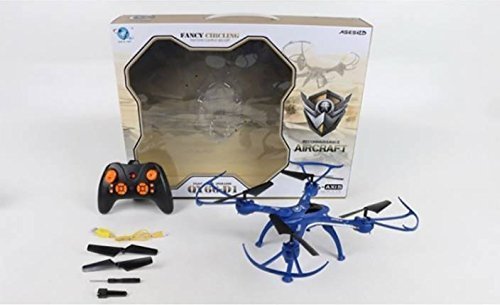
Figure 7.1: The AIRCRAFT QY66-D1 drone in blue, shown with its remote control and various accessories including spare propellers and a charging cable, all within its packaging.
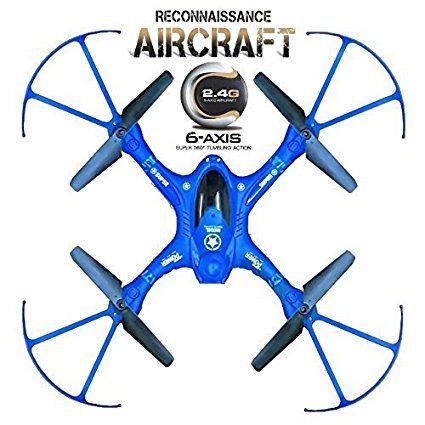
ചിത്രം 7.2: മുകളിൽ നിന്ന് താഴേക്ക് view of the AIRCRAFT QY66-D1 drone in blue, highlighting its 6-axis gyro and 2.4GHz communication capabilities.
8. വാറൻ്റിയും പിന്തുണയും
This product is manufactured by EFFY SHOPPY. For any technical support or warranty inquiries, please refer to the contact information provided at the point of purchase or on the product packaging. Specific warranty terms and conditions may vary and are typically outlined by the retailer or manufacturer.
Always ensure you purchase from authorized sellers to guarantee product authenticity and access to support services.