
1. ആമുഖം
This manual provides detailed instructions for the installation, operation, and maintenance of your Akozon Digital Programmable Timer. Please read this manual carefully before use to ensure proper function and safety.

Figure 1: Akozon Digital Programmable Timer 12V
2. ഉൽപ്പന്നം കഴിഞ്ഞുview ഫീച്ചറുകളും
The Akozon Digital Programmable Timer is a weekly programmable electronic timer designed for precise control of various electrical equipment. Its robust design and advanced features ensure reliable operation.
- യാന്ത്രിക നിയന്ത്രണം: Automatically turns electrical equipment on and off according to preset schedules.
- ഉയർന്ന കൃത്യത: Equipped with a high-precision chip for accurate timing.
- പ്രതിവാര പ്രോഗ്രാമിംഗ്: Supports advanced programming for up to one week in advance.
- ഒന്നിലധികം പ്രോഗ്രാമുകൾ: Features 16 ON/OFF settings (programs) for daily or weekly scheduling.
- ബാക്കപ്പ് പവർ: Integrated high-performance rechargeable battery maintains time display and stores data for over 12 months during power outages.
- നീണ്ടുനിൽക്കുന്ന നിർമ്മാണം: Housing made of hard, durable plastic for extended lifespan.
- LCD ഡിസ്പ്ലേ: Clear LCD for easy viewing of time and program status.
- DIN റെയിൽ ഇൻസ്റ്റാളേഷൻ: Designed for convenient installation on a DIN rail.
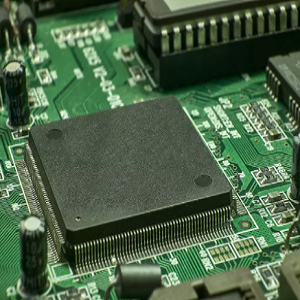
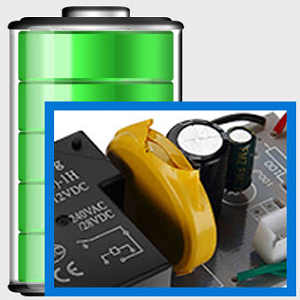
Figure 2: Internal components showing the high-precision chip and rechargeable backup battery.
3 സ്പെസിഫിക്കേഷനുകൾ
| മോഡൽ നമ്പർ | Akozonqegcgmk04u-01 |
| ഇൻപുട്ട് വോളിയംtage | 12V DC/AC |
| ഔട്ട്പുട്ട് ശേഷി | 25(16)A, 240VAC |
| വൈദ്യുതി ഉപഭോഗം | <1W |
| സമയ പരിധി | 1 മിനിറ്റ് മുതൽ 168 മണിക്കൂർ വരെ |
| പ്രോഗ്രാമുകൾ | 16 ON/OFF settings (daily/weekly) |
| സമയ പിശക് | <±2 seconds/day |
| പവർ പരാജയം മെമ്മറി | >12 months (with internal rechargeable battery) |
| പ്രവർത്തന താപനില | -20°C മുതൽ 55°C വരെ |
| ഇൻസ്റ്റലേഷൻ രീതി | DIN റെയിൽ |
| അളവുകൾ (ഏകദേശം) | 36 മിമി (ഡബ്ല്യു) x 86 എംഎം (എച്ച്) x 65 എംഎം (ഡി) |
| ഭാരം (ഏകദേശം) | 120 ഗ്രാം |
| പ്രദർശിപ്പിക്കുക | എൽസിഡി |

ചിത്രം 3: വിശദമായ ഉൽപ്പന്ന അളവുകളും പ്രധാന സവിശേഷതകളും.
4 സുരക്ഷാ വിവരങ്ങൾ
- ഇൻസ്റ്റാളേഷൻ അല്ലെങ്കിൽ അറ്റകുറ്റപ്പണിക്ക് മുമ്പ് എല്ലായ്പ്പോഴും വൈദ്യുതി വിച്ഛേദിക്കുക.
- Installation should be performed by a qualified electrician to prevent electric shock or damage to the device.
- ഇൻപുട്ട് വോളിയം ഉറപ്പാക്കുകtage matches the timer's specifications (12V DC/AC). Connecting to incorrect voltage യൂണിറ്റിന് കേടുപാടുകൾ വരുത്തിയേക്കാം.
- Do not expose the device to excessive moisture or extreme temperatures outside the specified operating range.
- Do not disassemble the timer; refer servicing to qualified personnel.
5. സജ്ജീകരണവും ഇൻസ്റ്റാളേഷനും
5.1 DIN Rail Installation
The timer is designed for easy installation on a standard 35mm DIN rail. Simply clip the timer onto the rail in your distribution box.

ചിത്രം 4: ഉദാample of the timer installed on a DIN rail within a distribution box.
5.2 വയറിംഗ് നിർദ്ദേശങ്ങൾ
Refer to the wiring diagram below for correct connection. Ensure all connections are secure and comply with local electrical codes.
- Terminals 1 & 2: Power input (12V DC/AC).
- Terminals 3, 4, 5: Output contacts.
- 3: സാധാരണയായി അടച്ചിരിക്കുന്നു (NC)
- 4: സാധാരണ (COM)
- 5: സാധാരണയായി തുറക്കുക (NO)

Figure 5: Detailed wiring diagram showing connections for power input and output contacts.

ചിത്രം 6: ഉദാamples of wiring methods, including direct load connection and connection via a contactor.
6. പ്രവർത്തന നിർദ്ദേശങ്ങൾ
6.1 Initial Setup and Unlocking
- Upon first use, connect the timer to power (12V DC/AC).
- അമർത്തുക പുനഃസജ്ജമാക്കുക button to clear all previous settings and initialize the timer.
- The timer display may be locked. To unlock, press the സി/ആർ button four times. The lock icon will disappear from the display. If no operation occurs for 15 seconds, the timer will automatically lock again.
6.2 നിലവിലെ സമയവും ദിവസവും ക്രമീകരിക്കൽ
After unlocking, set the current time and day:
- അമർത്തുക P button (Program button) once.
- അമർത്തുക D+ button to set the current day of the week (MO, TU, WE, TH, FR, SA, SU).
- അമർത്തുക H+ നിലവിലെ മണിക്കൂർ സജ്ജീകരിക്കാനുള്ള ബട്ടൺ.
- അമർത്തുക M+ നിലവിലെ മിനിറ്റ് സജ്ജമാക്കുന്നതിനുള്ള ബട്ടൺ.
- അമർത്തുക P button again to exit time setting mode.

ചിത്രം 7: ക്ലോസപ്പ് view of the timer's control buttons.

Figure 8: Explanation of button functions and display elements, including day, hour, minute, and reset.
6.3 മാനുവൽ നിയന്ത്രണം
അമർത്തുക മാനുവൽ സി/ആർ button to cycle through manual control modes:
- ഓൺ: Output is continuously ON.
- സ്വയമേവ: Timer operates according to programmed schedules.
- ഓഫാണ്: Output is continuously OFF.
തിരഞ്ഞെടുക്കുക ഓട്ടോ for the timer to follow your programmed settings.
7. Programming ON/OFF Schedules
ടൈമർ 16 ഓൺ/ഓഫ് പ്രോഗ്രാമുകൾ വരെ പിന്തുണയ്ക്കുന്നു. നിങ്ങൾക്ക് ആവശ്യമുള്ള ഷെഡ്യൂളുകൾ സജ്ജമാക്കാൻ ഈ ഘട്ടങ്ങൾ പാലിക്കുക:
- അമർത്തുക P button to enter programming mode. The display will show "1 ON".
- അമർത്തുക D+ to select the day(s) for this program. You can choose a single day, weekdays, weekends, or all days.
- അമർത്തുക H+ ഓൺ മണിക്കൂർ സജ്ജീകരിക്കാൻ.
- അമർത്തുക M+ ON മിനിറ്റ് സജ്ജീകരിക്കാൻ.
- അമർത്തുക P വീണ്ടും. ഡിസ്പ്ലേ "1 ഓഫ്" കാണിക്കും.
- അമർത്തുക D+ to select the day(s) for this OFF program (usually the same as ON, but can be different).
- അമർത്തുക H+ to set the OFF hour.
- അമർത്തുക M+ to set the OFF minute.
- Repeat steps 1-8 for additional ON/OFF programs (up to 16). Press P to advance to the next program number.
- പ്രോഗ്രാമിംഗ് മോഡിൽ നിന്ന് പുറത്തുകടക്കാൻ, അമർത്തുക മാനുവൽ സി/ആർ button. Ensure the timer is set to ഓട്ടോ mode for programs to execute.
Note: If you need to cancel a program, press the സി/ആർ അതേസമയം ബട്ടൺ viewing the specific ON or OFF program. This will clear the settings for that program.
8. അപേക്ഷകൾ
The Akozon Digital Programmable Timer is versatile and can be used in various applications, including:
- Controlling lamps and lighting systems (e.g., streetlights, garden lights, neon signs).
- Managing water heaters and preheaters.
- Automating agricultural facilities (e.g., irrigation systems).
- Controlling broadcasting equipment.
- Scheduling household appliances.
- Operating sprayers and bottling equipment.

ചിത്രം 9: ഉദാamples of environments where the timer can be used, such as controlling outdoor lighting and industrial equipment.
9. പരിപാലനം
- Keep the timer clean and free from dust. Use a soft, dry cloth for cleaning.
- ഉരച്ചിലുകളുള്ള ക്ലീനറുകളോ ലായകങ്ങളോ ഉപയോഗിക്കരുത്.
- അമിതമായി ചൂടാക്കുന്നത് തടയാൻ ഉപകരണത്തിന് ചുറ്റും ശരിയായ വായുസഞ്ചാരം ഉറപ്പാക്കുക.
- The internal battery is designed for long-term backup. If the timer consistently loses time or program settings after a power outage, the internal battery may need professional inspection.
10. പ്രശ്നപരിഹാരം
| പ്രശ്നം | സാധ്യമായ കാരണം | പരിഹാരം |
|---|---|---|
| ഡിസ്പ്ലേ ശൂന്യമാണ്. | No power supply or internal battery depleted. | Check power connections. Allow time for the internal battery to charge (connect to power for several hours). |
| Timer does not respond to button presses. | Timer is locked. | അമർത്തുക സി/ആർ button four times to unlock. |
| Programs are not executing. | Timer is not in AUTO mode. Incorrect program settings. | അമർത്തുക മാനുവൽ സി/ആർ "AUTO" പ്രദർശിപ്പിക്കുന്നതുവരെ. വീണ്ടുംview and correct program settings. |
| Time or settings are lost after power outage. | Internal backup battery is not charging or is depleted. | Ensure the timer is connected to power for sufficient time to charge the internal battery. If the issue persists, contact customer support. |
| Output is always ON or OFF, ignoring programs. | Timer is in manual ON or OFF mode. | അമർത്തുക മാനുവൽ സി/ആർ until "AUTO" is displayed. |
11. വാറൻ്റിയും പിന്തുണയും
Akozon products are manufactured to high-quality standards. For warranty information or technical support, please refer to the contact details provided with your purchase or visit the official Akozon webസൈറ്റ്.
വാറൻ്റി ക്ലെയിമുകൾക്കായി നിങ്ങളുടെ വാങ്ങിയതിൻ്റെ തെളിവ് സൂക്ഷിക്കുക.