
1. ആമുഖം
Thank you for choosing the LeeKooLuu RV Backup Camera System. This system is designed to enhance your driving and reversing experience by providing clear, reliable rear and side views. Featuring advanced wireless technology, a high-definition monitor, and durable cameras, it offers a stable and convenient solution for various large vehicles.
Key features of your system include:
- Newly upgraded dual antenna technology for stable, interference-free wireless signal up to 660ft in open areas.
- Multiple split screen modes (single, two, four) on the 7-inch monitor, supporting up to 4 cameras.
- IP69K waterproof cameras with 18 infrared lights and Sony CCD Sensor for clear day and night vision.
- Plug-and-Play installation, eliminating the need for complex wiring between camera and monitor.
- Built-in DVR recorder with loop recording capability.
2. പാക്കേജ് ഉള്ളടക്കം
താഴെ ലിസ്റ്റ് ചെയ്തിരിക്കുന്ന എല്ലാ ഇനങ്ങളും നിങ്ങളുടെ പാക്കേജിൽ ഉൾപ്പെടുത്തിയിട്ടുണ്ടെന്ന് ദയവായി പരിശോധിക്കുക:
- 1 x 7 ഇഞ്ച് മോണിറ്റർ
- 2 x Wireless Backup Cameras
- 2 x പവർ കോഡുകൾ
- 1 x സിഗരറ്റ് ലൈറ്റർ അഡാപ്റ്റർ
- 1 x സൺഷെയ്ഡ്
- 1 x വിൻഡ്ഷീൽഡ് മൗണ്ട്
- 1 x U ബ്രാക്കറ്റ്
- 4 x ആന്റിന
- 1 x ഉപയോക്തൃ മാനുവൽ (ഈ പ്രമാണം)
- Other necessary parts for installation

ചിത്രം: കഴിഞ്ഞുview of the LeeKooLuu RV Backup Camera System components.
3 സുരക്ഷാ വിവരങ്ങൾ
Always prioritize safety during installation and operation. Ensure all connections are secure and properly insulated. Do not attempt to operate the system if any components are damaged. Consult local regulations regarding the use of backup camera systems while driving.
4. സജ്ജീകരണവും ഇൻസ്റ്റാളേഷനും
This system is designed for straightforward installation. No need to run long cables between the camera and monitor due to its wireless design.
4.1 ക്യാമറ ഇൻസ്റ്റാളേഷൻ
The cameras are IP69K waterproof and can be mounted externally. Connect the camera's power cord to a 12V-24V DC power source, such as backup lights, running lights, or tail lights. Ensure proper polarity. For Furrion pre-wired RVs, an adapter is available to simplify installation.

Image: Illustration of potential camera placements on an RV and truck, including side view and license plate camera options. The system supports up to four cameras.

Image: The IP69K waterproof camera, designed to withstand challenging weather conditions.
4.2 ഇൻസ്റ്റലേഷൻ നിരീക്ഷിക്കുക
The 7-inch monitor can be powered via the included cigarette lighter adapter or by connecting directly to ACC/Fuse/Radio power sources. Two mounting methods are provided:
- വിൻഡ്ഷീൽഡ് മൗണ്ട്: Use the suction cup mount to attach the monitor to your vehicle's windshield.
- U Bracket: Use the U-shaped bracket for dashboard or surface mounting.

Image: Different mounting options for the monitor and the camera's adjustable angle.
5. പ്രവർത്തന നിർദ്ദേശങ്ങൾ
5.1 മോണിറ്റർ പ്രവർത്തനങ്ങൾ
The 7-inch monitor provides a clear 1080P display with a high refresh rate for stable images. Use the touch keys or physical buttons to navigate the menu.
- ഡിസ്പ്ലേ മോഡുകൾ: Switch between single camera view, two-split screen, or four-split screen mode. The monitor can display feeds from up to four cameras simultaneously.
- ഇമേജ് ഫ്ലിപ്പ്: The image can be flipped between mirror (rear view) അഭിമുഖീകരിക്കുന്നതും (മുന്നിൽ view), as well as inverted mirror and inverted front image. This allows for flexible camera placement and viewമുൻഗണനകൾ.
- റെക്കോർഡിംഗ് പ്രവർത്തനം: The system includes a built-in DVR recorder with loop recording. This feature automatically overwrites the oldest video files with the newest ones when the memory card is full, ensuring continuous recording.
- ക്രമീകരണങ്ങൾ: Adjust brightness, contrast, saturation, and enable/disable DIY guidelines directly from the monitor menu.
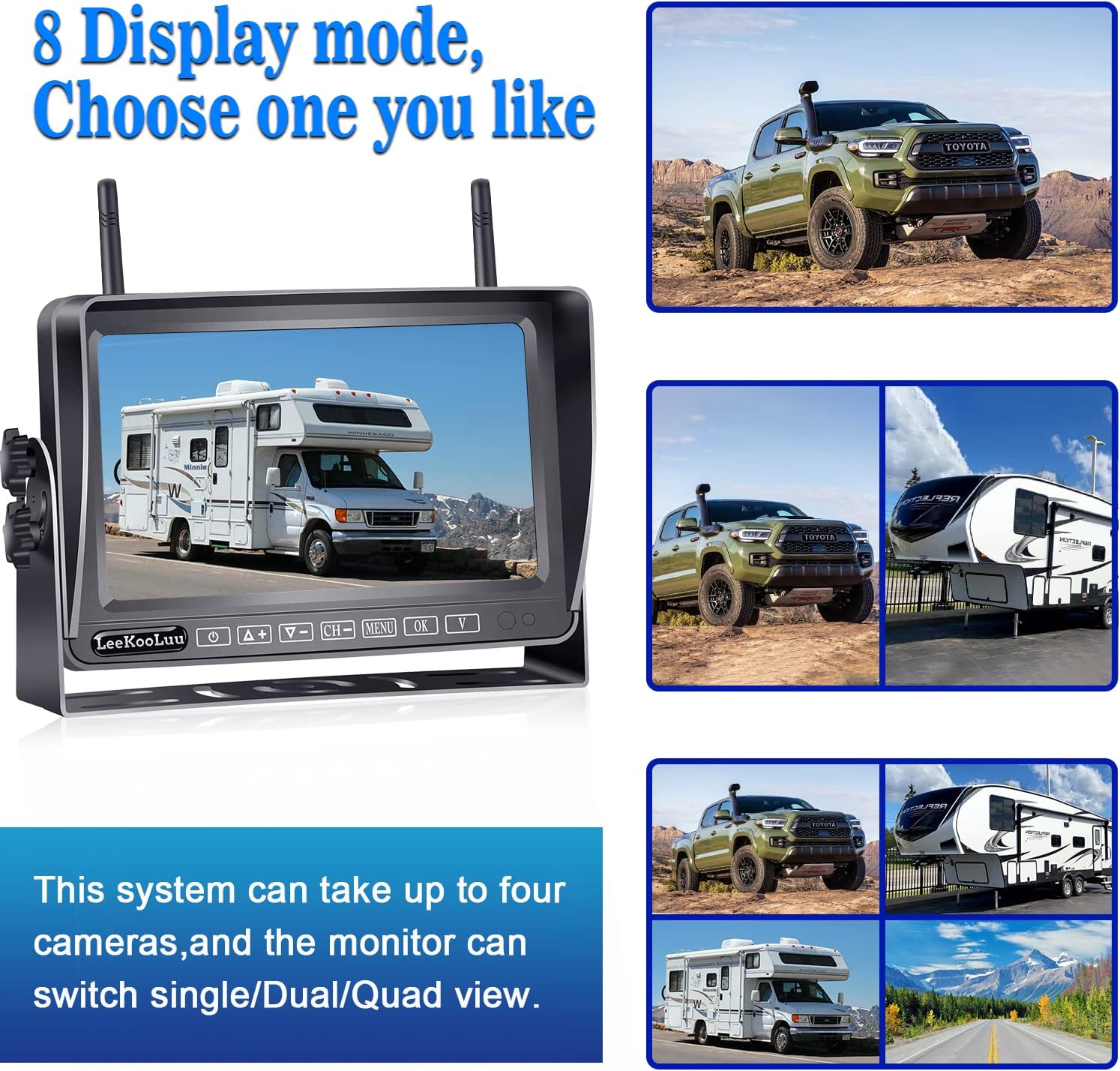
Image: The monitor's capability to display single, dual, or quad camera views.

Image: Demonstrates the four image flip options available on the monitor.

Image: Explanation of the seamless loop recording feature.
5.2 ക്യാമറ സവിശേഷതകൾ
- രാത്രി കാഴ്ച: Equipped with 18 infrared lights, the cameras provide clear night vision, ensuring visibility even in low-light conditions.
- വിശാലമായ Viewഇൻ ആംഗിൾ: The cameras offer a wide viewing angle, minimizing blind spots and providing a comprehensive view നിങ്ങളുടെ വാഹനത്തിന് പിന്നിലെ പ്രദേശം.
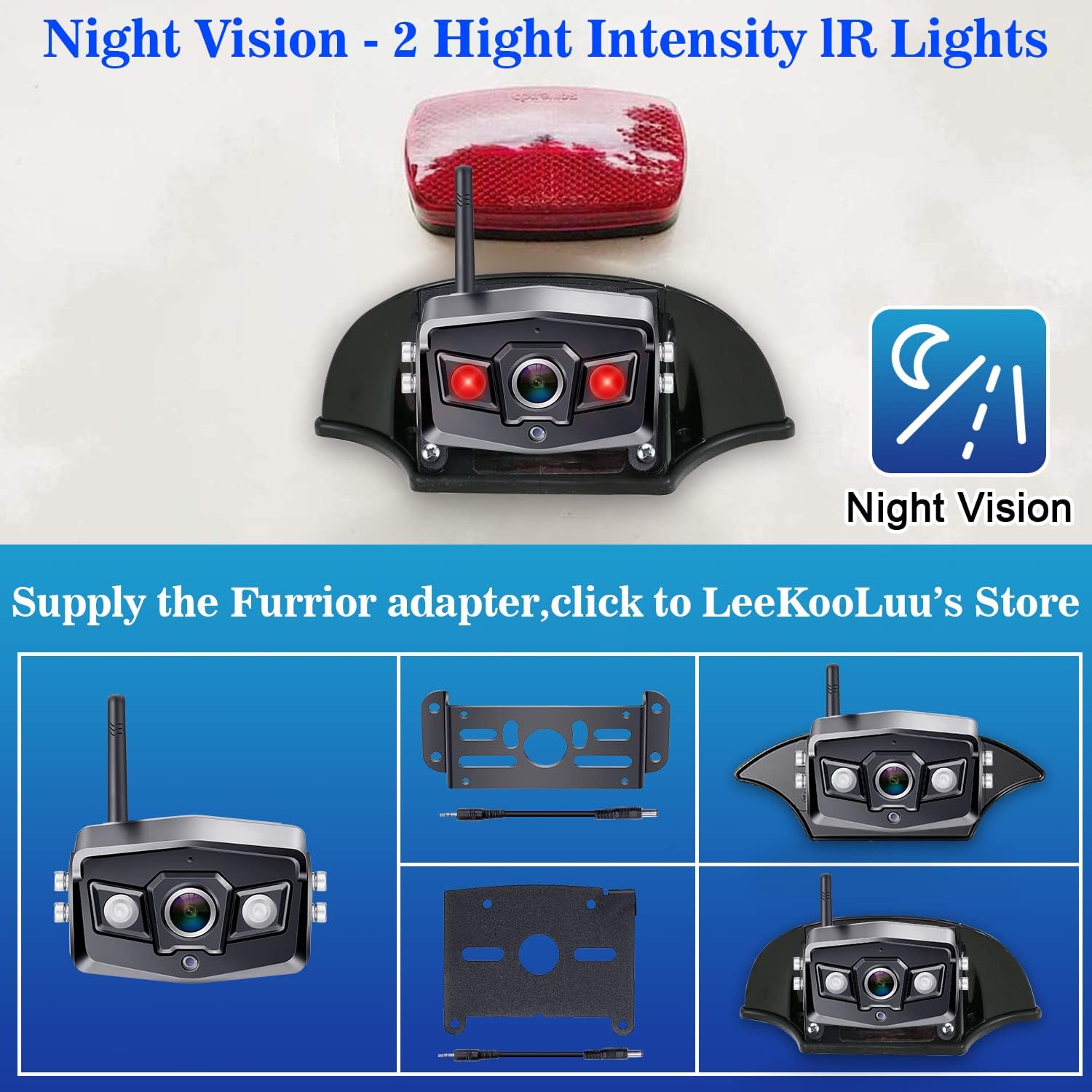
Image: The camera's night vision capability with high-intensity IR lights.
6. പരിപാലനം
നിങ്ങളുടെ LeeKooLuu RV ബാക്കപ്പ് ക്യാമറ സിസ്റ്റത്തിന്റെ ദീർഘായുസ്സും ഒപ്റ്റിമൽ പ്രകടനവും ഉറപ്പാക്കാൻ, ഈ അറ്റകുറ്റപ്പണി മാർഗ്ഗനിർദ്ദേശങ്ങൾ പാലിക്കുക:
- വൃത്തിയാക്കൽ: ക്യാമറ ലെൻസുകളും മോണിറ്റർ സ്ക്രീനും പതിവായി സോഫ്റ്റ്, ഡി ക്ലീനർ ഉപയോഗിച്ച് വൃത്തിയാക്കുക.amp തുണി. പ്രതലങ്ങളിൽ പോറലുകൾ ഉണ്ടാക്കാൻ സാധ്യതയുള്ള ഉരച്ചിലുകൾ ഉണ്ടാക്കുന്ന ക്ലീനറുകൾ ഒഴിവാക്കുക.
- കണക്ഷനുകൾ: Periodically check all power connections and cable integrity to ensure they are secure and free from corrosion.
- സംഭരണം: If storing the vehicle for an extended period, consider disconnecting the system from power to prevent battery drain.
7. പ്രശ്നപരിഹാരം
If you encounter issues with your system, please refer to the following common problems and solutions:
- സിഗ്നൽ ഇല്ല/ഇടവിട്ടുള്ള സിഗ്നൽ: Ensure cameras and monitor are powered on. Check antenna connections on both devices. Verify that the distance between the camera and monitor is within the effective range (under 240ft on vehicle, 660ft in open area). Minimize obstructions between the camera and monitor.
- മോണിറ്ററിൽ ചിത്രമില്ല: Check power connections to both the monitor and cameras. Ensure the correct camera channel is selected on the monitor.
- ചിത്രത്തിന്റെ ഗുണനിലവാര പ്രശ്നങ്ങൾ: Clean camera lenses. Adjust brightness, contrast, and saturation settings on the monitor. Ensure cameras are securely mounted and not vibrating.
- Recording Not Working: Ensure a compatible memory card is inserted correctly into the monitor. Check if the loop recording function is enabled in the settings.
For further assistance, please contact LeeKooLuu customer support.
8 സ്പെസിഫിക്കേഷനുകൾ
| ഫീച്ചർ | സ്പെസിഫിക്കേഷൻ |
|---|---|
| ഉൽപ്പന്ന അളവുകൾ | 8 x 2 x 8 ഇഞ്ച് (മോണിറ്റർ) |
| ഇനത്തിൻ്റെ ഭാരം | 4.8 പൗണ്ട് |
| മോഡൽ നമ്പർ | വി-07 |
| സ്ക്രീൻ വലിപ്പം | 7 ഇഞ്ച് |
| ഡിസ്പ്ലേ ടെക്നോളജി | എൽസിഡി |
| വീഡിയോ ക്യാപ്ചർ റെസല്യൂഷൻ | 1080p |
| വാല്യംtage | 12 വോൾട്ട് |
| ഒപ്റ്റിക്കൽ സെൻസർ ടെക്നോളജി | സിസിഡി |
| വാട്ടർപ്രൂഫ് റേറ്റിംഗ് | IP69K (Camera) |
| പ്രത്യേക സവിശേഷതകൾ | Real 1080P Resolution, DVR Recording, Loop Recording, Digital Wireless Signal, Night Vision, Split Screen (up to 4 cameras), Adjustable Guidelines, Image Flip |
9. വാറൻ്റിയും പിന്തുണയും
LeeKooLuu provides a 2 വർഷത്തെ വാറൻ്റി for this RV backup camera system. We also offer life-time technical support to ensure your satisfaction. If you encounter any issues or have questions regarding the use, installation, or maintenance of your system, please do not hesitate to contact our customer support team.
For support, please refer to the contact information provided with your product packaging or visit the official LeeKooLuu webസൈറ്റ്.