
1. ആമുഖം
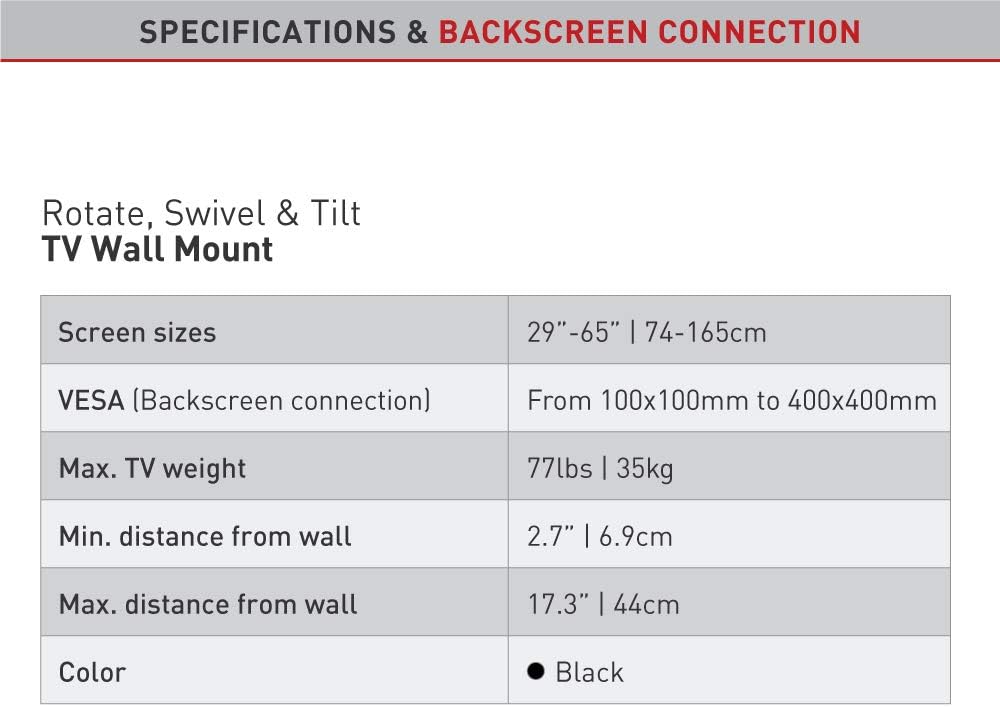
This manual provides detailed instructions for the safe and proper installation and operation of your Barkan L4TVM Articulated TV Wall Mount. This full-motion mount is designed for flat and curved screens ranging from 29 to 65 inches and supports a maximum weight of 35 kg (77 lbs). It offers four movements: rotate, fold, swivel, and tilt, allowing for optimal viewവ്യത്യസ്ത സ്ഥാനങ്ങളിൽ നിന്നുള്ള കോണുകൾ.

2 സുരക്ഷാ വിവരങ്ങൾ
Please read all instructions carefully before installation. Incorrect assembly or use may result in serious injury or damage to your TV and property. If you have any doubts, consult a qualified professional.
- Ensure the wall structure can safely support the combined weight of the mount and your TV.
- പരമാവധി ഭാര ശേഷി 35 കിലോഗ്രാം (77 പൗണ്ട്) കവിയരുത്.
- Use only the provided mounting hardware or suitable alternatives for your specific wall type.
- Always check for hidden electrical wires, water pipes, or gas lines before drilling.
- ഇൻസ്റ്റാളേഷൻ സമയത്ത് കുട്ടികളെയും വളർത്തുമൃഗങ്ങളെയും അകറ്റി നിർത്തുക.
- Two people are recommended for installation, especially when lifting the TV.
3. പാക്കേജ് ഉള്ളടക്കം
ഇൻസ്റ്റാളേഷൻ ആരംഭിക്കുന്നതിന് മുമ്പ് എല്ലാ ഘടകങ്ങളും ഉണ്ടെന്ന് ഉറപ്പാക്കുക.
- Barkan L4TVM TV Wall Mount
- മൗണ്ടിംഗ് നിർദ്ദേശങ്ങൾ
- Wall Screws and Anchors (for various wall types)
- TV Mounting Hardware (M4, M6, M8 screws, metal washers, plastic spacers)

4. സജ്ജീകരണവും ഇൻസ്റ്റാളേഷനും
Follow these steps carefully to install your Barkan L4TVM TV Wall Mount.
4.1 പ്രീ-ഇൻസ്റ്റലേഷൻ പരിശോധനകൾ
- ടിവി വലുപ്പവും ഭാരവും: Ensure your TV is between 29 and 65 inches and weighs no more than 35 kg (77 lbs).
- VESA അനുയോജ്യത: Check the VESA mounting pattern on the back of your TV. This mount supports VESA patterns from 100x100mm up to 400x400mm.
- ചുമർ തരം: Determine your wall type (e.g., concrete, brick, wood stud, drywall) to select the appropriate anchors and screws.

4.2 വാൾ പ്ലേറ്റ് മൌണ്ട് ചെയ്യൽ
- Locate the desired mounting position on your wall. Use a stud finder for wood stud walls.
- Mark the drilling points for the wall plate. Ensure the marks are level.
- Drill pilot holes according to the instructions for your specific wall type and chosen anchors.
- Secure the wall plate to the wall using the appropriate Barkan wall screws and anchors. Ensure it is firmly attached and level.
4.3 Attaching TV Brackets
- Place your TV face down on a soft, clean surface to protect the screen.
- നിങ്ങളുടെ ടിവിയുടെ പിൻഭാഗത്തുള്ള VESA മൗണ്ടിംഗ് ദ്വാരങ്ങൾ തിരിച്ചറിയുക.
- Select the correct size screws (M4, M6, or M8) and spacers from the hardware kit that fit your TV's mounting holes.
Note: Some Samsung TVs may require M8 x 45mm screws, which are not included. If needed, purchase these separately. - Attach the TV adapter plates to the back of your TV using the selected screws and spacers. Refer to the "Backscreen Connection Positioning Options" diagram for optimal plate configuration based on your TV's VESA pattern.

4.4 Mounting TV to Wall Mount
- With assistance, carefully lift the TV and hook the attached TV adapter plates onto the wall mount arm.
- Ensure the TV is securely seated on the mount. The internal anti-disengagement structure prevents accidental detachment.
- Tighten any safety screws or locking mechanisms as per the detailed instructions provided in the physical manual to prevent the TV from being lifted off the mount.
5. പ്രവർത്തന നിർദ്ദേശങ്ങൾ
The Barkan L4TVM mount offers flexible adjustments for optimal viewing.
- സ്വിവൽ: The mount features three pivot points for extensive swivel capabilities:
- Near the wall: Up to 180 degrees.
- Foldable arm: Up to 360 degrees.
- Near the screen connection plate: Up to 180 degrees.
- ടിൽറ്റ്: Adjust the screen's vertical angle from 0 to 15 degrees without tools. Gently push or pull the top or bottom of the TV to achieve the desired tilt.
- സ്ക്രീൻ ലെവലിംഗ്: An integrated mechanism allows for fine-tuning the screen's level after installation. Consult the physical manual for specific adjustment steps.
- വിപുലീകരണം/പിൻവലിക്കൽ: The mount allows the TV to extend up to 43.9 cm (17.3 inches) from the wall and retract to a minimum distance of 6.9 cm (2.7 inches).
6. പരിപാലനം
പതിവ് അറ്റകുറ്റപ്പണികൾ നിങ്ങളുടെ ടിവി മൗണ്ടിന്റെ ദീർഘായുസ്സും സുരക്ഷിതമായ പ്രവർത്തനവും ഉറപ്പാക്കുന്നു.
- വൃത്തിയാക്കൽ: മൃദുവായതും ഉണങ്ങിയതുമായ തുണി ഉപയോഗിച്ച് മൗണ്ട് തുടയ്ക്കുക. ഉരച്ചിലുകൾ ഉള്ള ക്ലീനറുകളോ ലായകങ്ങളോ ഉപയോഗിക്കുന്നത് ഒഴിവാക്കുക.
- ആനുകാലിക പരിശോധനകൾ: എല്ലാ സ്ക്രൂകളും കണക്ഷനുകളും ഇറുകിയതും സുരക്ഷിതവുമാണെന്ന് ഉറപ്പാക്കാൻ ഇടയ്ക്കിടെ പരിശോധിക്കുക. ആവശ്യമെങ്കിൽ വീണ്ടും മുറുക്കുക.
- പ്രസ്ഥാനം: If the mount's movement becomes stiff, a small amount of silicone-based lubricant can be applied to the pivot points. Do not use oil-based lubricants.
7. പ്രശ്നപരിഹാരം
നിങ്ങൾക്ക് പ്രശ്നങ്ങൾ നേരിടുകയാണെങ്കിൽ, ഇനിപ്പറയുന്ന പൊതുവായ പരിഹാരങ്ങൾ പരിശോധിക്കുക:
- ടിവി നിലവാരമില്ലാത്തതാണ്: Use the integrated screen leveling mechanism. Refer to the physical manual for detailed instructions on how to adjust it.
- മൗണ്ട് അയഞ്ഞതായി തോന്നുന്നു: Re-check all wall mounting screws and TV attachment screws. Ensure they are tightened securely. Do not overtighten.
- Difficulty moving the mount: Ensure no cables are snagged. If movement is stiff, apply a small amount of silicone lubricant to the joints.
- ടിവി യോജിക്കുന്നില്ല: Double-check your TV's size, weight, and VESA pattern against the specifications in Section 8. If it falls outside the supported range, the mount is not compatible.
8 സ്പെസിഫിക്കേഷനുകൾ
| മോഡൽ നമ്പർ | L4TVM |
| ബ്രാൻഡ് | ബാർക്കൻ |
| അനുയോജ്യമായ സ്ക്രീൻ വലുപ്പങ്ങൾ | 29 - 65 ഇഞ്ച് (74 - 165 സെ.മീ) |
| പരമാവധി ടിവി ഭാരം | 35 കി.ഗ്രാം (77 പൗണ്ട്) |
| VESA അനുയോജ്യത | 100x100mm, 200x100mm, 200x200mm, 300x300mm, 300x400mm, 400x200mm, 400x300mm, 400x400mm |
| ചുവരിൽ നിന്നുള്ള ഏറ്റവും കുറഞ്ഞ ദൂരം | 6.9 സെ.മീ (2.7 ഇഞ്ച്) |
| Maximum Distance from Wall | 43.9 സെ.മീ (17.3 ഇഞ്ച്) |
| ടിൽറ്റ് ആംഗിൾ | 0 മുതൽ 15 ഡിഗ്രി വരെ |
| സ്വിവൽ ആംഗിൾ | Up to 180 degrees (at wall), 360 degrees (foldable arm), 180 degrees (at screen plate) |
| മെറ്റീരിയൽ | Steel or high-strength aluminum alloy |
| നിറം | കറുപ്പ് |
| ഇനത്തിൻ്റെ ഭാരം | 7.52 പൗണ്ട് |
| ജിടിഐഎൻ / യുപിസി | 818212001728 |
9. വാറൻ്റി വിവരങ്ങൾ
This Barkan TV wall mount comes with a 10 വർഷത്തെ വാറൻ്റി. Please retain your proof of purchase for warranty claims. The warranty covers manufacturing defects under normal use. It does not cover damage caused by improper installation, misuse, or unauthorized modifications.
10. ഉപഭോക്തൃ പിന്തുണ
For further assistance, technical support, or if your backscreen connections are not included in the provided options, please visit the official Barkan support page:
You can also find more product information on the official product page: Barkan L4TVM Product Page