
ARCADE1UP 6650
ARCADE1UP 6650 Asteroids At-Home Arcade Game Instruction Manual
മോഡൽ: 6650
ആമുഖം
Welcome to the ARCADE1UP At-Home Arcade experience! This manual provides essential information for the assembly, operation, and maintenance of your new ARCADE1UP 6650 Asteroids arcade cabinet. Please read these instructions carefully before assembly and use to ensure safe and optimal performance.
Your ARCADE1UP cabinet brings classic arcade gaming into your home, featuring iconic titles such as Asteroids, Major Havoc, Lunar Lander, and Tempest.
സുരക്ഷാ വിവരങ്ങൾ
- മുതിർന്നവരുടെ അസംബ്ലി ആവശ്യമാണ്: This product contains small parts and requires adult assembly.
- ഇലക്ട്രിക്കൽ സുരക്ഷ: Ensure the power cord is not damaged. Plug into a grounded outlet. Do not expose to water or excessive moisture.
- പ്ലേസ്മെൻ്റ്: Place the arcade cabinet on a flat, stable surface. Avoid placing in direct sunlight or near heat sources.
- വെൻ്റിലേഷൻ: വെന്റിലേഷൻ തുറസ്സുകൾ തടയരുത്. യൂണിറ്റിന് ചുറ്റും മതിയായ വായുസഞ്ചാരം ഉറപ്പാക്കുക.
- വൃത്തിയാക്കൽ: വൃത്തിയാക്കുന്നതിന് മുമ്പ് വൈദ്യുതി വിച്ഛേദിക്കുക. മൃദുവായതും ഉണങ്ങിയതുമായ തുണി ഉപയോഗിക്കുക. ലിക്വിഡ് ക്ലീനറുകളോ എയറോസോളുകളോ ഉപയോഗിക്കരുത്.
- കുട്ടികൾ: Supervise children during use. This product is not a toy and is intended for users aged 14 and up.
പാക്കേജ് ഉള്ളടക്കം
Please refer to the packaging for a complete list of included components. Ensure all parts are present before beginning assembly. If any parts are missing or damaged, contact ARCADE1UP customer support.

Image: The ARCADE1UP Asteroids arcade cabinet packaging, showing the product box with graphics and key features.
സജ്ജീകരണവും അസംബ്ലിയും
Assembly typically requires two adults and takes approximately 1-2 hours. Follow the step-by-step instructions provided in the separate assembly guide included with your product. The general process involves:
- അൺപാക്ക് ചെയ്യുന്നു: പാക്കേജിംഗിൽ നിന്ന് എല്ലാ ഘടകങ്ങളും ശ്രദ്ധാപൂർവ്വം നീക്കം ചെയ്യുക.
- പാനൽ അസംബ്ലി: Connect the side panels, back panel, and base using the provided hardware.
- ഇൻസ്റ്റലേഷൻ നിരീക്ഷിക്കുക: Securely mount the LCD monitor into the cabinet.
- Control Panel Attachment: Attach the control panel to the cabinet, ensuring all cables are properly connected.
- Marquee and Top Panel: Install the illuminated marquee and top panel.
- പവർ കണക്ഷൻ: Connect the power adapter to the cabinet and then to a wall outlet.

ചിത്രം: മുൻഭാഗം view of the fully assembled ARCADE1UP Asteroids arcade cabinet, showcasing the screen, control panel, and artwork.
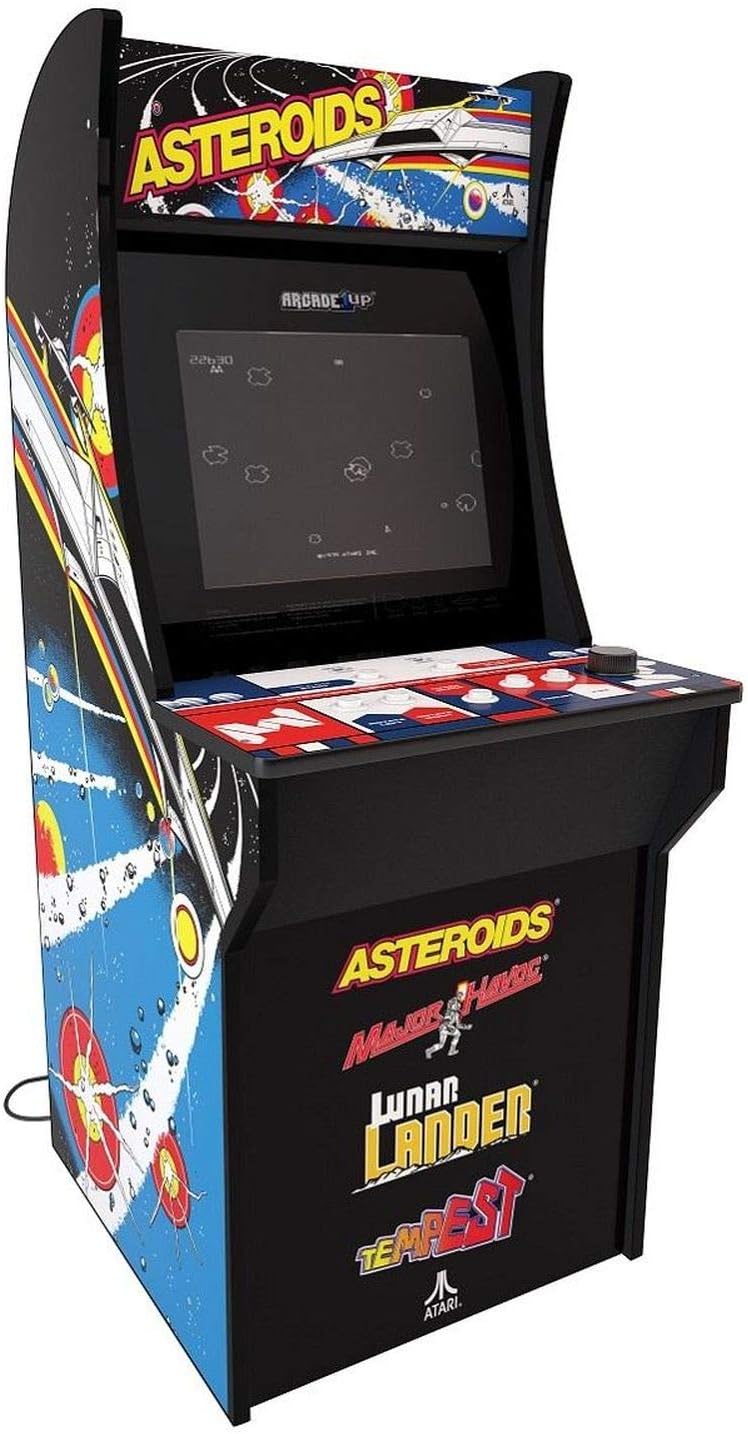
ചിത്രം: ആംഗിൾഡ് view of the fully assembled ARCADE1UP Asteroids arcade cabinet, highlighting the side panel artwork and overall design.

ചിത്രം: വശം view of the ARCADE1UP Asteroids arcade cabinet, showing the detailed side panel artwork and the power cord exiting the back.

ചിത്രം: ക്ലോസ്-അപ്പ് view of the ARCADE1UP Asteroids control panel, displaying the joystick, buttons, and game instructions printed on the surface.
പ്രവർത്തന നിർദ്ദേശങ്ങൾ
- പവർ ഓൺ: Plug the power adapter into a wall outlet. The arcade cabinet will automatically power on.
- ഗെയിം തിരഞ്ഞെടുക്കൽ: Use the joystick and buttons on the control panel to navigate the game selection menu.
- ഗെയിം ആരംഭിക്കുക: Once a game is selected, press the "1 Player Start" or "2 Player Start" button to begin.
- നിയന്ത്രണങ്ങൾ:
- ജോയ്സ്റ്റിക്ക്: Movement (e.g., steering your ship in Asteroids).
- ഫയർ ബട്ടൺ: Shoots projectiles.
- Thrust Button: Propels your ship forward.
- Hyperspace Button: Teleports your ship to a random location (use sparingly, as it can be risky).
- Rotate Left/Right Buttons: For games like Tempest, these buttons control rotation.
- വോളിയം നിയന്ത്രണം: Adjust the volume using the dedicated volume buttons or switch, typically located on the control panel or back of the unit.
- Exiting a Game: To return to the main menu, press the "Option" or "Menu" button (refer to your specific control panel layout).
- പവർ ഓഫ്: Unplug the power adapter from the wall outlet to power off the unit.
ഉൾപ്പെടുത്തിയ ഗെയിമുകൾ
Your ARCADE1UP 6650 cabinet includes the following classic Atari titles:
- Asteroids: The original space shooter where you destroy asteroids and flying saucers.
- Major Havoc: A vector graphics arcade game with multiple gameplay styles.
- Lunar Lander: A classic game of precision, guiding a lunar module to a safe landing.
- Tempest: A fast-paced tube shooter with vibrant vector graphics.
മെയിൻ്റനൻസ്
- കാബിനറ്റ് വൃത്തിയാക്കൽ: മൃദുവായ, ചെറുതായി ഡി ഉപയോഗിക്കുകamp cloth to wipe down the exterior surfaces. Avoid abrasive cleaners or solvents.
- സ്ക്രീൻ വൃത്തിയാക്കൽ: Use a microfiber cloth specifically designed for electronics screens. Do not spray cleaners directly onto the screen.
- Control Panel Care: Keep the control panel clean and dry. Avoid spills. For stubborn grime, a small amount of isopropyl alcohol on a cloth can be used, but test in an inconspicuous area first.
- പവർ കോർഡ് പരിശോധന: Periodically check the power cord for any signs of damage. If damaged, discontinue use and contact customer support.
ട്രബിൾഷൂട്ടിംഗ്
| പ്രശ്നം | സാധ്യമായ പരിഹാരം |
|---|---|
| വൈദ്യുതിയില്ല / യൂണിറ്റ് ഓണാക്കുന്നില്ല |
|
| ശബ്ദമില്ല |
|
| Screen Display Issues (No Picture, Flickering) |
|
| പ്രതികരിക്കാത്തത് നിയന്ത്രിക്കുന്നു |
|
If you encounter issues not listed here or if the suggested solutions do not resolve the problem, please contact ARCADE1UP customer support for further assistance.
സ്പെസിഫിക്കേഷനുകൾ
- മോഡൽ: ARCADE1UP 6650 Asteroids At-Home Arcade Game
- ഫോം ഘടകം: പൂർണ്ണ വലുപ്പം
- ഉൽപ്പന്ന അളവുകൾ: 119.38 cm (H) x 58.42 cm (W) x 48.26 cm (D)
- ഇനത്തിൻ്റെ ഭാരം: 26.76 കിലോഗ്രാം
- സ്ക്രീൻ വലിപ്പം: 17 ഇഞ്ച് എൽസിഡി
- ഊർജ്ജ സ്രോതസ്സ്: കോർഡഡ് ഇലക്ട്രിക്
- കളിക്കാരുടെ എണ്ണം: 1
- കൺട്രോളർ തരം: Joystick and Buttons
- ഉൾപ്പെടുത്തിയ ഗെയിമുകൾ: Asteroids, Major Havoc, Lunar Lander, Tempest
- പ്രായ പരിധി വിവരണം: Kid (Recommended for ages 14+)
വാറൻ്റിയും പിന്തുണയും
For warranty information, technical support, or to order replacement parts, please visit the official ARCADE1UP webസൈറ്റിൽ ബന്ധപ്പെടുകയോ അവരുടെ ഉപഭോക്തൃ സേവന വിഭാഗവുമായി ബന്ധപ്പെടുകയോ ചെയ്യുക. വാറന്റി ക്ലെയിമുകൾക്കായി നിങ്ങളുടെ വാങ്ങിയതിന്റെ തെളിവ് സൂക്ഷിക്കുക.
ARCADE1UP Official Webസൈറ്റ്: www.arcade1up.com
Ask a question about this manual
Ask about setup, troubleshooting, compatibility, parts, safety, or missing instructions. Manuals+ will review the question and use this page’s manual context to help answer it.