
1. ആമുഖം
വാങ്ങിയതിന് നന്ദി.asing the ieGeek Portable DVD Player. This manual provides essential information for the safe and efficient operation of your device. Please read it thoroughly before use and retain it for future reference.
സുരക്ഷാ വിവരങ്ങൾ
- മഴയോ ഈർപ്പമോ ഉപകരണത്തെ തുറന്നുകാട്ടരുത്.
- ഉപകരണം ഡിസ്അസംബ്ലിംഗ് ചെയ്യരുത്. എല്ലാ സേവനങ്ങളും യോഗ്യതയുള്ള ഉദ്യോഗസ്ഥരെ ഏൽപ്പിക്കുക.
- നിർദ്ദിഷ്ട പവർ അഡാപ്റ്ററുകളും അനുബന്ധ ഉപകരണങ്ങളും മാത്രം ഉപയോഗിക്കുക.
- ഉയർന്ന താപനിലയും നേരിട്ടുള്ള സൂര്യപ്രകാശവും ഒഴിവാക്കുക.
- ശക്തമായ കാന്തിക മണ്ഡലങ്ങളിൽ നിന്ന് ഉപകരണം അകറ്റി നിർത്തുക.
2. പാക്കേജ് ഉള്ളടക്കം
പാക്കേജിൽ എല്ലാ ഇനങ്ങളും ഉണ്ടെന്ന് ഉറപ്പാക്കുക:
- ieGeek Portable DVD Player
- റിമോട്ട് കൺട്രോൾ
- കാർ ചാർജർ
- എസി പവർ അഡാപ്റ്റർ
- 3-ഇൻ-1 AV കേബിൾ
- ഉപയോക്തൃ മാനുവൽ

ചിത്രം 2.1: ഉൾപ്പെടുത്തിയ ആക്സസറികൾ
3. ഉൽപ്പന്നം കഴിഞ്ഞുview
The ieGeek Portable DVD Player features a 10.5-inch HD swivel screen and supports various media formats for versatile entertainment.
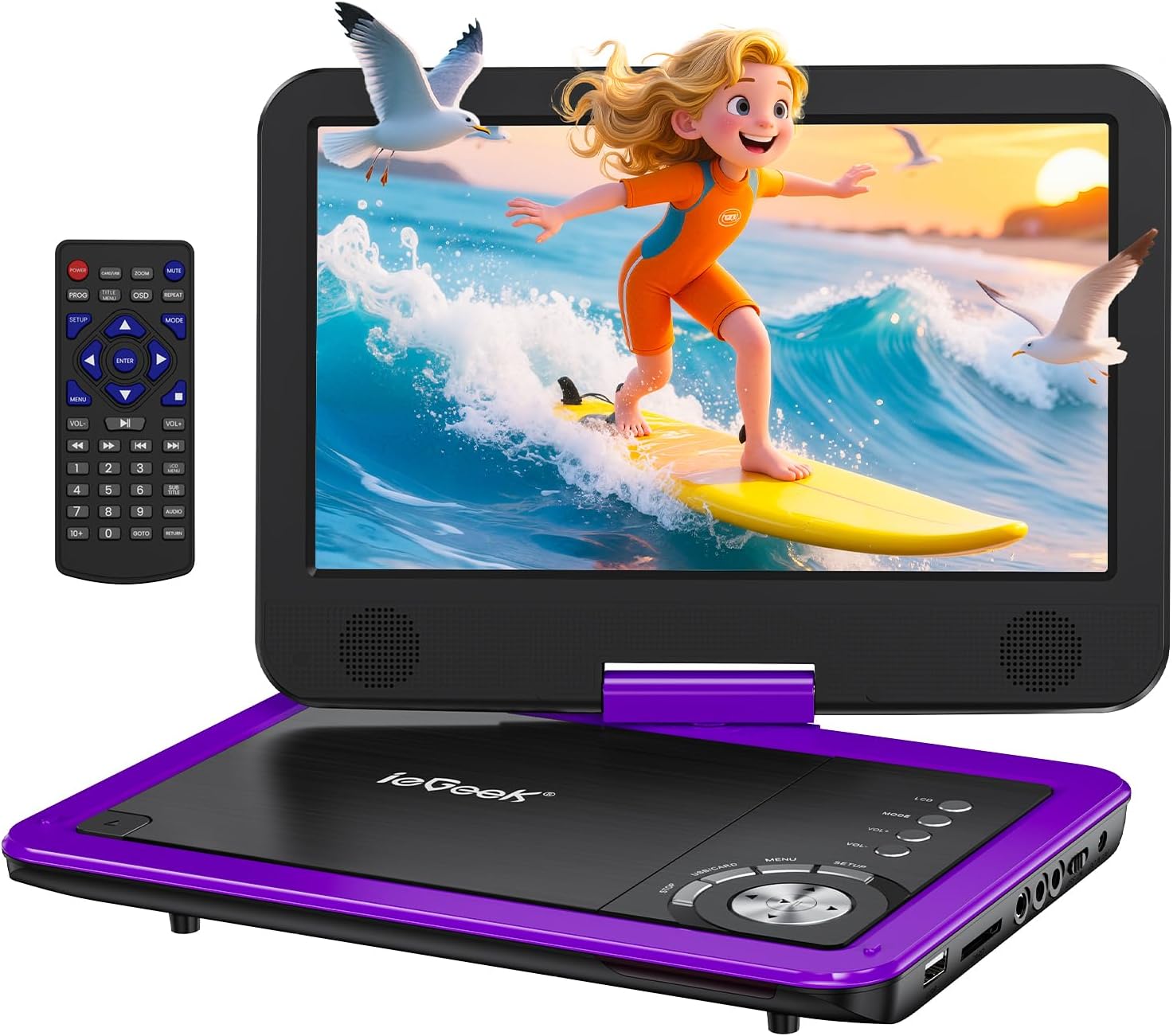
Figure 3.1: ieGeek Portable DVD Player
നിയന്ത്രണങ്ങളും തുറമുഖങ്ങളും

Figure 3.2: Side Ports and Controls
- USB പോർട്ട്: യുഎസ്ബി ഫ്ലാഷ് ഡ്രൈവുകൾ ബന്ധിപ്പിക്കുന്നതിന്.
- SD കാർഡ് സ്ലോട്ട്: SD മെമ്മറി കാർഡുകൾ ചേർക്കുന്നതിന്.
- ഇയർഫോൺ ജാക്ക്: ഹെഡ്ഫോണുകൾ ബന്ധിപ്പിക്കുന്നതിന്.
- AV U ട്ട്: Connects to a TV or projector for larger screen viewing.
- AV IN: Connects to another portable DVD player for synchronized viewing.
- ഓൺ/ഓഫ് സ്വിച്ച്: ഉപകരണം ഓൺ അല്ലെങ്കിൽ ഓഫ് ചെയ്യുന്നു.
- DC 12V: എസി അഡാപ്റ്ററിനോ കാർ ചാർജറിനോ ഉള്ള പവർ ഇൻപുട്ട്.
- GAME Port: For connecting a game controller (if supported).
4. സജ്ജീകരണം
4.1 പ്രാരംഭ ചാർജിംഗ്
Before first use, fully charge the portable DVD player. The built-in rechargeable battery provides approximately 5 hours of video playback.
- Connect the AC Power Adapter to the DC IN 12V port and a power outlet.
- Alternatively, use the Car Charger to power the device in a vehicle.

ചിത്രം 4.1: ചാർജിംഗ് ഓപ്ഷനുകൾ
4.2 ഒരു ഡിസ്ക് ലോഡ് ചെയ്യുന്നു
- Slide the 'OPEN' latch to open the disc lid.
- Place the DVD or CD onto the spindle, ensuring it clicks into place.
- Close the disc lid firmly. The player will begin loading automatically.
കുറിപ്പ്: Blu-ray discs are not supported.
4.3 Inserting USB/SD Card
- USB പോർട്ടിൽ ഒരു USB ഫ്ലാഷ് ഡ്രൈവ് ചേർക്കുക.
- Insert an SD card into the SD Card slot.
The player will detect the media and allow you to select fileപ്ലേബാക്കിനായി.

Figure 4.2: USB and SD Card Insertion
5. പ്രവർത്തന നിർദ്ദേശങ്ങൾ
5.1 അടിസ്ഥാന പ്ലേബാക്ക്
- പവർ ഓൺ/ഓഫ്: Use the ON/OFF switch on the side of the device.
- പ്ലേ/താൽക്കാലികമായി നിർത്തുക: Press the Play/Pause button on the device or remote to start or pause playback.
- നിർത്തുക: പ്ലേബാക്ക് അവസാനിപ്പിക്കാൻ സ്റ്റോപ്പ് ബട്ടൺ അമർത്തുക.
- ഒഴിവാക്കുക: Use the Previous/Next buttons to skip tracks or chapters.
- വോളിയം നിയന്ത്രണം: Adjust the volume using the VOL+ and VOL- buttons on the device or remote.
5.2 സ്ക്രീൻ റൊട്ടേഷൻ
The 10.5-inch HD screen can rotate 270° and flip 180°, allowing for multiple viewing angles or folding into a tablet-like form.

Figure 5.1: Screen Rotation Capabilities
5.3 വിദൂര നിയന്ത്രണം
ഉൾപ്പെടുത്തിയിരിക്കുന്ന റിമോട്ട് കൺട്രോൾ ദൂരെ നിന്ന് സൗകര്യപ്രദമായ പ്രവർത്തനത്തിനായി പൂർണ്ണ പ്രവർത്തനം നൽകുന്നു.
5.4 External Connections (SYNC Screen Playing)
- ടിവിയിലേക്ക് കണക്റ്റ് ചെയ്യുക: Use the AV to RCA cable (3-in-1 AV Cable) to connect the AV OUT port of the DVD player to the AV IN ports of a television. This allows you to view വലിയ സ്ക്രീനിൽ ഉള്ളടക്കം.
- Connect to Another Player: Use an AV to AV cable (not included) to connect the AV OUT of one player to the AV IN of another, enabling synchronized viewing across two devices.
5.5 പ്രത്യേക സവിശേഷതകൾ
- അവസാന മെമ്മറി പ്രവർത്തനം: The player automatically resumes playback from where it was last stopped, even after powering off.
- ലൂപ്പ് പ്ലേബാക്ക്: Enable the repeat function to play files on a continuous loop.
- ആന്റി-ഷേക്ക് ഫംഗ്ഷൻ: Designed to minimize disc skip issues during movement, ideal for car travel.
6. മീഡിയ അനുയോജ്യത
This portable DVD player supports a wide range of media formats and is region-free for DVD playback.

Figure 6.1: Supported Media Types
6.1 Supported Disc Formats
- CD, DVD, VCD, DVD±R, DVD±RW, CD-R, CD-RW, CVD, SVCD.
- Not compatible with Blu-ray discs.
6.2 Supported Digital Media (USB/SD Card)
Supports USB and SD cards up to 32GB.
- വീഡിയോ: AVI, MPG, MPVG4, VOB, FLV, RMVB (resolution within 720*576).
- ഓഡിയോ: MP3, WMA, OGG, AAC.
7. പ്രശ്നപരിഹാരം
If you encounter issues with your ieGeek Portable DVD Player, refer to the following common solutions:
- ശക്തിയില്ല: Ensure the device is fully charged or connected to a power source. Check the ON/OFF switch.
- No Disc Detected: Verify the disc is inserted correctly and is a supported format (not Blu-ray). Clean the disc if necessary.
- No Picture/Sound on TV: Check the AV cable connections between the DVD player and the TV. Ensure the TV input is set to the correct AV channel.
- മോശം ചിത്ര നിലവാരം: Ensure the disc is clean and free of scratches. Adjust screen settings if available.
- റിമോട്ട് കൺട്രോൾ പ്രവർത്തിക്കുന്നില്ല: Check the remote's batteries. Ensure there are no obstructions between the remote and the player's sensor.
Game Functionality
The ieGeek Portable DVD Player supports game playback via the USB port. Connect a compatible game controller to the USB port to access pre-loaded games or games from a USB drive.
Video 7.1: Demonstrating game play on the ieGeek Portable DVD Player by connecting a game controller via USB and playing a classic game.
8 സ്പെസിഫിക്കേഷനുകൾ
| ഉൽപ്പന്ന അളവുകൾ | 5.5 x 10.33 x 5.5 ഇഞ്ച് |
| ഇനത്തിൻ്റെ ഭാരം | 3.25 പൗണ്ട് |
| ബാറ്ററികൾ | 1 ലിഥിയം പോളിമർ ബാറ്ററികൾ ആവശ്യമാണ് (ഉൾപ്പെടുത്തിയിരിക്കുന്നു) |
| ബ്രാൻഡ് | ieGeek |
| മീഡിയ തരം | DVD, VCD, CD, MP3, MPEG, AVI, VOB, USB, SD |
| നിറം | പർപ്പിൾ |
| സ്ക്രീൻ വലിപ്പം | 10.5 ഇഞ്ച് |
| ഡിസ്പ്ലേ തരം | എൽസിഡി |
9. വാറൻ്റിയും പിന്തുണയും
The ieGeek Portable DVD Player typically comes with a 1-year warranty from the date of purchase. For technical support, warranty claims, or any inquiries, please contact ieGeek customer service.
- ബന്ധപ്പെടാനുള്ള ഇമെയിൽ: vp-service@iegeek.com
- പിന്തുണ: ആജീവനാന്ത സാങ്കേതിക പിന്തുണ ലഭ്യമാണ്.
- റിട്ടേണുകൾ/എക്സ്ചേഞ്ചുകൾ: 24 Months Return and Exchange policy.