
1. ആമുഖം
Welcome to the OWON XDS3104AE Digital Oscilloscope user manual. This document provides essential information for the safe and efficient operation of your new instrument. The XDS3104AE is a high-performance 4-channel digital oscilloscope featuring a 100 MHz bandwidth, 1 GS/s sample rate, 14-bit vertical resolution, and an 8-inch color LCD with optional multi-touch capabilities. It includes advanced triggering and bus decoding functions for I2C, SPI, RS232, and CAN protocols, making it suitable for a wide range of electronic testing and measurement applications.
2 സുരക്ഷാ വിവരങ്ങൾ
To prevent personal injury and avoid damage to the instrument or connected devices, please read and follow these safety precautions:
- ഗ്രൗണ്ടിംഗ്: Ensure the oscilloscope is properly grounded to prevent electric shock.
- ഊർജ്ജ സ്രോതസ്സ്: Use only the specified power cord and connect to a power source within the rated voltage range (100V - 240V AC, 50/60Hz).
- പേടകങ്ങൾ: വോള്യത്തിനായി റേറ്റുചെയ്ത പ്രോബുകൾ മാത്രം ഉപയോഗിക്കുകtage and current being measured. Do not touch exposed connections or components when power is applied.
- പരിസ്ഥിതി: Operate the instrument in a well-ventilated area, away from moisture, dust, and direct sunlight. Avoid operating in explosive atmospheres.
- പരിപാലനം: Refer all servicing to qualified personnel. Do not attempt to open or repair the instrument yourself.
3. പാക്കേജ് ഉള്ളടക്കം
താഴെ കൊടുത്തിരിക്കുന്ന എല്ലാ ഇനങ്ങളും നിങ്ങളുടെ പാക്കേജിൽ ഉണ്ടെന്ന് ഉറപ്പാക്കുക:
- OWON XDS3104AE Digital Oscilloscope Unit
- പവർ കോർഡ്
- CD-ROM (with software and documentation)
- ദ്രുത ഗൈഡ്
- USB കേബിൾ
- Probes (quantity may vary)
- Probe Adjust Tool
- Battery (optional, 3.7V, 13200mA)
4. ഉൽപ്പന്നം കഴിഞ്ഞുview
4.1 പ്രധാന സവിശേഷതകൾ
- 100 MHz Bandwidth, 4 Channels
- 1 GS/s Real-time Sample നിരക്ക്
- 14-bit High Resolution ADC
- 40M Record Length
- 45,000 wfms/s Waveform Refresh Rate
- 8-inch 800 x 600 High Resolution LCD (optional multi-touch screen)
- Low Background Noise
- Multi-trigger and Bus Decoding Functions (I2C, SPI, RS232, CAN)
- Multi-interface Integration: USB Host, USB Device, USB Port for PictBridge, LAN, AUX, VGA (optional)
- SCPI and LabVIEW പിന്തുണച്ചു
4.2 ഫ്രണ്ട് പാനൽ ലേഔട്ട്
The front panel features the 8-inch color LCD display, control knobs, function buttons, and input channels. The intuitive layout allows for easy navigation and parameter adjustment.
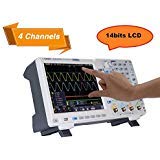
ചിത്രം 4.2.1: മുൻഭാഗം view of the OWON XDS3104AE Oscilloscope, showing the display, control panel, and input connectors.
4.3 പിൻ പാനൽ കണക്ഷനുകൾ
The rear panel provides various connectivity options including the power input, USB ports for host and device connections, LAN port for network connectivity, AUX output, and an optional VGA output for external display.
5. സജ്ജീകരണം
5.1 പവർ ചെയ്യുന്നു
- Connect the provided power cord to the AC input on the rear panel of the oscilloscope and then to a suitable AC power outlet.
- If using the optional battery, ensure it is properly installed and charged.
- Press the power button located on the front panel to turn on the oscilloscope. The boot screen will appear, followed by the main waveform display.
5.2 പ്രോബ് കണക്ഷനും നഷ്ടപരിഹാരവും
- Connect the BNC connector of the probe to one of the input channels (CH1, CH2, CH3, or CH4) on the front panel.
- Attach the probe ground clip to the circuit ground.
- For accurate measurements, it is recommended to compensate the probes. Connect the probe tip to the probe compensation output (usually a square wave signal) on the front panel. Adjust the probe compensation trimmer until a flat-top square wave is displayed on the screen.
6. പ്രവർത്തന നിർദ്ദേശങ്ങൾ
6.1 അടിസ്ഥാന പ്രവർത്തനം
- ലംബ നിയന്ത്രണങ്ങൾ: Use the vertical scale knobs (VOLTS/DIV) to adjust the vertical sensitivity for each channel. Use the position knobs to shift the waveform vertically.
- തിരശ്ചീന നിയന്ത്രണങ്ങൾ: Use the horizontal scale knob (SEC/DIV) to adjust the time base. Use the position knob to shift the waveform horizontally.
- മെനു നാവിഗേഷൻ: Utilize the touchscreen or navigation buttons to access various menus for settings, measurements, and analysis functions.
6.2 ട്രിഗറിംഗ്
The trigger system synchronizes the oscilloscope to a specific point on the input signal, ensuring stable waveform display. The XDS3104AE supports multiple trigger types:
- എഡ്ജ് ട്രിഗർ: ഒരു സിഗ്നലിന്റെ ഉയരുന്നതോ താഴുന്നതോ ആയ അരികിലുള്ള ട്രിഗറുകൾ.
- വീഡിയോ ട്രിഗർ: സ്റ്റാൻഡേർഡ് വീഡിയോ സിഗ്നലുകളിലെ ട്രിഗറുകൾ.
- പൾസ് ട്രിഗർ: പ്രത്യേക വീതിയുള്ള പൾസുകളിലെ ട്രിഗറുകൾ.
- ചരിവ് ട്രിഗർ: Triggers on the rising or falling edge with a specific slope.
- Runt Trigger: Triggers on pulses that cross one threshold but fail to cross a second threshold before crossing the first again.
- Windows Trigger: Triggers when a signal enters or exits a specified voltage window.
- Timeout Trigger: Triggers when a signal remains high or low for a specified duration.
- Nth Edge Trigger: Triggers on the Nth edge of a burst.
- Logic Trigger: Triggers based on a logical combination of multiple input channels.
- Bus Triggers (I2C, SPI, RS232, CAN): Triggers on specific data patterns or conditions within serial bus communications.
To set up a trigger, press the 'Trigger' button or access the trigger menu via the touchscreen. Select the desired trigger type, source channel, and adjust parameters like level, slope, and mode (Auto, Normal, Single).
6.3 ബസ് ഡീകോഡിംഗ്
The XDS3104AE offers powerful serial bus decoding capabilities for I2C, SPI, RS232, and CAN protocols. This feature allows you to view decoded data directly on the screen, simplifying debugging of embedded systems.
- Access the 'Decode' menu from the main interface.
- Select the desired bus protocol (I2C, SPI, RS232, or CAN).
- Configure the relevant parameters such as source channels, baud rate, data format, and address settings according to your specific bus setup.
- The decoded data will be displayed alongside the waveform, often in a tabular format or overlaid on the signal.
6.4 അളവുകൾ
The oscilloscope provides various measurement tools:
- യാന്ത്രിക അളവുകൾ: Access the 'Measure' menu to select from a range of automatic measurements such as Vpp, Vmax, Vmin, Freq, Period, Rise Time, Fall Time, etc.
- കഴ്സറുകൾ: Use horizontal and vertical cursors to manually measure voltage and time differences on the waveform.
- Waveform Math: Perform mathematical operations on waveforms (+, -, *, /, FFT, Intg, Diff, Sqrt, and user-defined functions).
7. പരിപാലനം
- വൃത്തിയാക്കൽ: Clean the instrument's exterior with a soft, damp cloth. Do not use abrasive cleaners or solvents. Ensure the unit is powered off and disconnected from the power source before cleaning.
- ബാറ്ററി കെയർ (ബാധകമെങ്കിൽ): If your unit includes a battery, follow proper charging and storage guidelines to maximize its lifespan. Avoid fully discharging the battery frequently.
- സോഫ്റ്റ്വെയർ അപ്ഡേറ്റുകൾ: Periodically check the OWON official webഒപ്റ്റിമൽ പ്രകടനവും പുതിയ സവിശേഷതകളിലേക്കുള്ള ആക്സസും ഉറപ്പാക്കാൻ ഫേംവെയർ അപ്ഡേറ്റുകൾക്കായുള്ള സൈറ്റ്.
8. പ്രശ്നപരിഹാരം
നിങ്ങൾ നേരിട്ടേക്കാവുന്ന പൊതുവായ പ്രശ്നങ്ങളെ ഈ വിഭാഗം അഭിസംബോധന ചെയ്യുന്നു:
- ശക്തിയില്ല: Check the power cord connection and the power outlet. Ensure the power button is pressed. If using battery, check battery charge.
- വേവ്ഫോം ഡിസ്പ്ലേ ഇല്ല: Verify probes are correctly connected to the input channels and the circuit under test. Adjust vertical (VOLTS/DIV) and horizontal (SEC/DIV) scales. Check trigger settings.
- അസ്ഥിരമായ തരംഗരൂപം: Adjust trigger level and trigger mode. Ensure the trigger source is correctly selected.
- തെറ്റായ അളവുകൾ: Perform probe compensation. Ensure correct probe attenuation settings (e.g., 1X, 10X) are selected on both the probe and the oscilloscope.
- ടച്ച്സ്ക്രീൻ പ്രതികരിക്കുന്നില്ല: ഉപകരണം പുനരാരംഭിക്കാൻ ശ്രമിക്കുക. പ്രശ്നം നിലനിൽക്കുകയാണെങ്കിൽ, പിന്തുണയെ ബന്ധപ്പെടുക.
9 സ്പെസിഫിക്കേഷനുകൾ
| പരാമീറ്റർ | സ്പെസിഫിക്കേഷൻ |
|---|---|
| മോഡൽ | XDS3104AE |
| ബാൻഡ്വിഡ്ത്ത് | 100 MHz |
| Sample നിരക്ക് | 1 GS/s |
| ലംബ റെസല്യൂഷൻ (A/D) | 14 ബിറ്റുകൾ |
| റെക്കോർഡ് ദൈർഘ്യം | 40 മി |
| വേവ്ഫോം പുതുക്കൽ നിരക്ക് | 45,000 wfms/s |
| ചാനലുകൾ | 4 |
| പ്രദർശിപ്പിക്കുക | 8" color LCD, 800 x 600 pixels |
| തിരശ്ചീന സ്കെയിൽ (s/div) | 2ns/div - 1000s/div |
| ലംബ സംവേദനക്ഷമത | 1mV/div - 10V/div (at input) |
| ഇൻപുട്ട് കപ്ലിംഗ് | ഡിസി, എസി, ജിഎൻഡി |
| ട്രിഗർ തരങ്ങൾ | Edge, Video, Pulse, Slope, Runt, Windows, Timeout, Nth Edge, Logic, I2C, SPI, RS232, CAN |
| ആശയവിനിമയ ഇൻ്റർഫേസ് | USB host, USB device, USB port for PictBridge, Trig Out (P/F), LAN, VGA (optional) |
| വൈദ്യുതി വിതരണം | 100V - 240V AC, 50/60Hz |
| ബാറ്ററി (ഓപ്ഷണൽ) | 3.7V, 13200mA |
| അളവുകൾ (W x H x D) | 340mm x 177mm x 90mm |
10. വാറൻ്റിയും പിന്തുണയും
OWON ഉൽപ്പന്നങ്ങൾ ഉയർന്ന നിലവാരമുള്ള മാനദണ്ഡങ്ങൾക്കനുസൃതമായി രൂപകൽപ്പന ചെയ്ത് നിർമ്മിക്കുന്നു. വാറന്റി വിവരങ്ങൾക്ക്, നിങ്ങളുടെ ഉൽപ്പന്നത്തിനൊപ്പം ഉൾപ്പെടുത്തിയിരിക്കുന്ന വാറന്റി കാർഡ് പരിശോധിക്കുക അല്ലെങ്കിൽ ഔദ്യോഗിക OWON സന്ദർശിക്കുക. website. For technical support, troubleshooting assistance, or service inquiries, please contact OWON customer service through their official channels. Keep your purchase receipt as proof of purchase for warranty claims.
Official OWON Webസൈറ്റ്: www.owon.com