
ആമുഖം
This manual provides essential instructions for the safe and effective use of your Andoer Portable 1080P Digital Camera D11773S. Please read this manual thoroughly before operating the device and retain it for future reference. This digital camera is designed for capturing high-resolution photos and videos, featuring a 48MP image sensor, 1080P video recording, 8X digital zoom, and a 2.7-inch LCD screen.
സുരക്ഷാ വിവരങ്ങൾ
- ക്യാമറ വെള്ളത്തിലോ ഈർപ്പത്തിലോ തുറന്നുകാട്ടരുത്.
- ക്യാമറ താഴെയിടുകയോ ശക്തമായ ആഘാതങ്ങൾക്ക് വിധേയമാക്കുകയോ ചെയ്യരുത്.
- ശക്തമായ കാന്തികക്ഷേത്രങ്ങളിൽ നിന്ന് ക്യാമറ അകറ്റി നിർത്തുക.
- Do not attempt to disassemble or modify the camera. Repairs should only be performed by qualified personnel.
- Use only the specified battery type and charging cable.
- ഉപയോഗത്തിലില്ലാത്തപ്പോൾ തണുത്തതും വരണ്ടതുമായ സ്ഥലത്ത് ക്യാമറ സൂക്ഷിക്കുക.
- ചെറിയ കുട്ടികൾക്ക് ലഭ്യമാകാതെ സൂക്ഷിക്കുക.
പാക്കേജ് ഉള്ളടക്കം
പാക്കേജിൽ എല്ലാ ഇനങ്ങളും ഉണ്ടെന്ന് ഉറപ്പാക്കുക:
- Andoer Portable Digital Camera (Model D11773S)
- Lithium Battery (3.7V 550mAh)
- ടൈപ്പ്-സി ചാർജ് കേബിൾ
- റിസ്റ്റ് സ്ട്രാപ്പ്
- സഞ്ചി
- ഉപയോക്തൃ മാനുവൽ

Image: Contents of the camera package, showing the camera, battery, USB-C cable, wrist strap, carry bag, and user manual.
ക്യാമറ ഓവർview
നിങ്ങളുടെ ക്യാമറയുടെ പ്രധാന ഘടകങ്ങളുമായി പരിചയപ്പെടുക.
ഫ്രണ്ട് View

ചിത്രം: മുൻഭാഗം view of the Andoer D11773S camera. Key features visible include the digital lens, built-in flash, and the 2.7" TFT display and 48 Mega pixels indicators.
- ലെൻസ്: ചിത്രങ്ങളും വീഡിയോകളും പകർത്തുന്നു.
- ഫ്ലാഷ്: കുറഞ്ഞ വെളിച്ചത്തിൽ പ്രകാശം നൽകുന്നു.
- മൈക്രോഫോൺ: Records audio during video capture.
പിൻഭാഗം View

ചിത്രം: പിൻഭാഗം view of the Andoer D11773S camera, displaying the 2.7-inch LCD screen and various control buttons for navigation and settings.
- LCD Screen (2.7 Inch): തത്സമയം പ്രദർശിപ്പിക്കുന്നു view, menus, and playback.
- നിയന്ത്രണ ബട്ടണുകൾ: For menu navigation, mode selection, zoom, and playback.
- സ്പീക്കർ: ഓഡിയോ പ്ലേബാക്കിനായി.
വശം View അളവുകളും

Image: Diagram illustrating the dimensions of the Andoer D11773S camera: 9.2cm length, 6.1cm width, and 1.4cm thickness.
- യുഎസ്ബി പോർട്ട് (ടൈപ്പ്-സി): ചാർജിംഗിനും ഡാറ്റ കൈമാറ്റത്തിനും.
- മെമ്മറി കാർഡ് സ്ലോട്ട്: For inserting a Micro SD card.
- ബാറ്ററി കമ്പാർട്ട്മെൻ്റ്: Houses the rechargeable lithium battery.
സജ്ജമാക്കുക
1 ബാറ്ററി ചാർജ് ചെയ്യുന്നു
- Insert the provided lithium battery into the camera's battery compartment.
- Connect the camera to a power source (e.g., computer USB port or USB wall adapter) using the supplied Type-C charge cable.
- ചാർജിംഗ് ഇൻഡിക്കേറ്റർ ലൈറ്റ് പ്രകാശിക്കും. പൂർണ്ണമായി ചാർജ് ചെയ്തുകഴിഞ്ഞാൽ, ലൈറ്റ് നിറം മാറുകയോ ഓഫാകുകയോ ചെയ്യാം.
2 ഒരു മെമ്മറി കാർഡ് ചേർക്കുന്നു
The camera requires a Class-10 external Micro SD memory card (not included) with a maximum capacity of 128GB.
- ക്യാമറയുടെ വശത്ത് മെമ്മറി കാർഡ് സ്ലോട്ട് കണ്ടെത്തുക.
- Insert the Micro SD card with the metal contacts facing the front of the camera until it clicks into place.
- നീക്കം ചെയ്യാൻ, കാർഡ് പുറത്തേക്ക് വരുന്നത് വരെ പതുക്കെ അകത്തേക്ക് അമർത്തുക.
പ്രവർത്തന നിർദ്ദേശങ്ങൾ
പവർ ഓൺ/ഓഫ്
- പവർ ഓൺ ചെയ്യാൻ, പവർ ബട്ടൺ അമർത്തിപ്പിടിക്കുക.
- പവർ ഓഫ് ചെയ്യാൻ, പവർ ബട്ടൺ വീണ്ടും അമർത്തിപ്പിടിക്കുക.
ഫോട്ടോകൾ എടുക്കുന്നു
The camera supports picture resolutions up to 48MP.
- ക്യാമറ ഓണാക്കുക.
- 2.7 ഇഞ്ച് എൽസിഡി സ്ക്രീൻ ഉപയോഗിച്ച് നിങ്ങളുടെ ഷോട്ട് ഫ്രെയിം ചെയ്യുക.
- Press the Shutter button halfway to focus (if applicable), then fully press to capture the photo.

Image: Visual representation of the camera's capabilities, showing a 48MP photo example and a 1080P video example.
വീഡിയോകൾ റെക്കോർഡുചെയ്യുന്നു
The camera supports video resolution up to 1920x1080 (1080P).
- Switch the camera to video recording mode (refer to on-screen icons or mode button).
- റെക്കോർഡിംഗ് ആരംഭിക്കാൻ റെക്കോർഡ് ബട്ടൺ അമർത്തുക.
- റെക്കോർഡിംഗ് നിർത്താൻ വീണ്ടും റെക്കോർഡ് ബട്ടൺ അമർത്തുക.
സൂം പ്രവർത്തനം
The camera features 8X digital zoom.
- Use the zoom buttons (often marked 'W' for Wide and 'T' for Telephoto) to adjust the zoom level.
ഫ്ലാഷ് ക്രമീകരണങ്ങൾ
The built-in flash can be used in dark conditions.
- Access the flash settings through the camera's menu to select modes like Auto Flash, Fill-in Flash, Red-eye Reduction, or Flash Off.
Special Features: Anti-Shake, Face Detect, Smile Capture, Self-Timer
These features enhance your photography experience.
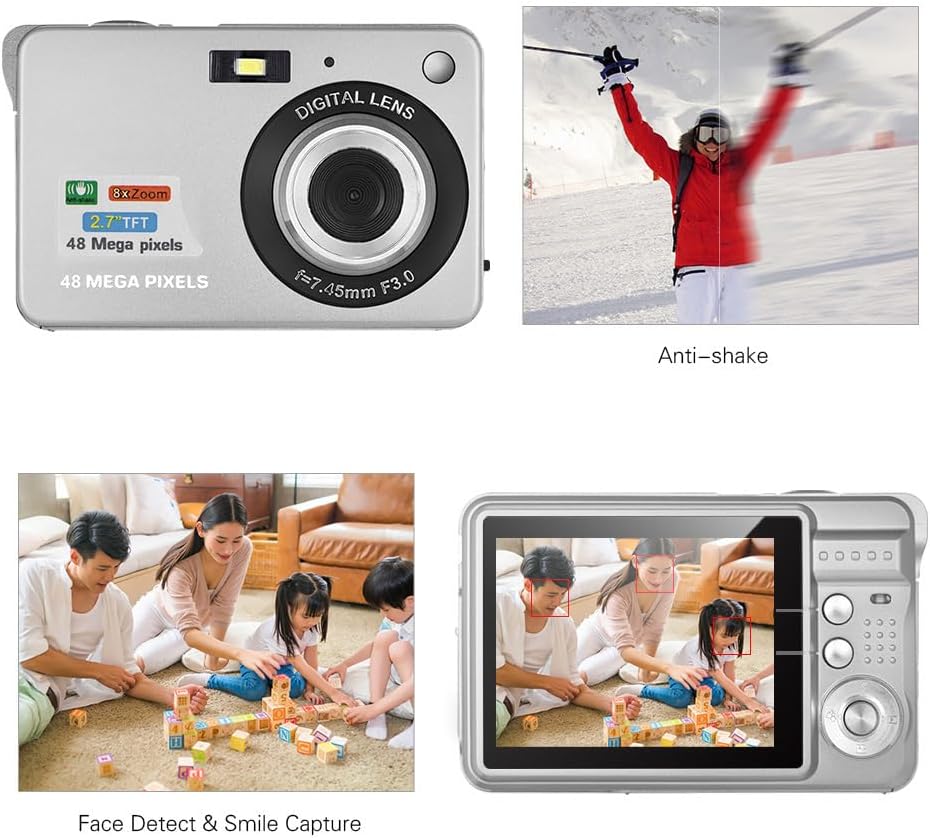
Image: Demonstrations of the camera's Anti-shake function (reducing blur from movement) and Face Detect & Smile Capture (identifying faces and automatically taking a photo when a smile is detected).
- ആന്റി-ഷേക്ക്: Helps reduce blur caused by camera movement. This feature is typically enabled by default or can be toggled in settings.
- Face Detect & Smile Capture: The camera can detect faces and automatically capture a photo when a smile is detected. Enable these options in the camera's menu.
- സ്വയം-ടൈമർ: Set a delay (2, 5, or 10 seconds) before the photo is taken, allowing you to be in the shot.
മാക്രോ മോഡ്
ചെറിയ വസ്തുക്കളുടെ ക്ലോസ്-അപ്പ് ഫോട്ടോഗ്രാഫിക്ക് വേണ്ടി.

Image: A close-up photograph of an ant, demonstrating the camera's Macro Mode capability for detailed shots of small subjects.
- Activate Macro Mode through the camera's menu or a dedicated button for close-up shots.
പ്ലേബാക്ക് മോഡ്
- വീണ്ടും പ്ലേബാക്ക് ബട്ടൺ അമർത്തുകview എൽസിഡി സ്ക്രീനിൽ ഫോട്ടോകളും വീഡിയോകളും പകർത്തി.
- നിങ്ങളുടെ മീഡിയയിലൂടെ സ്ക്രോൾ ചെയ്യാൻ നാവിഗേഷൻ ബട്ടണുകൾ ഉപയോഗിക്കുക.
ഒരു കമ്പ്യൂട്ടറിലേക്ക് ബന്ധിപ്പിക്കുന്നു
You can transfer photos and videos to a computer using the supplied Type-C USB cable.
- ക്യാമറ ഓണാണെന്ന് ഉറപ്പാക്കുക.
- Connect one end of the Type-C USB cable to the camera's USB port and the other end to an available USB port on your computer.
- The camera should appear as a removable disk or media device on your computer.
- നിങ്ങളുടെ files.
- Safely eject the device from your computer before disconnecting the cable.
മെയിൻ്റനൻസ്
- വൃത്തിയാക്കൽ: Use a soft, dry cloth to clean the camera body. For the lens and LCD screen, use a specialized lens cleaning cloth and solution. Do not use abrasive cleaners.
- സംഭരണം: When not in use for extended periods, remove the battery and store the camera in a cool, dry place, preferably in its carry bag.
- ബാറ്ററി കെയർ: Recharge the battery periodically even if not in use to maintain its lifespan.
ട്രബിൾഷൂട്ടിംഗ്
| പ്രശ്നം | സാധ്യമായ പരിഹാരം |
|---|---|
| ക്യാമറ പവർ ഓൺ ചെയ്യുന്നില്ല. | ബാറ്ററി പൂർണ്ണമായും ചാർജ്ജ് ചെയ്തിട്ടുണ്ടെന്നും ശരിയായി ചേർത്തിട്ടുണ്ടെന്നും ഉറപ്പാക്കുക. |
| ഫോട്ടോകൾ എടുക്കാനോ വീഡിയോകൾ റെക്കോർഡ് ചെയ്യാനോ കഴിയില്ല. | Check if a memory card is inserted and has sufficient free space. Ensure the camera is in the correct mode. |
| ചിത്രങ്ങൾ അവ്യക്തമാണ്. | Ensure the lens is clean. Hold the camera steady during capture. Check lighting conditions and use flash if necessary. |
| കമ്പ്യൂട്ടർ ക്യാമറ തിരിച്ചറിഞ്ഞില്ല. | Ensure the USB cable is securely connected. Try a different USB port or restart the computer. |
| ബാറ്ററി പെട്ടെന്ന് തീരുന്നു. | Reduce LCD brightness. Limit flash usage. Ensure the camera is powered off when not in use. |
സ്പെസിഫിക്കേഷനുകൾ
| ഫീച്ചർ | വിശദാംശങ്ങൾ |
|---|---|
| ഇമേജ് സെൻസർ | CMOS സെൻസർ |
| പ്രദർശിപ്പിക്കുക | 2.7 ഇഞ്ച് എൽസിഡി |
| File ഫോർമാറ്റ് | JPEG (Photo), AVI (Video) |
| ചിത്ര മിഴിവ് | 48M വരെ (8000x6000) |
| വീഡിയോ റെസല്യൂഷൻ | 1920x1080 (1080P), 1280x720 |
| ഡിജിറ്റൽ സൂം | 8X |
| എക്സ്പോഷർ നഷ്ടപരിഹാരം | EV-3 to EV+3 |
| സ്വയം-ടൈമർ | ഓഫ് / 2 സെക്കൻഡ് / 5 സെക്കൻഡ് / 10 സെക്കൻഡ് |
| പ്രത്യേക സവിശേഷതകൾ | Anti-Shake, Face Detect, Smile Capture |
| വൈദ്യുതി വിതരണം | 1 * Lithium battery (3.7V 550mAh) |
| പിന്തുണയ്ക്കുന്ന മെമ്മറി കാർഡ് | Class-10 Micro SD, max. 128GB (not included) |
| ഇൻ്റർഫേസ് | ടൈപ്പ്-സി യുഎസ്ബി |
| അളവുകൾ (L*W*H) | 9.2 * 6.1 * 1.4 cm / 3.6 * 2.4 * 0.5 inch |
| ഭാരം | 99g / 3.5oz |
| പിന്തുണയ്ക്കുന്ന സിസ്റ്റം | Windows XP, VISTA, WIN7, MAC |
വാറൻ്റിയും പിന്തുണയും
This product comes with a standard manufacturer's warranty. Please refer to the warranty card included in your package for specific terms and conditions. For technical support, troubleshooting assistance, or further inquiries, please visit the official Andoer webസൈറ്റിൽ ബന്ധപ്പെടുകയോ അവരുടെ ഉപഭോക്തൃ സേവന വിഭാഗവുമായി ബന്ധപ്പെടുകയോ ചെയ്യുക. വാറന്റി ക്ലെയിമുകൾക്കുള്ള വാങ്ങലിന്റെ തെളിവായി നിങ്ങളുടെ വാങ്ങൽ രസീത് സൂക്ഷിക്കുക.
ഓൺലൈൻ പിന്തുണ: Visit the Andoer Store on Amazon