
1. ആമുഖം
This manual provides detailed instructions for the setup, operation, and maintenance of your OWLENZ SD60 Wi-Fi Mini Projector. Please read this manual thoroughly before using the product to ensure proper functionality and safety. The SD60 features advanced LED light technology with 1500 lumens brightness, Wi-Fi screen sharing capabilities (Miracast/Airplay), and multiple media playback options for a versatile home theater experience. Its portable and compact design allows for easy installation and use.
2 പ്രധാനപ്പെട്ട സുരക്ഷാ വിവരങ്ങൾ
- l ചെയ്യുമ്പോൾ പ്രൊജക്ടർ ലെൻസിലേക്ക് നേരിട്ട് നോക്കരുത്amp ഓണാണ്.
- അമിതമായി ചൂടാകുന്നത് തടയാൻ പ്രൊജക്ടറിന് ചുറ്റും ശരിയായ വായുസഞ്ചാരം ഉറപ്പാക്കുക.
- പ്രൊജക്ടർ വെള്ളത്തിൽ നിന്നോ മറ്റ് ദ്രാവകങ്ങളിൽ നിന്നോ അകറ്റി നിർത്തുക.
- പ്രൊജക്ടറിനൊപ്പം നൽകിയിരിക്കുന്ന പവർ അഡാപ്റ്റർ മാത്രം ഉപയോഗിക്കുക.
- അസ്ഥിരമായ പ്രതലങ്ങളിൽ പ്രൊജക്ടർ സ്ഥാപിക്കുന്നത് ഒഴിവാക്കുക.
- The LED light technology is designed to be gentle on the eyes and has no radiation.
3. പാക്കേജ് ഉള്ളടക്കം
താഴെ ലിസ്റ്റ് ചെയ്തിരിക്കുന്ന എല്ലാ ഇനങ്ങളും നിങ്ങളുടെ പാക്കേജിൽ ഉൾപ്പെടുത്തിയിട്ടുണ്ടെന്ന് ഉറപ്പാക്കുക. ഏതെങ്കിലും ഇനങ്ങൾ നഷ്ടപ്പെട്ടിട്ടുണ്ടെങ്കിലോ കേടായിട്ടുണ്ടെങ്കിലോ, ദയവായി ഉപഭോക്തൃ പിന്തുണയുമായി ബന്ധപ്പെടുക.
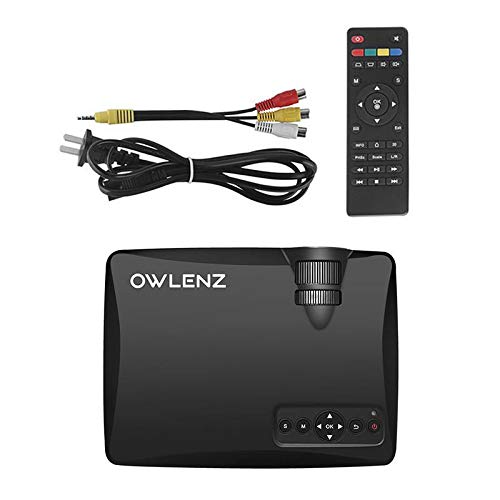
Image: OWLENZ SD60 Projector, remote control, power cable, and AV cables.
- OWLENZ SD60 Mini Projector
- റിമോട്ട് കൺട്രോൾ
- പവർ കേബിൾ
- എവി കേബിൾ
- ഉപയോക്തൃ മാനുവൽ (ഈ പ്രമാണം)
4. ഉൽപ്പന്നം കഴിഞ്ഞുview
Familiarize yourself with the various parts and controls of your OWLENZ SD60 projector.
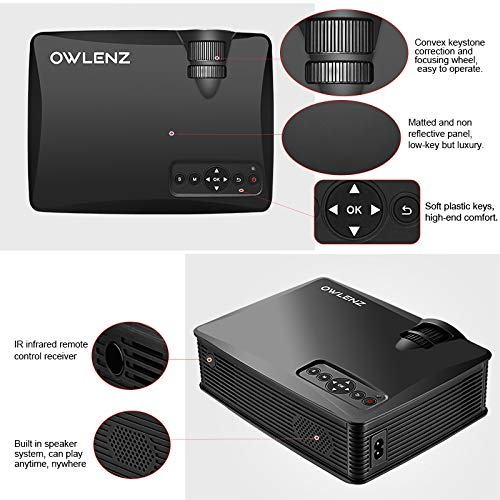
Image: Key features of the OWLENZ SD60 projector, including the focusing wheel, keystone correction, control panel, IR receiver, and built-in speaker.
- Convex Keystone Correction and Focusing Wheel: Located on the top, these allow for easy image adjustment.
- Matted and Non-Reflective Panel: Provides a sleek, low-key appearance.
- Soft Plastic Keys: For comfortable and responsive control.
- IR Infrared Remote Control Receiver: For remote operation.
- Built-in Speaker System: A 3W speaker for integrated audio playback.
- ഇൻപുട്ട് പോർട്ടുകൾ: HDMI, USB, AV, SD Card slot (located on the side/rear).
5. സജ്ജീകരണം
5.1 പവർ കണക്ഷൻ
- പ്രൊജക്ടറിന്റെ പവർ ഇൻപുട്ട് പോർട്ടിലേക്ക് പവർ കേബിൾ ബന്ധിപ്പിക്കുക.
- പവർ കേബിളിന്റെ മറ്റേ അറ്റം അനുയോജ്യമായ ഒരു ഇലക്ട്രിക്കൽ ഔട്ട്ലെറ്റിലേക്ക് പ്ലഗ് ചെയ്യുക.
- പ്രൊജക്ടറിലോ റിമോട്ട് കൺട്രോളിലോ ഉള്ള പവർ ബട്ടൺ അമർത്തി അത് ഓണാക്കുക.
5.2 ഇൻപുട്ട് സ്രോതസ്സുകൾ ബന്ധിപ്പിക്കുന്നു
The projector supports various input options:
- എച്ച്ഡിഎംഐ: Connect an HDMI cable from your device (laptop, gaming console, etc.) to the projector's HDMI port.
- USB: Insert a USB drive into the USB port for direct media playback.
- ഓഫ്: AV ഔട്ട്പുട്ടുള്ള ഉപകരണങ്ങളിലേക്ക് കണക്റ്റ് ചെയ്യാൻ നൽകിയിരിക്കുന്ന AV കേബിൾ ഉപയോഗിക്കുക.
- SD കാർഡ്: Insert an SD card into the SD card slot for media playback.
After connecting, select the appropriate input source from the projector's menu using the remote or control panel.
5.3 Wi-Fi Screen Sharing (Miracast / Airplay)
The SD60 supports wireless screen sharing from compatible smartphones and tablets.
- നിങ്ങളുടെ മൊബൈൽ ഉപകരണവും പ്രൊജക്ടറും ഒരേ വൈ-ഫൈ നെറ്റ്വർക്കിലേക്ക് കണക്റ്റ് ചെയ്തിട്ടുണ്ടെന്ന് ഉറപ്പാക്കുക.
- On the projector, navigate to the "Screen Share" or "Miracast/Airplay" option in the main menu.
- On your mobile device, activate the screen mirroring function (e.g., "Smart View" ആൻഡ്രോയിഡിൽ, "സ്ക്രീൻ മിററിംഗ്" iOS-ൽ).
- Select the projector's name from the list of available devices to establish the connection.
5.4 ഫോക്കസും കീസ്റ്റോൺ ക്രമീകരണവും
- ഫോക്കസ്: Rotate the focusing wheel near the lens until the projected image is clear and sharp.
- കീസ്റ്റോൺ തിരുത്തൽ: Use the keystone correction wheel to adjust the image shape if it appears trapezoidal (wider at the top or bottom).
6. ഓപ്പറേഷൻ
6.1 അടിസ്ഥാന നിയന്ത്രണങ്ങൾ
Use the control panel on the projector or the remote control to navigate menus and adjust settings.
- പവർ ബട്ടൺ: പ്രൊജക്ടർ ഓൺ/ഓഫ് ചെയ്യുന്നു.
- നാവിഗേഷൻ ബട്ടണുകൾ (അമ്പടയാളങ്ങൾ/ശരി): മെനു നാവിഗേഷനും തിരഞ്ഞെടുപ്പിനും.
- ഉറവിട ബട്ടൺ: Switches between input sources (HDMI, USB, AV, SD Card, Wi-Fi).
- മെനു ബട്ടൺ: പ്രൊജക്ടറിന്റെ ക്രമീകരണ മെനു ആക്സസ് ചെയ്യുന്നു.
6.2 മീഡിയ പ്ലേബാക്ക്
Once an input source is selected, the projector will display content. For USB/SD card playback, navigate through the file browser to select your desired media.
6.3 ഓഡിയോ putട്ട്പുട്ട്
- ബിൽറ്റ്-ഇൻ സ്പീക്കർ: The projector has a built-in 3W speaker suitable for small viewപ്രദേശങ്ങൾ.
- ബാഹ്യ സ്പീക്കർ: For a better listening experience, connect external speakers or headphones to the 3.5mm audio port.
6.4 Projection Size
The projector supports projection sizes ranging from 40 to 150 inches, offering a large screen experience.
7. പരിപാലനം
7.1 വൃത്തിയാക്കൽ
- പ്രൊജക്ടറിന്റെ പുറംഭാഗം വൃത്തിയാക്കാൻ മൃദുവായതും ഉണങ്ങിയതുമായ തുണി ഉപയോഗിക്കുക.
- For the lens, use a lens cleaning cloth and specialized lens cleaning solution. Do not use abrasive materials.
- Regularly clean the ventilation openings to ensure proper airflow and prevent dust buildup.
7.2 LED Bulb Lifespan
The OWLENZ SD60 features an LED bulb with a lifespan of up to 30,000+ hours, significantly longer than traditional projector lamps. No regular bulb replacement is typically required under normal usage conditions.
8. കേസുകൾ ഉപയോഗിക്കുക
The OWLENZ SD60 Mini Projector is versatile and suitable for various applications:
- ഹോം തിയേറ്റർ: Enjoy movies, TV shows, and sports on a large screen.
- ഗെയിമിംഗ്: Connect gaming consoles for an immersive gaming experience.
- വിദ്യാഭ്യാസ ലക്ഷ്യങ്ങൾ: Project educational content, videos, and presentations.
- Children's Entertainment: Ideal for playing videos and cartoons for children.
- ചെറുത് Viewing Areas: Its compact design and built-in speaker make it perfect for use in smaller rooms or spaces.
9. പ്രശ്നപരിഹാരം
| പ്രശ്നം | സാധ്യമായ കാരണം | പരിഹാരം |
|---|---|---|
| ചിത്രമൊന്നും പ്രദർശിപ്പിച്ചിട്ടില്ല | Incorrect input source selected; loose cable connection; source device not powered on. | Select the correct input source. Check all cable connections. Ensure the source device is powered on. |
| ചിത്രം മങ്ങിയതാണ് | Focus not adjusted correctly. | Adjust the focusing wheel until the image is clear. |
| ചിത്രം ട്രപസോയിഡൽ ആണ് | Keystone not adjusted correctly. | കീസ്റ്റോൺ കറക്ഷൻ വീൽ ക്രമീകരിക്കുക. |
| ശബ്ദമില്ല | Volume too low; external speakers not connected properly; audio format not supported. | Increase volume. Check external speaker connection or use built-in speaker. Ensure audio format is compatible. |
| Wi-Fi screen sharing not working | Devices not on the same Wi-Fi network; screen mirroring function not activated on mobile device. | Ensure both devices are on the same Wi-Fi. Activate screen mirroring on your mobile device and select the projector. |
10 സ്പെസിഫിക്കേഷനുകൾ
| ഫീച്ചർ | വിശദാംശങ്ങൾ |
|---|---|
| ബ്രാൻഡ് | OWLENZ |
| മോഡൽ | SD60 |
| ഉൽപ്പന്ന അളവുകൾ (LxWxH) | 20.8 x 16.5 x 8 സെ.മീ |
| ഇനത്തിൻ്റെ ഭാരം | 949 ഗ്രാം |
| ഹാർഡ്വെയർ ഇന്റർഫേസ് | HDMI, USB |
| കണക്റ്റിവിറ്റി ടെക്നോളജി | HDMI, USB, വൈ-ഫൈ |
| അനുയോജ്യമായ ഉപകരണങ്ങൾ | സ്മാർട്ട്ഫോണുകൾ, ടാബ്ലെറ്റുകൾ, ലാപ്ടോപ്പുകൾ |
| പ്രത്യേക സവിശേഷതകൾ | ബിൽറ്റ്-ഇൻ സ്പീക്കർ, പോർട്ടബിൾ |
| ഡിസ്പ്ലേ ടെക്നോളജി | എൽസിഡി |
| തെളിച്ചം | 1500 ല്യൂമെൻസ് |
| LED Bulb Lifespan | 30,000+ മണിക്കൂർ വരെ |
| പ്രൊജക്ഷൻ വലിപ്പം | 40 മുതൽ 150 ഇഞ്ച് വരെ |
| ബിൽറ്റ്-ഇൻ സ്പീക്കർ പവർ | 3W |
| ഫോം ഫാക്ടർ | പോർട്ടബിൾ |
| മൗണ്ടിംഗ് തരം | ടേബിൾടോപ്പ് മൗണ്ട് |
| വാട്ട്tage | 24 വാട്ട്സ് |
| ബാറ്ററികൾ ആവശ്യമാണ് | Yes (for remote control, not included) |
11. ഉൽപ്പന്ന വീഡിയോ കഴിഞ്ഞുview
Watch this short video for a quick overview of the OWLENZ SD60 Mini Projector's features and capabilities.
വീഡിയോ: ഒരു സംക്ഷിപ്ത വിവരണംview highlighting the OWLENZ SD60 projector's display, sound, smart features, other features, portability, and use cases.
12. വാറൻ്റിയും പിന്തുണയും
The OWLENZ SD60 Mini Projector comes with a standard brand warranty. For detailed warranty information, technical support, or service inquiries, please refer to the product detail page on Amazon.in or contact OWLENZ customer service directly.
For further information, visit the product detail page: ആമസോൺ ഉൽപ്പന്ന പേജ്