
CyberPower OL10KRT
CyberPower OL10KRT Smart App Online UPS User Manual
Model: OL10KRT
1. ഉൽപ്പന്നം കഴിഞ്ഞുview
The CyberPower Smart App Online OL10KRT is a 6U rack/tower double-conversion Uninterruptible Power Supply (UPS) system. It delivers pure sine wave output, ensuring seamless power protection for critical IT infrastructure. This UPS is generator compatible and provides consistent 200-240V power with zero transfer time. Its automatic bypass feature ensures continuous operation during overloads or internal faults. The OL10KRT includes a pre-installed RMCARD205 network card for remote monitoring and a removable LCD control panel for flexible placement.
Key features include Smart-battery management for extended battery life, fast-charge technology, and an energy-saving GreenPower UPS™ ECO Mode for high efficiency.

ചിത്രം: മുൻഭാഗം view of the CyberPower OL10KRT UPS (top unit) and its extended battery module (bottom unit), showing the LCD display and ventilation grilles.
2 സുരക്ഷാ വിവരങ്ങൾ
Please read and follow all safety instructions carefully before installing, operating, or servicing the UPS. Retain this manual for future reference.
- ഈ യുപിഎസിൽ അപകടകരമായ വോൾട്ടേജ് അടങ്ങിയിരിക്കുന്നു.tages. Do not attempt to disassemble the unit. Servicing should only be performed by qualified personnel.
- Do not install the UPS in direct sunlight, near heat sources, or in areas with excessive dust, humidity, or corrosive substances.
- Ensure proper grounding. Connect the UPS to a grounded AC power outlet.
- മെഡിക്കൽ ഉപകരണങ്ങൾ, ലൈഫ് സപ്പോർട്ട് ഉപകരണങ്ങൾ, മൈക്രോവേവ് ഓവനുകൾ, അല്ലെങ്കിൽ വാക്വം ക്ലീനറുകൾ എന്നിവ പോലുള്ള കമ്പ്യൂട്ടറുമായി ബന്ധമില്ലാത്ത ഇനങ്ങൾ യുപിഎസുമായി ബന്ധിപ്പിക്കരുത്.
- Risk of electric shock. Disconnect the UPS from the AC power source before servicing or installing batteries.
- ബാറ്ററികൾ വൈദ്യുതാഘാതത്തിനും ഉയർന്ന ഷോർട്ട് സർക്യൂട്ട് കറന്റിനും സാധ്യതയുള്ളതിനാൽ ഇനിപ്പറയുന്ന മുൻകരുതലുകൾ പാലിക്കുക:
- വാച്ചുകൾ, വളയങ്ങൾ അല്ലെങ്കിൽ മറ്റ് ലോഹ വസ്തുക്കൾ നീക്കം ചെയ്യുക.
- ഇൻസുലേറ്റഡ് ഹാൻഡിലുകളുള്ള ഉപകരണങ്ങൾ ഉപയോഗിക്കുക.
- റബ്ബർ കയ്യുറകളും ബൂട്ടുകളും ധരിക്കുക.
- ബാറ്ററികൾക്ക് മുകളിൽ ഉപകരണങ്ങളോ ലോഹഭാഗങ്ങളോ വയ്ക്കരുത്.
- ബാറ്ററി ടെർമിനലുകൾ ബന്ധിപ്പിക്കുന്നതിനോ വിച്ഛേദിക്കുന്നതിനോ മുമ്പ് ചാർജിംഗ് ഉറവിടം വിച്ഛേദിക്കുക.
- ആന്തരിക ബാറ്ററി വോള്യംtage 240V DC ആണ്.
- പ്രൊപ്പോസിഷൻ 65 മുന്നറിയിപ്പ്: ഈ ഉൽപ്പന്നത്തിൽ കാലിഫോർണിയ സംസ്ഥാനത്തിന് ക്യാൻസറിനും ജനന വൈകല്യങ്ങൾക്കും അല്ലെങ്കിൽ മറ്റ് പ്രത്യുൽപാദന വൈകല്യങ്ങൾക്കും കാരണമാകുന്ന രാസവസ്തുക്കൾ അടങ്ങിയിരിക്കാം.
3. പാക്കേജ് ഉള്ളടക്കം
Verify that all items listed below are included in your package. Contact your dealer if any items are missing or damaged.
- പവർ മൊഡ്യൂൾ
- Extended Battery Module (EBM)
- Left & Right Rackmount Rails
- Left & Right Hanging Brackets
- ഫോൺ കേബിൾ
- യുഎസ്ബി കമ്മ്യൂണിക്കേഷൻ കേബിൾ
- സീരിയൽ ഇന്റർഫേസ് കേബിൾ (RS-232)
- NEMA L6-30P to IEC-320-C13 Power Cord
- ദ്രുത ആരംഭ ഗൈഡ്
- സുരക്ഷാ നിർദ്ദേശങ്ങൾ
- Registration Warranty card
- PowerPanel മാനേജ്മെന്റ് സോഫ്റ്റ്വെയർ ഡൗൺലോഡ് കാർഡ്
- (4) Rackmount Ears
- (2) Tie Plates
- (16) Black M5X7L Flat Head Screws
- (24) Black M5X12L Pan Head Screws
- (12) Silver M5X6L Pan Head Screws
- (16) പ്ലാസ്റ്റിക് വാഷറുകൾ
- (28) Screw Hole Dust Covers
- (24) റബ്ബർ പാഡുകൾ
4. സജ്ജീകരണവും ഇൻസ്റ്റാളേഷനും
4.1 ഫിസിക്കൽ പ്ലേസ്മെന്റ്
The OL10KRT can be installed in a 6U rackmount configuration or as a tower unit. Ensure adequate ventilation around the unit and avoid blocking air vents.

Image: Multiple CyberPower OL10KRT UPS units and their extended battery modules installed within a server rack, demonstrating a typical rackmount setup.
4.2 യുപിഎസ് ബന്ധിപ്പിക്കുന്നു
- Initial Battery Connection: Connect the internal battery pack. Refer to the Quick Start Guide for specific instructions on connecting the internal battery cables.
- Connecting Extended Battery Modules (EBMs): If using optional BP240VL3U01 EBMs, connect them to the UPS power module. Up to ten EBMs can be connected for expanded runtime.
- എസി പവർ കണക്ഷൻ: Connect the UPS to a dedicated, grounded electrical outlet using the provided power cord. Ensure the input voltage matches the UPS requirements.
- ബന്ധിപ്പിക്കുന്ന ഉപകരണങ്ങൾ:
- Connect critical equipment to the three NEMA L6-30R outlets.
- For high-power or hardwired loads, utilize the Hardwire Terminal Block.
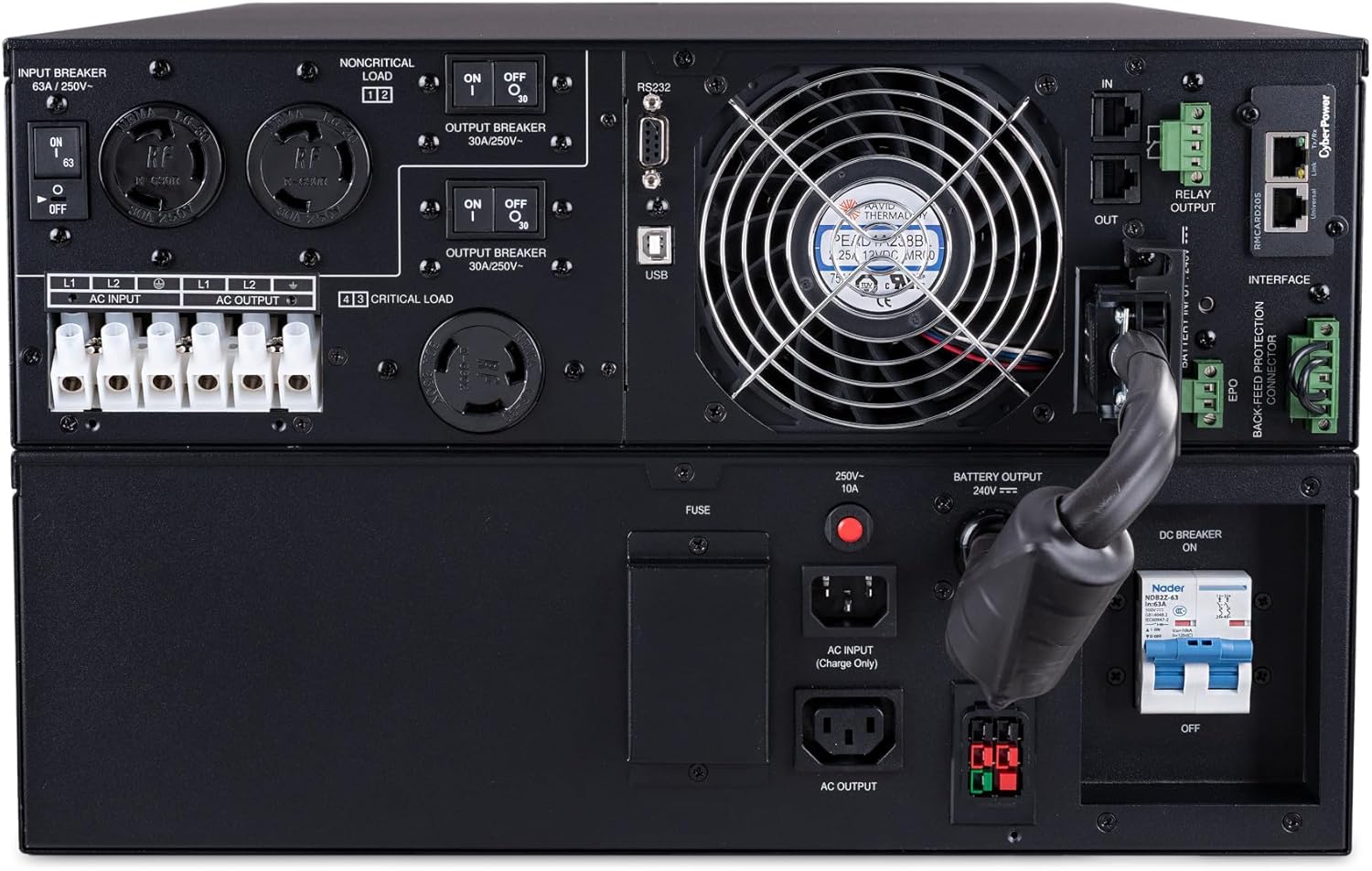
ചിത്രം: പിൻഭാഗം view of the CyberPower OL10KRT UPS, highlighting the input/output connections, including NEMA L6-30R outlets, hardwire terminal block, communication ports (USB, RS232, EPO), and cooling fan.
4.3 ആശയവിനിമയ സജ്ജീകരണം
The OL10KRT comes with a pre-installed RMCARD205 network card for remote monitoring and management. Connect an Ethernet cable to the network port on the RMCARD205. Use the provided USB or Serial (RS-232) cables to connect the UPS to a computer or server for local monitoring with PowerPanel Business Edition software.
The removable LCD control panel can be repositioned up to ten feet away using an optional DB-26 cable, providing flexible monitoring options.
5. ഓപ്പറേഷൻ
5.1 പവർ ഓൺ/ഓഫ്
- പവർ ഓണാക്കാൻ: Press and hold the power button on the front panel until the UPS beeps and the display illuminates.
- പവർ ഓഫ് ചെയ്യാൻ: Press and hold the power button until the UPS beeps and the display turns off. Ensure all connected equipment is safely shut down before powering off the UPS.
5.2 എൽസിഡി ഡിസ്പ്ലേയും സൂചകങ്ങളും
The LCD control panel provides real-time status information about the UPS, including input/output voltage, battery capacity, load level, and operational mode. Refer to the detailed user manual for a complete list of display messages and indicators.

ചിത്രം: ഒരു ക്ലോസ്-അപ്പ് view of the CyberPower OL10KRT UPS front panel, focusing on the LCD display which shows "CyberPower Battery Mode" and status indicators for Online, Battery, Bypass, Fault, and Replace Battery.
5.3 പ്രവർത്തന രീതികൾ
- ഓൺലൈൻ മോഡ്: The UPS provides continuous, clean power to connected equipment through double-conversion technology.
- ബാറ്ററി മോഡ്: When AC power fails, the UPS automatically switches to battery power to maintain operation.
- ബൈപാസ് മോഡ്: In case of an overload or internal fault, the UPS can automatically transfer to bypass mode, supplying utility power directly to connected equipment.
- ഗ്രീൻപവർ യുപിഎസ്™ ഇക്കോ മോഡ്: This energy-saving mode allows the UPS to achieve up to 97% efficiency by operating in bypass mode when utility power is stable, reducing power consumption and heat dissipation. The UPS will automatically switch to online mode if power quality degrades.
6. പരിപാലനം
6.1 Battery Management and Replacement
The Smart-battery management charging technology extends battery life by up to 50% through a three-stage charging process. Fast-charge technology allows batteries to reach 90% capacity within five hours, even with multiple EBMs connected.
When the "Replace Battery" indicator illuminates, it is time to replace the batteries. Contact CyberPower support or a certified technician for battery replacement to ensure safety and proper operation.
6.2 പൊതുവായ ശുചീകരണം
Periodically clean the exterior of the UPS with a soft, dry cloth. Ensure ventilation openings are free from dust and debris to maintain proper airflow and cooling.
7. പ്രശ്നപരിഹാരം
This section provides solutions to common issues. For more complex problems, contact CyberPower technical support.
| പ്രശ്നം | സാധ്യമായ കാരണം | പരിഹാരം |
|---|---|---|
| യുപിഎസ് ഓണാകുന്നില്ല. |
|
|
| UPS is in Battery Mode frequently. |
|
|
| "ബാറ്ററി മാറ്റിസ്ഥാപിക്കുക" സൂചകം ഓണാണ്. |
|
|
| യുപിഎസ് തുടർച്ചയായി ബീപ്പ് ചെയ്യുന്നു. |
|
|
8 സ്പെസിഫിക്കേഷനുകൾ
| മോഡൽ | OL10KRT |
| ശേഷി (VA/Wats) | 10000VA / 10000W |
| ടോപ്പോളജി | ഇരട്ട പരിവർത്തനം ഓൺലൈനിൽ |
| ഇൻപുട്ട് വോളിയംtage | 200-240V AC |
| Putട്ട്പുട്ട് വോളിയംtage | 200-240V AC (Sine Wave) |
| ഔട്ട്ലെറ്റുകൾ | 3 x NEMA L6-30R, 1 x Hardwire Terminal Block |
| ബാറ്ററികൾ | 20 x 12V Sealed Lead Acid (included) |
| ബാറ്ററി സെൽ കോമ്പോസിഷൻ | സീൽഡ് ലെഡ് ആസിഡ് |
| അളവുകൾ (D x W x H) | 26"D x 17"W x 10.5"H |
| ഇനത്തിൻ്റെ ഭാരം | 227 പൗണ്ട് |
| ആശയവിനിമയ തുറമുഖങ്ങൾ | USB, RS-232, EPO, SNMP (via RMCARD205) |
| നിർമ്മാതാവ് | സൈബർ പവർ സിസ്റ്റംസ് (യുഎസ്എ), ഇൻക്. |
| ആദ്യ തീയതി ലഭ്യമാണ് | ഓഗസ്റ്റ് 13, 2018 |

Image: Diagram showing the dimensions of the CyberPower OL10KRT UPS, indicating a depth of 26.00 inches, width of 17.00 inches, and height of 10.50 inches.
9. വാറൻ്റിയും പിന്തുണയും
The CyberPower OL10KRT comes with a 3 വർഷത്തെ വാറൻ്റി, ഇതിൽ ബാറ്ററികൾ ഉൾപ്പെടുന്നു. കൂടാതെ, ഇത് ഒരു കണക്റ്റഡ് എക്യുപ്മെന്റ് ഗ്യാരണ്ടി $300,000.
For technical assistance, warranty claims, or to download the PowerPanel Business Edition Management Software, please visit the official CyberPower webസൈറ്റ് അല്ലെങ്കിൽ അവരുടെ ഉപഭോക്തൃ പിന്തുണയുമായി ബന്ധപ്പെടുക.
Ask a question about this manual
Ask about setup, troubleshooting, compatibility, parts, safety, or missing instructions. Manuals+ will review the question and use this page’s manual context to help answer it.