
1. ആമുഖം
This manual provides comprehensive instructions for the installation, operation, and maintenance of your BrightSign XD1034 Expanded I/O Player. The XD1034 is an advanced digital signage media player designed for high-performance applications, featuring H.265 decoding, True 4K resolution support, dual video decode capabilities, and an advanced HTML5 engine with expanded input/output options.
ഉപകരണം പ്രവർത്തിപ്പിക്കുന്നതിന് മുമ്പ് ഈ മാനുവൽ നന്നായി വായിക്കുക, അതിന്റെ ശരിയായ ഉപയോഗം ഉറപ്പാക്കാനും അതിന്റെ പ്രകടനവും ദീർഘായുസ്സും പരമാവധിയാക്കാനും.
2 സുരക്ഷാ വിവരങ്ങൾ
ഉപകരണത്തിന് കേടുപാടുകൾ സംഭവിക്കാതിരിക്കാനോ സ്വയം പരിക്കേൽക്കാതിരിക്കാനോ ഇനിപ്പറയുന്ന സുരക്ഷാ മുൻകരുതലുകൾ പാലിക്കുക:
- ഉപകരണം വെള്ളത്തിലോ അമിതമായ ഈർപ്പത്തിലോ തുറന്നുകാട്ടരുത്.
- ഉപകരണം തുറക്കരുത് casing. എല്ലാ സേവനങ്ങളും യോഗ്യതയുള്ള ഉദ്യോഗസ്ഥർക്ക് റഫർ ചെയ്യുക.
- അമിതമായി ചൂടാക്കുന്നത് തടയാൻ ഉപകരണത്തിന് ചുറ്റും ശരിയായ വായുസഞ്ചാരം ഉറപ്പാക്കുക.
- ഉപകരണത്തിനൊപ്പം നൽകിയിട്ടുള്ള പവർ അഡാപ്റ്റർ മാത്രം ഉപയോഗിക്കുക.
- താപ സ്രോതസ്സുകൾക്ക് സമീപം അല്ലെങ്കിൽ നേരിട്ട് സൂര്യപ്രകാശത്തിൽ ഉപകരണം സ്ഥാപിക്കുന്നത് ഒഴിവാക്കുക.
3. പാക്കേജ് ഉള്ളടക്കം
നിങ്ങളുടെ പാക്കേജിൽ എല്ലാ ഇനങ്ങളും ഉണ്ടെന്ന് ഉറപ്പാക്കുക:
- BrightSign XD1034 Player Unit
- പവർ അഡാപ്റ്റർ
- ദ്രുത ആരംഭ ഗൈഡ്
- Mounting Bracket (optional, may vary by region)
4. ഉൽപ്പന്നം കഴിഞ്ഞുview
The BrightSign XD1034 features a robust set of connectivity options for various digital signage applications.
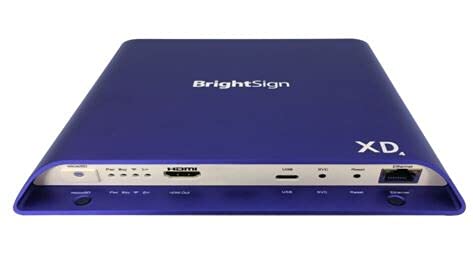
ചിത്രം 1: മുന്നിലും പിന്നിലും view of the BrightSign XD1034 player, showing various ports and indicators.
ഫ്രണ്ട് പാനൽ
- സ്റ്റാറ്റസ് LED: Indicates power and operational status.
- USB പോർട്ടുകൾ: For connecting peripherals like touchscreens, keyboards, or storage devices.
പിൻ പാനൽ
- പവർ ഇൻപുട്ട്: വിതരണം ചെയ്ത പവർ അഡാപ്റ്ററുമായി ബന്ധിപ്പിക്കുന്നു.
- HDMI ഔട്ട്പുട്ട്: Connects to a display for video and audio output.
- ഇഥർനെറ്റ് പോർട്ട്: For network connectivity (LAN).
- ഓഡിയോ Outട്ട്: 3.5mm jack for analog audio output.
- RS-232 സീരിയൽ പോർട്ട്: 3.5mm jack for serial control.
- ഐആർ ഇൻ/ഔട്ട്: 3.5mm jack for infrared control.
- മൈക്രോ എസ്ഡി കാർഡ് സ്ലോട്ട്: For content storage.
5. സജ്ജീകരണം
5.1 ബന്ധിപ്പിക്കുന്ന പവർ
- Connect the power adapter to the DC IN port on the rear of the XD1034.
- Plug the power adapter into a suitable electrical outlet. The device will power on automatically.
5.2 വീഡിയോ putട്ട്പുട്ട്
Connect an HDMI cable from the HDMI OUT port on the XD1034 to the HDMI input on your display device (monitor, TV, projector).
5.3 ഓഡിയോ putട്ട്പുട്ട്
For analog audio, connect a 3.5mm audio cable from the AUDIO OUT port on the XD1034 to your audio system. Digital audio is transmitted via the HDMI cable.
5.4 നെറ്റ്വർക്ക് കണക്ഷൻ
Connect an Ethernet cable from the ETHERNET port on the XD1034 to your network router or switch for internet and local network access.
5.5 USB and Serial Connections
Connect USB peripherals (e.g., keyboard, mouse, touch screen, external storage) to the USB ports. Use the RS-232 port for serial control of external devices, and the IR In/Out for infrared control.
6. പ്രവർത്തന നിർദ്ദേശങ്ങൾ
6.1 അടിസ്ഥാന പ്രവർത്തനം
The BrightSign XD1034 operates by playing content stored on a microSD card or delivered via a network. Content is typically created and published using BrightAuthor software.
- മൈക്രോ എസ്ഡി കാർഡ് ചേർക്കുക: Insert a microSD card containing your BrightAuthor presentation into the MicroSD card slot.
- പവർ ഓൺ: Connect the power adapter. The player will boot up and automatically begin playing the presentation.
- സ്റ്റാറ്റസ് LED: Observe the Status LED for operational feedback. A solid green light typically indicates normal operation.
6.2 Content Deployment
Content can be deployed to the XD1034 via:
- പ്രാദേശിക സംഭരണം: Prepare a microSD card with your presentation using BrightAuthor.
- Network Publishing: Publish presentations over a local network or BrightSign Network. Refer to the BrightAuthor documentation for detailed steps.
6.3 വിപുലമായ സവിശേഷതകൾ
The XD1034 supports advanced features including:
- True 4K Playback: Supports 4K resolution video playback for stunning visual quality.
- H.265 Decoding: Efficient video compression for high-quality content with smaller file വലിപ്പങ്ങൾ.
- Advanced HTML5: Capable of rendering complex HTML5 content, including interactive experiences and web-അടിസ്ഥാന പ്രയോഗങ്ങൾ.
- Expanded I/O: Utilize the RS-232, IR, and USB ports for interactive controls, external device synchronization, and more.
7. പരിപാലനം
7.1 വൃത്തിയാക്കൽ
To clean the device, disconnect it from power and wipe the exterior with a soft, dry cloth. Do not use liquid cleaners or abrasive materials.
7.2 ഫേംവെയർ അപ്ഡേറ്റുകൾ
Regularly check the BrightSign website for firmware updates. Keeping your player's firmware up-to-date ensures optimal performance, security, and access to new features. Firmware updates can typically be applied via BrightAuthor or through network publishing.
8. പ്രശ്നപരിഹാരം
| പ്രശ്നം | സാധ്യമായ കാരണം | പരിഹാരം |
|---|---|---|
| വീഡിയോ ഔട്ട്പുട്ട് ഇല്ല | Loose HDMI cable, incorrect display input, no content on SD card. | Check HDMI connection. Ensure display is on correct input. Verify SD card has valid presentation. |
| Player not powering on | Power adapter not connected, faulty outlet. | പവർ അഡാപ്റ്റർ സുരക്ഷിതമായി ബന്ധിപ്പിച്ചിട്ടുണ്ടെന്നും പ്രവർത്തിക്കുന്ന ഒരു ഔട്ട്ലെറ്റിൽ പ്ലഗ് ചെയ്തിട്ടുണ്ടെന്നും ഉറപ്പാക്കുക. |
| നെറ്റ്വർക്ക് കണക്ഷൻ പ്രശ്നങ്ങൾ | Loose Ethernet cable, incorrect network settings. | Check Ethernet cable connection. Verify network configuration in BrightAuthor. |
| Content not playing | Corrupt SD card, incorrect presentation settings, unsupported media format. | Re-prepare SD card. Review presentation settings in BrightAuthor. Ensure media formats are supported. |
9 സ്പെസിഫിക്കേഷനുകൾ
| ഫീച്ചർ | വിശദാംശങ്ങൾ |
|---|---|
| മോഡൽ | XD1034 |
| ഉൽപ്പന്ന അളവുകൾ | 7.1 x 8 x 0.9 ഇഞ്ച് |
| ഇനത്തിൻ്റെ ഭാരം | 2.35 പൗണ്ട് |
| റെസലൂഷൻ | Up to 3840x2160 (4K) |
| വീഡിയോ ഡീകോഡിംഗ് | H.265, Dual Video Decode |
| കണക്റ്റിവിറ്റി | Ethernet, USB (Type A and Type C), HDMI, 3.5mm RS-232 Serial Port, 3.5mm IR In/Out, 3.5mm Audio Out |
| മീഡിയ തരം | Video, HTML5 |
| പ്രത്യേക ഫീച്ചർ | Compact, Advanced HTML5 |
10. വാറൻ്റിയും പിന്തുണയും
For warranty information and technical support, please refer to the official BrightSign website or contact your authorized BrightSign reseller. Keep your purchase receipt for warranty claims.
BrightSign Official Webസൈറ്റ്: www.brightsign.biz