
1. ആമുഖം
This user manual provides detailed instructions for the installation, configuration, and operation of the Tenda TEG1124P-24-250W Unmanaged Gigabit PoE Ethernet Switch. Please read this manual thoroughly before using the device to ensure proper setup and optimal performance. Keep this manual for future reference.
2. ഉൽപ്പന്നം കഴിഞ്ഞുview
2.1 പ്രധാന സവിശേഷതകൾ
- 24 Gigabit Ethernet Ports (10/100/1000 Mbps)
- Power over Ethernet (PoE) support on all 24 ports
- Unmanaged switch for plug-and-play simplicity
- Total PoE power budget of 250 Watts
- ഈടുനിൽക്കുന്ന ലോഹം സിasing for robust performance
- Compatible with various PoE-powered devices such as IP cameras
2.2 പാക്കേജ് ഉള്ളടക്കം
- Tenda TEG1124P-24-250W Unmanaged Gigabit PoE Ethernet Switch
- റാക്ക് മ Mount ണ്ട് കിറ്റ്
- 4 കാൽ പാഡുകൾ
- പവർ കോർഡ്
- ദ്രുത ഇൻസ്റ്റലേഷൻ ഗൈഡ്
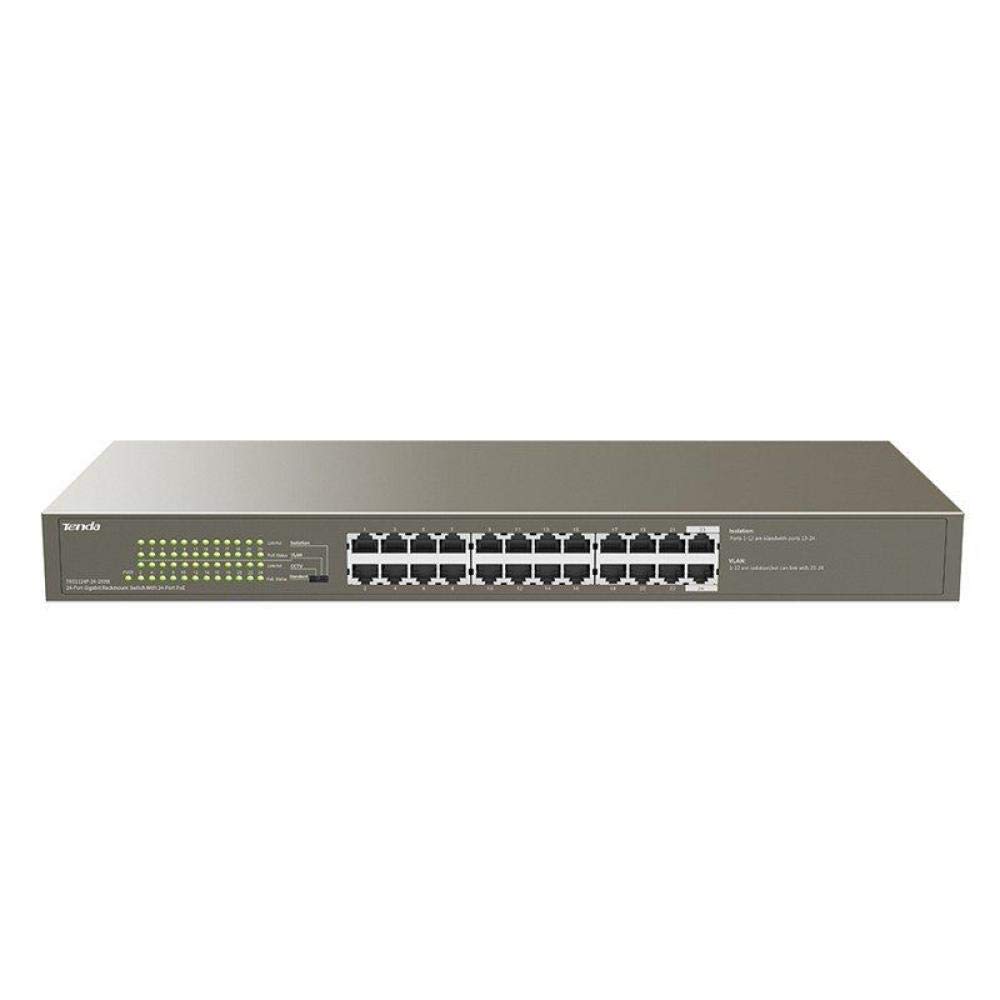
ചിത്രം 1: മുൻഭാഗം view of the Tenda TEG1124P-24-250W Unmanaged Gigabit PoE Ethernet Switch, showing 24 RJ45 ports and LED indicators.
3. സജ്ജീകരണം
3.1 ഫിസിക്കൽ ഇൻസ്റ്റലേഷൻ
The Tenda TEG1124P-24-250W switch can be installed on a desktop or mounted in a standard 19-inch equipment rack.
- ഡെസ്ക്ടോപ്പ് പ്ലേസ്മെന്റ്: Attach the included rubber foot pads to the bottom of the switch. Place the switch on a flat, stable surface with adequate ventilation.
- റാക്ക് മൗണ്ടിംഗ്: Use the provided rack mount brackets and screws to secure the switch into a standard 19-inch equipment rack. Ensure proper airflow around the device.

Figure 2: Diagram illustrating the dimensions of the Tenda TEG1124P-24-250W switch: approximately 24.64 cm length, 16.51 cm width, and 2.79 cm height.
3.2 ഉപകരണങ്ങൾ ബന്ധിപ്പിക്കുന്നു
- പവർ കണക്ഷൻ: Connect the provided power cord to the power inlet on the rear panel of the switch and then to a suitable power outlet.
- നെറ്റ്വർക്ക് ഉപകരണങ്ങൾ: Connect your network devices (e.g., computers, servers, NVRs) to any of the 24 RJ45 ports using standard Ethernet cables.
- PoE ഉപകരണങ്ങൾ: For Power over Ethernet (PoE) compatible devices (e.g., IP cameras, VoIP phones, wireless access points), connect them to any of the 24 RJ45 ports. The switch will automatically detect and provide power to these devices if they are PoE compliant and within the switch's power budget.
4. പ്രവർത്തന നിർദ്ദേശങ്ങൾ
4.1 പവർ ചെയ്യുന്നു
After connecting the power cord, the switch will automatically power on. The Power LED indicator on the front panel should illuminate, indicating that the device is receiving power.
4.2 LED സൂചകങ്ങൾ
The front panel of the switch features LED indicators to provide status information:
- പവർ എൽഇഡി: Illuminates when the switch is powered on.
- ലിങ്ക്/ആക്റ്റ് LED-കൾ (ഓരോ പോർട്ടിലും):
- കട്ടിയുള്ള പച്ച: A stable network link is established.
- മിന്നുന്ന പച്ച: പോർട്ട് വഴിയാണ് ഡാറ്റ കൈമാറുകയോ സ്വീകരിക്കുകയോ ചെയ്യുന്നത്.
- ഓഫ്: നെറ്റ്വർക്ക് ലിങ്കൊന്നും കണ്ടെത്തിയില്ല.
- PoE Status LEDs (per port):
- കട്ടിയുള്ള മഞ്ഞ: ബന്ധിപ്പിച്ച ഉപകരണത്തിലേക്ക് PoE പവർ വിതരണം ചെയ്യുന്നു.
- മിന്നുന്ന മഞ്ഞ: PoE power fault or overload detected.
- ഓഫ്: No PoE device connected or no power being supplied.
4.3 PoE Functionality
The TEG1124P-24-250W switch automatically detects and supplies power to IEEE 802.3af/at compliant Powered Devices (PDs) connected to its ports. It is an unmanaged switch, meaning no configuration is required for basic network and PoE operation. The total power budget for PoE is 250W. Ensure that the total power consumption of all connected PoE devices does not exceed this limit.
5. പരിപാലനം
To ensure the longevity and reliable operation of your Tenda switch, follow these maintenance guidelines:
- വൃത്തിയാക്കൽ: മൃദുവായതും ഉണങ്ങിയതുമായ തുണി ഉപയോഗിച്ച് സ്വിച്ചിന്റെ പുറംഭാഗം പതിവായി വൃത്തിയാക്കുക. ലിക്വിഡ് അല്ലെങ്കിൽ എയറോസോൾ ക്ലീനറുകൾ ഉപയോഗിക്കരുത്. വെന്റിലേഷൻ ഓപ്പണിംഗുകൾ പൊടിയിൽ നിന്നും തടസ്സങ്ങളിൽ നിന്നും മുക്തമാണെന്ന് ഉറപ്പാക്കുക.
- വെൻ്റിലേഷൻ: അമിതമായി ചൂടാകുന്നത് തടയാൻ സ്വിച്ച് നന്നായി വായുസഞ്ചാരമുള്ള സ്ഥലത്ത് സ്ഥാപിച്ചിട്ടുണ്ടെന്ന് ഉറപ്പാക്കുക. വെന്റിലേഷൻ ദ്വാരങ്ങൾ അടയ്ക്കരുത്.
- പരിസ്ഥിതി വ്യവസ്ഥകൾ: Operate the switch within the recommended temperature and humidity ranges specified in the product specifications.
- കേബിൾ മാനേജുമെന്റ്: ആകസ്മികമായ വിച്ഛേദങ്ങളോ കേടുപാടുകളോ തടയുന്നതിന് നെറ്റ്വർക്ക് കേബിളുകൾ ക്രമീകരിച്ച് ശരിയായി സുരക്ഷിതമായി സൂക്ഷിക്കുക.
6. പ്രശ്നപരിഹാരം
If you encounter issues with your Tenda TEG1124P-24-250W switch, refer to the following common problems and solutions:
- ശക്തിയില്ല:
- പവർ കോർഡ് സ്വിച്ചിലേക്കും പ്രവർത്തിക്കുന്ന ഒരു പവർ ഔട്ട്ലെറ്റിലേക്കും സുരക്ഷിതമായി ബന്ധിപ്പിച്ചിട്ടുണ്ടെന്ന് ഉറപ്പാക്കുക.
- മറ്റൊരു ഉപകരണം പ്ലഗ് ഇൻ ചെയ്ത് പവർ ഔട്ട്ലെറ്റ് പ്രവർത്തനക്ഷമമാണെന്ന് ഉറപ്പാക്കുക.
- Check the Power LED on the front panel. If it is off, contact technical support.
- നെറ്റ്വർക്ക് കണക്റ്റിവിറ്റി ഇല്ല:
- Check the Link/Act LED for the connected port. If it is off, ensure the Ethernet cable is properly connected at both ends.
- മറ്റൊരു ഇതർനെറ്റ് കേബിളോ പോർട്ടോ പരീക്ഷിക്കുക.
- Verify that the connected device (e.g., computer, router) is powered on and functioning correctly.
- PoE ഉപകരണം ഓണാക്കുന്നില്ല:
- Check the PoE Status LED for the connected port. If it is off, ensure the device is PoE compliant (IEEE 802.3af/at).
- If the PoE LED is flashing yellow, there might be a power fault or overload. Disconnect other PoE devices to reduce the total power load.
- Ensure the connected PoE device is not drawing more power than the switch can provide per port or exceeding the total 250W budget.
- Try connecting the PoE device to a different port.
7 സ്പെസിഫിക്കേഷനുകൾ
| ഫീച്ചർ | വിവരണം |
|---|---|
| ബ്രാൻഡ് നാമം | ടെൻഡ |
| മോഡൽ നമ്പർ | TEG1124P-24-250W |
| Product Type Name | നെറ്റ്വർക്ക് സ്വിച്ച് |
| തുറമുഖങ്ങളുടെ എണ്ണം | 24 |
| സ്വിച്ച് തരം | Unmanaged PoE |
| ഡാറ്റ കൈമാറ്റ നിരക്ക് | 1000 Mbps (ഗിഗാബൈറ്റ്) |
| ഉപയോക്തൃ ഇൻ്റർഫേസ് | ആർജെ45, പിഒഇ |
| Maximum PoE Power | 250 വാട്ട്സ് |
| Case Material Type | ലോഹം |
| നിറം | ചാരനിറം |
| അനുയോജ്യമായ ഉപകരണങ്ങൾ | ക്യാമറ |
| ഉൽപ്പന്ന അളവുകൾ (L x W x H) | 24.6 സെ.മീ x 16.5 സെ.മീ x 2.8 സെ.മീ |
| ഇനത്തിൻ്റെ ഭാരം | 3434 ഗ്രാം |
8. വാറൻ്റിയും പിന്തുണയും
For warranty information and technical support, please refer to the warranty card included with your product or visit the official Tenda webസൈറ്റ്. സഹായത്തിനായി നിങ്ങളുടെ പ്രാദേശിക വിതരണക്കാരനെയോ റീസെല്ലറെയോ ബന്ധപ്പെടാവുന്നതാണ്.