
1. ആമുഖം
Thank you for choosing the Green Extreme Dual Smart Charger. This charger is designed to efficiently and reliably charge two Sony NP-FZ100 batteries simultaneously. Featuring an intuitive LCD screen, it provides real-time charging status, ensuring your camera batteries are always ready for use. Its universal power input allows for flexible charging from various power sources, making it ideal for both studio and on-location photography.
2 സുരക്ഷാ വിവരങ്ങൾ
- ഉപയോഗിക്കുന്നതിന് മുമ്പ് എല്ലാ നിർദ്ദേശങ്ങളും വായിക്കുക.
- ചാർജർ മഴയിലോ ഈർപ്പത്തിലോ തുറന്നുകാട്ടരുത്.
- Do not disassemble the charger. Refer servicing to qualified personnel.
- Use only with compatible batteries (Sony NP-FZ100 or other batteries with appropriate plates).
- Avoid charging damaged or leaking batteries.
- കുട്ടികൾക്ക് ലഭ്യമാകാതെ സൂക്ഷിക്കുക.
- ഉപയോഗത്തിലില്ലാത്തപ്പോൾ പവർ ഉറവിടത്തിൽ നിന്ന് ചാർജർ അൺപ്ലഗ് ചെയ്യുക.
3. പാക്കേജ് ഉള്ളടക്കം
- Green Extreme Dual Smart Charger Unit
- എസി പവർ കോർഡ്
- DC Car Charger Adapter
- NP-FZ100 Battery Plates (pre-installed or included separately)
4. ഉൽപ്പന്നം കഴിഞ്ഞുview
Familiarize yourself with the components of your Green Extreme Dual Smart Charger.
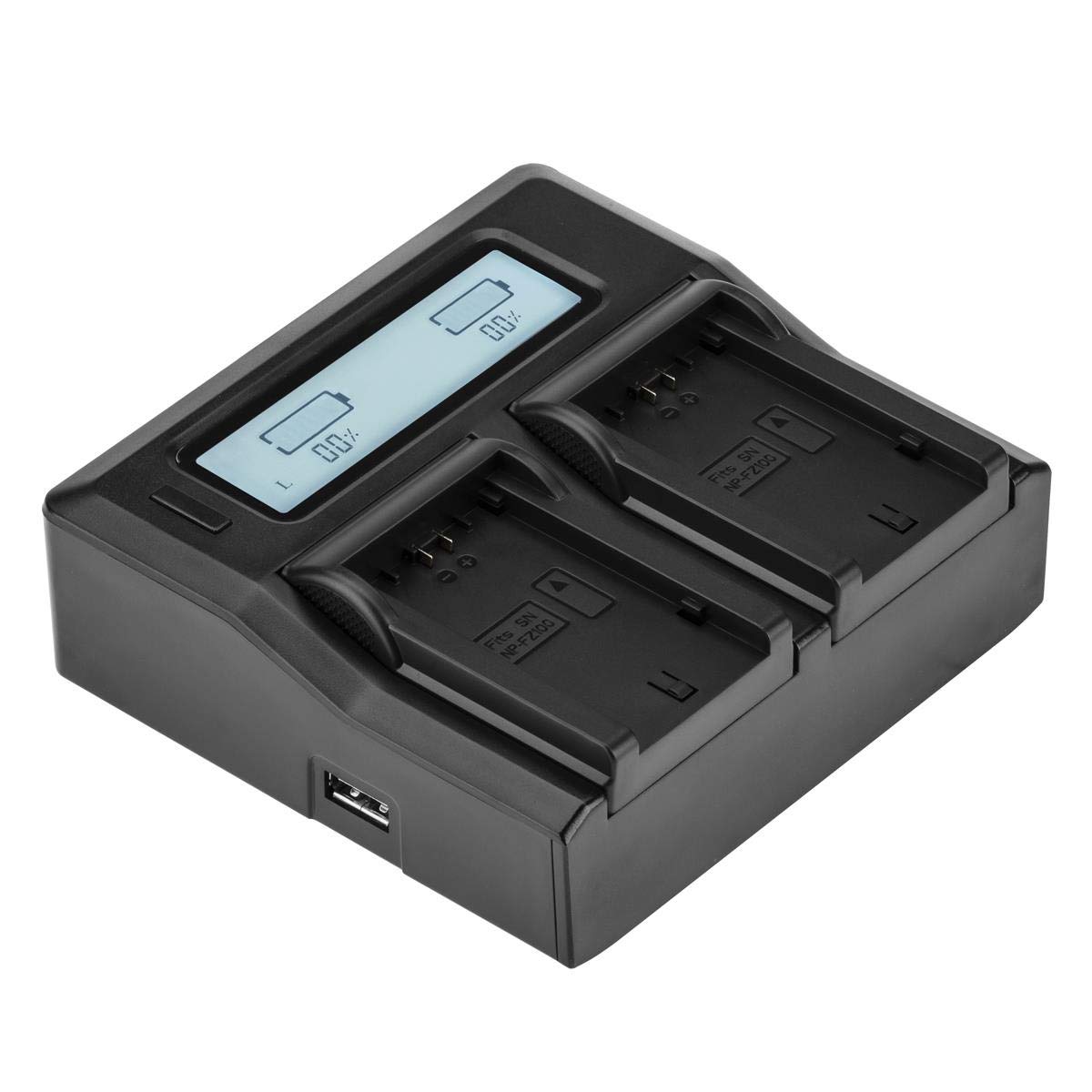
ചിത്രം 4.1: മുകളിൽ view of the Green Extreme Dual Smart Charger, showing the LCD screen and two charging bays.

ചിത്രം 4.2: The charger unit with two NP-FZ100 battery plates installed in the charging bays.

ചിത്രം 4.3: ഒരു ക്ലോസപ്പ് view of a single NP-FZ100 battery plate, showing the battery contacts and model designation.

ചിത്രം 4.4: Demonstration of how to correctly insert or remove a battery plate from the charger bay.

ചിത്രം 4.5: Close-up of the power input ports on the side of the charger, including the AC and DC inputs.
5. സജ്ജീകരണം
- Install Battery Plates: Ensure the correct battery plates for Sony NP-FZ100 are securely installed in both charging bays. If not, align the plate with the bay and slide it into place until it clicks.
- പവർ ബന്ധിപ്പിക്കുക:
- എസി പവർ: Connect the provided AC power cord to the charger's AC input port and then to a standard wall outlet (110-240V).
- ഡിസി പവർ: For in-vehicle charging, connect the provided DC car charger adapter to the charger's DC input port and then to your vehicle's 12-24V accessory socket.
- The LCD screen will illuminate, indicating the charger is powered on.
6. പ്രവർത്തന നിർദ്ദേശങ്ങൾ
6.1 ചാർജിംഗ് ബാറ്ററികൾ
- With the charger powered on, carefully insert one or two Sony NP-FZ100 batteries into the installed battery plates. Ensure the battery contacts align correctly with the plate contacts.
- The charger will automatically detect the battery and begin the charging process.
- Monitor the LCD screen for charging status.

ചിത്രം 6.1: The charger with two NP-FZ100 batteries inserted, displaying their charge status on the LCD screen.
6.2 എൽസിഡി ഡിസ്പ്ലേ വിവരങ്ങൾ
The backlit LCD screen provides clear, real-time information about the charging process:
- ശതമാനം ഈടാക്കുകtage: Displays the current charge level of each battery numerically.
- Charge Bar Indicator: A graphical bar fills up as the battery charges, providing a quick visual reference.
- ചാർജിംഗ് നില: The display will indicate when charging is active and when a battery is fully charged.
6.3 Universal Voltagഇ കണ്ടെത്തൽ
The charger features intelligent design that automatically detects and adjusts to the voltage of the attached battery. This ensures optimal and safe charging for compatible battery types when using the correct battery plates.
7. പരിപാലനം
- വൃത്തിയാക്കൽ: Disconnect the charger from power before cleaning. Use a soft, dry cloth to wipe the exterior. Do not use liquid cleaners or solvents.
- സംഭരണം: നേരിട്ടുള്ള സൂര്യപ്രകാശത്തിൽ നിന്നും തീവ്രമായ താപനിലയിൽ നിന്നും മാറി തണുത്തതും വരണ്ടതുമായ സ്ഥലത്ത് ചാർജർ സൂക്ഷിക്കുക.
- Battery Plates: Ensure battery plates are free from dust and debris to maintain good contact with batteries.
8. പ്രശ്നപരിഹാരം
- ചാർജർ ഓണാക്കുന്നില്ല: Ensure the power cord is securely connected to both the charger and the power outlet/vehicle socket. Try a different outlet or power source.
- ബാറ്ററി ചാർജ്ജുചെയ്യുന്നില്ല: Verify that the battery is correctly inserted and making proper contact with the battery plate. Ensure the battery is compatible and not damaged. Check if the battery plate is securely installed.
- എൽസിഡി ഡിസ്പ്ലേ പ്രവർത്തിക്കുന്നില്ല: If the charger is powered on but the LCD is blank, try disconnecting and reconnecting the power. If the issue persists, contact customer support.
- വേഗത കുറഞ്ഞ ചാർജിംഗ്: Ensure you are using a stable power source. Charging speed can vary based on battery condition and ambient temperature.
9 സ്പെസിഫിക്കേഷനുകൾ
| മോഡൽ നമ്പർ | NP-FZ100 Charger |
| ഇൻപുട്ട് വോളിയംtage | എസി 110-240V, ഡിസി 12-24V |
| Putട്ട്പുട്ട് വോളിയംtage | 7.4 Volts (auto-detect) |
| ഉൽപ്പന്ന അളവുകൾ | 7 x 4.8 x 1.7 ഇഞ്ച് |
| ഇനത്തിൻ്റെ ഭാരം | 14.1 ഔൺസ് |
| സർട്ടിഫിക്കേഷനുകൾ | UL, CE, FCC |
10. വാറൻ്റിയും പിന്തുണയും
Green Extreme products are manufactured to high-quality standards. For warranty information, technical support, or service inquiries, please contact Green Extreme customer support through the retailer where the product was purchased or visit the official Green Extreme webസൈറ്റ്.