
1. ആമുഖം
The Renogy Rover 40A MPPT Solar Charge Controller is designed to optimize the power output from your solar panels to efficiently charge your battery bank. Utilizing Maximum Power Point Tracking (MPPT) technology, it ensures maximum energy harvest from your solar array. This controller is compatible with 12V/24V DC systems and supports various battery types including AGM, Gel, and Lithium. It features an LCD screen for system information display and offers remote monitoring capabilities via an optional Bluetooth module.
2 പ്രധാന സവിശേഷതകൾ
- പരമാവധി പവർ പോയിന്റ് ട്രാക്കിംഗ് (MPPT): Ensures optimal power extraction from solar modules, achieving up to 99% tracking efficiency and 98% conversion efficiency.
- ഓട്ടോമാറ്റിക് സിസ്റ്റം വോളിയംtagഇ കണ്ടെത്തൽ: Automatically detects 12V/24V DC system voltages (Lithium batteries require manual setting).
- വിജ്ഞാനപ്രദമായ LCD ഡിസ്പ്ലേ: Provides real-time solar charging and battery operation information, customizable parameters, and error codes.
- വിപുലമായ 4-എസ്tagഇ ചാർജിംഗ്: Offers Bulk, Boost, Float, and Equalization charging for lead-acid batteries, and 2-stage charging (Bulk and Boost) with lithium reactivation for lithium batteries.
- Comprehensive System Protection: Features self-diagnosis functions to protect against reverse polarity, overcharging, over-discharging, short circuits, and reverse current.
- റിമോട്ട് മോണിറ്ററിംഗ്: Equipped with an RS232 communication port for connection to the Renogy BT-1 Bluetooth module, enabling monitoring via the Renogy DC Home app.
3. ഉൽപ്പന്നം കഴിഞ്ഞുview

ഫ്രണ്ട് view of the Renogy Rover 40A MPPT Solar Charge Controller.

The LCD screen and multiple LEDs display system operating information, including battery voltage, charging status, and error codes.

പിൻഭാഗം view showing the product label with model and version number (e.g., V010408).

The RS232 port allows communication with an optional Renogy BT-1 Bluetooth Module for remote monitoring.
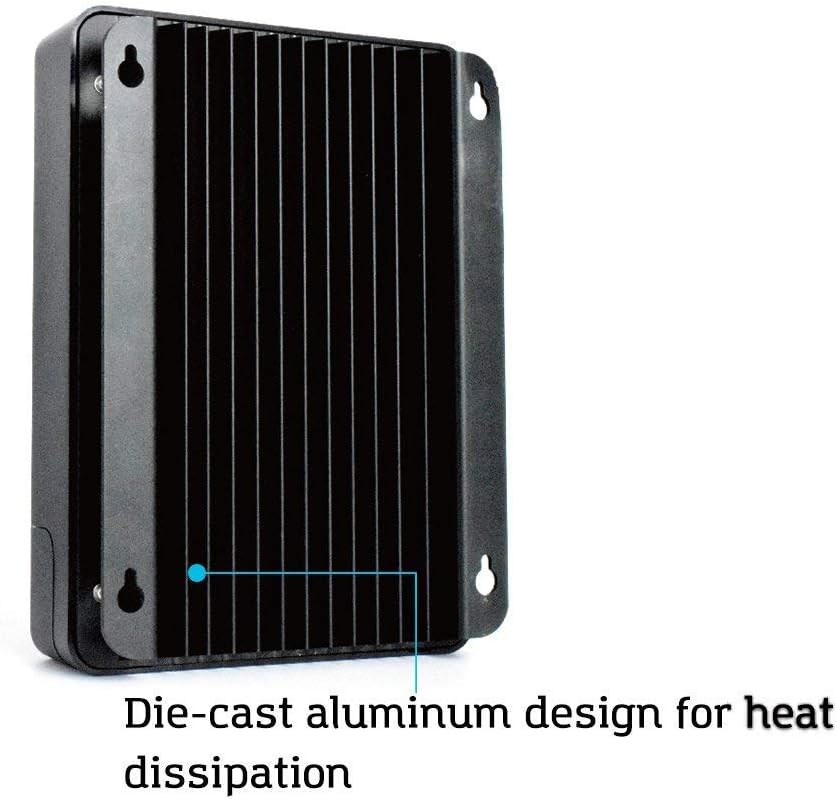
Die-cast aluminum design with fins for efficient heat dissipation, ensuring optimal performance and longevity.

The Renogy BT-1 Bluetooth Module, used for wireless monitoring of the charge controller via a mobile app.
4. സജ്ജീകരണവും ഇൻസ്റ്റാളേഷനും
4.1 സുരക്ഷാ മുൻകരുതലുകൾ
- Ensure all connections are tight to avoid loose connections which can cause excessive heat.
- Install the controller indoors in a well-ventilated area, away from direct sunlight, high temperatures, and water.
- Connect the battery first, then the load, and finally the solar panel. Disconnect in the reverse order.
- Use appropriate circuit breakers or fuses for the battery, solar panel, and load circuits.
4.2 കൺട്രോളർ മൌണ്ട് ചെയ്യുന്നു
Mount the controller vertically on a solid surface, ensuring adequate airflow around the unit for heat dissipation. Maintain a minimum clearance of 6 inches (15 cm) above and below the controller.
4.3 Wiring Sequence
- Connect the battery to the controller's BAT+ and BAT- terminals. Observe correct polarity.
- Connect the DC load to the controller's LOAD+ and LOAD- terminals (if applicable). Observe correct polarity.
- Connect the solar panel to the controller's PV+ and PV- terminals. Observe correct polarity.
- If using the BT-1 Bluetooth module, connect it to the RS232 port.
5. പ്രവർത്തന നിർദ്ദേശങ്ങൾ
5.1 LCD Display and Button Functions
The integrated LCD screen displays various system parameters such as battery voltage, ചാർജിംഗ് കറന്റ്, സോളാർ പാനൽ വോളിയംtage, and load status. Use the buttons below the screen to navigate through the display menus and adjust settings.
- മുകളിലേക്ക്/താഴ്ന്ന ബട്ടണുകൾ: Navigate through display screens and adjust parameter values.
- എന്റർ ബട്ടൺ: Confirm selections or enter setting modes.
- ESC ബട്ടൺ: Exit setting modes or return to the previous screen.
5.2 ബാറ്ററി തരം തിരഞ്ഞെടുക്കൽ
The controller automatically detects 12V/24V systems. For lithium batteries, the battery type must be manually selected through the LCD menu to ensure proper charging algorithms. Refer to the detailed manual for specific steps on setting battery parameters.
5.3 Remote Monitoring (with BT-1 Module)
Once the BT-1 Bluetooth module is connected, download the Renogy DC Home app on your smartphone. Pair your device with the controller to monitor real-time system data, view historical performance, and adjust certain parameters remotely.
6. പരിപാലനം
പതിവ് അറ്റകുറ്റപ്പണികൾ നിങ്ങളുടെ സോളാർ ചാർജ് കൺട്രോളറിന്റെ ദീർഘായുസ്സും ഒപ്റ്റിമൽ പ്രകടനവും ഉറപ്പാക്കുന്നു.
- കണക്ഷനുകൾ പരിശോധിക്കുക: എല്ലാ വയറിംഗ് കണക്ഷനുകളും സുരക്ഷിതമാണെന്നും തുരുമ്പെടുക്കലിൽ നിന്ന് മുക്തമാണെന്നും ഉറപ്പാക്കാൻ ഇടയ്ക്കിടെ പരിശോധിക്കുക.
- ശുചിത്വം: കൺട്രോളർ വൃത്തിയായും പൊടിയും അവശിഷ്ടങ്ങളും ഇല്ലാതെയും സൂക്ഷിക്കുക. വൃത്തിയാക്കാൻ ഉണങ്ങിയ തുണി ഉപയോഗിക്കുക.
- വെൻ്റിലേഷൻ: Ensure that the area around the controller remains unobstructed to allow for proper heat dissipation.
- ഫേംവെയർ അപ്ഡേറ്റുകൾ: Check the Renogy website for any available firmware updates for your controller.
7. പ്രശ്നപരിഹാരം
If you encounter issues with your Renogy Rover 40A MPPT Solar Charge Controller, refer to the following common troubleshooting steps:
- ഡിസ്പ്ലേ/പവർ ഇല്ല: Check battery connections and ensure the battery voltage പ്രവർത്തന പരിധിയിലാണ്.
- ചാർജിംഗ് ഇല്ല: Verify solar panel connections, ensure panels are receiving adequate sunlight, and check for any shading. Confirm solar panel voltage is above battery voltage.
- ലോഡ് പ്രവർത്തിക്കുന്നില്ല: Check load connections, ensure the load is not exceeding the controller's rated current, and verify load settings on the LCD.
- പിശക് കോഡുകൾ: Consult the detailed manual for a list of specific error codes displayed on the LCD and their corresponding solutions.
- ബ്ലൂടൂത്ത് കണക്റ്റിവിറ്റി പ്രശ്നങ്ങൾ: Ensure the BT-1 module is properly connected, Bluetooth is enabled on your device, and you are within range.
8 സ്പെസിഫിക്കേഷനുകൾ
| ആട്രിബ്യൂട്ട് | മൂല്യം |
|---|---|
| മോഡൽ | MPPT 40A+BT |
| ബ്രാൻഡ് | റെനോജി |
| നിറം | നീറോ |
| വാല്യംtage | 12 Volt (CC) |
| ഉൽപ്പന്ന അളവുകൾ (LxWxH) | 23.8L x 17.3l x 72.5H cm |
| മെറ്റീരിയൽ | പ്ലാസ്റ്റിക് |
| യു.പി.സി | 816360029649 |
| ഭാഗം നമ്പർ | RNG-CTRL-RVR40-BT-DE |
| ഘടകങ്ങൾ ഉൾപ്പെടുത്തിയിട്ടുണ്ട് | Regolatore di carica con modulo Bluetooth |
| മാതൃരാജ്യം | സിന |
| ഡിസ്പ്ലേ തരം | എൽസിഡി |
| ഇനത്തിൻ്റെ ഭാരം | 2.45 കിലോഗ്രാം |
9. വാറൻ്റിയും പിന്തുണയും
Renogy products are backed by a limited warranty. For detailed warranty information, product registration, and technical support, please visit the official Renogy webസൈറ്റിൽ ബന്ധപ്പെടുക അല്ലെങ്കിൽ അവരുടെ ഉപഭോക്തൃ സേവനവുമായി ബന്ധപ്പെടുക. വാറന്റി ക്ലെയിമുകൾക്കായി നിങ്ങളുടെ വാങ്ങൽ രസീത് സൂക്ഷിക്കുക.
For further assistance, please refer to the contact information provided on the Renogy official webസൈറ്റ്: www.renogy.com