
Technical Pro RX113+(2) HC85
Technical Pro RX113BT Home Theater System User Manual
Model: RX113+(2) HC85
ആമുഖം
This manual provides comprehensive instructions for the setup, operation, and maintenance of your Technical Pro RX113BT 1500w Home Theater Amplifier Receiver and RockvilIe HC85 8" In-Ceiling Speakers. Please read this manual thoroughly before using the product to ensure proper functionality and safety.
പാക്കേജ് ഉള്ളടക്കം
താഴെ ലിസ്റ്റ് ചെയ്തിരിക്കുന്ന എല്ലാ ഇനങ്ങളും നിങ്ങളുടെ പാക്കേജിൽ ഉൾപ്പെടുത്തിയിട്ടുണ്ടെന്ന് ഉറപ്പാക്കുക:
- (1) Technical Pro RX113BT 1500w Bluetooth Home Receiver Ampജീവപര്യന്തം Amp with 10 Band EQ
- (2) Pairs of RockvilIe HC85 8" Inch 700 Watt In-Ceiling Home Theater Speakers (4 speakers total)
- Rack Ears (detachable)
- Feet attached to bottom of receiver
- വിദൂര ആന്റിന
- ഉടമസ്ഥരുടെ മാനുവൽ (ഈ പ്രമാണം)
- പവർ പ്ലഗ്
- റിമോട്ട് കൺട്രോൾ
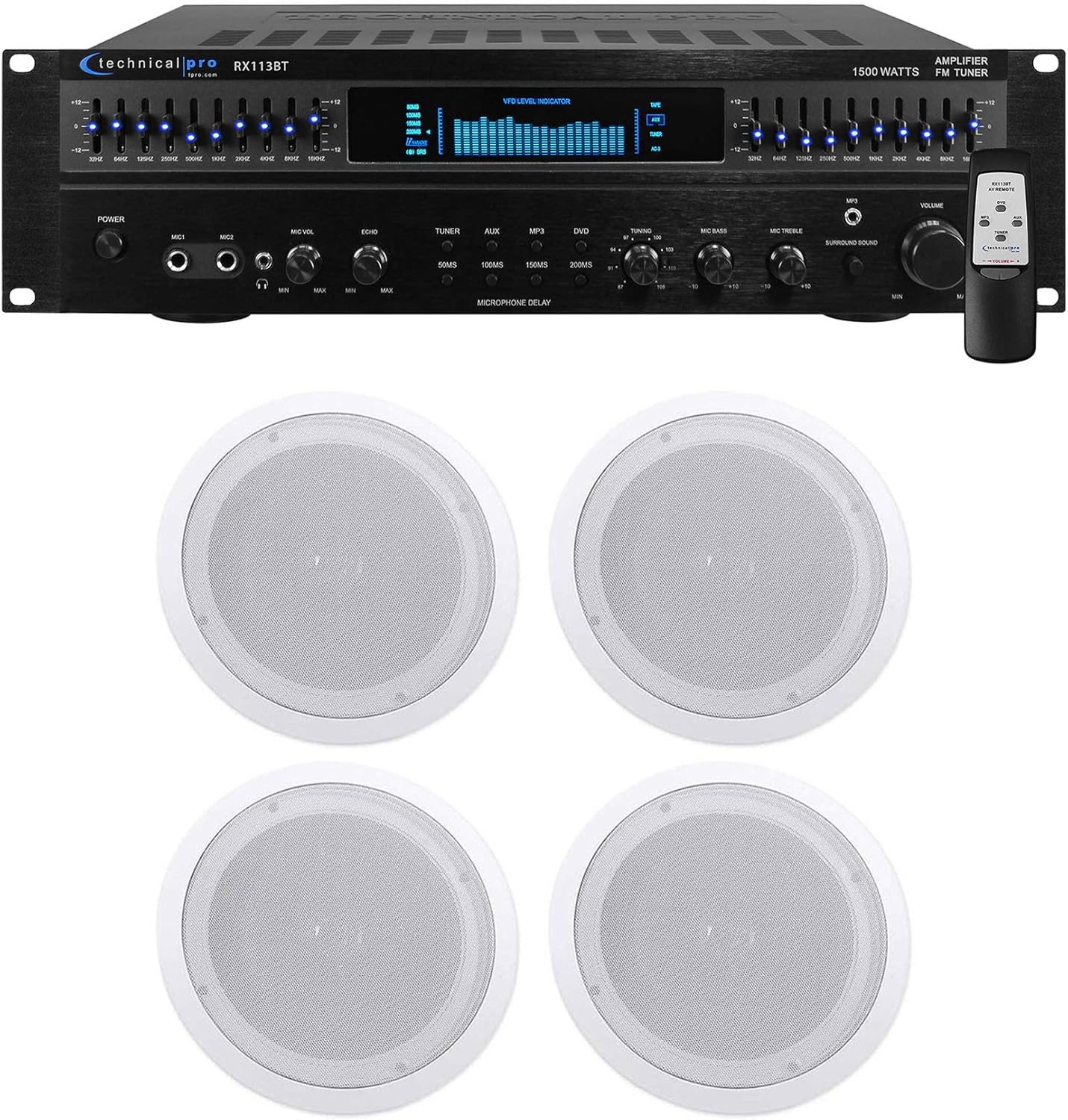
Image: The Technical Pro RX113BT amplifier receiver shown with four RockvilIe HC85 in-ceiling speakers.
സുരക്ഷാ വിവരങ്ങൾ
മുന്നറിയിപ്പ്: To reduce the risk of fire or electric shock, do not expose this appliance to rain or moisture. Do not open the casing; ഉള്ളിൽ ഉപയോക്തൃ-സേവനയോഗ്യമായ ഭാഗങ്ങളൊന്നുമില്ല. എല്ലാ സേവനങ്ങളും യോഗ്യതയുള്ള സേവന ഉദ്യോഗസ്ഥരെ ഏൽപ്പിക്കുക.
- യൂണിറ്റിന് ചുറ്റും ശരിയായ വായുസഞ്ചാരം ഉറപ്പാക്കുക. വെന്റിലേഷൻ ദ്വാരങ്ങൾ തടയരുത്.
- റേഡിയേറ്ററുകൾ, ഹീറ്റ് രജിസ്റ്ററുകൾ, സ്റ്റൗകൾ അല്ലെങ്കിൽ മറ്റ് ഉപകരണങ്ങൾ (ഉൾപ്പെടെ) പോലുള്ള താപ സ്രോതസ്സുകൾക്ക് സമീപം യൂണിറ്റ് സ്ഥാപിക്കരുത്. ampലൈഫയറുകൾ) ചൂട് ഉത്പാദിപ്പിക്കുന്നത്.
- പ്രത്യേകിച്ച് പ്ലഗുകൾ, കൺവീനിയൻസ് റെസെപ്റ്റക്കിളുകൾ, ഉപകരണത്തിൽ നിന്ന് പുറത്തുകടക്കുന്ന ഇടം എന്നിവയിൽ നടക്കുകയോ നുള്ളുകയോ ചെയ്യുന്നതിൽ നിന്ന് പവർ കോർഡ് സംരക്ഷിക്കുക.
- നിർമ്മാതാവ് വ്യക്തമാക്കിയ അറ്റാച്ച്മെൻ്റുകൾ/ആക്സസറികൾ മാത്രം ഉപയോഗിക്കുക.
- മിന്നൽ കൊടുങ്കാറ്റുകളുടെ സമയത്തോ ദീർഘനേരം ഉപയോഗിക്കാത്ത സമയത്തോ ഈ ഉപകരണം അൺപ്ലഗ് ചെയ്യുക.
സജ്ജമാക്കുക
Ampലൈഫയർ പ്ലേസ്മെന്റ്
The RX113BT amplifier can be placed on a flat surface or mounted in a standard 19-inch audio rack using the included detachable rack ears. Ensure adequate space for ventilation, especially around the cooling fan.

ചിത്രം: മുൻഭാഗം view of the RX113BT amplifier, showing its controls and the option for rack mounting.
Speaker Installation (RockvilIe HC85 In-Ceiling Speakers)
The HC85 speakers are designed for in-ceiling installation. Refer to the separate speaker installation guide for detailed instructions on cutting the ceiling opening and securing the speakers. The cut-out diameter is 9.3 inches and mounting depth is 3.03 inches.

Image: A RockvilIe HC85 in-ceiling speaker with its grille removed, revealing the 8-inch woofer and Mylar dome tweeter.

Image: Two white, paintable grilles for the RockvilIe HC85 in-ceiling speakers.
Connecting Speakers to Ampജീവപര്യന്തം
The RX113BT supports 5-channel surround sound. Connect your speakers to the appropriate outputs on the rear panel of the amplifier. The HC85 speakers have an impedance of 8 Ohms.
- Use high-quality speaker wire.
- Connect the positive (+) terminal of the speaker to the positive (+) terminal of the ampജീവിത outputട്ട്പുട്ട്.
- Connect the negative (-) terminal of the speaker to the negative (-) terminal of the ampജീവിത outputട്ട്പുട്ട്.
- ഷോർട്ട് സർക്യൂട്ടുകൾ തടയാൻ എല്ലാ കണക്ഷനുകളും സുരക്ഷിതമാണെന്ന് ഉറപ്പാക്കുക.

Image: Rear panel of the RX113BT amplifier, highlighting the speaker output terminals (Banana Binding Post and Push Button) and various audio inputs.
ഓഡിയോ ഉറവിടങ്ങൾ ബന്ധിപ്പിക്കുന്നു
ദി amplifier features multiple input options:
- RCA ഇൻപുട്ടുകൾ: Connect up to three audio sources (e.g., CD player, DVD player, game console) using RCA cables.
- ഓക്സ് ഇൻപുട്ട്: Use the 1/8" (3.5mm) input for connecting MP3 players or other portable devices.
- ബ്ലൂടൂത്ത്: Pair your Bluetooth-enabled device wirelessly (see Operating Instructions).
- മൈക്രോഫോൺ ഇൻപുട്ടുകൾ: Two 1/4" microphone inputs are available on the front panel for karaoke or DJ use.
പവർ കണക്ഷൻ
വിതരണം ചെയ്ത പവർ കോർഡ് ഇതിലേക്ക് ബന്ധിപ്പിക്കുക amplifier's power input and then to a suitable wall outlet. The unit is 110-220V switchable. Ensure the voltage selector on the rear panel matches your local power supply before plugging in.
പ്രവർത്തന നിർദ്ദേശങ്ങൾ
പവർ ചെയ്യുന്നത് ഓൺ/ഓഫ്
അമർത്തുക പവർ യൂണിറ്റ് ഓണാക്കാനോ ഓഫാക്കാനോ മുൻ പാനലിലെ ബട്ടൺ.
ഉറവിട തിരഞ്ഞെടുപ്പ്
Use the input selector buttons (TUNER, AUX, MP3, DVD) on the front panel or remote control to choose your desired audio source.
വോളിയം നിയന്ത്രണം
Adjust the master വോളിയം knob on the front panel or use the volume buttons on the remote control.
ഇക്വലൈസർ ക്രമീകരണം
The RX113BT features dual 10-band equalizers with individual LED indicators. Adjust the sliders for each frequency band to customize the audio output to your preference. Each EQ band is individually lit with a blue LED for easy readout.

Image: Close-up of the RX113BT amplifier's front panel, highlighting the dual 10-band graphic equalizer with its illuminated sliders.
ബ്ലൂടൂത്ത് ജോടിയാക്കൽ
- തിരഞ്ഞെടുക്കുക ബ്ലൂടൂത്ത് ഇൻപുട്ട് ഉറവിടം.
- നിങ്ങളുടെ ബ്ലൂടൂത്ത് പ്രവർത്തനക്ഷമമാക്കിയ ഉപകരണത്തിൽ (സ്മാർട്ട്ഫോൺ, ടാബ്ലെറ്റ് മുതലായവ), ബ്ലൂടൂത്ത് പ്രവർത്തനക്ഷമമാക്കി ലഭ്യമായ ഉപകരണങ്ങൾക്കായി തിരയുക.
- Select "RX113BT" from the list of devices.
- Once paired, audio from your device will play through the ampജീവൻ.
Karaoke / DJ Functions
Connect microphones to the MIC1 or MIC2 inputs on the front panel. Use the എംഐസി വോൾ, ECHO, MIC BASS, ഒപ്പം MIC ട്രെബിൾ controls to adjust microphone levels and effects.
ദി MICROPHONE DELAY buttons (50MS, 100MS, 150MS, 200MS) allow you to add a delay effect to the microphone output.
എഫ്എം ട്യൂണർ
തിരഞ്ഞെടുക്കുക ട്യൂണർ input. Use the tuning controls to manually scan for FM radio stations. The digital fluorescent output display meter will show tuning information.
സറൗണ്ട് സൗണ്ട്
ദി amplifier supports 5-channel surround sound. Ensure your speakers are connected correctly to the surround sound outputs. Use the ചുറ്റുമുള്ള ശബ്ദം knob to adjust the surround effect.
മെയിൻ്റനൻസ്
- വൃത്തിയാക്കൽ: പുറംഭാഗം വൃത്തിയാക്കാൻ മൃദുവായതും ഉണങ്ങിയതുമായ തുണി ഉപയോഗിക്കുക amplifier and speakers. Do not use liquid cleaners or aerosols.
- വെൻ്റിലേഷൻ: Periodically check that the ventilation openings on the amplifier are clear of dust and debris to ensure proper cooling. The built-in cooling speed fan helps maintain optimal operating temperature.
- സ്പീക്കർ ഗ്രിൽസ്: The speaker grilles are paintable. If painting, ensure the paint does not clog the perforations.
ട്രബിൾഷൂട്ടിംഗ്
| പ്രശ്നം | സാധ്യമായ കാരണം | പരിഹാരം |
|---|---|---|
| ശക്തിയില്ല | Power cord not connected; power outlet faulty; voltage സെലക്ടർ തെറ്റാണ്. | Ensure power cord is securely plugged in. Test outlet with another device. Verify voltage selector (110/220V) matches local supply. |
| സ്പീക്കറുകളിൽ നിന്ന് ശബ്ദമില്ല | Incorrect input selected; speaker wires loose or incorrectly connected; volume too low; mute engaged. | Select correct input source. Check all speaker wire connections (positive to positive, negative to negative). Increase volume. Ensure mute is off. |
| ബ്ലൂടൂത്ത് കണക്റ്റ് ചെയ്യുന്നില്ല | Amplifier not in Bluetooth mode; device too far; device already paired with another unit. | ഉറപ്പാക്കുക amplifier input is set to Bluetooth. Move device closer to amplifier. Disconnect device from other Bluetooth devices and try again. |
| വികലമായ ഓഡിയോ | Volume too high; incorrect equalizer settings; faulty audio source. | Reduce volume. Adjust equalizer settings. Test with a different audio source. |
സ്പെസിഫിക്കേഷനുകൾ
Technical Pro RX113BT Ampജീവപര്യന്തം
- പീക്ക് പവർ: 1500 വാട്ട്സ്
- ചാനലുകൾ: 5 ചാനൽ സറൗണ്ട് സൗണ്ട്
- സമനില: Dual 10-band with individual LED indicators
- ഇൻപുട്ടുകൾ: RCA (3 audio sources), 1/8" (MP3/Aux), Bluetooth, Dual 1/4" Microphone
- ഔട്ട്പുട്ടുകൾ: Banana Binding Post (2 Speakers), Push Button (Surround Sound Speakers), RCA (1 Record Line, 2 Mono to Subwoofer)
- ട്യൂണർ: FM Manual Tuner
- ഫീച്ചറുകൾ: Cooling Speed Fan, Digital Display, Digital Fluorescent Output Display Meter, Removable Rack-Mount Brackets, Remote Control, Balance, Bass and Treble controls, Bass Booster, Echo, Treble controls for Mic.
- അളവുകൾ: 17"w (19" w/ brackets) x 5"h x 12.25"d
- ഭാരം: 15 പൗണ്ട്
- വാല്യംtage: 110-220 വി സ്വിച്ചുചെയ്യാവുന്ന
RockvilIe HC85 In-Ceiling Speakers
- പീക്ക് പവർ കൈകാര്യം ചെയ്യൽ: 350 വാട്ട്സ് (ഓരോ സ്പീക്കറിനും) / 700 വാട്ട്സ് (ഓരോ ജോഡിക്കും)
- RMS പവർ കൈകാര്യം ചെയ്യൽ: 120 വാട്ട്സ് (ഓരോ സ്പീക്കറിനും) / 240 വാട്ട്സ് (ഓരോ ജോഡിക്കും)
- വൂഫർ: 8" Polypropylene Cone with Rubber Surround
- വോയ്സ് കോയിൽ: 1" Aluminum
- ട്വീറ്റർ: Mylar Dome, Aim-able Swivel
- കാന്തം: 20 oz. Ferrite
- ടെർമിനലുകൾ: High Quality Spring Loaded Push
- ഫ്രീക്വൻസി പ്രതികരണം: 40Hz - 20KHz
- സംവേദനക്ഷമത: 89dB @ 1w / 1m
- പ്രതിരോധം: 8 ഓം
- മൗണ്ടിംഗ് ഡെപ്ത്: 3.03 ഇഞ്ച്
- കട്ട് out ട്ട് വ്യാസം: 9.3 ഇഞ്ച്
- നിറം: വെള്ള (പെയിന്റബിൾ)
വാറൻ്റിയും പിന്തുണയും
This product comes with a manufacturer's warranty. Please refer to the warranty card included in your package for specific terms and conditions. For technical support or service inquiries, please contact Technical Pro customer service. Information regarding protection plans is available from your retailer.
നിർമ്മാതാവ്: സാങ്കേതിക പ്രോ
ആദ്യം ലഭ്യമായ തീയതി: സെപ്റ്റംബർ 17, 2018
Ask a question about this manual
Ask about setup, troubleshooting, compatibility, parts, safety, or missing instructions. Manuals+ will review the question and use this page’s manual context to help answer it.