
ആമുഖം
Welcome to the user manual for your Maxcom MM135 2G Mobile Phone. This guide provides comprehensive instructions to help you get started, operate, and maintain your device. The Maxcom MM135 is a simple and elegant mobile phone, designed for straightforward communication with essential features.
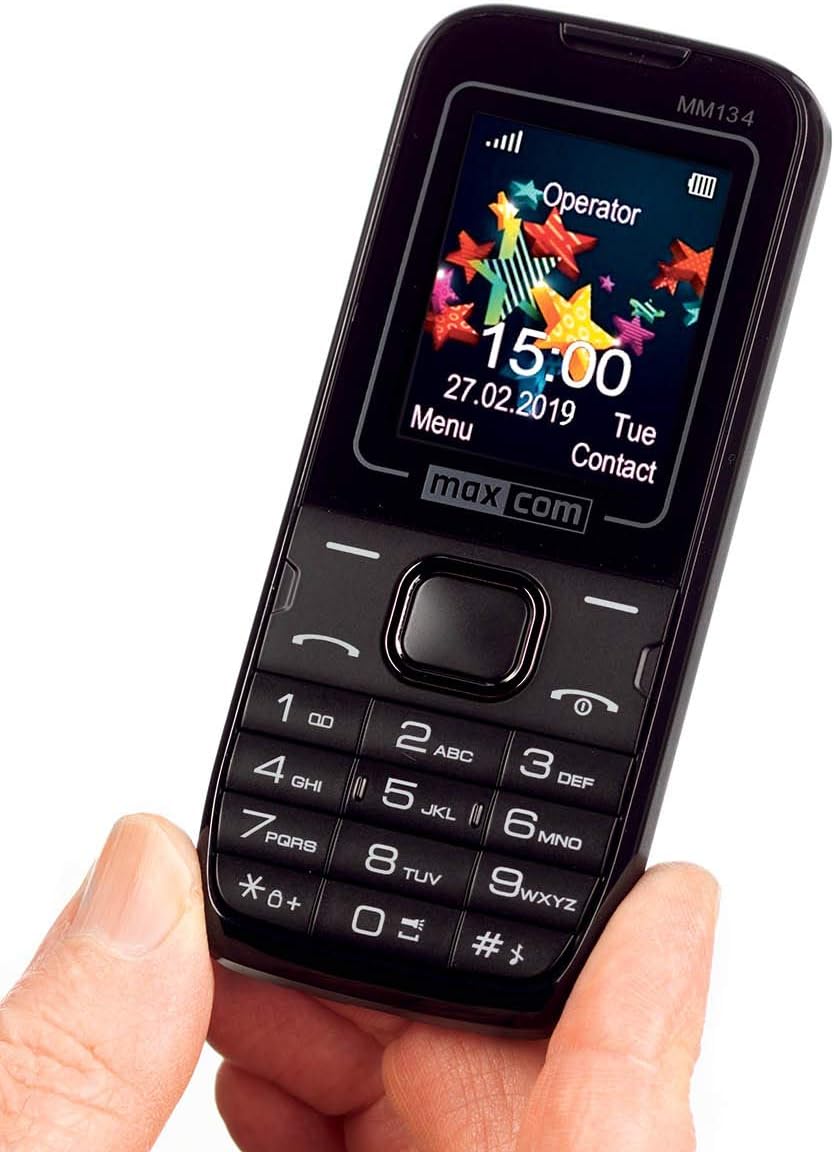
ചിത്രം: ഫ്രണ്ട് view of the Maxcom MM135 mobile phone, showing the display, keypad, and navigation buttons. The screen displays "Operator", time, date, and menu options.
ബോക്സിൽ എന്താണുള്ളത്
Please check the contents of your Maxcom MM135 package. It should include:
- Maxcom MM135 Mobile Phone
- ബാറ്ററി (ലിഥിയം-അയൺ)
- ചാർജർ
- USB കേബിൾ
- ഹെഡ്സെറ്റ്
- ഉപയോക്തൃ മാനുവൽ
സജ്ജമാക്കുക
1. സിം കാർഡും ബാറ്ററിയും ഇൻസ്റ്റാൾ ചെയ്യുന്നു
- ഫോണിന്റെ പിൻ കവർ പതുക്കെ നീക്കം ചെയ്യുക.
- Insert your SIM card(s) into the designated slot(s). The Maxcom MM135 supports Dual SIM.
- If using a microSD card (up to 32 GB), insert it into the memory card slot.
- Insert the Lithium-ion battery into its compartment, ensuring the contacts align.
- സുരക്ഷിതമായി സ്ഥലത്ത് ക്ലിക്ക് ചെയ്യുന്നതുവരെ പിൻ കവർ മാറ്റിസ്ഥാപിക്കുക.

ചിത്രം: ക്ലോസ് അപ്പ് view of the top or bottom edge of the Maxcom MM135, showing the 3.5mm audio jack and the USB charging port.
2 ബാറ്ററി ചാർജ് ചെയ്യുന്നു
- Connect the USB cable to the charger adapter.
- Plug the small end of the USB cable into the charging port on your phone (3.5mm Jack).
- ഒരു പവർ ഔട്ട്ലെറ്റിൽ ചാർജർ പ്ലഗ് ചെയ്യുക.
- ആദ്യ ഉപയോഗത്തിന് മുമ്പ് ഫോൺ പൂർണ്ണമായും ചാർജ് ചെയ്യാൻ അനുവദിക്കുക. സ്ക്രീനിലെ ബാറ്ററി ഇൻഡിക്കേറ്റർ ചാർജിംഗ് സ്റ്റാറ്റസ് കാണിക്കും.
പ്രവർത്തന നിർദ്ദേശങ്ങൾ
പവർ ഓൺ/ഓഫ്
- പവർ ഓൺ ചെയ്യാൻ: അമർത്തിപ്പിടിക്കുക പവർ/എൻഡ് കോൾ സ്ക്രീൻ പ്രകാശിക്കുന്നത് വരെ ബട്ടൺ.
- പവർ ഓഫ് ചെയ്യാൻ: അമർത്തിപ്പിടിക്കുക പവർ/എൻഡ് കോൾ ബട്ടൺ അമർത്തി, ഓപ്ഷനുകളിൽ നിന്ന് "പവർ ഓഫ്" തിരഞ്ഞെടുക്കുക.
കോളുകൾ ചെയ്യുന്നു
- From the home screen, dial the phone number using the keypad.
- അമർത്തുക വിളിക്കൂ button (usually green) to initiate the call.
- ഒരു കോൾ അവസാനിപ്പിക്കാൻ, അമർത്തുക കോൾ അവസാനിപ്പിക്കുക button (usually red).
- ഇൻകമിംഗ് കോളിന് മറുപടി നൽകാൻ, അമർത്തുക വിളിക്കൂ ബട്ടൺ.
SMS സന്ദേശങ്ങൾ അയയ്ക്കുന്നു
- പോകുക മെനു > സന്ദേശങ്ങൾ > സന്ദേശം എഴുതുക.
- കീപാഡ് ഉപയോഗിച്ച് നിങ്ങളുടെ സന്ദേശം നൽകുക.
- സ്വീകർത്താവിന്റെ ഫോൺ നമ്പർ നൽകുക അല്ലെങ്കിൽ കോൺടാക്റ്റുകളിൽ നിന്ന് തിരഞ്ഞെടുക്കുക.
- അമർത്തുക അയക്കുക. The phone can store up to 200 messages.
Contacts (Phonebook)
- Access contacts via മെനു > ബന്ധങ്ങൾ.
- You can store up to 500 entries.
- To add a new contact, select പുതിയത് ചേർക്കുക and enter the details.
പ്രത്യേക സവിശേഷതകൾ
- ബ്ലൂടൂത്ത്: ബ്ലൂടൂത്ത് പ്രവർത്തനക്ഷമമാക്കാൻ, ഇതിലേക്ക് പോകുക മെനു > ക്രമീകരണങ്ങൾ > കണക്റ്റിവിറ്റി > ബ്ലൂടൂത്ത്. You can pair with other Bluetooth-enabled devices for hands-free communication.
- എഫ്എം റേഡിയോ: Plug in the headset (which acts as an antenna) and go to മെനു > എഫ്എം റേഡിയോ to listen to radio stations.
- ഫ്ലാഷ്ലൈറ്റ്: The phone includes a built-in flashlight. Typically, this can be activated by a dedicated button or a long press on a specific key (e.g., '0' or a side button). Refer to your phone's quick start guide for exact activation.
- ക്യാമറ: The phone features a 0.08 MP camera. Access it via മെനു > ക്യാമറ ഫോട്ടോകൾ എടുക്കാൻ.
മെയിൻ്റനൻസ്
- ഫോൺ വരണ്ടതായി സൂക്ഷിക്കുക. ഈർപ്പം ഇലക്ട്രോണിക് സർക്യൂട്ടുകളെ തകരാറിലാക്കും.
- തീവ്രമായ താപനിലയിൽ ഫോൺ തുറന്നുവെക്കരുത്.
- Clean the phone with a soft, dry cloth. Avoid using harsh chemicals.
- Handle the phone with care to prevent physical damage.
- Ensure the charging port and headphone jack are free from dust and debris.
ട്രബിൾഷൂട്ടിംഗ്
| പ്രശ്നം | സാധ്യമായ പരിഹാരം |
|---|---|
| ഫോൺ ഓൺ ആകുന്നില്ല. | Ensure the battery is correctly inserted and fully charged. Try charging the phone for at least 30 minutes. |
| കോളുകൾ വിളിക്കാനോ സ്വീകരിക്കാനോ കഴിയില്ല | Check if the SIM card is properly inserted and activated. Verify network signal strength. Ensure airplane mode is off. |
| Poor sound quality during calls | Check network signal. Ensure the speaker/earpiece is not blocked. Adjust call volume. |
| ബാറ്ററി പെട്ടെന്ന് തീരുന്നു | സ്ക്രീൻ തെളിച്ചം കുറയ്ക്കുക. ഉപയോഗിക്കാത്ത ആപ്ലിക്കേഷനുകൾ അടയ്ക്കുക. പശ്ചാത്തല ഡാറ്റ ഉപയോഗം പരിമിതപ്പെടുത്തുക. ബാറ്ററി പഴയതോ കേടായതോ അല്ലെന്ന് ഉറപ്പാക്കുക. |
| ബ്ലൂടൂത്ത് കണക്റ്റ് ചെയ്യുന്നില്ല | Ensure Bluetooth is enabled on both devices. Make sure devices are within range. Try restarting both devices. |
സ്പെസിഫിക്കേഷനുകൾ
| ഫീച്ചർ | വിശദാംശങ്ങൾ |
|---|---|
| മോഡൽ നമ്പർ | MM135 |
| നെറ്റ്വർക്ക് സാങ്കേതികവിദ്യ | 2G (GSM 900/1800 MHz) |
| ഡിസ്പ്ലേ വലിപ്പം | 1.77 ഇഞ്ച് |
| ഡിസ്പ്ലേ റെസല്യൂഷൻ | 160 x 128 പിക്സലുകൾ |
| സിം കാർഡ് സ്ലോട്ടുകൾ | ഡ്യുവൽ സിം |
| കണക്റ്റിവിറ്റി | ബ്ലൂടൂത്ത്, യുഎസ്ബി |
| ഹെഡ്ഫോൺ ജാക്ക് | 3.5 മി.മീ |
| ക്യാമറ | 0.08 എംപി (പിൻവശം) |
| Flash Memory Support | മൈക്രോ എസ്ഡി 32 ജിബി വരെ |
| ഫോൺബുക്ക് ശേഷി | 500 എൻട്രികൾ വരെ |
| SMS Memory | 200 സന്ദേശങ്ങൾ വരെ |
| ബാറ്ററി തരം | ലിഥിയം-അയൺ |
| ബാറ്ററി ശേഷി | 800 mAh (estimated) |
| സംസാര സമയം | 6 മണിക്കൂർ വരെ |
| ഭാരം | 68 ഗ്രാം |
| അളവുകൾ | 111 x 47 x 13 mm (L x W x H) |
| ഓപ്പറേറ്റിംഗ് സിസ്റ്റം | സിംബിയൻ |
| പ്രത്യേക സവിശേഷതകൾ | FM Radio, Flashlight, Hands-free function |
വാറൻ്റിയും പിന്തുണയും
For warranty information and customer support, please refer to the warranty card included in your product package or visit the official Maxcom webസൈറ്റ്. ഏതെങ്കിലും വാറന്റി ക്ലെയിമുകൾക്ക് നിങ്ങളുടെ വാങ്ങലിന്റെ തെളിവ് സൂക്ഷിക്കുക.
Note: Information regarding spare parts availability and software updates is not available at this time.