
AUNA KC6-SilverStar ST WHs
AUNA Silver Star Internet Stereo Radio User Manual
Model: KC6-SilverStar ST WHs | Brand: AUNA
1. ആമുഖം
Thank you for choosing the AUNA Silver Star Internet Stereo Radio. This versatile music device combines powerful performance with multiple features and a stylish design. It offers a wide range of listening options including Internet Radio, DAB+, FM, Bluetooth, and USB playback. This manual provides essential information for setting up, operating, and maintaining your device to ensure optimal performance and longevity.

Figure 1: AUNA Silver Star Internet Stereo Radio, front view with display and controls.
2 സുരക്ഷാ വിവരങ്ങൾ
ഉപകരണം ഉപയോഗിക്കുന്നതിന് മുമ്പ് എല്ലാ സുരക്ഷാ നിർദ്ദേശങ്ങളും ശ്രദ്ധാപൂർവ്വം വായിക്കുക. ഭാവി റഫറൻസിനായി ഈ മാനുവൽ സൂക്ഷിക്കുക.
- ഊർജ്ജ സ്രോതസ്സ്: നൽകിയിരിക്കുന്ന പവർ അഡാപ്റ്റർ മാത്രം ഉപയോഗിക്കുക. വോളിയം ഉറപ്പാക്കുകtagഇ നിങ്ങളുടെ പ്രദേശത്തിന്റെ ആവശ്യകതകളുമായി പൊരുത്തപ്പെടുന്നു.
- ജലവും ഈർപ്പവും: Do not expose the device to rain, moisture, or dripping/splashing liquids. Do not place objects filled with liquids, such as vases, on the device.
- വെൻ്റിലേഷൻ: Ensure adequate ventilation. Do not block ventilation openings. Maintain a minimum distance of 10 cm around the device for proper airflow.
- ചൂട്: റേഡിയേറ്ററുകൾ, ഹീറ്റ് രജിസ്റ്ററുകൾ, സ്റ്റൗകൾ, അല്ലെങ്കിൽ മറ്റ് ഉപകരണങ്ങൾ (ഉൾപ്പെടെ) പോലുള്ള താപ സ്രോതസ്സുകളിൽ നിന്ന് ഉപകരണം അകറ്റി നിർത്തുക. ampലൈഫയറുകൾ) ചൂട് ഉത്പാദിപ്പിക്കുന്നത്.
- വൃത്തിയാക്കൽ: Unplug the device from the power outlet before cleaning. Use a soft, dry cloth. Do not use liquid cleaners or aerosol cleaners.
- സേവനം: ഈ ഉൽപ്പന്നം സ്വയം സേവിക്കാൻ ശ്രമിക്കരുത്. യോഗ്യതയുള്ള സേവന ഉദ്യോഗസ്ഥർക്ക് എല്ലാ സേവനങ്ങളും റഫർ ചെയ്യുക.
3. പാക്കേജ് ഉള്ളടക്കം
Carefully unpack your AUNA Silver Star Internet Stereo Radio and check that all items are present and in good condition:
- AUNA Silver Star Internet Stereo Radio Unit
- റിമോട്ട് കൺട്രോൾ
- മെയിൻസ് അഡാപ്റ്റർ
- ഉടമയുടെ മാനുവൽ (ഈ പ്രമാണം)
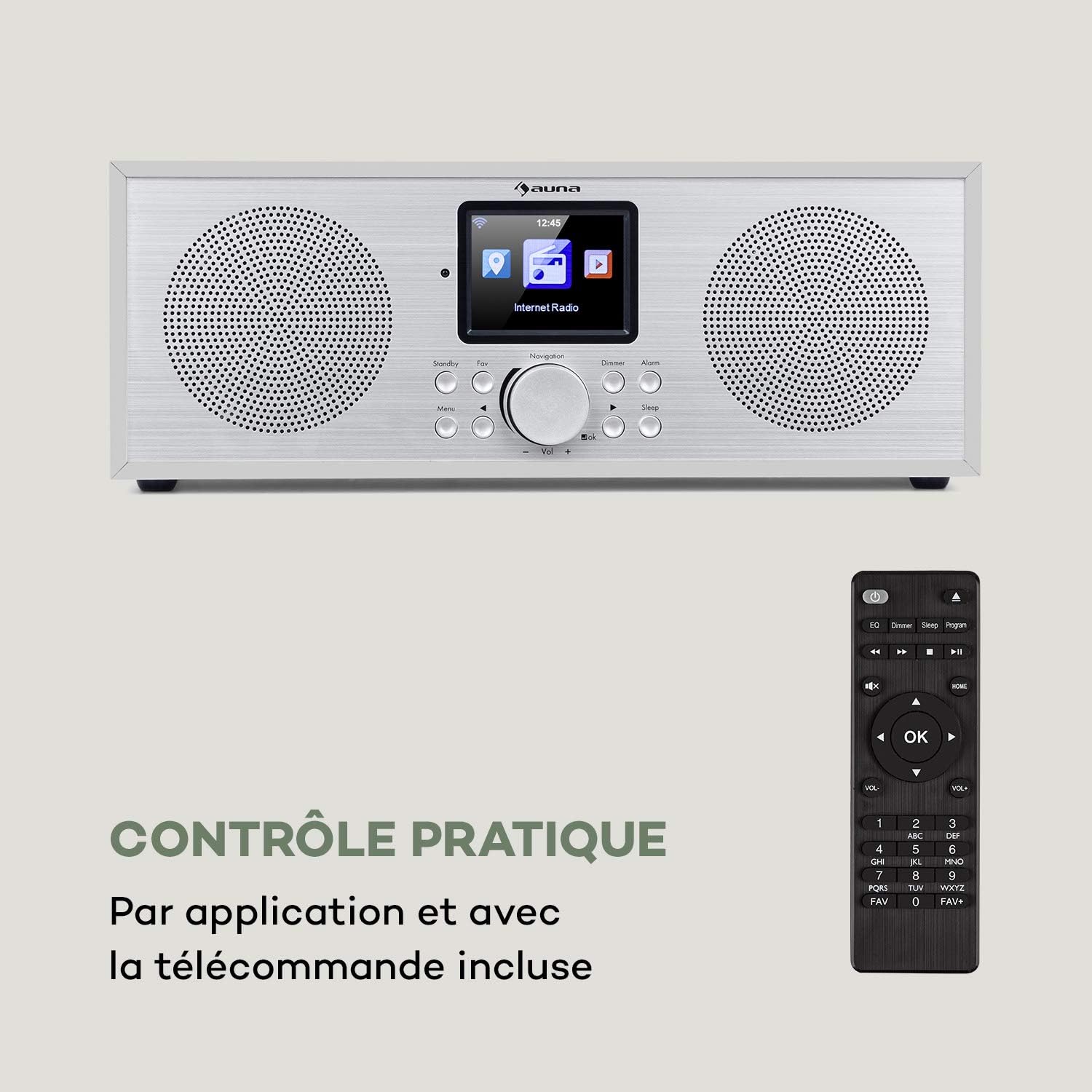
Figure 2: The AUNA Silver Star Internet Stereo Radio unit and its included remote control.
4. സജ്ജീകരണം
4.1 ബന്ധിപ്പിക്കുന്ന പവർ
Connect the provided mains adapter to the "DC IN" port on the rear of the radio and then plug the adapter into a wall outlet. Ensure the ON/OFF switch on the back is set to "ON".
4.2 ആന്റിന കണക്ഷൻ
For optimal FM and DAB+ reception, extend the telescopic antenna located at the rear of the unit fully.
4.3 നെറ്റ്വർക്ക് കണക്ഷൻ (വൈ-ഫൈ)
To access Internet Radio features, the device requires a Wi-Fi connection. Upon first power-on, the radio will guide you through the network setup process on its display. Select your Wi-Fi network from the list and enter the password using the navigation controls.
4.4 ബാഹ്യ കണക്ഷനുകൾ
The radio features various ports for external devices:
- ഓക്സ് ഇൻ: Connect external audio sources (e.g., MP3 player) using a 3.5mm audio cable.
- ലൈൻ Uട്ട്: Connect the radio to an external amplifier or active speakers for enhanced audio output.
- USB: Insert a USB flash drive for MP3 file പ്ലേബാക്ക്.

Figure 3: Rear panel connections including AUX IN, LINE OUT, USB, and DC IN.
5. പ്രവർത്തന നിർദ്ദേശങ്ങൾ
5.1 അടിസ്ഥാന നിയന്ത്രണങ്ങൾ
The radio can be operated using the buttons and rotary knob on the front panel, or via the included remote control. The 2.8" (7 cm) HCC display provides clear information and navigation.
- പവർ/സ്റ്റാൻഡ്ബൈ: Press the Standby button to turn the unit on or off.
- Navigation Knob: Rotate to scroll through menus or adjust volume. Press to confirm selection.
- മെനു: പ്രധാന മെനു ആക്സസ് ചെയ്യുക.
- തിരികെ: മുമ്പത്തെ മെനുവിലേക്ക് മടങ്ങുക.
- ഇഷ്ടം: Access favorite stations.
- ഡിമ്മർ: ഡിസ്പ്ലേ തെളിച്ചം ക്രമീകരിക്കുക.
- അലാറം: അലാറങ്ങൾ സജ്ജമാക്കുക.
- ഉറക്കം: സ്ലീപ്പ് ടൈമർ സജ്ജീകരിക്കുക.

Figure 4: The high-contrast color display for easy navigation.
5.2 മോഡ് തിരഞ്ഞെടുക്കൽ
From the main menu, you can select different operating modes:
- ഇൻ്റർനെറ്റ് റേഡിയോ: Access thousands of online radio stations worldwide. Browse by genre, location, or search.
- DAB+: Tune into digital audio broadcasting stations for high-quality sound.
- എഫ്എം: Listen to traditional analog FM radio stations.
- ബ്ലൂടൂത്ത്: Pair your smartphone, tablet, or computer to stream audio wirelessly.
- USB: MP3 പ്ലേ ചെയ്യുക files from a connected USB flash drive.
- AUX ഇതിൽ: Play audio from an external device connected to the AUX IN port.
5.3 ബ്ലൂടൂത്ത് ജോടിയാക്കൽ
ബ്ലൂടൂത്ത് ഉപകരണം ജോടിയാക്കാൻ:
- Select "Bluetooth" mode on the radio. The radio will enter pairing mode.
- നിങ്ങളുടെ മൊബൈൽ ഉപകരണത്തിൽ, ബ്ലൂടൂത്ത് പ്രവർത്തനക്ഷമമാക്കി ലഭ്യമായ ഉപകരണങ്ങൾക്കായി തിരയുക.
- Select "AUNA Silver Star" from the list. Once connected, you can stream audio to the radio.

Figure 5: Wireless audio streaming via Bluetooth from a smartphone.
5.4 യുഎസ്ബി പ്ലേബാക്ക്
Insert a USB flash drive into the USB port on the rear of the unit. Select "USB" mode from the menu. The radio will automatically detect and display playable MP3 files. Use the navigation controls to browse and select tracks.

Figure 6: Connecting a USB flash drive for MP3 playback.
5.5 Air Music Control App
For convenient control, download the "Air Music Control" app from your smartphone's app store (available on App Store and Google Play). This app allows you to control the radio, browse stations, and manage settings from your mobile device.

Figure 7: Controlling the radio using the Air Music Control app.
6. പരിപാലനം
6.1 വൃത്തിയാക്കൽ
Always unplug the radio from the power outlet before cleaning. Use a soft, dry, lint-free cloth to wipe the surfaces. Do not use abrasive cleaners, waxes, or solvents as they may damage the finish. Avoid spraying liquids directly onto the unit.
6.2 സംഭരണം
If you plan to store the radio for an extended period, unplug it from the power supply and store it in a cool, dry place, away from direct sunlight and extreme temperatures.
7. പ്രശ്നപരിഹാരം
If you encounter issues with your AUNA Silver Star Internet Stereo Radio, refer to the following common problems and solutions:
| പ്രശ്നം | സാധ്യമായ കാരണം | പരിഹാരം |
|---|---|---|
| ശക്തിയില്ല | പവർ അഡാപ്റ്റർ ബന്ധിപ്പിച്ചിട്ടില്ല; ഓൺ/ഓഫ് സ്വിച്ച് ഓഫാണ്. | Ensure power adapter is securely connected and plugged into a live outlet. Check ON/OFF switch on the back. |
| ശബ്ദമില്ല | ശബ്ദം വളരെ കുറവാണ്; മ്യൂട്ട് സജീവമാക്കി; തെറ്റായ ഉറവിടം തിരഞ്ഞെടുത്തു. | Increase volume. Check if mute is active. Select the correct input source (Internet Radio, DAB+, FM, Bluetooth, USB, AUX). |
| Wi-Fi-യിലേക്ക് കണക്റ്റുചെയ്യാൻ കഴിയില്ല | Incorrect password; Router issue; Weak signal. | Double-check Wi-Fi password. Restart your router. Move the radio closer to the router or use a Wi-Fi extender. |
| മോശം DAB+/FM റിസപ്ഷൻ | Antenna not extended; Location interference. | Fully extend the telescopic antenna. Try repositioning the radio to a different location. |
| USB പ്ലേബാക്ക് പ്രവർത്തിക്കുന്നില്ല | USB format not supported; Files not MP3; USB drive issue. | Ensure USB drive is formatted to FAT32. Verify fileകൾ MP3 ഫോർമാറ്റിലാണ്. മറ്റൊരു USB ഡ്രൈവ് പരീക്ഷിക്കുക. |
ഈ പരിഹാരങ്ങൾ പരീക്ഷിച്ചതിന് ശേഷവും പ്രശ്നം നിലനിൽക്കുകയാണെങ്കിൽ, ദയവായി ഉപഭോക്തൃ പിന്തുണയുമായി ബന്ധപ്പെടുക.
8 സ്പെസിഫിക്കേഷനുകൾ
| ബ്രാൻഡ് | ഔന |
| മോഡൽ നമ്പർ | KC6-SilverStar ST WHs |
| ഉൽപ്പന്ന അളവുകൾ | 33 x 12 x 15 cm (L x H x D) |
| ഇനത്തിൻ്റെ ഭാരം | 2.3 കി.ഗ്രാം |
| ഔട്ട്പുട്ട് പവർ | 2 x 8 വാട്ട്സ് ആർഎംഎസ് |
| പ്രദർശിപ്പിക്കുക | 2.8" (7 cm) HCC (High Contrast Color) |
| ട്യൂണർ ടെക്നോളജി | FM, Internet Radio, DAB+ |
| കണക്റ്റിവിറ്റി ടെക്നോളജി | ബ്ലൂടൂത്ത്, ഓക്സിലറി, വൈ-ഫൈ, യുഎസ്ബി |
| മെറ്റീരിയൽ | Wood, Aluminium |
| പവർ ഉറവിടം | കോർഡഡ് ഇലക്ട്രിക് |
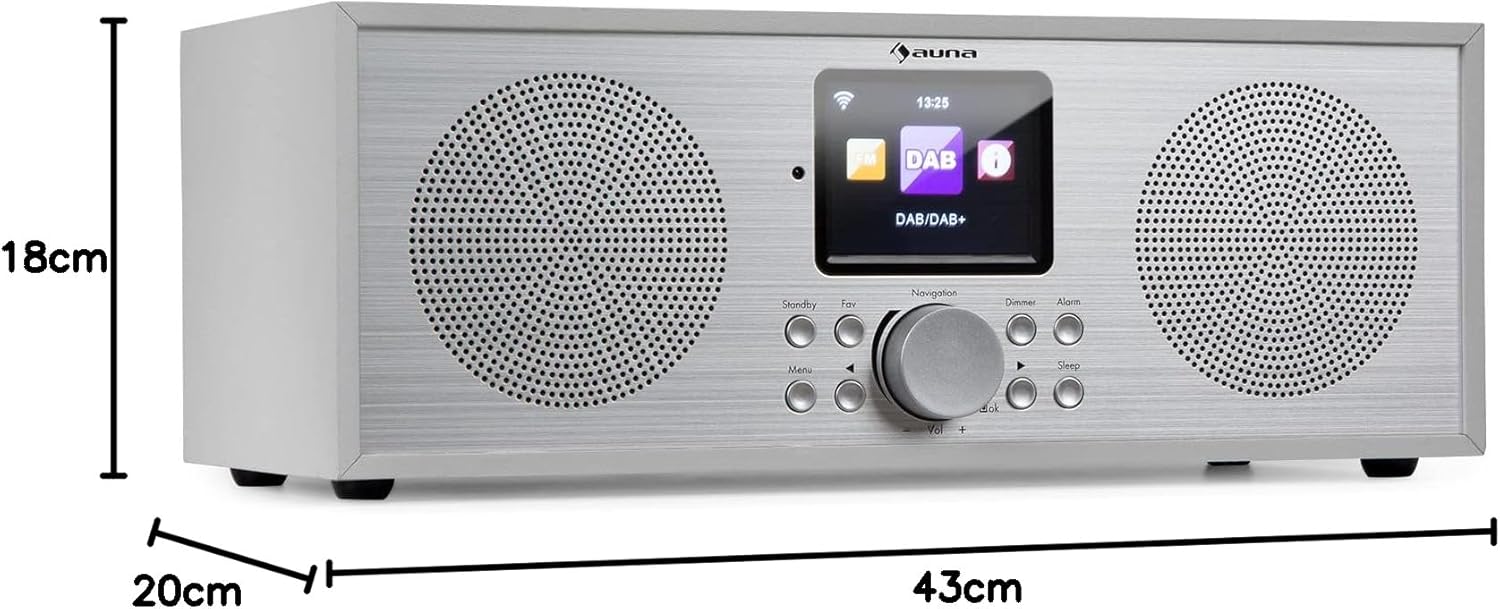
ചിത്രം 8: ഉൽപ്പന്ന അളവുകൾ.
9. വാറൻ്റിയും പിന്തുണയും
Your AUNA Silver Star Internet Stereo Radio comes with a standard manufacturer's warranty. Please refer to the warranty card included in your package or visit the official AUNA webവിശദമായ വാറന്റി നിബന്ധനകൾക്കും വ്യവസ്ഥകൾക്കും സൈറ്റ്.
For technical support, troubleshooting assistance beyond this manual, or spare parts, please contact AUNA customer service through their official webനിങ്ങളുടെ വാങ്ങലിനൊപ്പം നൽകിയിരിക്കുന്ന സൈറ്റ് അല്ലെങ്കിൽ ബന്ധപ്പെടാനുള്ള വിവരങ്ങൾ.
Ask a question about this manual
Ask about setup, troubleshooting, compatibility, parts, safety, or missing instructions. Manuals+ will review the question and use this page’s manual context to help answer it.