
1. ആമുഖം
This manual provides detailed instructions for the operation and maintenance of your AUNA Worldwide Internet Radio. Please read this manual thoroughly before using the device to ensure proper function and to prevent damage. Keep this manual for future reference.
The AUNA Worldwide Internet Radio is a versatile audio system featuring Internet Radio, DAB/DAB+ and FM tuners, a CD player, Bluetooth connectivity, USB playback, and AUX input. It offers a wide range of listening options and convenient control features.
2. സുരക്ഷാ നിർദ്ദേശങ്ങൾ
- ഉപകരണം പ്രവർത്തിപ്പിക്കുന്നതിന് മുമ്പ് എല്ലാ നിർദ്ദേശങ്ങളും വായിക്കുക.
- തീയോ വൈദ്യുതാഘാതമോ തടയാൻ ഉപകരണം മഴയിലോ ഈർപ്പത്തിലോ തുറന്നുകാട്ടരുത്.
- ശരിയായ വായുസഞ്ചാരം ഉറപ്പാക്കുക. വായുസഞ്ചാര ദ്വാരങ്ങളൊന്നും തടയരുത്.
- സുസ്ഥിരവും പരന്നതുമായ പ്രതലത്തിൽ ഉപകരണം സ്ഥാപിക്കുക.
- ഉപകരണത്തിനൊപ്പം നൽകിയിട്ടുള്ള പവർ അഡാപ്റ്റർ മാത്രം ഉപയോഗിക്കുക.
- ഇടിമിന്നലുള്ള സമയത്തോ ദീർഘനേരം ഉപയോഗിക്കാത്ത സമയത്തോ ഉപകരണം അൺപ്ലഗ് ചെയ്യുക.
- ഉപകരണം സ്വയം നന്നാക്കാൻ ശ്രമിക്കരുത്. എല്ലാ സേവനങ്ങളും യോഗ്യതയുള്ള ഉദ്യോഗസ്ഥരെ ഏൽപ്പിക്കുക.
3. പാക്കേജ് ഉള്ളടക്കം
എല്ലാ ഇനങ്ങളും നിലവിലുണ്ടോ എന്നും നല്ല നിലയിലാണെന്നും ദയവായി പരിശോധിക്കുക:
- 1 x AUNA Worldwide Internet Radio Unit
- 1 x പവർ അഡാപ്റ്റർ
- 1 x റിമോട്ട് കൺട്രോൾ
- 1 x User Manual (German, English, French)
4. ഉൽപ്പന്നം കഴിഞ്ഞുview
The AUNA Worldwide Internet Radio features a sleek design with intuitive controls and a clear LCD display.

ചിത്രം 4.1: ഫ്രണ്ട് view of the AUNA Worldwide Internet Radio, showcasing the central LCD display, control knobs, buttons for various functions (USB, Audio In, Mode, Scan, Stop, Tuning, Back), and the CD slot. Two speaker grilles are visible on either side.

ചിത്രം 4.2: A close-up of the radio's LCD display, showing 'Internet Radio' mode with 'Burn FM' and 'AIM - Wicked Game' displayed. The volume knob and 'SELECT' button are prominent, along with power and mode buttons.
4.1 ഫ്രണ്ട് പാനൽ നിയന്ത്രണങ്ങൾ
- പവർ ബട്ടൺ: Turns the unit on/off or into standby mode.
- LCD ഡിസ്പ്ലേ: Shows current mode, station information, time, and date.
- വോളിയം നോബ്: ഓഡിയോ ഔട്ട്പുട്ട് ലെവൽ ക്രമീകരിക്കുന്നു.
- Select Knob/Button: മെനുകളിലൂടെ നാവിഗേറ്റ് ചെയ്ത് തിരഞ്ഞെടുപ്പുകൾ സ്ഥിരീകരിക്കുന്നു.
- USB Port (5V 1A): For connecting USB storage devices and charging.
- AUDIO IN (3.5mm AUX): ബാഹ്യ ഓഡിയോ സ്രോതസ്സുകളെ ബന്ധിപ്പിക്കുന്നതിന്.
- മോഡ് ബട്ടൺ: Switches between different operating modes (Internet Radio, DAB, FM, CD, Bluetooth, USB, AUX).
- സ്കാൻ ബട്ടൺ: Initiates station scanning in radio modes.
- Stop/Play/Pause Buttons: സിഡി, യുഎസ്ബി, ബ്ലൂടൂത്ത് എന്നിവയ്ക്കുള്ള പ്ലേബാക്ക് നിയന്ത്രിക്കുന്നു.
- ട്യൂണിംഗ്/ഒഴിവാക്കൽ ബട്ടണുകൾ: സ്റ്റേഷനുകളിലൂടെയോ ട്രാക്കുകളിലൂടെയോ നാവിഗേറ്റ് ചെയ്യുന്നു.
- ബാക്ക് ബട്ടൺ: മുമ്പത്തെ മെനുവിലേക്കോ സ്ക്രീനിലേക്കോ മടങ്ങുന്നു.
- വിവര ബട്ടൺ: Displays additional information about the current track or station.
- മെനു ബട്ടൺ: Accesses the main system menu.
4.2 പിൻ പാനൽ കണക്ഷനുകൾ
- DC IN: പവർ അഡാപ്റ്റർ കണക്ഷൻ.
- ടെലിസ്കോപ്പിക് ആന്റിന: For DAB/DAB+ and FM reception.
5. സജ്ജീകരണം
5.1 പവർ കണക്ഷൻ
- Connect the supplied power adapter to the DC IN port on the rear of the radio.
- Plug the power adapter into a standard wall outlet (220-240V ~ | 50/60Hz).
- Press the Power button on the front panel to turn on the device.
5.2 ആന്റിന സജ്ജീകരണം
Extend the telescopic antenna fully for optimal DAB/DAB+ and FM radio reception. Adjust its position to improve signal strength if needed.
5.3 നെറ്റ്വർക്ക് കണക്ഷൻ (വൈ-ഫൈ)
To access Internet Radio and Spotify Connect, the device requires a Wi-Fi connection.
- Upon first power-on, the radio will guide you through the initial setup, including Wi-Fi configuration.
- അല്ലെങ്കിൽ, ഇതിലേക്ക് നാവിഗേറ്റ് ചെയ്യുക Menu > System Settings > Network > Wi-Fi Setup.
- ലഭ്യമായ വൈഫൈ നെറ്റ്വർക്കുകൾക്കായി റേഡിയോ സ്കാൻ ചെയ്യും. ലിസ്റ്റിൽ നിന്ന് നിങ്ങളുടെ നെറ്റ്വർക്ക് തിരഞ്ഞെടുക്കുക.
- Enter your Wi-Fi password using the Select knob and buttons.
- കണക്റ്റ് ചെയ്തുകഴിഞ്ഞാൽ, ഡിസ്പ്ലേയിൽ വൈ-ഫൈ ഐക്കൺ ദൃശ്യമാകും.

ചിത്രം 5.1: A hand holding a smartphone with a Wi-Fi symbol, illustrating the wireless connectivity feature of the AUNA radio, which allows for remote control via an app.
6. പ്രവർത്തന നിർദ്ദേശങ്ങൾ
6.1 അടിസ്ഥാന നിയന്ത്രണങ്ങൾ
- പവർ ഓൺ/ഓഫ്: പവർ ബട്ടൺ അമർത്തുക.
- വോളിയം ക്രമീകരണം: Rotate the Volume knob.
- മോഡ് തിരഞ്ഞെടുക്കൽ: Press the Mode button repeatedly to cycle through available sources (Internet Radio, DAB, FM, CD, Bluetooth, USB, AUX).
- മെനു നാവിഗേഷൻ: Use the Select knob to scroll and press to confirm. Use the Back button to return.
6.2 ഇൻ്റർനെറ്റ് റേഡിയോ
നിങ്ങളുടെ Wi-Fi കണക്ഷൻ വഴി ലോകമെമ്പാടുമുള്ള ആയിരക്കണക്കിന് റേഡിയോ സ്റ്റേഷനുകൾ ആക്സസ് ചെയ്യുക.
- Select 'Internet Radio' mode using the Mode button.
- Navigate through categories (e.g., Location, Genre, Popular) using the Select knob.
- Select a station to begin playback.
6.3 DAB/DAB+ റേഡിയോ
Enjoy digital radio broadcasts with clear sound quality.
- Select 'DAB' mode.
- The radio will automatically scan for available DAB/DAB+ stations on first use or if you initiate a scan via the Menu.
- Use the Tuning/Skip buttons to browse through the station list.
6.4 എഫ്എം റേഡിയോ
പരമ്പരാഗത അനലോഗ് എഫ്എം പ്രക്ഷേപണങ്ങൾ ആസ്വദിക്കൂ.
- Select 'FM' mode.
- Press the Scan button to automatically search for and store available stations.
- Use the Tuning/Skip buttons for manual tuning or to navigate stored stations.
- The RDS function provides additional information like station name and program details.
6.5 സിഡി പ്ലെയർ
Play your favorite audio CDs and MP3 CDs.

ചിത്രം 6.1: A close-up of the AUNA Worldwide Internet Radio, showing a CD being inserted into the slot-loading CD player, highlighting its capability to play physical media.
- Select 'CD' mode.
- Insert an audio CD or MP3 CD into the slot. The disc will be loaded automatically.
- Playback will start automatically. Use the Play/Pause, Stop, and Skip buttons to control playback.
6.6 ബ്ലൂടൂത്ത് കണക്റ്റിവിറ്റി
നിങ്ങളുടെ ബ്ലൂടൂത്ത് പ്രാപ്തമാക്കിയ ഉപകരണങ്ങളിൽ നിന്ന് വയർലെസ് ആയി ഓഡിയോ സ്ട്രീം ചെയ്യുക.
- Select 'Bluetooth' mode. The radio will enter pairing mode, indicated on the display.
- On your smartphone, tablet, or other Bluetooth device, enable Bluetooth and search for 'AUNA Worldwide'.
- Select the radio from your device's list to pair. Once connected, you can stream audio.
6.7 യുഎസ്ബി പ്ലേബാക്ക്
MP3, WMA എന്നിവ പ്ലേ ചെയ്യുക fileഒരു USB സ്റ്റോറേജ് ഉപകരണത്തിൽ നിന്ന് s.
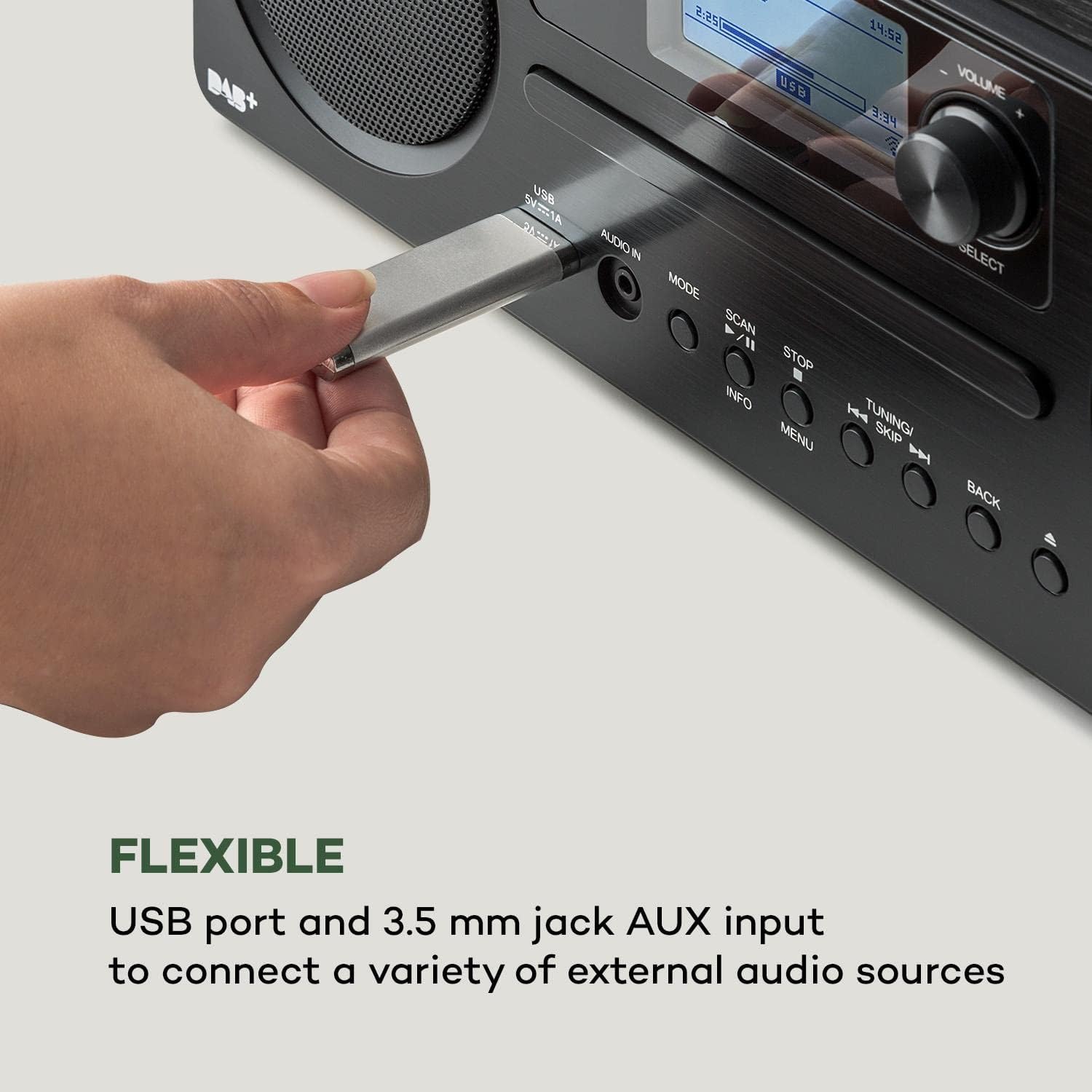
ചിത്രം 6.2: ഒരു ക്ലോസപ്പ് view of a USB stick inserted into the USB port on the front panel of the AUNA Worldwide Internet Radio, demonstrating its capability for playing media from external storage.
- Insert a USB storage device into the USB port on the front panel.
- Select 'USB' mode. The radio will automatically detect and display the content.
- ഫോൾഡറുകളിലൂടെ നാവിഗേറ്റ് ചെയ്യുക കൂടാതെ files using the Select knob and buttons. Use playback controls as needed.
6.8 AUX ഇൻപുട്ട്
ഒരു 3.5mm ഓഡിയോ കേബിൾ ഉപയോഗിച്ച് ബാഹ്യ ഓഡിയോ ഉപകരണങ്ങൾ ബന്ധിപ്പിക്കുക.
- Connect your external audio device to the 'AUDIO IN' (3.5mm AUX) port on the front panel.
- Select 'AUX' mode.
- Control playback from your connected external device.
6.9 Spotify കണക്റ്റ്
Stream music directly from your Spotify account.

ചിത്രം 6.3: A person relaxing on a couch, using a smartphone with the Spotify logo visible, illustrating the convenience of Spotify Connect for streaming music directly to the AUNA radio.
- Ensure your radio is connected to the same Wi-Fi network as your smartphone or tablet running the Spotify app.
- നിങ്ങളുടെ ഉപകരണത്തിൽ Spotify ആപ്പ് തുറക്കുക.
- ഒരു ഗാനം പ്ലേ ചെയ്ത് 'Devices Available' ഐക്കൺ തിരഞ്ഞെടുക്കുക.
- Choose your AUNA Worldwide radio from the list to start streaming.
6.10 UNDOK ആപ്പ് നിയന്ത്രണം
Control your radio remotely using the UNDOK app on your smartphone or tablet.

ചിത്രം 6.4: A screenshot of the UNDOK app interface on a smartphone, displayed next to the physical remote control for the AUNA radio, demonstrating the dual control options available to the user.
- Download the 'UNDOK' app from your device's app store.
- Ensure your radio and smartphone/tablet are connected to the same Wi-Fi network.
- Open the UNDOK app. It will automatically detect your AUNA radio.
- Select your radio within the app to gain full control over modes, stations, volume, and settings.
6.11 അലാറം പ്രവർത്തനങ്ങൾ
The radio includes dual alarm, sleep timer, and snooze functions.
- നാവിഗേറ്റ് ചെയ്യുക Menu > Alarms to set up dual alarms with customizable sources (buzzer, radio) and schedules.
- സെറ്റ് എ സ്ലീപ്പ് ടൈമർ via the Menu to automatically turn off the radio after a set period.
- അലാറം മുഴങ്ങുമ്പോൾ, അമർത്തുക സ്നൂസ് ചെയ്യുക button (often the Select knob) to temporarily silence it.
7. പരിപാലനം
- വൃത്തിയാക്കൽ: യൂണിറ്റിന്റെ പുറംഭാഗം വൃത്തിയാക്കാൻ മൃദുവായതും ഉണങ്ങിയതുമായ തുണി ഉപയോഗിക്കുക. അബ്രസീവ് ക്ലീനറുകളോ ലായകങ്ങളോ ഉപയോഗിക്കരുത്.
- സിഡി പ്ലെയർ: Keep the CD slot free from dust and debris. Do not insert damaged or dirty CDs.
- സംഭരണം: യൂണിറ്റ് ദീർഘനേരം സൂക്ഷിക്കുകയാണെങ്കിൽ, പവർ ഔട്ട്ലെറ്റിൽ നിന്ന് അത് അൺപ്ലഗ് ചെയ്ത് തണുത്തതും വരണ്ടതുമായ സ്ഥലത്ത് സൂക്ഷിക്കുക.
8. പ്രശ്നപരിഹാരം
| പ്രശ്നം | സാധ്യമായ കാരണം | പരിഹാരം |
|---|---|---|
| ശക്തിയില്ല | പവർ അഡാപ്റ്റർ ബന്ധിപ്പിച്ചിട്ടില്ല; ഔട്ട്ലെറ്റ് പ്രവർത്തിക്കുന്നില്ല. | Check power adapter connection; try a different outlet. |
| ശബ്ദമില്ല | Volume too low; incorrect source selected. | Increase volume; ensure correct mode (e.g., Internet Radio, CD) is selected. |
| ഇന്റർനെറ്റ് റേഡിയോ കണക്റ്റ് ചെയ്യുന്നില്ല. | Wi-Fi connection issue; incorrect password. | Check Wi-Fi settings and password; ensure router is working; restart radio and router. |
| മോശം DAB/FM റിസപ്ഷൻ | ആന്റിന നീട്ടിയിട്ടില്ല; ദുർബലമായ സിഗ്നൽ. | Fully extend and adjust the telescopic antenna; try repositioning the unit. |
| സിഡി പ്ലേ ചെയ്യുന്നില്ല | CD inserted incorrectly; CD is dirty or scratched. | Re-insert CD correctly; clean or try a different CD. |
| ബ്ലൂടൂത്ത് ജോടിയാക്കുന്നില്ല | Radio not in pairing mode; device too far. | Ensure radio is in Bluetooth mode; bring devices closer; restart Bluetooth on both devices. |
9 സ്പെസിഫിക്കേഷനുകൾ
- മോഡൽ: MG2-2200-gfvd
- വൈദ്യുതി വിതരണം: 220-240 V ~ | 50/60 Hz (via power adapter)
- ഔട്ട്പുട്ട് പവർ: 2 x 5 W RMS
- പിന്തുണയ്ക്കുന്ന പ്ലേബാക്ക് ഫോർമാറ്റുകൾ: MP3, WMA, WAV, AAC, FLAC
- കണക്ഷനുകൾ: 1 x USB port (5 V, 1 A charging function), 1 x 3.5 mm jack AUX input, Bluetooth, Wi-Fi
- റേഡിയോ ട്യൂണറുകൾ: Internet Radio, DAB/DAB+, FM/AM
- പ്രത്യേക സവിശേഷതകൾ: Spotify Connect, UNDOK App Control, LCD Display, Time and Date Display, Standby Function, Alarm Functions (Dual Alarm, Sleep Timer, Snooze), RDS Function
- അളവുകൾ (W x H x D): 35 x 12 x 20 സെ.മീ
- ഭാരം: ഏകദേശം 2.6 കിലോ
- നിറം: കറുപ്പ്
10. വാറൻ്റിയും പിന്തുണയും
AUNA products are designed and manufactured to the highest quality standards. In the unlikely event of a problem with your device, please refer to the troubleshooting section of this manual. If the issue persists, please contact your retailer or authorized service center for assistance.
Please retain your proof of purchase for warranty claims. Information regarding spare parts availability and software updates is not available at this time.