
auna MG2-Worldwide CD WD
auna Worldwide CD Internet Radio User Manual
Model: MG2-Worldwide CD WD
ആമുഖം
Thank you for choosing the auna Worldwide CD Internet Radio. This manual provides essential information for the safe and efficient operation of your device. Please read it thoroughly before use and keep it for future reference.
This versatile audio system combines traditional CD playback with modern internet radio, DAB/DAB+ digital radio, FM radio, Bluetooth connectivity, and USB playback. It also features Spotify Connect and multiroom functionality for a comprehensive listening experience.
സുരക്ഷാ നിർദ്ദേശങ്ങൾ
Always observe the following safety precautions to prevent electric shock, fire, or damage to the device.
- ഊർജ്ജ സ്രോതസ്സ്: നൽകിയിരിക്കുന്ന പവർ അഡാപ്റ്റർ മാത്രം ഉപയോഗിക്കുക. വോളിയം ഉറപ്പാക്കുകtagഇ നിങ്ങളുടെ പ്രാദേശിക വൈദ്യുതി വിതരണവുമായി പൊരുത്തപ്പെടുന്നു.
- വെൻ്റിലേഷൻ: Do not block any ventilation openings. Place the device on a stable, flat surface with adequate space around it for proper airflow.
- ജലവും ഈർപ്പവും: Do not expose the device to rain, moisture, or dripping/splashing liquids. Do not place objects filled with liquids, such as vases, on the device.
- താപ സ്രോതസ്സുകൾ: റേഡിയേറ്ററുകൾ, ഹീറ്റ് രജിസ്റ്ററുകൾ, സ്റ്റൗകൾ, അല്ലെങ്കിൽ മറ്റ് ഉപകരണങ്ങൾ (ഉൾപ്പെടെ) പോലുള്ള താപ സ്രോതസ്സുകളിൽ നിന്ന് ഉപകരണം അകറ്റി നിർത്തുക. ampലൈഫയറുകൾ) ചൂട് ഉത്പാദിപ്പിക്കുന്നത്.
- വൃത്തിയാക്കൽ: Unplug the device from the power outlet before cleaning. Use a soft, dry cloth only. Do not use liquid cleaners or aerosol cleaners.
- സേവനം: ഈ ഉൽപ്പന്നം സ്വയം സേവിക്കാൻ ശ്രമിക്കരുത്. യോഗ്യതയുള്ള സേവന ഉദ്യോഗസ്ഥർക്ക് എല്ലാ സേവനങ്ങളും റഫർ ചെയ്യുക.
- ഒബ്ജക്റ്റ്, ലിക്വിഡ് എൻട്രി: അപകടകരമായ വോളിയം സ്പർശിച്ചേക്കാവുന്നതിനാൽ, തുറസ്സുകളിലൂടെ ഈ ഉൽപ്പന്നത്തിലേക്ക് ഏതെങ്കിലും തരത്തിലുള്ള വസ്തുക്കളെ ഒരിക്കലും തള്ളരുത്tagതീയോ വൈദ്യുതാഘാതമോ ഉണ്ടാക്കിയേക്കാവുന്ന ഇ പോയിൻ്റുകൾ അല്ലെങ്കിൽ ഷോർട്ട്-ഔട്ട് ഭാഗങ്ങൾ.
പാക്കേജ് ഉള്ളടക്കം
എല്ലാ ഇനങ്ങളും നിലവിലുണ്ടോ എന്നും നല്ല നിലയിലാണെന്നും ദയവായി പരിശോധിക്കുക:
- 1 x auna Worldwide CD Internet Radio Unit
- 1 x പവർ അഡാപ്റ്റർ
- 1 x Remote Control (Battery not included for remote control, typically CR2025)
- 1 x User Manual (English, French, German)
ഉൽപ്പന്നം കഴിഞ്ഞുview
The auna Worldwide CD Internet Radio features a sleek design with a walnut finish, integrating seamlessly into various home environments. Below is an overview of its main components and dimensions.

ചിത്രം 1: മുൻഭാഗം view of the auna Worldwide CD Internet Radio.

Figure 2: Dimensions of the auna Worldwide CD Internet Radio (Width: 45cm, Height: 18cm, Depth: 26cm).
ഫ്രണ്ട് പാനൽ നിയന്ത്രണങ്ങളും ഡിസ്പ്ലേയും
The front panel houses the main controls, display, and media inputs for easy access.

ചിത്രം 3: വിശദമായി view of the LCD display and front panel controls, including volume knob, select button, and navigation buttons.
- LCD ഡിസ്പ്ലേ: Shows current mode, station information, time, and menu options.
- പവർ ബട്ടൺ: യൂണിറ്റ് ഓണാക്കുകയോ ഓഫാക്കുകയോ ചെയ്യുന്നു.
- വോളിയം നോബ്: ഓഡിയോ ഔട്ട്പുട്ട് ലെവൽ ക്രമീകരിക്കുന്നു.
- ബട്ടൺ തിരഞ്ഞെടുക്കുക: മെനുകളിലെ തിരഞ്ഞെടുപ്പുകൾ സ്ഥിരീകരിക്കുന്നു.
- നാവിഗേഷൻ ബട്ടണുകൾ: For navigating menus and tuning stations (Tuning/Skip, Back).
- മോഡ് ബട്ടൺ: Switches between different audio sources (Internet Radio, DAB, FM, CD, USB, Bluetooth, AUX).
- വിവര ബട്ടൺ: Displays additional information about the current track or station.
- മെനു ബട്ടൺ: പ്രധാന മെനുവിൽ പ്രവേശിക്കുന്നു.
- സിഡി ട്രേ: ഓഡിയോ സിഡികൾ ചേർക്കുന്നതിന്.
- USB Port (5V/1A): For connecting USB storage devices and charging.
- Audio In (3.5mm AUX): ബാഹ്യ ഓഡിയോ സ്രോതസ്സുകളെ ബന്ധിപ്പിക്കുന്നതിന്.
സജ്ജമാക്കുക
1. പവർ കണക്ഷൻ
Connect the provided power adapter to the DC IN port on the rear of the radio and then plug it into a wall outlet. The unit will enter standby mode.
2. ആന്റിന കണക്ഷൻ
Extend the telescopic antenna fully for optimal DAB/DAB+ and FM radio reception.
3. പ്രാരംഭ സജ്ജീകരണ വിസാർഡ്
Upon first power-on, the radio will guide you through an initial setup wizard. Follow the on-screen prompts to configure:
- ഭാഷ: നിങ്ങൾ ഇഷ്ടപ്പെടുന്ന ഭാഷ തിരഞ്ഞെടുക്കുക.
- നെറ്റ്വർക്ക് കണക്ഷൻ: The radio will scan for available Wi-Fi networks. Select your network and enter the password using the navigation and select buttons. A stable internet connection is required for Internet Radio and Spotify Connect features.
- സമയവും തീയതിയും: Set the correct time and date, or allow the radio to synchronize automatically via network or DAB signal.
4. റിമോട്ട് കൺട്രോൾ ബാറ്ററി ഇൻസ്റ്റാളേഷൻ
Insert one CR2025 battery (not included) into the remote control, ensuring correct polarity.
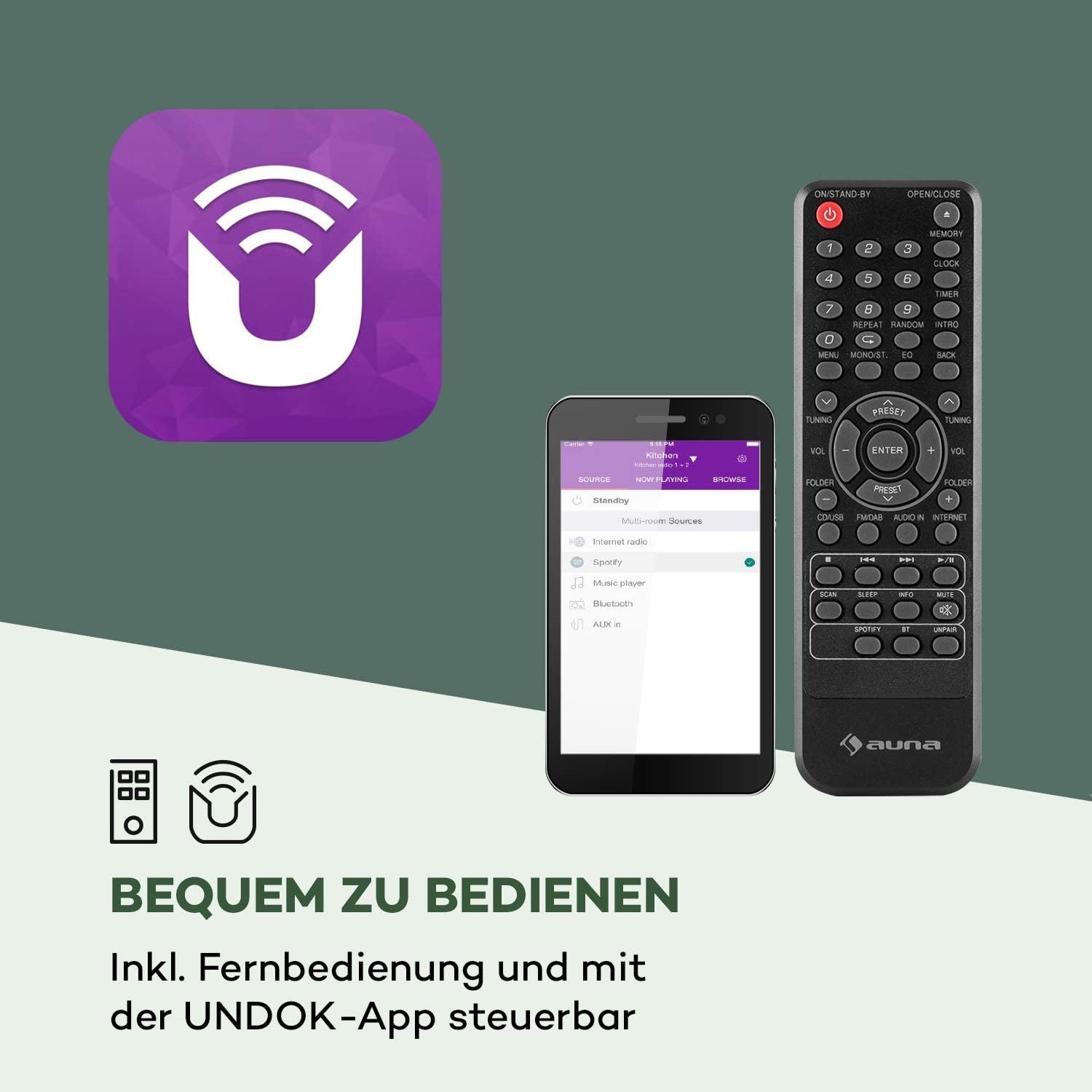
Figure 4: The included remote control and the UNDOK app interface.
പ്രവർത്തന നിർദ്ദേശങ്ങൾ
അടിസ്ഥാന പ്രവർത്തനം
- പവർ ഓൺ/ഓഫ്: അമർത്തുക ശക്തി യൂണിറ്റിലെയോ റിമോട്ട് കൺട്രോളിലെയോ ബട്ടൺ അമർത്തിപ്പിടിച്ചുകൊണ്ട്.
- വോളിയം ക്രമീകരണം: തിരിക്കുക വോളിയം നോബ് ചെയ്യുക അല്ലെങ്കിൽ ഉപയോഗിക്കുക വോൾ +/- റിമോട്ടിലെ ബട്ടണുകൾ.
- ഉറവിട തിരഞ്ഞെടുപ്പ്: അമർത്തുക മോഡ് button on the unit or remote to cycle through available sources (Internet Radio, DAB, FM, CD, USB, Bluetooth, AUX).
ഇൻ്റർനെറ്റ് റേഡിയോ
Access thousands of radio stations from around the world via your internet connection.

Figure 5: The radio seamlessly integrates into your home, offering a vast selection of over 10,000 internet radio stations.
- Select "Internet Radio" as the source.
- Navigate through categories (e.g., Location, Genre, Popular) using the navigation buttons and press തിരഞ്ഞെടുക്കുക സ്ഥിരീകരിക്കാൻ.
- പെട്ടെന്നുള്ള ആക്സസ്സിനായി നിങ്ങളുടെ പ്രിയപ്പെട്ട സ്റ്റേഷനുകൾ പ്രീസെറ്റുകളായി സംരക്ഷിക്കാനാകും.
DAB/DAB+ റേഡിയോ
ഉയർന്ന നിലവാരമുള്ള ഡിജിറ്റൽ റേഡിയോ പ്രക്ഷേപണങ്ങൾ ആസ്വദിക്കൂ.
- Select "DAB Radio" as the source.
- ലഭ്യമായ DAB/DAB+ സ്റ്റേഷനുകൾക്കായി റേഡിയോ സ്വയമേവ സ്കാൻ ചെയ്യും.
- Use the navigation buttons to select a station from the list.
എഫ്എം റേഡിയോ
പരമ്പരാഗത എഫ്എം റേഡിയോ സ്റ്റേഷനുകൾ ആസ്വദിക്കൂ.
- Select "FM Radio" as the source.
- ഉപയോഗിക്കുക Tuning/Skip buttons to manually tune or auto-scan for stations.
സിഡി പ്ലെയർ
Play your favorite audio CDs.

Figure 6: The integrated CD player supports standard audio CDs and MP3-compatible discs.
- Gently insert an audio CD into the CD slot. The radio will automatically switch to CD mode and begin playback.
- പ്ലേബാക്ക് നിയന്ത്രണങ്ങൾ ഉപയോഗിക്കുക (പ്ലേ/താൽക്കാലികമായി നിർത്തുക, നിർത്തുക, ഒഴിവാക്കുക) യൂണിറ്റിലോ റിമോട്ടിലോ.
USB പ്ലേബാക്ക്
സംഗീതം പ്ലേ ചെയ്യുക fileഒരു യുഎസ്ബി ഫ്ലാഷ് ഡ്രൈവിൽ നിന്ന്.

Figure 7: The USB port allows playback of various audio formats from a USB storage device.
- മുൻ പാനലിലെ USB പോർട്ടിലേക്ക് ഒരു USB ഫ്ലാഷ് ഡ്രൈവ് തിരുകുക.
- Select "USB" as the source. The radio will display the folder structure.
- Navigate and select your desired audio files. Supported formats include MP3, WMA, WAV, AAC, FLAC.
ബ്ലൂടൂത്ത് കണക്റ്റിവിറ്റി
നിങ്ങളുടെ ബ്ലൂടൂത്ത് പ്രാപ്തമാക്കിയ ഉപകരണങ്ങളിൽ നിന്ന് വയർലെസ് ആയി ഓഡിയോ സ്ട്രീം ചെയ്യുക.

Figure 8: Wireless flexibility is provided through the Bluetooth interface, allowing connection to smartphones, tablets, and laptops.
- Select "Bluetooth" as the source. The radio will enter pairing mode.
- On your Bluetooth device (smartphone, tablet, etc.), search for "auna Worldwide CD" and connect.
- ജോടിയാക്കിയാൽ, നിങ്ങളുടെ ഉപകരണത്തിൽ നിന്ന് റേഡിയോ വഴി ഓഡിയോ പ്ലേ ചെയ്യാൻ കഴിയും.
AUX ഇൻപുട്ട്
ഒരു 3.5mm ഓഡിയോ കേബിൾ ഉപയോഗിച്ച് ബാഹ്യ ഓഡിയോ ഉപകരണങ്ങൾ ബന്ധിപ്പിക്കുക.
- Connect one end of a 3.5mm audio cable to the "Audio In" port on the radio and the other end to the headphone jack or audio output of your external device.
- Select "AUX" as the source.
Spotify കണക്റ്റ്
Stream music directly from your Spotify account to the radio.

Figure 9: Spotify Connect enables seamless music streaming and multiroom audio experiences.
- Ensure your radio is connected to the same Wi-Fi network as your device running the Spotify app.
- നിങ്ങളുടെ സ്മാർട്ട്ഫോണിലോ ടാബ്ലെറ്റിലോ സ്പോട്ടിഫൈ ആപ്പ് തുറക്കുക.
- Play a song and tap the "Devices Available" icon (speaker icon).
- Select your auna Worldwide CD radio from the list.
App Control (UNDOK App)
Control your radio conveniently from your smartphone or tablet using the UNDOK app.
- Download the "UNDOK" app from your device's app store (iOS App Store or Google Play Store).
- Ensure your smartphone/tablet and the radio are connected to the same Wi-Fi network.
- Open the UNDOK app, and it will automatically detect your radio.
- You can now control all functions of the radio, including source selection, station tuning, volume, and multiroom settings.
Alarm Clock and Timer Functions
The radio features dual alarms, a snooze function, and a sleep timer.
- അലാറങ്ങൾ സജ്ജീകരിക്കുക: Access the "Alarm" option in the main menu. You can set two independent alarms with customizable time, source (buzzer, internet radio, DAB, FM), and repetition (daily, once, weekdays, weekends).
- സ്നൂസ്: When an alarm sounds, press any button (except Power) to activate snooze for a short period.
- സ്ലീപ്പ് ടൈമർ: Access the "Sleep" option in the main menu. Set a timer (e.g., 15, 30, 60 minutes) after which the radio will automatically turn off.
മൾട്ടിറൂം പ്രവർത്തനം
Connect multiple compatible auna devices to create a synchronized multiroom audio system, controlled via the UNDOK app.
- Ensure all multiroom devices are connected to the same Wi-Fi network.
- Use the UNDOK app to group devices and play synchronized audio across different rooms.
മെയിൻ്റനൻസ്
Proper care will ensure the longevity of your auna Worldwide CD Internet Radio.
- വൃത്തിയാക്കൽ: Disconnect the power before cleaning. Use a soft, dry, lint-free cloth to wipe the surfaces. Do not use abrasive cleaners, waxes, or solvents.
- സിഡി പ്ലെയർ: Handle CDs by their edges to avoid fingerprints. If the CD player experiences issues, try cleaning the lens with a specialized CD lens cleaner.
- സംഭരണം: യൂണിറ്റ് ദീർഘനേരം സൂക്ഷിക്കുകയാണെങ്കിൽ, പവർ ഔട്ട്ലെറ്റിൽ നിന്ന് അത് അൺപ്ലഗ് ചെയ്ത് തണുത്തതും വരണ്ടതുമായ സ്ഥലത്ത് സൂക്ഷിക്കുക.
ട്രബിൾഷൂട്ടിംഗ്
If you encounter any issues, please refer to the table below for common problems and their solutions.
| പ്രശ്നം | സാധ്യമായ കാരണം | പരിഹാരം |
|---|---|---|
| ശക്തിയില്ല | Power adapter not connected; Power outlet not active. | Ensure power adapter is securely connected and the outlet is working. |
| ശബ്ദമില്ല | ശബ്ദം വളരെ കുറവാണ്; മ്യൂട്ട് ഫംഗ്ഷൻ സജീവമാണ്; തെറ്റായ ഉറവിടം തിരഞ്ഞെടുത്തു. | Increase volume; Check if mute is on; Select the correct audio source. |
| Wi-Fi-യിലേക്ക് കണക്റ്റുചെയ്യാൻ കഴിയില്ല | Incorrect password; Router too far; Network issue. | Verify Wi-Fi password; Move radio closer to router; Restart router. |
| മോശം റേഡിയോ റിസപ്ഷൻ (DAB/FM) | ആന്റിന നീട്ടിയിട്ടില്ല; ദുർബലമായ സിഗ്നൽ. | Fully extend the telescopic antenna; Reposition the radio for better signal. |
| സിഡി പ്ലേ ചെയ്യുന്നില്ല | CD inserted incorrectly; Disc is dirty or scratched; Unsupported disc format. | Re-insert CD correctly; Clean the disc; Ensure it's an audio CD or compatible MP3 CD. |
| ബ്ലൂടൂത്ത് ജോടിയാക്കൽ പരാജയപ്പെടുന്നു | Radio not in pairing mode; Device too far; Bluetooth interference. | Ensure radio is in Bluetooth mode; Move devices closer; Turn off other Bluetooth devices. |
സ്പെസിഫിക്കേഷനുകൾ
Detailed technical specifications for the auna Worldwide CD Internet Radio.
| ഫീച്ചർ | വിശദാംശങ്ങൾ |
|---|---|
| ബ്രാൻഡ് | auna |
| മോഡൽ നമ്പർ | MG2-Worldwide CD WD |
| ഉൽപ്പന്ന അളവുകൾ (W x H x D) | 45 സെ.മീ x 18 സെ.മീ x 26 സെ.മീ |
| ഭാരം | 2.6 കിലോഗ്രാം |
| കണക്റ്റിവിറ്റി ടെക്നോളജി | USB, 3.5 mm audio, Bluetooth, Wi-Fi |
| പിന്തുണയ്ക്കുന്ന റേഡിയോ ബാൻഡുകൾ | Internet Radio, DAB/DAB+, FM |
| ഔട്ട്പുട്ട് പവർ | 2 x 5 വാട്ട് ആർഎംഎസ് |
| പിന്തുണയ്ക്കുന്ന പ്ലേബാക്ക് ഫോർമാറ്റുകൾ | MP3, WMA, WAV, AAC, FLAC |
| ഡിസ്പ്ലേ ടെക്നോളജി | എൽസിഡി |
| പ്രത്യേക സവിശേഷതകൾ | CD Player, Spotify Connect, UNDOK App Control, Multiroom Function, Alarm Clock, Sleep Timer, USB Charging (5V, 1A) |
| വൈദ്യുതി വിതരണം | 220-240 V~ | 50/60 ഹെർട്സ് |
വാറൻ്റിയും പിന്തുണയും
For warranty information and technical support, please refer to the documentation included with your product or visit the official auna webസൈറ്റ്. ഏതെങ്കിലും വാറന്റി ക്ലെയിമുകൾക്ക് നിങ്ങളുടെ വാങ്ങലിന്റെ തെളിവ് സൂക്ഷിക്കുക.
For further assistance, you may contact auna customer service directly.
അനുബന്ധ രേഖകൾ - MG2-Worldwide CD WD
 |
auna IR-260 Internetradio Bedienungsanleitung Umfassende Bedienungsanleitung für das auna IR-260 Internetradio, inklusive Installation, Einrichtung, Funktionen wie DAB+, FM, Spotify Connect, Bluetooth, USB und Netzwerkeinstellungen. |
 |
Auna NR-620 Kompaktanlage: Plattenspieler, Kassettendeck, MP3-CD-Player & Radio Umfassende Bedienungsanleitung für die Auna NR-620 Kompaktanlage. Erfahren Sie mehr über die Funktionen wie Plattenspieler, Kassettendeck, CD-Player, Radio, MP3-Wiedergabe und Digitalisierung von Schallplatten und Kassetten. |
 |
Auna Stereo Components HiFi System User Manual Comprehensive user manual for the Auna Stereo Components HiFi system, covering amplifier and CD player functions, connections, remote control operation, MP3 playback, USB input, radio tuning, troubleshooting, and disposal information. |
 |
ഔന സിഡി-1000 ഡിജി സിഡി പ്ലെയർ യൂസർ മാനുവൽ സാങ്കേതിക സവിശേഷതകൾ, സുരക്ഷാ നിർദ്ദേശങ്ങൾ, ഉപകരണ വിവരണം, റിമോട്ട് കൺട്രോൾ പ്രവർത്തനങ്ങൾ, സജ്ജീകരണം എന്നിവ വിശദമാക്കുന്ന Auna CD-1000 DG CD പ്ലെയറിനായുള്ള ഉപയോക്തൃ മാനുവൽ. |
 |
auna AV2-CD509 HiFi CD-Player Bedienungsanleitung Umfassende Anleitung für den auna AV2-CD509 HiFi CD-Player. Enthält Sicherheitshinweise, Bedienung, Fehlerbehebung und Entsorgungsinformationen für optimale Leistung. |
 |
ഔന സിൽവർ സ്റ്റാർ സ്റ്റീരിയോ: മാനുവൽ യുറ്റെൻ്റെ ഇ സ്പെസിഫിഷെ ടെക്നിഷ് Guida completa per l'Auna Silver Star Stereo (modelli 10032916, 10032917, 10038351), che istruzioni per l'uso, Panoramica delle funzioni, configurazione di rete e risoluzione dei problemi എന്നിവ ഉൾപ്പെടുന്നു. |
Ask a question about this manual
Ask about setup, troubleshooting, compatibility, parts, safety, or missing instructions. Manuals+ will review the question and use this page’s manual context to help answer it.