
ആമുഖം
This manual provides detailed instructions for the safe and effective operation of your Digitek Speedlite DFL985C TTL Flash with Inbuilt Receiver for Canon cameras. Please read this manual thoroughly before use to ensure optimal performance and to prevent damage to the unit or injury.
സുരക്ഷാ മുൻകരുതലുകൾ
- Do not expose the flash unit to rain, moisture, or extreme humidity.
- ഫ്ലാഷ് ലൈറ്റുമായി നേരിട്ട് കണ്ണിൽ തൊടുന്നത് ഒഴിവാക്കുക, പ്രത്യേകിച്ച് അടുത്തു നിന്ന് നോക്കുമ്പോൾ, കാരണം അത് താൽക്കാലിക കാഴ്ച വൈകല്യത്തിന് കാരണമാകും.
- കത്തുന്ന വസ്തുക്കളിൽ നിന്ന് യൂണിറ്റിനെ അകറ്റി നിർത്തുക.
- Do not disassemble or attempt to repair the flash unit yourself. Refer to qualified service personnel.
- Use only specified AA alkaline or Ni-MH rechargeable batteries. Do not mix old and new batteries or different types of batteries.
- യൂണിറ്റ് ദീർഘനേരം ഉപയോഗിക്കുന്നില്ലെങ്കിൽ ബാറ്ററികൾ നീക്കം ചെയ്യുക.
ഉൽപ്പന്നം കഴിഞ്ഞുview
The Digitek Speedlite DFL985C is a high-performance TTL flash designed for Canon cameras, featuring a built-in 2.4G wireless transmission system and an optical slave function. It offers versatile lighting control for various photographic situations.
ഘടകങ്ങൾ

ചിത്രം 1: മുന്നിലും വശത്തും view of the Digitek Speedlite DFL985C flash unit. This image displays the flash head, main body, and the hot shoe mount.
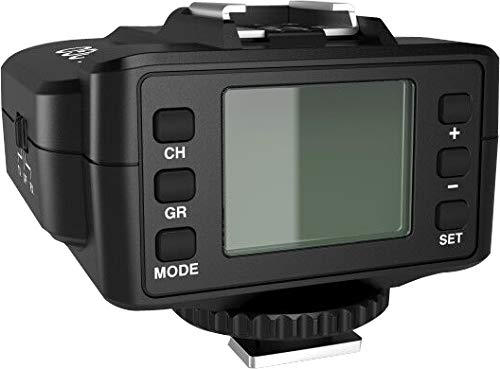
ചിത്രം 2: Rear panel of the DFL985C, showing the large LCD display and control buttons for Channel (CH), Group (GR), Mode, and adjustment buttons (+, -, SET).
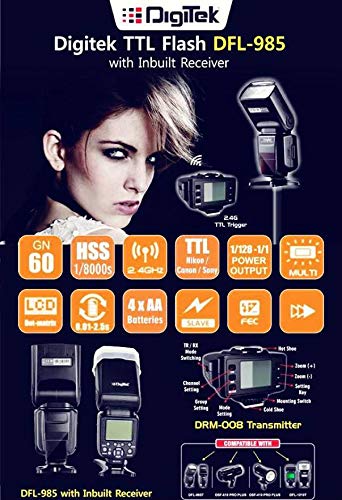
ചിത്രം 3: The Digitek Speedlite DFL985C flash unit shown alongside the DRM 008 wireless transmitter, which is included for remote flash control.
സജ്ജമാക്കുക
ബാറ്ററി ഇൻസ്റ്റാളേഷൻ
- ഫ്ലാഷ് യൂണിറ്റിന്റെ വശത്തുള്ള ബാറ്ററി കമ്പാർട്ട്മെന്റ് കവർ തുറക്കുക.
- നാല് (4) AA ആൽക്കലൈൻ അല്ലെങ്കിൽ Ni-MH റീചാർജ് ചെയ്യാവുന്ന ബാറ്ററികൾ ഇടുക, ശരിയായ പോളാരിറ്റി (+/-) ഉറപ്പാക്കുക.
- ബാറ്ററി കമ്പാർട്ട്മെൻ്റ് കവർ സുരക്ഷിതമായി അടയ്ക്കുക.
Mounting the Flash on Camera
- നിങ്ങളുടെ ക്യാമറ ഓഫാക്കിയിട്ടുണ്ടെന്ന് ഉറപ്പാക്കുക.
- Slide the flash unit's hot shoe mount into your camera's hot shoe slot.
- Tighten the locking wheel on the flash unit to secure it firmly to the camera.
DRM 008 Transmitter Setup
The included DRM 008 transmitter enables wireless control of the DFL985C flash unit.
- Install batteries into the DRM 008 transmitter (refer to the transmitter's specific manual for battery type and installation).
- Mount the DRM 008 transmitter onto your camera's hot shoe.
- Power on both the flash unit and the transmitter.
- Set the same channel and group on both the transmitter and the flash unit to establish a wireless connection. Refer to the operating modes section for setting channels and groups on the flash.
ഓപ്പറേറ്റിംഗ് മോഡുകൾ
The DFL985C offers several flash modes to suit various photographic needs.
TTL Mode (Through-The-Lens)
In TTL mode, the flash automatically determines the appropriate light output based on the camera's metering system. This provides convenient and accurate flash exposure.
- അമർത്തുക മോഡ് button until 'TTL' is displayed on the LCD.
- Flash Exposure Compensation (FEC) can be adjusted in this mode using the +/- buttons to fine-tune exposure.
Manual (M) Mode
Manual mode allows you to set the flash power output manually from 1/1 (full power) to 1/128 power, in 0.3 EV steps. This provides precise control over lighting.
- അമർത്തുക മോഡ് button until 'M' is displayed.
- Use the +/- buttons to adjust the flash power output.
മൾട്ടി (സ്ട്രോബോസ്കോപ്പിക്) മോഡ്
Multi mode fires a series of rapid flashes during a single exposure, useful for capturing multiple movements of a subject in one frame.
- അമർത്തുക മോഡ് button until 'MULTI' is displayed.
- Adjust the flash frequency (Hz) and number of flashes using the control buttons.
S1 & S2 Optical Slave Modes
These modes allow the DFL985C to be triggered by another flash unit without a physical connection.
- അമർത്തുക മോഡ് button until 'S1' or 'S2' is displayed.
- S1 മോഡ്: Triggers the flash upon sensing the first flash from a master unit. Suitable for manual flash systems.
- S2 മോഡ്: Ignores the pre-flash of a master TTL flash and triggers on the main flash. Suitable for TTL flash systems.
High-Speed Sync (HSS)
The DFL985C supports High-Speed Sync up to 1/8000s, allowing you to use flash at shutter speeds faster than your camera's native sync speed. This is ideal for freezing fast action or using wide apertures in bright conditions.
സൂം പ്രവർത്തനം
The flash head's zoom position can be adjusted automatically or manually to match the lens focal length, optimizing light coverage.
- ഓട്ടോ സൂം: The flash automatically adjusts its zoom position (24-105mm for Canon) to match the camera's lens focal length.
- Manual Zoom: You can manually set the zoom position to control the spread of light.
വിപുലമായ സവിശേഷതകൾ
- Flash Exposure Compensation (FEC): Adjust flash output in TTL mode.
- ഓട്ടോ എക്സ്പോഷർ ബ്രാക്കറ്റിംഗ് (AEB): Automatically takes multiple shots at different flash exposures.
- അമിത ചൂടാക്കൽ സംരക്ഷണം: The unit includes a protection mechanism to prevent damage from excessive use.
- പിൻ കർട്ടൻ സമന്വയം: Synchronizes the flash with the closing of the shutter curtain, creating motion blur behind the subject.
മെയിൻ്റനൻസ്
- വൃത്തിയാക്കൽ: ഫ്ലാഷ് യൂണിറ്റ് വൃത്തിയാക്കാൻ മൃദുവായതും ഉണങ്ങിയതുമായ ഒരു തുണി ഉപയോഗിക്കുക. കഠിനമായ അഴുക്കിന്, അല്പം ഡി.amp cloth can be used, followed by a dry cloth. Do not use solvents or abrasive cleaners.
- സംഭരണം: Store the flash unit in a cool, dry place, away from direct sunlight and extreme temperatures. Remove batteries if storing for extended periods.
- ബാറ്ററി കെയർ: Always use fresh batteries. If using rechargeable batteries, ensure they are fully charged before use and properly maintained according to their manufacturer's instructions.
ട്രബിൾഷൂട്ടിംഗ്
| പ്രശ്നം | സാധ്യമായ കാരണം | പരിഹാരം |
|---|---|---|
| ഫ്ലാഷ് കത്തുന്നില്ല. | Low batteries, incorrect mode, flash not securely mounted, camera settings. | Replace batteries, check flash mode (TTL/M), ensure secure hot shoe connection, verify camera flash settings. |
| ഫ്ലാഷ് ഔട്ട്പുട്ട് വളരെ ദുർബലമാണ്/ശക്തമാണ്. | Incorrect flash power setting (M mode), FEC adjustment (TTL mode), distance to subject. | Adjust manual power output, modify FEC, ensure subject is within flash range. |
| വയർലെസ്സ് ട്രിഗർ പ്രവർത്തിക്കുന്നില്ല. | Mismatched channel/group, transmitter batteries low, distance too far. | Ensure flash and transmitter are on the same channel/group, replace transmitter batteries, reduce distance between units. |
| Flash overheats and stops firing. | Rapid consecutive flashes. | ഫ്ലാഷ് തണുക്കാൻ അനുവദിക്കുക. ഫ്ലാഷുകളുടെ ആവൃത്തി കുറയ്ക്കുക. |
സ്പെസിഫിക്കേഷനുകൾ
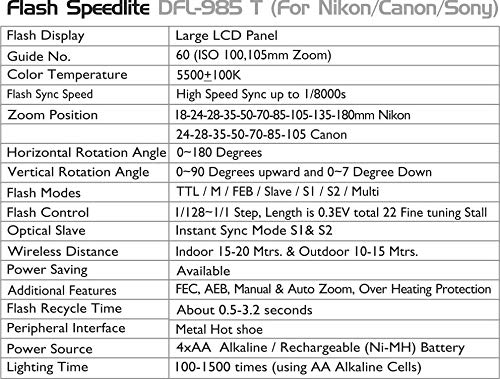
ചിത്രം 4: Detailed specifications for the Digitek Speedlite DFL985C flash unit.
| ഫീച്ചർ | വിവരണം |
|---|---|
| ഫ്ലാഷ് ഡിസ്പ്ലേ | വലിയ എൽസിഡി പാനൽ |
| ഗൈഡ് നം. | 60 (ISO 100, 105mm സൂം) |
| വർണ്ണ താപനില | 5500 ± 100 കെ |
| PC Sync Port | ലഭ്യമാണ് |
| ഫ്ലാഷ് സമന്വയ വേഗത | 1/8000s വരെ ഹൈ സ്പീഡ് സിങ്ക്, റിയർ കർട്ടൻ സിങ്ക് |
| Zoom Position (Canon) | 24-28-35-50-70-85-105mm |
| തിരശ്ചീന റൊട്ടേഷൻ ആംഗിൾ | 0-180 ഡിഗ്രി |
| ലംബ റൊട്ടേഷൻ ആംഗിൾ | 7-90 Degrees upward and 0-7 Degree Down |
| ഫ്ലാഷ് മോഡുകൾ | TTL / Manual / Multi / S1 and S2 |
| ഫ്ലാഷ് നിയന്ത്രണം | 8 Grade Hi-Speed control (1/128-1/1), Step Length: 0.3EV, total 22 Fine Tuning Stall |
| വയർലെസ് ദൂരം | Indoor 20-30 Mtrs. and Outdoor 10-15 Mtrs. |
| ഒപ്റ്റിക്കൽ സ്ലേവ് | Instant Sync Mode S1 and S2 |
| പവർ സേവിംഗ് | ലഭ്യമാണ് |
| ഫ്ലാഷ് റീസൈക്കിൾ സമയം | ഏകദേശം 0.5-3.2 സെക്കൻഡ് |
| അധിക സവിശേഷതകൾ | FEC, AEB, Manual and Auto Zoom, Over Heating Protection |
| പെരിഫറൽ ഇന്റർഫേസ് | Hot shoe, PC Mount and External charge Mount |
| പവർ ഉറവിടം | 4xAA ആൽക്കലൈൻ / റീചാർജ് ചെയ്യാവുന്ന (Ni-MH) ബാറ്ററി |
| ലൈറ്റിംഗ് സമയം | 100-1500 തവണ (AA ആൽക്കലൈൻ സെല്ലുകൾ ഉപയോഗിക്കുന്നു) |
| ഉൽപ്പന്ന അളവുകൾ | 20 x 7 x 6 സെ.മീ |
| ഇനത്തിൻ്റെ ഭാരം | 320 ഗ്രാം |
വാറൻ്റിയും പിന്തുണയും
The Digitek Speedlite DFL985C comes with a manufacturer's warranty. For specific warranty terms, duration, and conditions, please refer to the warranty card included with your product or visit the official Digitek website. For technical support, service, or inquiries, please contact Digitek customer service through their official channels. You can find more information about Digitek products and support at the ആമസോണിലെ ഡിജിടെക് സ്റ്റോർ.