
ആമുഖം
വാങ്ങിയതിന് നന്ദി.asing the 2BOOM Journey BX510R Bluetooth Wireless Boombox Stereo Speaker. This manual provides essential information for setting up, operating, and maintaining your device. Please read these instructions carefully before use to ensure proper function and to maximize your listening experience.
ഉൽപ്പന്ന സവിശേഷതകൾ
- ബ്ലൂടൂത്ത് വയർലെസ് കണക്റ്റിവിറ്റി
- ഇന്റഗ്രേറ്റഡ് എഫ്എം റേഡിയോ
- Dual 4-inch Sub-Woofers for enhanced bass
- പോർട്ടബിൾ ഉപയോഗത്തിനായി റീചാർജ് ചെയ്യാവുന്ന ബാറ്ററി
- Splash-proof design for outdoor durability
- Durable metal grill and rubberized exterior
- Multiple input options: USB, TF (Micro SD) card, AUX In
- സൗകര്യപ്രദമായ ക്യാരി ഹാൻഡിൽ
ഉൽപ്പന്നം കഴിഞ്ഞുview
Familiarize yourself with the various components and controls of your 2BOOM Journey BX510R speaker.

ചിത്രം 1: മൊത്തത്തിൽ view of the 2BOOM Journey BX510R speaker highlighting key features like splash-proof design and durable metal grill.

ചിത്രം 2: Top panel controls and physical features. This image shows the layout of the control buttons: Previous, Play/Pause, Next, Volume -/+, and Mode. It also indicates the rubberized exterior, metal grills, and the carry handle.
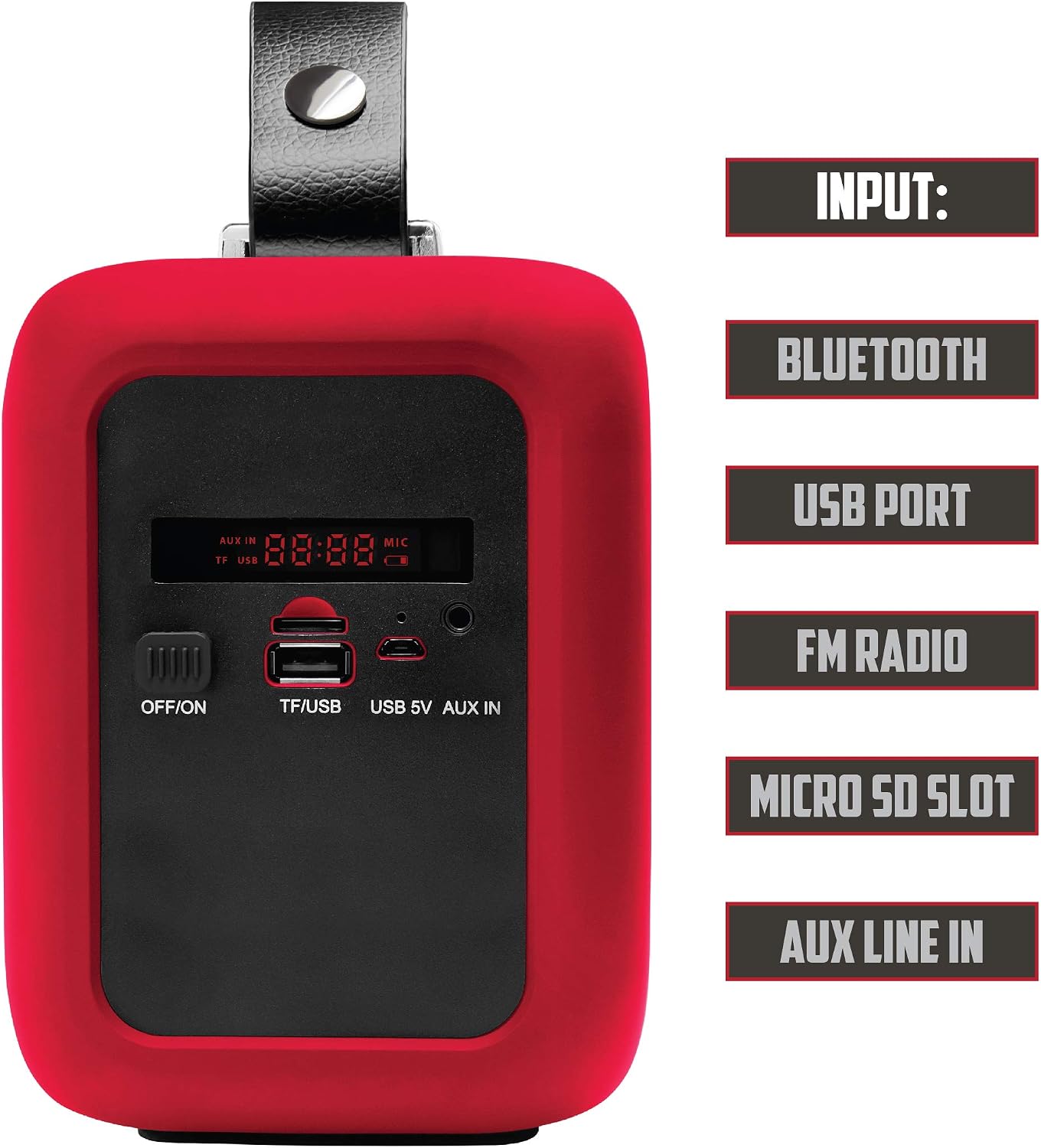
ചിത്രം 3: Side panel inputs. This image details the various input ports: OFF/ON switch, TF/USB slot for Micro SD cards and USB drives, USB 5V charging port, and AUX IN port. The digital display is also visible.
സജ്ജമാക്കുക
1. സ്പീക്കറിൽ നിന്ന് നിരക്ക് ഈടാക്കുന്നു
- Locate the USB 5V charging port on the side panel (refer to Figure 3).
- Connect the provided USB charging cable to the speaker's USB 5V port.
- USB കേബിളിന്റെ മറ്റേ അറ്റം അനുയോജ്യമായ ഒരു USB പവർ അഡാപ്റ്ററിലേക്ക് (ഉൾപ്പെടുത്തിയിട്ടില്ല) അല്ലെങ്കിൽ കമ്പ്യൂട്ടറിന്റെ USB പോർട്ടിലേക്ക് പ്ലഗ് ചെയ്യുക.
- The charging indicator (if available) will illuminate during charging and turn off or change color when fully charged.
- ഒപ്റ്റിമൽ ബാറ്ററി ലൈഫിനായി, ആദ്യ ഉപയോഗത്തിന് മുമ്പ് സ്പീക്കർ പൂർണ്ണമായും ചാർജ് ചെയ്യുക.
2. പവർ ഓൺ/ഓഫ്
- To power on, slide the OFF/ON switch (refer to Figure 3) to the 'ON' position. The speaker will emit an audible tone and the display will light up.
- പവർ ഓഫ് ചെയ്യാൻ, ഓഫ്/ഓൺ സ്വിച്ച് 'ഓഫ്' സ്ഥാനത്തേക്ക് സ്ലൈഡ് ചെയ്യുക.
പ്രവർത്തന നിർദ്ദേശങ്ങൾ
1. ബ്ലൂടൂത്ത് മോഡ്
- Power on the speaker. It will automatically enter Bluetooth pairing mode, indicated by a flashing Bluetooth icon on the display or an audible prompt.
- നിങ്ങളുടെ മൊബൈൽ ഉപകരണത്തിൽ (സ്മാർട്ട്ഫോൺ, ടാബ്ലെറ്റ് മുതലായവ), ബ്ലൂടൂത്ത് പ്രവർത്തനക്ഷമമാക്കി ലഭ്യമായ ഉപകരണങ്ങൾക്കായി തിരയുക.
- Select "2BOOM Journey" from the list of devices.
- Once paired, the speaker will confirm with an audible tone, and the Bluetooth icon on the display will stop flashing.
- ഇപ്പോൾ നിങ്ങളുടെ ഉപകരണത്തിൽ നിന്ന് സ്പീക്കറിലൂടെ ഓഡിയോ പ്ലേ ചെയ്യാൻ കഴിയും.
- Use the Play/Pause button (Figure 2) to control playback.
- Use the Previous/Next buttons (Figure 2) to skip tracks.
2. എഫ്എം റേഡിയോ മോഡ്
- Press the 'MODE' button (Figure 2) repeatedly until "FM" appears on the display.
- To auto-scan and save available FM stations, press and hold the 'Play/Pause' button. The speaker will scan and store stations automatically.
- Use the 'Previous' and 'Next' buttons (Figure 2) to navigate between saved stations.
3. USB/TF കാർഡ് പ്ലേബാക്ക്
- Insert a USB flash drive or a TF (Micro SD) card into the respective port on the side panel (Figure 3).
- സ്പീക്കർ യാന്ത്രികമായി USB അല്ലെങ്കിൽ TF കാർഡ് മോഡിലേക്ക് മാറുകയും ഓഡിയോ പ്ലേ ചെയ്യാൻ തുടങ്ങുകയും ചെയ്യും. files. ഇല്ലെങ്കിൽ, ശരിയായ ഇൻപുട്ട് തിരഞ്ഞെടുക്കാൻ 'MODE' ബട്ടൺ അമർത്തുക.
- Use the Play/Pause button (Figure 2) to control playback.
- Use the Previous/Next buttons (Figure 2) to skip tracks.
4. AUX ഇൻപുട്ട് മോഡ്
- Connect one end of a 3.5mm audio cable (not included) to the AUX IN port on the speaker (Figure 3).
- ഓഡിയോ കേബിളിന്റെ മറ്റേ അറ്റം ഹെഡ്ഫോൺ ജാക്കിലേക്കോ നിങ്ങളുടെ ബാഹ്യ ഉപകരണത്തിന്റെ ഓഡിയോ ഔട്ട്പുട്ടിലേക്കോ ബന്ധിപ്പിക്കുക.
- Press the 'MODE' button (Figure 2) repeatedly until "AUX" appears on the display.
- Audio will now play from your external device through the speaker. Control playback from your external device.
5. വോളിയം നിയന്ത്രണം
- Press the 'Volume -' button (Figure 2) to decrease the volume.
- Press the 'Volume +' button (Figure 2) to increase the volume.
മെയിൻ്റനൻസ്
- വൃത്തിയാക്കൽ: സ്പീക്കറിന്റെ പുറംഭാഗം വൃത്തിയാക്കാൻ മൃദുവായതും ഉണങ്ങിയതുമായ തുണി ഉപയോഗിക്കുക. അബ്രസീവ് ക്ലീനറുകളോ ലായകങ്ങളോ ഉപയോഗിക്കരുത്.
- സംഭരണം: ദീർഘനേരം ഉപയോഗിക്കാത്തപ്പോൾ നേരിട്ടുള്ള സൂര്യപ്രകാശത്തിൽ നിന്നും കടുത്ത താപനിലയിൽ നിന്നും മാറി തണുത്തതും വരണ്ടതുമായ സ്ഥലത്ത് സ്പീക്കർ സൂക്ഷിക്കുക.
- ബാറ്ററി കെയർ: To prolong battery life, avoid fully discharging the battery frequently. Recharge the speaker regularly, even if not in constant use.
- വാട്ടർ എക്സ്പോഷർ: While the speaker is splash-proof, do not submerge it in water or expose it to heavy rain. Ensure all port covers (if present) are securely closed when near water.
ട്രബിൾഷൂട്ടിംഗ്
| പ്രശ്നം | പരിഹാരം |
|---|---|
| സ്പീക്കർ പവർ ഓൺ ചെയ്യുന്നില്ല. | Ensure the battery is charged. Connect the speaker to a power source using the USB charging cable. Check the ON/OFF switch position. |
| ശബ്ദമില്ല. | Increase the volume on both the speaker and your connected device. Ensure the correct input mode (Bluetooth, FM, USB, AUX) is selected. Check cable connections for AUX mode. |
| ബ്ലൂടൂത്ത് വഴി ജോടിയാക്കാൻ കഴിയില്ല. | Ensure the speaker is in Bluetooth pairing mode (flashing indicator). Make sure Bluetooth is enabled on your device and it's within 32.8ft (10m) range. Try unpairing and re-pairing. Turn off and on both devices. |
| എഫ്എം റേഡിയോ റിസപ്ഷൻ മോശമാണ്. | Move the speaker to a location with better signal reception. Extend any external antenna if available (not explicitly mentioned for this model, but a general tip). |
| USB/TF കാർഡ് പ്ലേ ചെയ്യുന്നില്ല. | Ensure the card/drive is inserted correctly. Check that the audio files are in a compatible format (e.g., MP3). Press the 'MODE' button to select the correct input. |
സ്പെസിഫിക്കേഷനുകൾ

ചിത്രം 4: Visual representation of the speaker's technical specifications.
| ഫീച്ചർ | വിശദാംശങ്ങൾ |
|---|---|
| മോഡൽ | ബിഎക്സ് 510ആർ |
| ബ്ലൂടൂത്ത് പതിപ്പ് | V2.1 |
| ഫ്രീക്വൻസി റേഞ്ച് | 90Hz - 20KHz |
| ബ്ലൂടൂത്ത് ദൂരം | 32.8 അടി വരെ (10 മീറ്റർ) |
| ഡ്രൈവർ യൂണിറ്റ് | 2 x 3-ഇഞ്ച് |
| സബ് വൂഫർ വ്യാസം | 4 ഇഞ്ച് |
| ബാറ്ററി ശേഷി | 1200mAh |
| വാല്യംtage | AC 100-240V / DC 5V 1.3A |
| സ്പീക്കർ ഔട്ട്പുട്ട് | 2 x 3.5W (RMS) |
| പരമാവധി സ്പീക്കർ ഔട്ട്പുട്ട് പവർ | 120 വാട്ട്സ് (പീക്ക്) |
| കണക്റ്റിവിറ്റി ടെക്നോളജി | ബ്ലൂടൂത്ത്, യുഎസ്ബി |
| പവർ ഉറവിടം | ബാറ്ററി |
സുരക്ഷാ വിവരങ്ങൾ
- സ്പീക്കറിനെ തീവ്രമായ താപനിലയിലോ, നേരിട്ടുള്ള സൂര്യപ്രകാശത്തിലോ, ഉയർന്ന ആർദ്രതയിലോ തുറന്നുകാട്ടരുത്.
- സ്പീക്കറെ ശക്തമായ ആഘാതങ്ങൾക്ക് വിധേയമാക്കുകയോ താഴെയിടുകയോ ചെയ്യുന്നത് ഒഴിവാക്കുക.
- Do not attempt to disassemble or modify the speaker. This will void the warranty and may cause damage or injury.
- മെഡിക്കൽ ഉപകരണങ്ങളുടെ പ്രവർത്തനത്തെ തടസ്സപ്പെടുത്തിയേക്കാവുന്നതിനാൽ സ്പീക്കർ അവയിൽ നിന്ന് അകറ്റി നിർത്തുക.
- Dispose of the battery according to local regulations. Do not dispose of batteries in fire.
- നിർദ്ദിഷ്ട ചാർജിംഗ് വോളിയം മാത്രം ഉപയോഗിക്കുകtage (DC 5V 1.3A).
വാറൻ്റിയും പിന്തുണയും
Specific warranty information for the 2BOOM Journey BX510R is not provided in this manual. Please refer to the product packaging or the retailer where you purchased the device for warranty details.
For technical support or further assistance, please contact 2BOOM customer service through their official webനിങ്ങളുടെ വാങ്ങലിനൊപ്പം നൽകിയിരിക്കുന്ന സൈറ്റ് അല്ലെങ്കിൽ ബന്ധപ്പെടാനുള്ള വിവരങ്ങൾ.