
ആമുഖം
Thank you for choosing the ChenFec Bluetooth Beanie. This beanie integrates wireless stereo headphones, allowing you to enjoy music and hands-free calls while staying warm. This manual provides detailed instructions for setup, operation, and maintenance to ensure optimal performance and longevity of your device.
ഉൽപ്പന്നം കഴിഞ്ഞുview
The ChenFec Bluetooth Beanie is designed for comfort and convenience, featuring:
- ബ്ലൂടൂത്ത് V5.0 സാങ്കേതികവിദ്യ: Ensures stable and wide compatibility with various Bluetooth-enabled devices.
- നീണ്ട ബാറ്ററി ലൈഫ്: Offers up to 60 hours of standby time and 8–10 hours of continuous music playback.
- ഉപയോക്തൃ സൗഹൃദ നിയന്ത്രണ പാനൽ: Integrated on the left earpiece for easy management of music and calls.
- Built-in Stereo Speakers and Microphone: Provides clear audio for music and hands-free communication.
- Warm and Comfortable Material: Keeps your head warm in cold weather.
ബോക്സിൽ എന്താണുള്ളത്
പാക്കേജ് തുറക്കുമ്പോൾ, നിങ്ങൾക്ക് ഇനിപ്പറയുന്ന ഇനങ്ങൾ കണ്ടെത്താനാകും:
- 1 x ChenFec Bluetooth Beanie
- 1 x മൈക്രോ USB ചാർജിംഗ് കേബിൾ
- 1 x User Welcome Guide
വീഡിയോ: അൺബോക്സിംഗും അതിനുമുകളിലുംview of the ChenFec Bluetooth Beanie, showing the beanie, charging cable, and welcome guide.
സജ്ജീകരണ നിർദ്ദേശങ്ങൾ
1. Charging the Beanie
Before first use, fully charge your Bluetooth Beanie.
- Locate the Micro USB charging port on the control panel, typically on the left earpiece.
- Connect the provided Micro USB cable to the beanie's charging port.
- Plug the other end of the USB cable into a USB power source (e.g., computer, wall adapter).
- The LED indicator light will illuminate during charging and turn off or change color when fully charged.
2. ബ്ലൂടൂത്ത് ജോടിയാക്കൽ
Follow these steps to connect your beanie to your device:
- പ്ലേ/പോസ് ബട്ടൺ ദീർഘനേരം അമർത്തുക (usually about 4 seconds) on the beanie's control panel until the LED indicator light flashes blue and red, indicating pairing mode.
- On your mobile device (smartphone, tablet, etc.), open Bluetooth settings.
- ഇതിനായി തിരയുക പുതിയ ഉപകരണങ്ങൾ and select "BT-03S" from the list of available devices.
- Once connected, the LED indicator light will typically show a solid blue or flash blue slowly.

ചിത്രം: Visual guide for connecting the Bluetooth beanie to a smartphone. It illustrates pressing the play button, opening device settings, and selecting "BT-03S" for connection.
പ്രവർത്തന നിർദ്ദേശങ്ങൾ
നിയന്ത്രണ പാനൽ പ്രവർത്തനങ്ങൾ
The control panel is located on the left earpiece of the beanie. Familiarize yourself with its buttons:
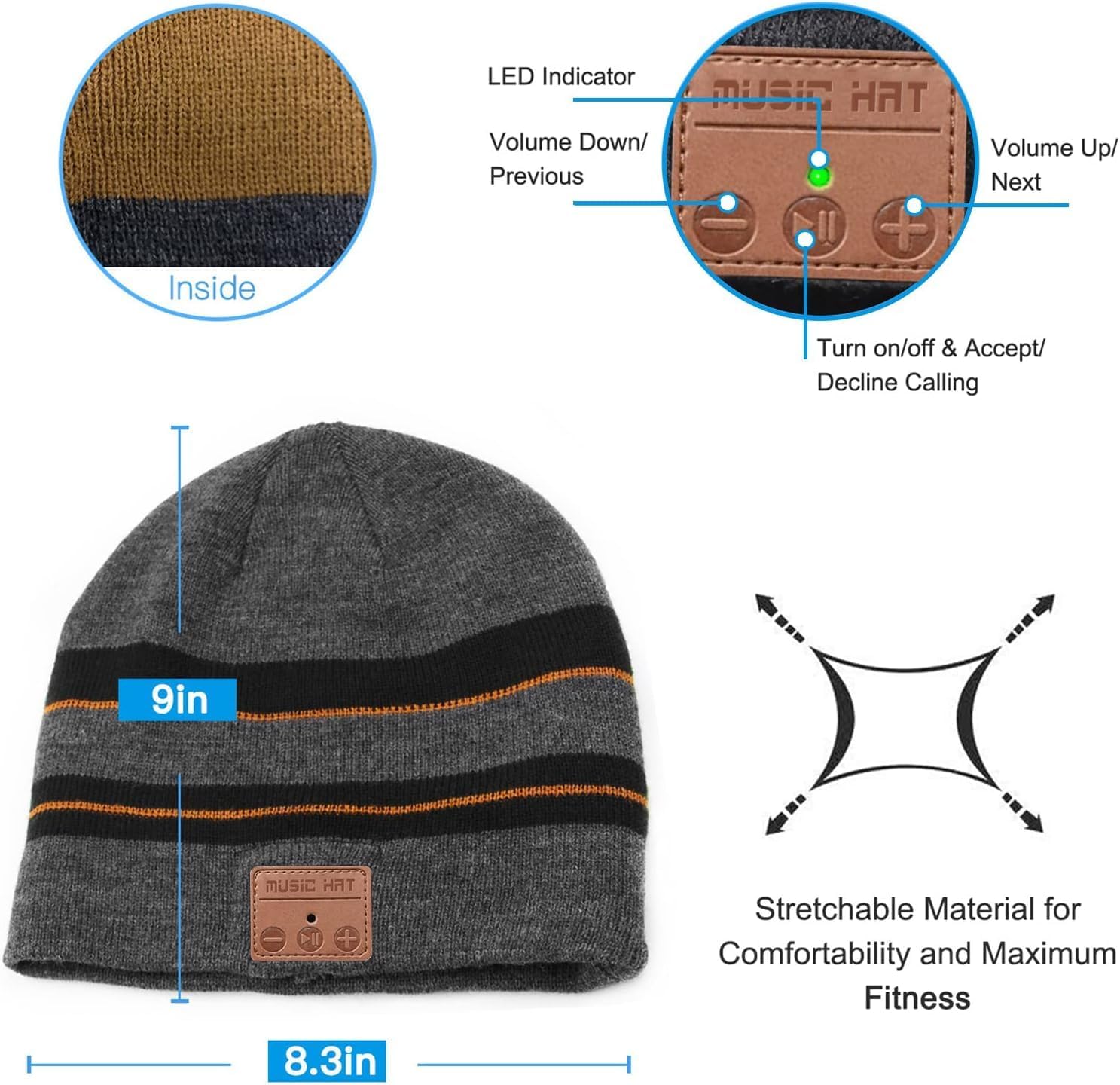
ചിത്രം: വിശദമായി view of the beanie's control panel, highlighting the LED indicator, Volume Down/Previous Track button, Play/Pause/Power/Call button, and Volume Up/Next Track button.
- പവർ ഓൺ/ഓഫ്: പ്ലേ/പോസ് ബട്ടൺ ദീർഘനേരം അമർത്തുക.
- സംഗീതം പ്ലേ ചെയ്യുക/താൽക്കാലികമായി നിർത്തുക: പ്ലേ/പോസ് ബട്ടൺ ഹ്രസ്വമായി അമർത്തുക.
- വോളിയം കൂട്ടുക: "+" ബട്ടൺ ചുരുക്കി അമർത്തുക.
- വോളിയം താഴേക്ക്: "-" ബട്ടൺ ചുരുക്കി അമർത്തുക.
- അടുത്ത ട്രാക്ക്: "+" ബട്ടൺ ദീർഘനേരം അമർത്തുക.
- മുമ്പത്തെ ട്രാക്ക്: "-" ബട്ടൺ ദീർഘനേരം അമർത്തുക.
- ഉത്തരം/അവസാന കോൾ: Short press the Play/Pause button during an incoming call.
- കോൾ നിരസിക്കുക: ഒരു ഇൻകമിംഗ് കോൾ സമയത്ത് പ്ലേ/പോസ് ബട്ടൺ ദീർഘനേരം അമർത്തുക.
- അവസാന നമ്പർ വീണ്ടും ഡയൽ ചെയ്യുക: പ്ലേ/പോസ് ബട്ടൺ രണ്ടുതവണ അമർത്തുക.
മെയിൻ്റനൻസ്
Washing Instructions (Detachable Speakers)
To wash your ChenFec Bluetooth Beanie, you must first remove the electronic components:
- Find the pocket between the double layers of the beanie where the control unit and speakers are housed.
- Gently take out one of the speakers from its pocket.
- Remove the other speaker and the main control unit. Ensure all electronic parts are completely removed before washing.
- Hand wash the beanie with mild detergent and cold water. Do not machine wash or tumble dry with electronics inside.
- Allow the beanie to air dry completely before reinserting the electronic components.
- Once dry, carefully reinsert the speakers and control unit into their designated pockets.
ചിത്രം: Step-by-step visual guide demonstrating how to locate the inner pocket, gently remove the speakers, and detach the control unit from the beanie for washing.
ട്രബിൾഷൂട്ടിംഗ്
- ഓണാക്കാൻ കഴിയില്ല: Ensure the beanie is fully charged. Connect it to a power source and try again.
- ഉപകരണവുമായി ജോടിയാക്കാൻ കഴിയില്ല:
- Ensure the beanie is in pairing mode (LED flashing red and blue).
- നിങ്ങളുടെ ഉപകരണത്തിൽ ബ്ലൂടൂത്ത് പ്രവർത്തനക്ഷമമാക്കിയിട്ടുണ്ടെന്ന് ഉറപ്പാക്കുക.
- Check if the beanie is already connected to another device. Disconnect from other devices if necessary.
- Move your device closer to the beanie.
- ശബ്ദമില്ല അല്ലെങ്കിൽ കുറഞ്ഞ ശബ്ദം:
- Increase the volume on both the beanie and your connected device.
- Ensure the beanie is properly paired.
- Check if the speakers are correctly positioned over your ears.
- ഇടവിട്ടുള്ള കണക്ഷൻ:
- Ensure there are no obstructions between the beanie and your device.
- Stay within the effective Bluetooth range (up to 33 feet).
- Restart both the beanie and your device.
സ്പെസിഫിക്കേഷനുകൾ
| ഫീച്ചർ | വിശദാംശങ്ങൾ |
|---|---|
| ഉൽപ്പന്ന അളവുകൾ | 8.66 x 9.44 x 0.59 ഇഞ്ച് |
| ഇനത്തിൻ്റെ ഭാരം | 4.2 ഔൺസ് |
| ഇനം മോഡൽ നമ്പർ | ബ്ലൂടൂത്ത് തൊപ്പി |
| ബാറ്ററികൾ | 1 ലിഥിയം അയോൺ ബാറ്ററി ആവശ്യമാണ് (ഉൾപ്പെടുത്തിയിരിക്കുന്നു) |
| വയർലെസ് കമ്മ്യൂണിക്കേഷൻ ടെക്നോളജീസ് | ബ്ലൂടൂത്ത് |
| കണക്റ്റിവിറ്റി ടെക്നോളജികൾ | Bluetooth, Wired (for charging) |
| പ്രത്യേക സവിശേഷതകൾ | Bluetooth connectivity, Built-in headphones and microphone, Volume control |
| ഓഡിയോ ജാക്ക് | മൈക്രോ യുഎസ്ബി |
| നിറം | ബ്രൗൺ |
| നിർമ്മാതാവ് | Shenzhen CFZC technology co., LTD |
| ആദ്യ തീയതി ലഭ്യമാണ് | ഡിസംബർ 17, 2018 |
സുരക്ഷാ വിവരങ്ങൾ
- Do not expose the electronic components to water or extreme temperatures.
- Avoid disassembling the control unit or speakers.
- നൽകിയിരിക്കുന്ന ചാർജിംഗ് കേബിളോ സാക്ഷ്യപ്പെടുത്തിയ തത്തുല്യമായതോ മാത്രം ഉപയോഗിക്കുക.
- കുട്ടികൾക്ക് ലഭ്യമാകാതെ സൂക്ഷിക്കുക.
- Do not wear the beanie in situations where hearing external sounds is critical for safety (e.g., driving, operating heavy machinery).
വാറൻ്റിയും പിന്തുണയും
Your ChenFec Bluetooth Beanie comes with a standard manufacturer's warranty. For specific warranty details, please refer to the packaging or contact ChenFec customer support. If you encounter any issues or have questions not covered in this manual, please reach out to our support team for assistance.
Contact information for support can typically be found on the product packaging or the official ChenFec webസൈറ്റ്.