
Brightsign LS424
BrightSign LS424 Digital Signage Player User Manual
മോഡൽ: LS424
ആമുഖം
This manual provides comprehensive instructions for the setup, operation, and maintenance of your BrightSign LS424 Digital Signage Player. The LS424 is a commercial-grade, small-form factor player designed for reliable digital signage applications, featuring H.265 1080p60 video playback, entry-level HTML5 support, and USB interactivity. It is ideal for simple streaming applications and large deployments requiring common content.
സുരക്ഷാ വിവരങ്ങൾ
- ആകസ്മികമായ വീഴ്ചകൾ തടയാൻ ഉപകരണം സ്ഥിരതയുള്ളതും പരന്നതുമായ ഒരു പ്രതലത്തിൽ സ്ഥാപിച്ചിട്ടുണ്ടെന്ന് ഉറപ്പാക്കുക.
- ഉപകരണം വെള്ളം, ഈർപ്പം അല്ലെങ്കിൽ തീവ്രമായ താപനില എന്നിവയിൽ തുറന്നുകാട്ടരുത്.
- Use only the power adapter supplied with the device. Using an incorrect adapter may damage the unit and void the warranty.
- ഉപകരണം തുറക്കരുത് casing. എല്ലാ സേവനങ്ങളും യോഗ്യതയുള്ള ഉദ്യോഗസ്ഥർക്ക് റഫർ ചെയ്യുക.
- അമിതമായി ചൂടാകുന്നത് തടയാൻ വെൻ്റിലേഷൻ ഓപ്പണിംഗുകൾ വ്യക്തമായി സൂക്ഷിക്കുക.
പാക്കേജ് ഉള്ളടക്കം
നിങ്ങളുടെ പാക്കേജിൽ എല്ലാ ഇനങ്ങളും ഉണ്ടെന്ന് ദയവായി പരിശോധിക്കുക:
- BrightSign LS424 Digital Signage Player
- പവർ അഡാപ്റ്റർ
- ക്വിക്ക് സ്റ്റാർട്ട് ഗൈഡ് (ഉൾപ്പെടുത്തിയിട്ടുണ്ടെങ്കിൽ)
സജ്ജമാക്കുക
Follow these steps to set up your BrightSign LS424 player:
1. മൈക്രോ എസ്ഡി കാർഡ് ചേർക്കുക
Prepare a microSD card (not included) with your digital signage content and BrightSign OS. Insert the microSD card into the dedicated slot on the front of the player.

ചിത്രം 1: ഫ്രണ്ട് view of the BrightSign LS424, highlighting the USB-C port and microSD card slot. The microSD card slot is located on the right side of the front panel, designed for easy insertion of content and operating system cards.
2. Connect to Display
Connect an HDMI cable from the HDMI output port on the rear of the LS424 player to the HDMI input on your display or TV.

ചിത്രം 2: പിൻഭാഗം view of the BrightSign LS424, displaying the HDMI output, 5V 2A power input, and Ethernet port. The HDMI port is on the left, essential for connecting to a display.
3. Connect to Network (Optional)
For network-connected applications, plug an Ethernet cable into the Ethernet port on the rear of the player and connect it to your network router or switch.
4. Connect USB Devices (Optional)
If your content requires interactivity, connect compatible USB devices (e.g., touchscreens, buttons) to the USB-C port on the front of the player.
5. പവർ ഓൺ
Connect the supplied power adapter to the 5V 2A power input port on the rear of the player, then plug the adapter into a power outlet. The player will automatically power on and begin booting.
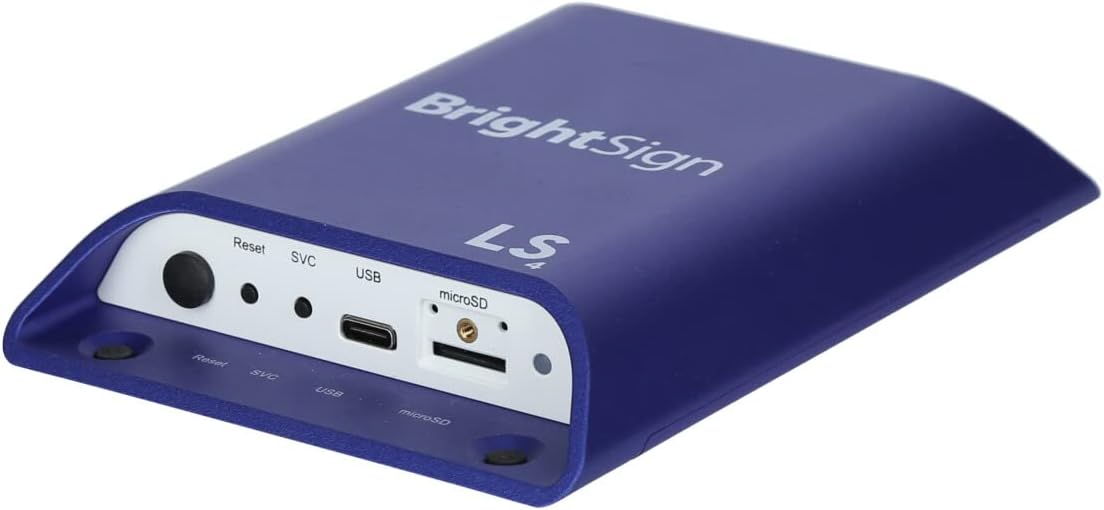
ചിത്രം 3: An overall perspective view of the BrightSign LS424 Digital Signage Player, showcasing its compact design and port accessibility.
Operating the BrightSign LS424
The BrightSign LS424 operates by playing content stored on its microSD card or streamed over the network. Content is typically created and published using BrightSign's proprietary software, BrightAuthor.
ഉള്ളടക്ക പ്ലേബാക്ക്
- യാന്ത്രിക പ്ലേബാക്ക്: Once powered on with a valid microSD card containing BrightSign content, the player will automatically begin playback.
- H.265 Decoding: The player supports H.265 video decoding, allowing for smaller file sizes and lower bitrates while maintaining high-quality 1080p60 video playback.
- HTML5 Support: The hardware-accelerated engine supports entry-level HTML5 content, enabling dynamic and interactive presentations.
വിപുലമായ സവിശേഷതകൾ
- BrightBeacon: With an optional wireless/Bluetooth module, the LS424 supports 2-way Bluetooth/Beacon communication for interaction with mobile devices.
- BrightWall: Achieve synchronized playback across multiple displays for impressive video wall installations.
- AutoWall: Utilize HTML5 capabilities to create unique and flexible multimedia video walls.
Content Updates
Content can be updated by replacing the microSD card or, if networked, by publishing new content through BrightSign Network or local network publishing tools.
മെയിൻ്റനൻസ്
- വൃത്തിയാക്കൽ: Use a soft, dry cloth to clean the exterior of the player. Do not use liquid cleaners or aerosols.
- വെൻ്റിലേഷൻ: Ensure the player's ventilation openings are not obstructed to prevent overheating.
- ഫേംവെയർ അപ്ഡേറ്റുകൾ: Periodically check the BrightSign website for firmware updates to ensure optimal performance and access to new features. Follow the instructions provided by BrightSign for updating firmware.
ട്രബിൾഷൂട്ടിംഗ്
| പ്രശ്നം | സാധ്യമായ കാരണം | പരിഹാരം |
|---|---|---|
| ഡിസ്പ്ലേ ഔട്ട്പുട്ട് ഇല്ല |
|
|
| Content not playing or freezing |
|
|
| നെറ്റ്വർക്ക് കണക്റ്റിവിറ്റി പ്രശ്നങ്ങൾ |
|
|
For further assistance, please refer to the official BrightSign support resources or contact their customer service.
സ്പെസിഫിക്കേഷനുകൾ
| ഫീച്ചർ | വിശദാംശങ്ങൾ |
|---|---|
| മോഡൽ | LS424 |
| അളവുകൾ (LxWxH) | 7.83 x 7.24 x 2.95 ഇഞ്ച് |
| ഭാരം | 5.6 ഔൺസ് |
| വീഡിയോ ഡീകോഡിംഗ് | H.265 1080p60 |
| HTML Support | Entry-level HTML5 (Hardware-accelerated) |
| സംഭരണം | MicroSD slot (supports up to 8 GB Digital Storage Capacity mentioned in specs, but typically supports larger) |
| കണക്റ്റിവിറ്റി | Ethernet, USB 2.0 (Type C), Bluetooth (with optional module) |
| ഔട്ട്പുട്ട് | HDMI |
| പവർ ഇൻപുട്ട് | 5 വോൾട്ട്, 2 Amps |
| ആദ്യം ലഭ്യമായ തീയതി | 7 ജനുവരി 2019 |
വാറൻ്റിയും പിന്തുണയും
For information regarding product warranty, technical support, and service, please visit the official BrightSign website or contact their authorized distributors. Keep your purchase receipt as proof of purchase for warranty claims.
ഓൺലൈൻ ഉറവിടങ്ങൾ:
Ask a question about this manual
Ask about setup, troubleshooting, compatibility, parts, safety, or missing instructions. Manuals+ will review the question and use this page’s manual context to help answer it.