
1. ആമുഖം
Thank you for choosing the AWEI A950BL ANC Noise Reduction Headset. This manual provides detailed instructions on how to set up, operate, and maintain your new headphones. Please read this manual thoroughly before use to ensure optimal performance and longevity of your device.

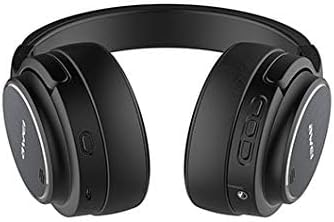
ചിത്രം: മുൻഭാഗം view of the AWEI A950BL ANC Noise Reduction Headset.
2. ഉൽപ്പന്ന സവിശേഷതകൾ
- സജീവ നോയ്സ് റദ്ദാക്കൽ (ANC): ആഴത്തിലുള്ള ഓഡിയോ അനുഭവത്തിനായി ആംബിയന്റ് നോയ്സ് കുറയ്ക്കുന്നു.
- വയർലെസ് & വയർഡ് കണക്റ്റിവിറ്റി: Bluetooth V4.1 for wireless freedom and a 3.5mm jack for wired connection.
- സംയോജിത മൈക്രോഫോൺ: For hands-free calls and voice commands.
- നീണ്ട ബാറ്ററി ലൈഫ്: Up to 10 hours of talk or music time on a single charge.
- മടക്കാവുന്ന ഡിസൈൻ: എളുപ്പത്തിലുള്ള സംഭരണത്തിനും പോർട്ടബിലിറ്റിക്കും വേണ്ടി.

Image: The AWEI A950BL headset featuring a convenient folding design for portability.
3. പാക്കേജ് ഉള്ളടക്കം
- AWEI A950BL ANC Noise Reduction Headset
- യുഎസ്ബി ചാർജിംഗ് കേബിൾ
- 3.5 എംഎം ഓഡിയോ കേബിൾ
- ഉപയോക്തൃ മാനുവൽ
4. നിയന്ത്രണങ്ങളും ഘടകങ്ങളും
Familiarize yourself with the various buttons and ports on your AWEI A950BL headset:
ചിത്രം: വശം view of the headset highlighting the control panel.
- പവർ ഓൺ/ഓഫ് ബട്ടൺ: Located on the right earcup. Press and hold to power on or off.
- Volume Up / Previous Song Button: Short press for Volume+, Long press for Previous song.
- Volume Down / Next Song Button: Short press for Volume-, Long press for Next song.
- മൾട്ടി-ഫംഗ്ഷൻ ബട്ടൺ (MFB): Used for Play/Pause, Answer/End calls, and Reject calls.
- ANC ബട്ടൺ: ആക്ടീവ് നോയ്സ് റദ്ദാക്കൽ സജീവമാക്കുന്നു അല്ലെങ്കിൽ നിർജ്ജീവമാക്കുന്നു.
- മൈക്രോഫോൺ: വോയ്സ് ഇൻപുട്ടിനായി സംയോജിപ്പിച്ചിരിക്കുന്നു.
- AUX Jack (3.5mm): വയർഡ് ഓഡിയോ കണക്ഷന്.
- യുഎസ്ബി ചാർജിംഗ് പോർട്ട്: ഹെഡ്സെറ്റ് ചാർജ് ചെയ്യുന്നതിനായി.
- LED ഇൻഡിക്കേറ്റർ ലൈറ്റ്: പവർ, ജോടിയാക്കൽ, ചാർജിംഗ് നില എന്നിവ പ്രദർശിപ്പിക്കുന്നു.
5. സജ്ജീകരണം
5.1 ഹെഡ്സെറ്റ് ചാർജ് ചെയ്യുന്നു
- Connect the USB charging cable to the headset's USB charging port.
- കേബിളിന്റെ മറ്റേ അറ്റം ഒരു USB പവർ സ്രോതസ്സുമായി ബന്ധിപ്പിക്കുക (ഉദാ: കമ്പ്യൂട്ടർ USB പോർട്ട്, വാൾ അഡാപ്റ്റർ).
- LED ഇൻഡിക്കേറ്റർ ചാർജിംഗ് സ്റ്റാറ്റസ് കാണിക്കും (ഉദാ: ചാർജ് ചെയ്യുമ്പോൾ ചുവപ്പ്, പൂർണ്ണമായി ചാർജ് ചെയ്യുമ്പോൾ ഓഫ് അല്ലെങ്കിൽ നീല).
- ഒരു ഫുൾ ചാർജ് ഏകദേശം 2-3 മണിക്കൂർ എടുക്കും.
5.2 ബ്ലൂടൂത്ത് ജോടിയാക്കൽ
- ഹെഡ്സെറ്റ് ഓഫാണെന്ന് ഉറപ്പാക്കുക.
- Press and hold the Power On/Off button until the LED indicator flashes blue and red alternately, indicating pairing mode.
- നിങ്ങളുടെ ഉപകരണത്തിൽ (സ്മാർട്ട്ഫോൺ, ടാബ്ലെറ്റ്, കമ്പ്യൂട്ടർ), ബ്ലൂടൂത്ത് പ്രവർത്തനക്ഷമമാക്കി ലഭ്യമായ ഉപകരണങ്ങൾക്കായി തിരയുക.
- Select "AWEI A950BL" from the list of found devices.
- Once connected, the LED indicator will flash blue slowly or turn solid blue.
5.3 വയർഡ് കണക്ഷൻ
വയർഡ് മോഡിൽ ഹെഡ്സെറ്റ് ഉപയോഗിക്കാൻ:
- Connect one end of the 3.5mm audio cable to the AUX jack on the headset.
- മറ്റേ അറ്റം നിങ്ങളുടെ ഉപകരണത്തിന്റെ ഓഡിയോ ഔട്ട്പുട്ട് ജാക്കുമായി ബന്ധിപ്പിക്കുക.
- The headset can be used in wired mode even if the battery is depleted.
6. പ്രവർത്തന നിർദ്ദേശങ്ങൾ
6.1 പവർ ഓൺ/ഓഫ്
- പവർ ഓൺ: Press and hold the Power On/Off button for approximately 3 seconds until the LED indicator lights up.
- പവർ ഓഫ്: Press and hold the Power On/Off button for approximately 3 seconds until the LED indicator turns off.
6.2 മ്യൂസിക് പ്ലേബാക്ക്
- പ്ലേ/താൽക്കാലികമായി നിർത്തുക: Short press the Multi-function Button (MFB).
- വോളിയം കൂട്ടുക: വോളിയം അപ്പ് ബട്ടൺ ചുരുക്കി അമർത്തുക.
- വോളിയം താഴേക്ക്: വോളിയം ഡൗൺ ബട്ടൺ ചുരുക്കി അമർത്തുക.
- അടുത്ത ഗാനം: വോളിയം ഡൗൺ ബട്ടൺ ദീർഘനേരം അമർത്തുക.
- മുൻ ഗാനം: വോളിയം അപ്പ് ബട്ടൺ ദീർഘനേരം അമർത്തുക.
6.3 കോൾ മാനേജ്മെന്റ്
- മറുപടി കോൾ: Short press the Multi-function Button (MFB) when a call comes in.
- കോൾ അവസാനിപ്പിക്കുക: Short press the Multi-function Button (MFB) during a call.
- കോൾ നിരസിക്കുക: Long press the Multi-function Button (MFB) when a call comes in.
6.4 സജീവ ശബ്ദം റദ്ദാക്കൽ (ANC)
The ANC feature reduces ambient noise, providing a clearer audio experience.

Image: Diagram illustrating the concept of Active Noise Cancellation.
- ANC സജീവമാക്കുക: Press the ANC button. The LED indicator for ANC will light up (usually green).
- ANC നിർജ്ജീവമാക്കുക: Press the ANC button again. The ANC LED indicator will turn off.
7. പരിപാലനം
- മൃദുവായതും ഉണങ്ങിയതുമായ തുണി ഉപയോഗിച്ച് ഹെഡ്സെറ്റ് പതിവായി വൃത്തിയാക്കുക.
- കഠിനമായ രാസവസ്തുക്കളോ ഉരച്ചിലുകളോ ഉപയോഗിക്കുന്നത് ഒഴിവാക്കുക.
- ഹെഡ്സെറ്റ് നേരിട്ട് സൂര്യപ്രകാശം ഏൽക്കാത്തതും ഉയർന്ന താപനില ഏൽക്കാത്തതുമായ ഒരു തണുത്ത വരണ്ട സ്ഥലത്ത് സൂക്ഷിക്കുക.
- Do not expose the headset to water or excessive moisture.
- ഹെഡ്സെറ്റ് താഴെയിടുകയോ ശക്തമായ ആഘാതങ്ങൾക്ക് വിധേയമാക്കുകയോ ചെയ്യുന്നത് ഒഴിവാക്കുക.
8. പ്രശ്നപരിഹാരം
| പ്രശ്നം | സാധ്യമായ കാരണം | പരിഹാരം |
|---|---|---|
| ഹെഡ്സെറ്റ് പവർ ഓണാക്കുന്നില്ല | കുറഞ്ഞ ബാറ്ററി | ഹെഡ്സെറ്റ് പൂർണ്ണമായും ചാർജ് ചെയ്യുക. |
| ഉപകരണവുമായി ജോടിയാക്കാൻ കഴിയില്ല | Headset not in pairing mode / Device Bluetooth off | Ensure headset is in pairing mode (flashing red/blue). Turn on Bluetooth on your device. Move headset closer to device. |
| ശബ്ദമില്ല | Volume too low / Not connected / Wrong audio source | Increase volume on headset and device. Reconnect Bluetooth or check 3.5mm cable. Ensure correct audio output is selected on your device. |
| ANC ഫലപ്രദമായി പ്രവർത്തിക്കുന്നില്ല. | ANC not activated / Environmental noise too high | സജീവമാക്കാൻ ANC ബട്ടൺ അമർത്തുക. കുറഞ്ഞ ആവൃത്തിയിലുള്ള, സ്ഥിരമായ ശബ്ദത്തിനെതിരെ ANC ഏറ്റവും ഫലപ്രദമാണ്. |
9 സ്പെസിഫിക്കേഷനുകൾ
| മോഡലിൻ്റെ പേര് | A950BL |
| കണക്റ്റിവിറ്റി ടെക്നോളജി | Wireless (Bluetooth V4.1), Wired (3.5 mm Jack) |
| ഹെഡ്ഫോണുകൾ ഫോം ഫാക്ടർ | ചെവിക്ക് മുകളിൽ |
| ശബ്ദ നിയന്ത്രണം | സജീവ നോയ്സ് റദ്ദാക്കൽ |
| ബാറ്ററി ശേഷി | 1050mAh (ലിഥിയം അയോൺ) |
| സംസാര സമയം | 10 മണിക്കൂർ വരെ |
| സംഗീത സമയം | 10 മണിക്കൂർ വരെ |
| ഉൽപ്പന്ന അളവുകൾ | 22 x 6 x 23 സെ.മീ |
| ഇനത്തിൻ്റെ ഭാരം | 165 ഗ്രാം |
| നിറം | കറുപ്പ് |
10. വാറൻ്റിയും പിന്തുണയും
AWEI products are manufactured to the highest quality standards. For warranty information or technical support, please refer to the warranty card included with your purchase or contact your local retailer or AWEI customer service. Keep your proof of purchase for warranty claims.