
ആമുഖം
This manual provides detailed instructions for the setup, operation, maintenance, and troubleshooting of your TOZO T12 Wireless Earbuds. Please read this guide thoroughly to ensure optimal performance and longevity of your device.
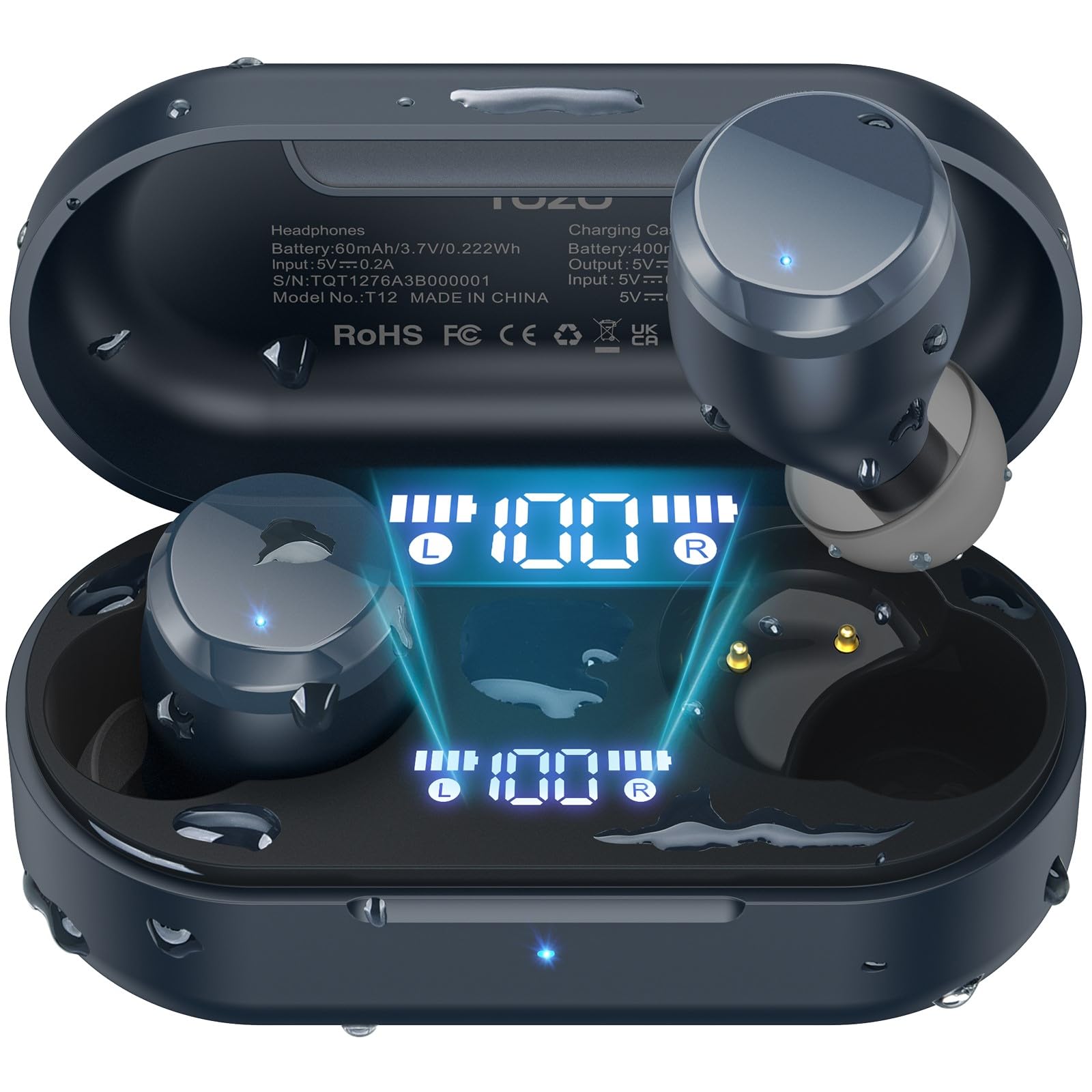
Image: TOZO T12 Wireless Earbuds and their charging case, showcasing the matte blue finish.
പാക്കേജ് ഉള്ളടക്കം
പാക്കേജിൽ എല്ലാ ഇനങ്ങളും ഉണ്ടെന്ന് ഉറപ്പാക്കുക:
- TOZO T12 Wireless Earbuds (Left and Right)
- ചാർജിംഗ് കേസ്
- USB-C ചാർജിംഗ് കേബിൾ
- 5 Pairs of Ear Caps (various sizes)
- ഉപയോക്തൃ മാനുവൽ
സജ്ജമാക്കുക
1. ഇയർബഡുകളും കേസും ചാർജ് ചെയ്യുന്നു
Before first use, fully charge the earbuds and charging case. The case features an LED digital display to show battery levels.
- നൽകിയിരിക്കുന്ന USB-C കേബിൾ കേസിലെ ചാർജിംഗ് പോർട്ടിലേക്കും ഒരു പവർ സ്രോതസ്സിലേക്കും ബന്ധിപ്പിക്കുക.
- പകരമായി, ചാർജിംഗ് കേസ് അനുയോജ്യമായ ഒരു വയർലെസ് ചാർജിംഗ് പാഡിൽ സ്ഥാപിക്കുക.
- The LED display will indicate charging status and battery percentage.

Image: The TOZO T12 charging case connected via USB-C cable and also shown on a wireless charging pad, illustrating both charging methods.

Image: The TOZO T12 earbuds and charging case, highlighting the 55-hour total battery life and 15-hour single charge playtime.
2. ഇയർ ടിപ്പ് സെലക്ഷനും ഫിറ്റും
Choosing the correct ear tip size is crucial for sound quality and comfort. Experiment with the 5 provided pairs to find the best fit for your ear canal.
- ഇയർബഡ് പതുക്കെ ചെവിയിൽ തിരുകുക.
- Twist slightly to ensure a secure and comfortable seal.
- ഒരു നല്ല സീൽ ബാസ് പ്രതികരണവും ശബ്ദ ഇൻസുലേഷനും വർദ്ധിപ്പിക്കുന്നു.
3. ബ്ലൂടൂത്ത് ജോടിയാക്കൽ
The TOZO T12 earbuds utilize Bluetooth 5.3 for a stable connection.
- ചാർജിംഗ് കെയ്സിൽ നിന്ന് രണ്ട് ഇയർബഡുകളും പുറത്തെടുക്കുക. അവ സ്വയമേവ ജോടിയാക്കൽ മോഡിലേക്ക് പ്രവേശിക്കും.
- നിങ്ങളുടെ ഉപകരണത്തിൽ (സ്മാർട്ട്ഫോൺ, ടാബ്ലെറ്റ് മുതലായവ), ബ്ലൂടൂത്ത് പ്രവർത്തനക്ഷമമാക്കുക.
- ഇതിനായി തിരയുക "TOZO T12" in the list of available devices and select it to connect.
- Once paired, the earbuds will automatically connect to your device when removed from the case.

Image: A visual representation of the Bluetooth 5.3 chip, indicating advanced wireless connectivity.
പ്രവർത്തന നിർദ്ദേശങ്ങൾ
1. പവർ ഓൺ/ഓഫ്
- പവർ ഓൺ: ചാർജിംഗ് കെയ്സിൽ നിന്ന് ഇയർബഡുകൾ നീക്കം ചെയ്യുക. അവ സ്വയമേവ പവർ ചെയ്യും.
- പവർ ഓഫ്: ഇയർബഡുകൾ ചാർജിംഗ് കെയ്സിലേക്ക് തിരികെ വയ്ക്കുക. അവ സ്വയമേവ ഓഫാകുകയും ചാർജ് ചെയ്യാൻ തുടങ്ങുകയും ചെയ്യും.
2. ടച്ച് നിയന്ത്രണങ്ങൾ
The TOZO T12 earbuds feature touch-sensitive controls. Specific functions may vary slightly based on your device and app settings.
- പ്ലേ/താൽക്കാലികമായി നിർത്തുക: ഇയർബഡുകളിൽ ഏതെങ്കിലുമൊന്നിൽ ഒറ്റ ടാപ്പ് ചെയ്യുക.
- അടുത്ത ട്രാക്ക്: വലതുവശത്തെ ഇയർബഡിൽ രണ്ടുതവണ ടാപ്പ് ചെയ്യുക.
- മുമ്പത്തെ ട്രാക്ക്: ഇടതുവശത്തെ ഇയർബഡിൽ രണ്ടുതവണ ടാപ്പ് ചെയ്യുക.
- വോളിയം കൂട്ടുക: വലതുവശത്തെ ഇയർബഡിൽ മൂന്ന് തവണ ടാപ്പ് ചെയ്യുക.
- വോളിയം താഴേക്ക്: ഇടതുവശത്തെ ഇയർബഡിൽ മൂന്ന് തവണ ടാപ്പ് ചെയ്യുക.
- ഉത്തരം/അവസാന കോൾ: ഇയർബഡുകളിൽ ഏതെങ്കിലുമൊന്നിൽ ഒറ്റ ടാപ്പ് ചെയ്യുക.
- കോൾ നിരസിക്കുക: ഏതെങ്കിലും ഇയർബഡിൽ 2 സെക്കൻഡ് അമർത്തിപ്പിടിക്കുക.
- വോയ്സ് അസിസ്റ്റന്റിനെ സജീവമാക്കുക: ഏതെങ്കിലും ഇയർബഡിൽ 3 സെക്കൻഡ് അമർത്തിപ്പിടിക്കുക.
3. കോൾ മാനേജ്മെന്റ്
The earbuds are equipped with Call ENC Noise Cancelling Microphones for clear communication.
- ഇൻകമിംഗ് കോളിന് മറുപടി നൽകാൻ, ഒന്നുകിൽ ഇയർബഡിൽ ഒറ്റ ടാപ്പ് ചെയ്യുക.
- To end an active call, single tap either earbud.
- To reject an incoming call, press and hold either earbud for 2 seconds.

Image: A woman wearing TOZO T12 earbuds, illustrating their use for clear phone calls and crystal sound quality.
4. TOZO App Integration
Enhance your audio experience by downloading the official TOZO App. The app allows for personalized settings and EQ customization.
- Download the "TOZO App" from your device's app store.
- Connect your TOZO T12 earbuds to the app.
- Explore 32 preset EQ modes or customize your own.
- Access additional features and settings.

Image: Screenshots of the TOZO App interface, demonstrating the 32 preset EQ modes and other customization options.
മെയിൻ്റനൻസ്
1. വൃത്തിയാക്കൽ
- ഇയർബഡുകളും ചാർജിംഗ് കെയ്സും മൃദുവായതും ഉണങ്ങിയതും ലിന്റ് രഹിതവുമായ തുണി ഉപയോഗിച്ച് പതിവായി വൃത്തിയാക്കുക.
- ചെവിയുടെ അറ്റം നീക്കം ചെയ്ത് നേരിയ സോപ്പും വെള്ളവും ഉപയോഗിച്ച് വൃത്തിയാക്കുക, തുടർന്ന് വീണ്ടും ഘടിപ്പിക്കുന്നതിന് മുമ്പ് നന്നായി ഉണക്കുക.
- ഉരച്ചിലുകളുള്ള വസ്തുക്കളോ കഠിനമായ രാസവസ്തുക്കളോ ഉപയോഗിക്കുന്നത് ഒഴിവാക്കുക.
2. വാട്ടർപ്രൂഫിംഗ് (IPX8)
The TOZO T12 earbuds are IPX8 waterproof, offering protection against water immersion. This makes them suitable for workouts and use in wet conditions.
- Ensure earbuds are dry before placing them back into the charging case to prevent damage to the charging contacts.
- ചാർജിംഗ് കേസ് വാട്ടർപ്രൂഫ് അല്ല.

Image: TOZO T12 earbuds partially submerged in water, illustrating their IPX8 waterproof capability.
3. സംഭരണം
ഇയർബഡുകൾ ഉപയോഗിക്കാത്തപ്പോൾ അവയുടെ ചാർജ്ജിംഗ് കെയ്സിൽ സൂക്ഷിക്കുക, അവയെ സംരക്ഷിക്കുകയും ചാർജ്ജ് ചെയ്തിരിക്കുകയും ചെയ്യുക.
ട്രബിൾഷൂട്ടിംഗ്
| ഇഷ്യൂ | പരിഹാരം |
|---|---|
| ഇയർബഡുകൾ ജോടിയാക്കുന്നില്ല |
|
| ഒരു ഇയർബഡിൽ നിന്ന് ശബ്ദമില്ല |
|
| ചാർജിംഗ് കേസ് ചാർജുചെയ്യുന്നില്ല |
|
| മോശം ശബ്ദ നിലവാരം |
|
സ്പെസിഫിക്കേഷനുകൾ
| ഫീച്ചർ | വിശദാംശങ്ങൾ |
|---|---|
| ബ്രാൻഡ് | ടോസോ |
| മോഡൽ നമ്പർ | T12 |
| ബ്ലൂടൂത്ത് പതിപ്പ് | 5.3 |
| ചെവി പ്ലേസ്മെൻ്റ് | ചെവിയിൽ |
| ശബ്ദ നിയന്ത്രണം | Call ENC Noise Cancelling Mic |
| ആകെ പ്ലേടൈം (കേസിനൊപ്പം) | 55 മണിക്കൂർ വരെ |
| സിംഗിൾ ചാർജ് പ്ലേടൈം | 15 മണിക്കൂർ വരെ |
| വാട്ടർപ്രൂഫ് റേറ്റിംഗ് | IPX8 |
| ഓഡിയോ ഡ്രൈവർ തരം | 10 എംഎം ഡൈനാമിക് ഡ്രൈവർ |
| ഫ്രീക്വൻസി റേഞ്ച് | 14Hz - 20kHz |
| നിയന്ത്രണ രീതി | App, Media Control |
വാറൻ്റിയും പിന്തുണയും
TOZO provides a warranty for this product. For detailed warranty information and customer support, please visit the official TOZO webസൈറ്റ് അല്ലെങ്കിൽ അവരുടെ ഉപഭോക്തൃ സേവനവുമായി ബന്ധപ്പെടുക.
നിർമ്മാതാവ്: ടോസോ
വാറൻ്റി വിവരണം: ടോസോ
ഔദ്യോഗിക ഉൽപ്പന്ന വീഡിയോകൾ
TOZO T12 Ergonomic Edition (APP2024) Overview
വീഡിയോ: ഒരു ഉദ്യോഗസ്ഥൻview of the TOZO T12 Ergonomic Edition earbuds, highlighting features and design. This video is provided by the seller, Worgo.
TOZO T12 (Compact Ergonomic Edition) Features
Video: A detailed look at the features of the TOZO T12 Compact Ergonomic Edition wireless earbuds. This video is provided by the seller, Worgo.