
1. ആമുഖം
വാങ്ങിയതിന് നന്ദി.asing the DACOM GF7 TWS V4.2 Bluetooth Earbuds. This manual provides detailed instructions on how to set up, operate, and maintain your earbuds to ensure optimal performance and longevity. Please read this manual thoroughly before using the product and retain it for future reference.
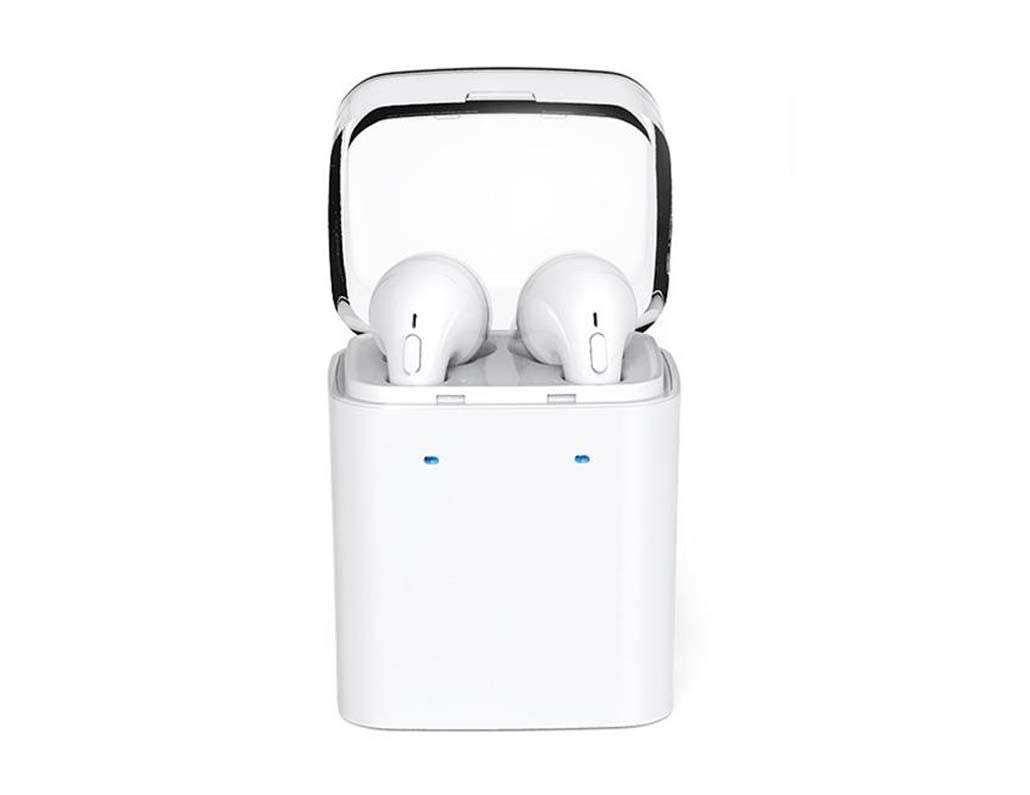
Image 1.1: DACOM GF7 TWS V4.2 Bluetooth Earbuds in their charging case.
2. പാക്കേജ് ഉള്ളടക്കം
അൺബോക്സ് ചെയ്യുമ്പോൾ പാക്കേജ് ഉള്ളടക്കങ്ങൾ പരിശോധിക്കുക. ഏതെങ്കിലും ഇനങ്ങൾ നഷ്ടപ്പെട്ടാലോ കേടായാലോ, നിങ്ങളുടെ റീട്ടെയിലറെ ബന്ധപ്പെടുക.
- DACOM GF7 TWS V4.2 Bluetooth Earbuds (Left and Right)
- പോർട്ടബിൾ ചാർജിംഗ് കേസ്
- യുഎസ്ബി ചാർജിംഗ് കേബിൾ
- ഇയർ കുഷ്യനുകൾ (വിവിധ വലുപ്പങ്ങൾ)
- ഉപയോക്തൃ മാനുവൽ (ഈ പ്രമാണം)
3. ഉൽപ്പന്നം കഴിഞ്ഞുview
Familiarize yourself with the components of your DACOM GF7 TWS V4.2 Earbuds and charging case.

Image 3.1: Detailed diagram showing the Multifunction Button (MFB), Indicator Light, Microphone (Mic), Air Gate, DC5V Charge Jack Cover, Headphone Charging Indicator Light, USB Charging Input Port, and the Charging Indicator Light of the bottom on the DACOM GF7 TWS V4.2 Earbuds and Charging Case.
- മൾട്ടിഫംഗ്ഷൻ ബട്ടൺ (MFB): Used for power, playback, call management, and voice assistant activation.
- ഇൻഡിക്കേറ്റർ ലൈറ്റ്: Displays pairing status, charging status, and power status.
- മൈക്ക്: കോളുകൾക്കും വോയ്സ് കമാൻഡുകൾക്കുമായി ബിൽറ്റ്-ഇൻ മൈക്രോഫോൺ.
- എയർ ഗേറ്റ്: Acoustic vent for sound performance.
- DC5V Charge Jack Cover: Protects the charging port on the earbuds.
- Headphone Charging Indicator Light: Shows charging status of individual earbuds within the case.
- USB Charging Input Port: For charging the portable charging case.
- Charging Indicator Light of the bottom: Shows charging status of the case.
4. സജ്ജീകരണം
4.1. ഇയർബഡുകളും ചാർജിംഗ് കേസും ചാർജ് ചെയ്യുന്നു
- കേസ് ചാർജ് ചെയ്യുന്നത്: Connect the USB charging cable to the USB Charging Input Port on the charging case and the other end to a 5V USB power adapter (not included). The Charging Indicator Light at the bottom of the case will illuminate to indicate charging. Once fully charged, the indicator light may change color or turn off.
- ഇയർബഡുകൾ ചാർജ് ചെയ്യുന്നു: Place the earbuds into their respective slots in the charging case. Ensure the earbuds are properly seated. The Headphone Charging Indicator Light on the case will show the charging status of the earbuds. The earbuds' indicator lights will also show charging status (e.g., red while charging, off when fully charged).
- For first-time use, fully charge both the earbuds and the charging case.
4.2. ബ്ലൂടൂത്ത് ജോടിയാക്കൽ
- പവർ ഓൺ: Take both earbuds out of the charging case. They will automatically power on and attempt to pair with each other. You will hear an audible prompt indicating they are connected to each other.
- ജോടിയാക്കൽ മോഡ്: Once the earbuds are paired with each other, one earbud's indicator light will flash red and blue alternately, indicating it is in pairing mode and ready to connect to your device.
- ഉപകരണത്തിലേക്ക് കണക്റ്റുചെയ്യുക: On your smartphone or Bluetooth-enabled device, go to the Bluetooth settings and search for available devices. Select "DACOM GF7 TWS" (or similar name) from the list.
- വിജയകരമായ കണക്ഷൻ: Once connected, the earbud's indicator light will stop flashing, and you will hear a confirmation sound.
- യാന്ത്രിക പുനഃസംയോജനം: After initial pairing, the earbuds will automatically connect to the last paired device when taken out of the charging case, provided Bluetooth is enabled on your device.
5. പ്രവർത്തന നിർദ്ദേശങ്ങൾ
The DACOM GF7 TWS V4.2 Earbuds feature a Multifunction Button (MFB) for various controls.
5.1. പവർ ഓൺ/ഓഫ്
- പവർ ഓൺ: Take the earbuds out of the charging case. They will power on automatically. Alternatively, press and hold the MFB on both earbuds for approximately 3 seconds until you hear a power-on prompt.
- പവർ ഓഫ്: Place the earbuds back into the charging case. They will power off automatically. Alternatively, press and hold the MFB on both earbuds for approximately 5 seconds until you hear a power-off prompt.
5.2. സംഗീതം പ്ലേബാക്ക്
- പ്ലേ/താൽക്കാലികമായി നിർത്തുക: Single press the MFB on either earbud.
- അടുത്ത ട്രാക്ക്: Double press the MFB on the right earbud.
- മുമ്പത്തെ ട്രാക്ക്: Double press the MFB on the left earbud.
5.3. കോൾ മാനേജ്മെന്റ്
- ഉത്തരം/അവസാന കോൾ: Single press the MFB on either earbud.
- കോൾ നിരസിക്കുക: Press and hold the MFB on either earbud for approximately 2 seconds.
5.4. വോയ്സ് അസിസ്റ്റൻ്റ്
- വോയ്സ് അസിസ്റ്റന്റിനെ സജീവമാക്കുക: Triple press the MFB on either earbud to activate your device's voice assistant (e.g., Siri, Google Assistant).
5.5. നോയ്സ് റദ്ദാക്കൽ
- The DACOM GF7 TWS V4.2 features active noise cancellation. Specific activation methods may vary. Refer to the product's quick start guide or manufacturer's website for precise instructions if not detailed here. Typically, a long press or specific tap sequence on an MFB or dedicated button activates/deactivates ANC.
6. പരിപാലനം
ശരിയായ അറ്റകുറ്റപ്പണി നിങ്ങളുടെ ഇയർബഡുകളുടെ ദീർഘായുസ്സും പ്രകടനവും ഉറപ്പാക്കുന്നു.
- വൃത്തിയാക്കൽ: ഇയർബഡുകളും ചാർജിംഗ് കെയ്സും മൃദുവായതും ഉണങ്ങിയതും ലിന്റ് രഹിതവുമായ തുണി ഉപയോഗിച്ച് പതിവായി വൃത്തിയാക്കുക. കഠിനമായ രാസവസ്തുക്കളോ ഉരച്ചിലുകളോ ഉള്ള വസ്തുക്കൾ ഉപയോഗിക്കരുത്.
- ചെവി ടിപ്പുകൾ: പരസ്യം ഉപയോഗിച്ച് ചെവിയുടെ അറ്റങ്ങൾ ഇടയ്ക്കിടെ നീക്കം ചെയ്ത് വൃത്തിയാക്കുക.amp തുണിയും വീര്യം കുറഞ്ഞ സോപ്പും ഉപയോഗിച്ച് വൃത്തിയാക്കുക, തുടർന്ന് വീണ്ടും ഘടിപ്പിക്കുന്നതിന് മുമ്പ് നന്നായി കഴുകി ഉണക്കുക.
- സംഭരണം: ഉപയോഗത്തിലില്ലാത്തപ്പോൾ, പൊടിയിൽ നിന്നും കേടുപാടുകളിൽ നിന്നും സംരക്ഷിക്കാൻ ഇയർബഡുകൾ അവയുടെ ചാർജിംഗ് കേസിൽ സൂക്ഷിക്കുക.
- ഈർപ്പം ഒഴിവാക്കുക: Keep the earbuds and charging case away from water, excessive humidity, and extreme temperatures.
7. പ്രശ്നപരിഹാരം
If you encounter issues with your earbuds, refer to the following common problems and solutions.
| പ്രശ്നം | പരിഹാരം |
|---|---|
| ഇയർബഡുകൾ പരസ്പരം ജോടിയാക്കുന്നില്ല. |
|
| ഇയർബഡുകൾ ഉപകരണത്തിലേക്ക് കണക്റ്റ് ചെയ്യുന്നില്ല. |
|
| ഇയർബഡുകളിൽ നിന്ന് ശബ്ദമൊന്നുമില്ല. |
|
| Charging case or earbuds not charging. |
|
8 സ്പെസിഫിക്കേഷനുകൾ
| ബ്രാൻഡ് നാമം | ഡാകോം |
| മോഡലിൻ്റെ പേര് | GF7 TWS |
| മോഡൽ നമ്പർ | 7 ടിഡബ്ല്യുഎസ് |
| നിറം | വെള്ള |
| ഹെഡ്ഫോണുകൾ ഫോം ഫാക്ടർ | ഇൻ-ഇയർ |
| ശബ്ദ നിയന്ത്രണം | സജീവ നോയ്സ് റദ്ദാക്കൽ |
| കണക്റ്റിവിറ്റി ടെക്നോളജി | വയർലെസ് (ബ്ലൂടൂത്ത്) |
| വയർലെസ് കമ്മ്യൂണിക്കേഷൻ ടെക്നോളജി | Bluetooth V4.2 (inferred from title) |
| ഉൾപ്പെടുത്തിയ ഘടകങ്ങൾ | ചെവി തലയണകൾ |
| പ്രത്യേക സവിശേഷതകൾ | Noise Cancellation, Microphone Included |
| നിയന്ത്രണ രീതി | സ്പർശിക്കുക |
| അനുയോജ്യമായ ഉപകരണങ്ങൾ | എല്ലാ ഉപകരണങ്ങളും |
| മെറ്റീരിയൽ | PU Metal Eraser (likely referring to ear tip material or casing finish) |
9 സുരക്ഷാ വിവരങ്ങൾ
Please read and follow these safety guidelines to prevent injury or damage to your device.
- ഉൽപ്പന്നം വേർപെടുത്തുകയോ നന്നാക്കുകയോ പരിഷ്കരിക്കുകയോ ചെയ്യരുത്. ഇത് തീ, വൈദ്യുതാഘാതം, അല്ലെങ്കിൽ ഉൽപ്പന്നത്തിന് പൂർണ്ണമായ കേടുപാടുകൾ എന്നിവയ്ക്ക് കാരണമായേക്കാം.
- Keep the product away from extreme temperatures (hot or cold), direct sunlight, and sources of heat.
- ഉൽപ്പന്നം വെള്ളത്തിലോ മറ്റ് ദ്രാവകങ്ങളിലോ തുറന്നുകാട്ടുന്നത് ഒഴിവാക്കുക.
- കേൾവിക്കുറവ് തടയാൻ ഉൽപ്പന്നം ഉയർന്ന അളവിൽ ദീർഘനേരം ഉപയോഗിക്കരുത്.
- നൽകിയിരിക്കുന്നതോ ശുപാർശ ചെയ്യുന്നതോ ആയ ചാർജിംഗ് കേബിളുകളും അഡാപ്റ്ററുകളും മാത്രം ഉപയോഗിക്കുക.
- കുട്ടികൾക്കും വളർത്തുമൃഗങ്ങൾക്കും എത്താൻ പറ്റാത്ത വിധത്തിൽ സൂക്ഷിക്കുക. ചെറിയ ഭാഗങ്ങൾ ശ്വാസംമുട്ടലിന് കാരണമായേക്കാം.
- Be aware of your surroundings when using the earbuds, especially in traffic or other potentially dangerous situations.
10. വാറൻ്റിയും പിന്തുണയും
DACOM products are designed and manufactured to the highest quality standards. For detailed warranty information, please refer to the warranty card included with your purchase or visit the official DACOM webസൈറ്റ്.
For technical support, troubleshooting assistance, or to inquire about replacement parts, please contact DACOM customer service through their official webസൈറ്റ് അല്ലെങ്കിൽ നിങ്ങളുടെ ഉൽപ്പന്ന പാക്കേജിംഗിൽ നൽകിയിരിക്കുന്ന ബന്ധപ്പെടാനുള്ള വിവരങ്ങൾ.
- ഓൺലൈൻ പിന്തുണ: Visit the official DACOM webപതിവുചോദ്യങ്ങൾ, പിന്തുണാ ലേഖനങ്ങൾ, കോൺടാക്റ്റ് ഫോമുകൾ എന്നിവയ്ക്കുള്ള സൈറ്റ്.
- ഇമെയിൽ പിന്തുണ: Refer to your product packaging for customer service email addresses.