
1. ആമുഖം
The Fuzion Ultra Mini Scale MT1000 is a compact and precise digital weighing instrument designed for various applications requiring accurate measurements up to 1000 grams. Its small size and multiple features make it suitable for weighing small items such as jewelry, food ingredients, or other small components.
This manual provides essential information for the proper setup, operation, maintenance, and troubleshooting of your Fuzion Ultra Mini Scale MT1000.
2. ഉൽപ്പന്നം കഴിഞ്ഞുview
The Fuzion Ultra Mini Scale MT1000 features a durable stainless steel weighing platform, a clear blue backlit LCD display, and intuitive button controls. Its ultra-compact design ensures portability and ease of storage.

A compact digital scale with a stainless steel weighing platform and a blue backlit LCD display.

A diagram illustrating the main components and features of the scale, including the protective cover (which doubles as a weighing pan), battery compartment, bright backlit LCD display, Tare function, and stainless steel weighing platform.
പ്രധാന സവിശേഷതകൾ:
- Ultra Mini Design: Highly portable and easy to store.
- High-Precision: Accurate measurements with 0.1g readability.
- ബാക്ക്ലിറ്റ് എൽസിഡി ഡിസ്പ്ലേ: Provides clear readings in various lighting conditions.
- ടാരെ പ്രവർത്തനം: Allows you to subtract the weight of a container.
- ഒന്നിലധികം യൂണിറ്റുകൾ: Supports 6 different weighing units (g, oz, gn, ct, dwt, ozt).
- യാന്ത്രിക-ഓഫ് പ്രവർത്തനം: ബാറ്ററി ലൈഫ് സംരക്ഷിക്കുന്നു.
- ഓവർലോഡ് സൂചന: Alerts when capacity is exceeded.
- കുറഞ്ഞ ബാറ്ററി സൂചന: ബാറ്ററികൾ മാറ്റിസ്ഥാപിക്കേണ്ടിവരുമ്പോൾ അറിയിക്കുന്നു.
3. സജ്ജീകരണം
3.1 ബാറ്ററി ഇൻസ്റ്റാളേഷൻ
- സ്കെയിലിന്റെ അടിഭാഗത്ത് സ്ഥിതിചെയ്യുന്ന ബാറ്ററി കമ്പാർട്ട്മെന്റ് കവർ തുറക്കുക.
- ശരിയായ പോളാരിറ്റി (+/-) ഉറപ്പാക്കിക്കൊണ്ട് രണ്ട് (2) AAA ബാറ്ററികൾ ഇടുക.
- ബാറ്ററി കമ്പാർട്ട്മെൻ്റ് കവർ സുരക്ഷിതമായി അടയ്ക്കുക.

The Fuzion Ultra Mini Scale shown alongside two AAA batteries, indicating the power source required for operation.
3.2 പ്രാരംഭ പ്ലേസ്മെന്റ്
Place the scale on a hard, flat, and stable surface. Avoid placing it on soft or uneven surfaces, as this can affect accuracy. Ensure there are no vibrations or air currents that could interfere with weighing.
4. ഓപ്പറേഷൻ
4.1 പവർ ഓൺ/ഓഫ്
- സ്കെയിൽ ഓണാക്കാൻ, [ഓൺ/ഓഫ്] button. The display will show "88888" then "0.0" or "0.00".
- സ്കെയിൽ ഓഫ് ചെയ്യാൻ, അമർത്തിപ്പിടിക്കുക [ഓൺ/ഓഫ്] button for a few seconds until the display turns off. The scale also features an automatic shut-off function after a period of inactivity to save battery life.
4.2 യൂണിറ്റ് പരിവർത്തനം
To change the weighing unit, press the [എം] (Mode) button repeatedly. The scale will cycle through the available units: grams (g), ounces (oz), grains (gn), carats (ct), pennyweights (dwt), and troy ounces (ozt).
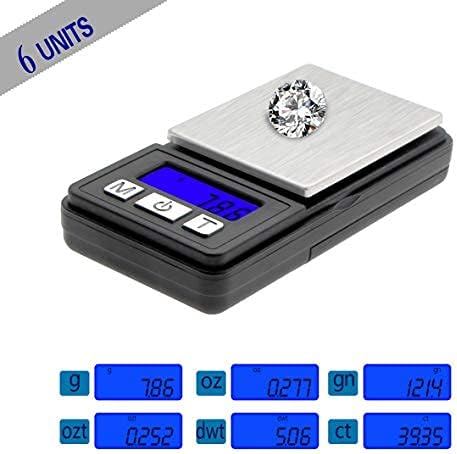
The scale displaying various units of measurement including grams (g), ounces (oz), grains (gn), carats (ct), pennyweights (dwt), and troy ounces (ozt), highlighting its versatility.
4.3 ടാരെ ഫംഗ്ഷൻ
The Tare function allows you to subtract the weight of a container, so you only measure the net weight of the contents.
- Turn on the scale and wait for it to display "0.0" or "0.00".
- Place an empty container (e.g., a bowl or the scale's protective cover) on the weighing platform. The display will show the weight of the container.
- അമർത്തുക [ടി] (Tare) button. The display will reset to "0.0" or "0.00".
- Place the items you wish to weigh into the container. The display will now show only the weight of the items.

A visual guide demonstrating how to use the Tare function: 1) Turn on the scale, 2) Place a container on the scale, 3) Press the 'T' button to zero the scale, 4) Add items to the container for weighing.
4.4 തൂക്കം കണക്കാക്കുന്ന വസ്തുക്കൾ
- Ensure the scale is on and displaying "0.0" or "0.00" in your desired unit.
- Carefully place the item(s) to be weighed onto the center of the weighing platform.
- LCD സ്ക്രീനിൽ പ്രദർശിപ്പിച്ചിരിക്കുന്ന സ്ഥിരതയുള്ള ഭാരം വായിക്കുക.

ഒരു ഇമേജ് പ്രദർശനംasing the multi-purpose applications of the scale, suitable for weighing small items like jewelry, coins, pills, and coffee beans.
5. കാലിബ്രേഷൻ
Calibration ensures the accuracy of your scale over time. It is recommended to calibrate your scale periodically or if you suspect inaccurate readings. A 1000g calibration weight (not included) is typically required for this model.
- Turn the scale OFF.
- അമർത്തിപ്പിടിക്കുക [എം] (Mode) button, then press the [ഓൺ/ഓഫ്] button simultaneously until "CAL" appears on the display.
- Release both buttons. The display will then show the required calibration weight (e.g., "1000.0g").
- കൃത്യമായ കാലിബ്രേഷൻ ഭാരം (ഉദാ: 1000 ഗ്രാം) വെയ്റ്റിംഗ് പ്ലാറ്റ്ഫോമിന്റെ മധ്യത്തിൽ വയ്ക്കുക.
- Wait for the display to show "PASS" and then return to normal weighing mode (e.g., "0.0" or "0.00").
- കാലിബ്രേഷൻ ഭാരം നീക്കം ചെയ്യുക. സ്കെയിൽ ഇപ്പോൾ കാലിബ്രേറ്റ് ചെയ്തിട്ടുണ്ട്, ഉപയോഗത്തിന് തയ്യാറാണ്.
6. പരിപാലനവും പരിചരണവും
- വൃത്തിയാക്കൽ: ചെറുതായി ഡി ഉപയോഗിച്ച് സ്കെയിൽ തുടയ്ക്കുകamp തുണി. സ്കെയിൽ വെള്ളത്തിൽ മുക്കുകയോ ഉരച്ചിലുകളുള്ള ക്ലീനറുകൾ ഉപയോഗിക്കുകയോ ചെയ്യരുത്.
- സംഭരണം: Store the scale in a clean, dry environment. Avoid extreme temperatures and humidity. The protective cover can be used to shield the weighing platform.
- ബാറ്ററി മാറ്റിസ്ഥാപിക്കൽ: Replace batteries when the "Lo" indicator appears on the display. Remove batteries if the scale will not be used for an extended period.
- കൈകാര്യം ചെയ്യൽ: Handle the scale with care. Avoid dropping it or subjecting it to strong impacts, as this can damage the internal sensors.
7. പ്രശ്നപരിഹാരം
| പ്രശ്നം | സാധ്യമായ കാരണം | പരിഹാരം |
|---|---|---|
| ഡിസ്പ്ലേ "ലോ" കാണിക്കുന്നു | കുറഞ്ഞ ബാറ്ററി പവർ. | AAA ബാറ്ററികൾ മാറ്റിസ്ഥാപിക്കുക. |
| Display shows "OUE2" | ഓവർലോഡ്. ഭാരം പരമാവധി ശേഷി കവിയുന്നു. | അധിക ഭാരം ഉടനടി നീക്കം ചെയ്യുക. 1000 ഗ്രാമിൽ കൂടരുത്. |
| കൃത്യമല്ലാത്ത വായനകൾ | Unstable surface, scale not tared, needs calibration, or damaged sensor. | Place on a stable surface. Use Tare function. Perform calibration. If problem persists, contact support. |
| സ്കെയിൽ ഓണാക്കുന്നില്ല | ബാറ്ററികൾ തെറ്റായി ഇൻസ്റ്റാൾ ചെയ്തതോ അല്ലെങ്കിൽ തീർന്നതോ ആണ്. | ബാറ്ററി പോളാരിറ്റി പരിശോധിക്കുക അല്ലെങ്കിൽ ബാറ്ററികൾ മാറ്റിസ്ഥാപിക്കുക. |
8 സ്പെസിഫിക്കേഷനുകൾ

An image illustrating the compact size of the Fuzion Ultra Mini Scale, showing its length (3.4 inches), width (1.7 inches), and height (0.59 inches), along with the platform size.
- മോഡൽ: MT1000
- ശേഷി: 1000 ഗ്രാം (1 കിലോ)
- വായനാക്ഷമത: 0.1 ഗ്രാം
- വെയ്റ്റിംഗ് യൂണിറ്റുകൾ: g, oz, gn, ct, dwt, ozt
- ഡിസ്പ്ലേ: ബ്ലൂ ബാക്ക്ലിറ്റ് എൽസിഡി
- ശക്തി: 2 x AAA ബാറ്ററികൾ (ഉൾപ്പെട്ടിരിക്കുന്നു)
- Scale Dimensions (L x W x H): 3.4 ൽ x 1.7 ൽ x 0.59 ഇഞ്ച്
- Platform Size (L x W): 1.93 ൽ x 1.5 ഇഞ്ച്
- മൊത്തം ഭാരം: ഏകദേശം 58.7 ഗ്രാം (2.08 oz)
- മെറ്റീരിയലുകൾ: എബിഎസ് പ്ലാസ്റ്റിക്, സ്റ്റെയിൻലെസ്സ് സ്റ്റീൽ
- പ്രത്യേക സവിശേഷതകൾ: Tare Function, Auto-Off, Overload Indication, Low Battery Indication
9. വാറൻ്റിയും പിന്തുണയും
Fuzion products are manufactured with quality and precision. For warranty information or technical support, please refer to the contact details provided with your purchase or visit the official Fuzion webസൈറ്റ്. ഏതെങ്കിലും വാറന്റി ക്ലെയിമുകൾക്കായി നിങ്ങളുടെ വാങ്ങലിന്റെ തെളിവ് സൂക്ഷിക്കുക.