
Other M99
M99 Sport Smart Watch User Manual
Model: M99 | Brand: Other
1. ആമുഖം
Thank you for choosing the M99 Sport Smart Watch. This device is designed to enhance your daily life with its advanced features, including Bluetooth calling, a full touch screen, and comprehensive health monitoring. It boasts an IP68 water resistance rating, making it suitable for various activities. This manual provides essential information on setting up, operating, maintaining, and troubleshooting your new smart watch to ensure optimal performance.

ചിത്രം 1: മുൻഭാഗം view of the M99 Sport Smart Watch, showcasing അതിന്റെ വൃത്താകൃതിയിലുള്ള ഡിസ്പ്ലേയും കറുത്ത സ്ട്രാപ്പും.
2. സജ്ജീകരണം
2.1 ഉപകരണം ചാർജ് ചെയ്യുന്നു
Before first use, fully charge your M99 Smart Watch. Connect the magnetic charging cable to the charging points on the back of the watch and plug the USB end into a compatible power adapter (not included). A full charge typically takes approximately 2 hours.

Figure 2: The smart watch display showing the charging indicator and estimated battery life. The watch offers 5-7 days of daily use and up to 30 days of standby time on a single charge.
2.2 പവർ ഓൺ/ഓഫ്
- പവർ ഓൺ: സ്ക്രീൻ പ്രകാശിക്കുന്നത് വരെ സൈഡ് ബട്ടൺ കുറച്ച് സെക്കൻഡ് അമർത്തിപ്പിടിക്കുക.
- പവർ ഓഫ്: സൈഡ് ബട്ടൺ അമർത്തിപ്പിടിക്കുക, തുടർന്ന് സ്ക്രീനിൽ 'പവർ ഓഫ്' ഓപ്ഷൻ തിരഞ്ഞെടുക്കുക.
2.3 ആപ്പ് ഇൻസ്റ്റാളേഷനും ജോടിയാക്കലും
To unlock the full functionality of your M99 Smart Watch, download the companion application on your smartphone. The watch is compatible with both Android and iOS operating systems.
- Scan the QR code provided in the watch's packaging or search for the designated app in your phone's app store.
- അപ്ലിക്കേഷൻ ഇൻസ്റ്റാൾ ചെയ്ത് തുറക്കുക.
- നിങ്ങളുടെ സ്മാർട്ട്ഫോണിൽ ബ്ലൂടൂത്ത് പ്രവർത്തനക്ഷമമാക്കുക.
- In the app, follow the on-screen instructions to search for and pair with your M99 Smart Watch. Ensure the watch is powered on and within Bluetooth range.
- നിങ്ങളുടെ ഫോണിലും വാച്ചിലും ജോടിയാക്കൽ അഭ്യർത്ഥന സ്ഥിരീകരിക്കുക.
3. പ്രവർത്തന നിർദ്ദേശങ്ങൾ
3.1 അടിസ്ഥാന നാവിഗേഷൻ
- മുകളിലേക്കും താഴേക്കും സ്വൈപ്പ് ചെയ്യുക: മെനുകളിലൂടെയും അറിയിപ്പുകളിലൂടെയും നാവിഗേറ്റ് ചെയ്യുക.
- ഇടത്തേക്ക്/വലത്തേക്ക് സ്വൈപ്പ് ചെയ്യുക: Access quick functions or different data screens.
- ടാപ്പ് ചെയ്യുക: ഒരു ഇനം തിരഞ്ഞെടുക്കുക അല്ലെങ്കിൽ ഒരു പ്രവർത്തനം സ്ഥിരീകരിക്കുക.
- സൈഡ് ബട്ടൺ: ഹോം സ്ക്രീനിലേക്ക് മടങ്ങാൻ അമർത്തുക അല്ലെങ്കിൽ ഉപകരണം ഉണർത്തുക.
3.2 ബ്ലൂടൂത്ത് കോൾ പ്രവർത്തനം
The M99 Smart Watch allows you to make and receive calls directly from your wrist when connected to your smartphone via Bluetooth.
- കോളുകൾ ചെയ്യുന്നു: ഒരു കോൾ ആരംഭിക്കാൻ വാച്ചിലെ ഡയൽ പാഡിലോ കോൺടാക്റ്റ് ലിസ്റ്റോ ആക്സസ് ചെയ്യുക.
- കോളുകൾ സ്വീകരിക്കുന്നു: When a call comes in, the watch will display the caller ID. You can answer or reject the call directly from the watch screen.
- കോൾ ചരിത്രം: View your recent call history on the watch.

Figure 3: Illustrations of the M99 Smart Watch's Bluetooth call features, including the dial pad, recent call log, and options to answer or reject incoming calls.
3.3 ആരോഗ്യ നിരീക്ഷണം
The M99 Smart Watch is equipped with sensors to monitor various health metrics. Please note: This device is not a medical device and should not be used for medical diagnosis or treatment.
- ഹൃദയമിടിപ്പ് നിരീക്ഷണം: Real-time tracking of your heart rate.
- രക്തസമ്മർദ്ദ നിരീക്ഷണം: കണക്കാക്കിയ രക്തസമ്മർദ്ദ റീഡിംഗുകൾ നൽകുന്നു.
- രക്ത ഓക്സിജൻ നിരീക്ഷണം: നിങ്ങളുടെ രക്തത്തിലെ ഓക്സിജൻ സാച്ചുറേഷൻ (SpO2) അളവ് അളക്കുന്നു.
- ഉറക്ക നിരീക്ഷണം: നിങ്ങളുടെ ഉറക്ക രീതികളും ഗുണനിലവാരവും ട്രാക്ക് ചെയ്യുന്നു.
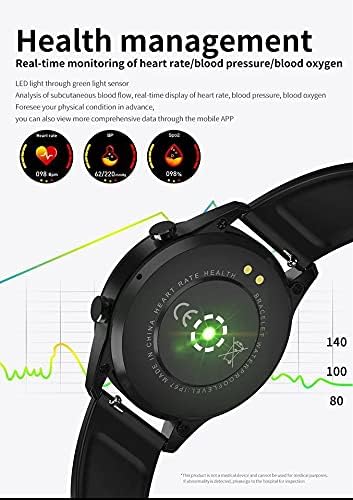
Figure 4: The back of the M99 Smart Watch showing the green light sensors used for heart rate, blood pressure, and blood oxygen monitoring.
3.4 Activity Monitoring
Track your daily activities and workouts:
- സ്പോർട്സ് മോഡുകൾ: Select from various sports modes to track specific activities.
- സ്റ്റെപ്പ് കൗണ്ടർ: നിങ്ങളുടെ ദൈനംദിന ചുവടുകൾ, ദൂരം, കത്തിച്ച കലോറികൾ എന്നിവ രേഖപ്പെടുത്തുന്നു.
- ഉദാസീനമായ ഓർമ്മപ്പെടുത്തൽ: Notifies you to move after periods of inactivity.
3.5 അറിയിപ്പുകളും മറ്റ് സവിശേഷതകളും
Receive notifications from your smartphone directly on your watch. The M99 also includes:
- സന്ദേശ ഓർമ്മപ്പെടുത്തൽ: Get alerts for incoming messages.
- അലാറം ക്ലോക്ക്: Set alarms to wake you up or remind you of tasks.
- ഫോൺ കണ്ടെത്തുക: Use your watch to locate your paired smartphone.
- Bluetooth Pictures: Remotely control your phone's camera.
- ബഹുഭാഷാ പിന്തുണ: The watch supports various languages.

ചിത്രം 5: ഒരു ഓവർview of the M99 Smart Watch's capabilities, including low power consumption, Bluetooth phone, activity monitoring, heart rate, sleep, blood pressure, blood oxygen, alarm clock, find phone, and multi-language support.
4. പരിപാലനം
4.1 ജല പ്രതിരോധം (IP68)
The M99 Smart Watch has an IP68 water resistance rating, meaning it is protected against dust ingress and can withstand immersion in water up to 1.5 meters for 30 minutes. It is suitable for daily use, such as hand washing, rain, and shallow swimming. However, it is not recommended for hot showers, saunas, or diving, as steam and high water pressure can compromise the seals.
4.2 ശുചീകരണവും പരിചരണവും
- മൃദുവായ, ഡി ക്ലീനർ ഉപയോഗിച്ച് വാച്ചും സ്ട്രാപ്പും പതിവായി തുടയ്ക്കുക.amp തുണി.
- വാച്ചിന്റെ ഫിനിഷിനും സീലുകൾക്കും കേടുവരുത്താൻ സാധ്യതയുള്ളതിനാൽ, കഠിനമായ രാസവസ്തുക്കൾ, ക്ലീനിംഗ് ലായകങ്ങൾ, അല്ലെങ്കിൽ ശക്തമായ ഡിറ്റർജന്റുകൾ എന്നിവ ഉപയോഗിക്കുന്നത് ഒഴിവാക്കുക.
- ചാർജ് ചെയ്യുന്നതിനു മുമ്പ് ചാർജിംഗ് കോൺടാക്റ്റുകൾ വൃത്തിയുള്ളതും വരണ്ടതുമാണെന്ന് ഉറപ്പാക്കുക, അങ്ങനെ അവയ്ക്ക് നാശം സംഭവിക്കില്ല.
4.3 സംഭരണം
When not in use for extended periods, store the watch in a cool, dry place away from direct sunlight and extreme temperatures. It is advisable to charge the watch periodically to maintain battery health.
5. പ്രശ്നപരിഹാരം
- വാച്ച് ഓണാകുന്നില്ല: Ensure the watch is fully charged. If it still doesn't turn on, try holding the side button for an extended period (10-15 seconds) for a forced restart.
- സ്മാർട്ട്ഫോണുമായി ജോടിയാക്കാൻ കഴിയില്ല:
- നിങ്ങളുടെ ഫോണിലും വാച്ചിലും ബ്ലൂടൂത്ത് പ്രവർത്തനക്ഷമമാക്കിയിട്ടുണ്ടെന്ന് ഉറപ്പാക്കുക.
- Make sure the watch is within the phone's Bluetooth range (typically 10 meters).
- വാച്ചും ഫോണും റീസ്റ്റാർട്ട് ചെയ്യുക.
- Clear the Bluetooth cache on your phone or forget the device and try pairing again.
- കൃത്യമല്ലാത്ത ആരോഗ്യ വായനകൾ:
- വാച്ച് നിങ്ങളുടെ കൈത്തണ്ടയിൽ നന്നായി ധരിക്കുന്നുണ്ടെന്ന് ഉറപ്പാക്കുക, അധികം ഇറുകിയതോ അധികം അയഞ്ഞതോ അല്ല.
- Keep the sensor area on the back of the watch clean.
- വായനയ്ക്കിടെ അമിതമായ ചലനം ഒഴിവാക്കുക.
- അറിയിപ്പുകൾ ദൃശ്യമാകുന്നില്ല:
- Check notification permissions in your phone's settings for the companion app.
- ആപ്പ് പശ്ചാത്തലത്തിൽ പ്രവർത്തിക്കുന്നുണ്ടെന്നും ബാറ്ററി ഒപ്റ്റിമൈസേഷൻ ക്രമീകരണങ്ങൾ വഴി അത് അടയ്ക്കുന്നില്ലെന്നും ഉറപ്പാക്കുക.
- Verify that notifications are enabled within the companion app for specific applications.
6 സ്പെസിഫിക്കേഷനുകൾ
| ഫീച്ചർ | വിവരണം |
|---|---|
| മോഡൽ നമ്പർ | M99 |
| പ്രദർശിപ്പിക്കുക | 1.28 inch Full Touch Screen |
| കണക്റ്റിവിറ്റി | ബ്ലൂടൂത്ത് |
| അനുയോജ്യമായ OS | Android & iOS |
| റാം വലിപ്പം | 128 MB |
| ജല പ്രതിരോധം | IP68 |
| Battery Life (Daily Use) | 5-7 ദിവസം |
| ബാറ്ററി ലൈഫ് (സ്റ്റാൻഡ്ബൈ) | 30 ദിവസം വരെ |
| ചാർജിംഗ് സമയം | ഏകദേശം 2 മണിക്കൂർ |
| മെറ്റീരിയൽ | പ്ലാസ്റ്റിക് |
| ഇനത്തിൻ്റെ ഭാരം | 120 ഗ്രാം |
| പ്രത്യേക സവിശേഷതകൾ | Lightweight, Bluetooth Call, Health Monitoring (HR, BP, SpO2), Activity Tracking |
7. വാറൻ്റിയും പിന്തുണയും
Specific warranty terms and conditions for the M99 Sport Smart Watch may vary depending on your region and point of purchase. Please refer to the warranty information provided at the time of purchase or contact your retailer for details.
For technical support or further assistance, please contact the seller or manufacturer through the contact information provided with your product or on their official website. Ensure you have your model number (M99) and proof of purchase ready when seeking support.
Ask a question about this manual
Ask about setup, troubleshooting, compatibility, parts, safety, or missing instructions. Manuals+ will review the question and use this page’s manual context to help answer it.