
1. ആമുഖം
The CreatBot F430 is a professional-grade 3D printer designed for high-precision additive manufacturing, capable of processing demanding industrial filaments such as ABS, PC, PP, Nylon, and PEEK. Its heated build chamber (up to 70°C) and hot end (up to 420°C) minimize deformation and ensure excellent print quality. With a full metal housing and a high-precision industrial guide system, the F430 delivers exceptional accuracy up to 0.04 mm and speeds up to 120 mm/s, making it ideal for engineering and aerospace applications.
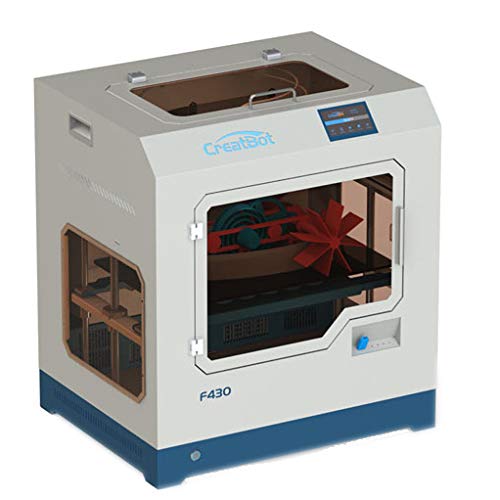
Image 1.1: The CreatBot F430 Professional 3D Printer. This image shows the front and side view of the printer, highlighting its robust metal casing and the transparent viewing window into the build chamber. A printed object is visible inside.
2. സജ്ജീകരണം
2.1 അൺബോക്സിംഗും പ്ലേസ്മെന്റും
- പ്രിന്റർ അതിന്റെ പാക്കേജിംഗിൽ നിന്ന് ശ്രദ്ധാപൂർവ്വം നീക്കം ചെയ്യുക. ഭാവിയിലെ ഗതാഗതത്തിനോ സേവനത്തിനോ വേണ്ടി എല്ലാ പാക്കേജിംഗ് വസ്തുക്കളും സൂക്ഷിക്കുക.
- Place the CreatBot F430 on a stable, level surface capable of supporting its weight. Ensure adequate ventilation around the printer.
- Remove all internal packing materials and protective films from the build chamber, print head, and bed.
2.2 പവർ കണക്ഷൻ
- Connect the power cable to the printer's power input and then to a grounded electrical outlet.
- ബന്ധിപ്പിക്കുന്നതിന് മുമ്പ് പവർ സ്വിച്ച് ഓഫ് സ്ഥാനത്താണെന്ന് ഉറപ്പാക്കുക.
2.3 പ്രാരംഭ കാലിബ്രേഷൻ
Refer to the on-screen instructions on the printer's control panel for initial bed leveling and print head calibration. This is crucial for achieving optimal print quality.
3. ഓപ്പറേഷൻ
3.1 സോഫ്റ്റ്വെയർ ഇൻസ്റ്റലേഷൻ
Install the CreatBot slicing software (or a compatible third-party slicer) on your PC. This software converts 3D models into printable G-code files.
3.2 ലോഡിംഗ് ഫിലമെന്റ്
- Preheat the hot end to the recommended temperature for your chosen filament type.
- Insert the filament into the designated feeder mechanism.
- Guide the filament through the extruder until it emerges from the nozzle.
3.3 ഒരു പ്രിന്റ് ആരംഭിക്കുന്നു
- Transfer your G-code file to the printer via USB or network connection.
- ആവശ്യമുള്ളത് തിരഞ്ഞെടുക്കുക file from the printer's control panel.
- Confirm print settings and initiate the print job.
4. പരിപാലനം
4.1 റെഗുലർ ക്ലീനിംഗ്
- Regularly clean the print bed with isopropyl alcohol to ensure good adhesion.
- Remove any filament debris from the build chamber and around the print head.
4.2 നോസൽ പരിപാലനം
Periodically inspect the nozzle for wear or clogs. Use the provided cleaning tools to clear any blockages. Replace the nozzle if significant wear is observed.
4.3 ലൂബ്രിക്കേഷൻ
Apply a small amount of lubricant to the linear rails and lead screws every few months to ensure smooth movement.
5. പ്രശ്നപരിഹാരം
5.1 പൊതുവായ പ്രശ്നങ്ങളും പരിഹാരങ്ങളും
| ഇഷ്യൂ | സാധ്യമായ കാരണം | പരിഹാരം |
|---|---|---|
| ഫിലമെന്റ് പുറത്തെടുക്കുന്നില്ല | Clogged nozzle, incorrect temperature, tangled filament | Clean or replace nozzle, verify temperature settings, untangle filament |
| Poor print adhesion | Dirty print bed, incorrect bed leveling, wrong bed temperature | Clean print bed, re-level bed, adjust bed temperature |
| ലെയർ ഷിഫ്റ്റിംഗ് | Loose belts, motor issues, print speed too high | Check and tighten belts, inspect motors, reduce print speed |
6 സ്പെസിഫിക്കേഷനുകൾ
| ഫീച്ചർ | വിശദാംശങ്ങൾ |
|---|---|
| ബ്രാൻഡ് | Creatbot |
| മോഡൽ നമ്പർ | F430 |
| നിർമ്മാതാവ് | Creatbot |
| നിറം | നീല, വെള്ള |
| അനുയോജ്യമായ ഉപകരണങ്ങൾ | PC |
| അനുയോജ്യമായ മെറ്റീരിയൽ | Nylon, ABS, PC, PP, PEEK (and others) |
| Heated Build Chamber | 70 ഡിഗ്രി സെൽഷ്യസ് വരെ |
| Hot End Temperature | 420 ഡിഗ്രി സെൽഷ്യസ് വരെ |
| Production Accuracy | 0.04 മില്ലിമീറ്റർ വരെ |
| പ്രിൻ്റ് വേഗത | 120 mm/s വരെ |
| ഹൗസിംഗ് മെറ്റീരിയൽ | ഫുൾ മെറ്റൽ |
| ASIN | B07MVJFMJF |
| ആദ്യം ലഭ്യമായത് | 16 ജനുവരി 2019 |
7. വാറൻ്റിയും പിന്തുണയും
For detailed warranty information and technical support, please refer to the official CreatBot webസൈറ്റിൽ ബന്ധപ്പെടുകയോ അവരുടെ ഉപഭോക്തൃ സേവനവുമായി നേരിട്ട് ബന്ധപ്പെടുകയോ ചെയ്യുക. വാറന്റി ക്ലെയിമുകൾക്കുള്ള വാങ്ങലിന്റെ തെളിവായി നിങ്ങളുടെ വാങ്ങൽ രസീത് സൂക്ഷിക്കുക.
ഓൺലൈൻ ഉറവിടങ്ങൾ: Visit the CreatBot official webപതിവുചോദ്യങ്ങൾ, സോഫ്റ്റ്വെയർ അപ്ഡേറ്റുകൾ, അധിക ഉറവിടങ്ങൾ എന്നിവയ്ക്കുള്ള സൈറ്റ്.
കസ്റ്റമർ സർവീസ്: പിന്തുണയ്ക്കുള്ള കോൺടാക്റ്റ് വിവരങ്ങൾ സാധാരണയായി നിർമ്മാതാവിന്റെ വിലാസത്തിൽ കാണാം. webസൈറ്റ്.