
1. ആമുഖം
വാങ്ങിയതിന് നന്ദി.asing the Olafus OLAFUS-02SK Portable Bluetooth Bike Speaker. This manual provides essential information for setting up, operating, and maintaining your speaker. Please read it carefully before use to ensure optimal performance and longevity of your device.

The Olafus Portable Bluetooth Bike Speaker, model OLAFUS-02SK, is designed for easy attachment to bicycle handlebars, providing audio during rides.
2. പാക്കേജ് ഉള്ളടക്കം
- 1 x പോർട്ടബിൾ സ്പീക്കർ
- 1 x Detachable Bike Stand
- 1 x ഹുക്ക്
- 1 x 3.5mm ഓഡിയോ കേബിൾ
- 1 x ഉപയോക്തൃ ഗൈഡ്
3. ഉൽപ്പന്നം കഴിഞ്ഞുview
സ്പീക്കറിന്റെ ഘടകങ്ങളും നിയന്ത്രണങ്ങളും സ്വയം പരിചയപ്പെടുത്തുക.
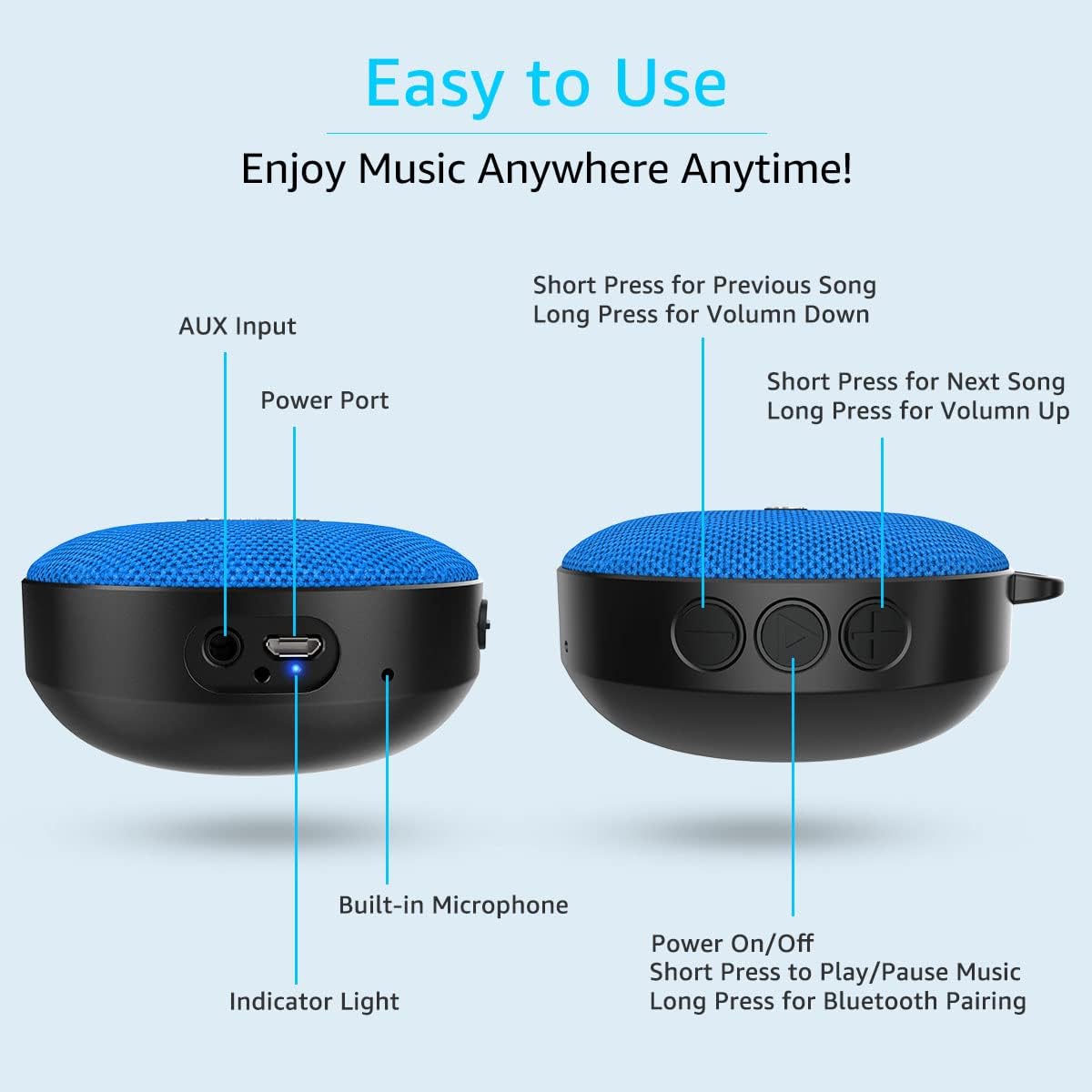
This diagram illustrates the AUX input, power port, built-in microphone, indicator light, and control buttons for power, play/pause, volume, and track selection.
4. സജ്ജീകരണം
4.1. സ്പീക്കർ മൌണ്ട് ചെയ്യുന്നു
- Attach the detachable bike stand to your bicycle handlebars using the provided screw and gripping strips. Ensure it is securely fastened.
- Align the speaker with the bike stand and press it firmly until it clicks into place.

The speaker comes with a detachable bike mount and gripping strips, allowing secure attachment to bicycle handlebars and easy removal.
4.2. പവർ ഓൺ/ഓഫ്
- പവർ ഓൺ ചെയ്യാൻ, ചെറിയ അമർത്തുക the Power On/Off button.
- പവർ ഓഫ് ചെയ്യാൻ, ചെറിയ അമർത്തുക the Power On/Off button again.
4.3. ബ്ലൂടൂത്ത് ജോടിയാക്കൽ
- Power on the speaker. The indicator light will flash, indicating it's in pairing mode.
- On your device (smartphone, tablet, etc.), enable Bluetooth and search for "Olafus OLAFUS-02SK".
- Select the speaker from the list to connect. Once connected, the indicator light will remain solid.
4.4. Wired Connection (AUX Input)
For non-Bluetooth devices, connect the speaker using the supplied 3.5mm audio cable to the AUX input port.
This video demonstrates the installation of the Olafus Bluetooth Bike Speaker on a bicycle and highlights its sound quality during a ride.
5. പ്രവർത്തന നിർദ്ദേശങ്ങൾ
5.1. സംഗീതം പ്ലേബാക്ക്
- പ്ലേ/താൽക്കാലികമായി നിർത്തുക: പ്ലേ/പോസ് ബട്ടൺ ഹ്രസ്വമായി അമർത്തുക.
- അടുത്ത ഗാനം: Short press the 'Next Song' button.
- മുൻ ഗാനം: Short press the 'Previous Song' button.
- വോളിയം കൂട്ടുക: 'വോളിയം അപ്പ്' ബട്ടൺ ദീർഘനേരം അമർത്തുക.
- വോളിയം താഴേക്ക്: 'വോളിയം ഡൗൺ' ബട്ടൺ ദീർഘനേരം അമർത്തുക.
5.2. കോൾ കൈകാര്യം ചെയ്യൽ
ബ്ലൂടൂത്ത് വഴി കണക്റ്റ് ചെയ്യുമ്പോൾ ഹാൻഡ്സ്-ഫ്രീ കോളിംഗ് സാധ്യമാക്കുന്ന ബിൽറ്റ്-ഇൻ മൈക്രോഫോൺ.
- മറുപടി കോൾ: പ്ലേ/പോസ് ബട്ടൺ ഹ്രസ്വമായി അമർത്തുക.
- കോൾ അവസാനിപ്പിക്കുക: പ്ലേ/പോസ് ബട്ടൺ ഹ്രസ്വമായി അമർത്തുക.
- കോൾ നിരസിക്കുക: പ്ലേ/പോസ് ബട്ടൺ ദീർഘനേരം അമർത്തുക.
5.3. Waterproof Feature (IP65)
The speaker is rated IP65 waterproof, making it resistant to dust and water splashes. It is suitable for outdoor use and can withstand rain or splashes from a shower or pool.

The speaker is IP65 waterproof, making it suitable for use in various water environments such as showers, pools, and beaches.
5.4. പോർട്ടബിലിറ്റി
The speaker's detachable design and included hook enhance its portability for various activities.
- Easily detach the speaker from the bike mount to carry it with you.
- Use the metal hook to hang it on bags, tents, or other suitable locations.

The speaker features a metal hook for easy attachment to backpacks, making it a convenient companion for outdoor activities like hiking.
6. പരിപാലനം
- വൃത്തിയാക്കൽ: മൃദുവായ സ്പീക്കർ തുടയ്ക്കുക, ഡിamp തുണി. കഠിനമായ രാസവസ്തുക്കളോ ഉരച്ചിലുകളുള്ള ക്ലീനറുകളോ ഉപയോഗിക്കരുത്.
- സംഭരണം: ഉപയോഗത്തിലില്ലാത്തപ്പോൾ തണുത്തതും വരണ്ടതുമായ സ്ഥലത്ത് സ്പീക്കർ സൂക്ഷിക്കുക. കടുത്ത താപനില ഒഴിവാക്കുക.
- ബാറ്ററി കെയർ: To prolong battery life, fully charge the speaker before its first use and recharge it regularly, even if not used frequently.
7. പ്രശ്നപരിഹാരം
- സ്പീക്കർ ഓണാകില്ല: ബാറ്ററി ചാർജ്ജ് ചെയ്തിട്ടുണ്ടെന്ന് ഉറപ്പാക്കുക. ഒരു പവർ സ്രോതസ്സിലേക്ക് കണക്റ്റ് ചെയ്ത് വീണ്ടും ശ്രമിക്കുക.
- ബ്ലൂടൂത്ത് വഴി ജോടിയാക്കാൻ കഴിയില്ല: Make sure the speaker is in pairing mode (flashing indicator light). Check that Bluetooth is enabled on your device and that the speaker is within range (10 meters). Forget previous pairings on your device and try again.
- ശബ്ദമില്ല: Check the volume levels on both the speaker and your connected device. Ensure the speaker is correctly paired or the AUX cable is securely connected.
- മോശം ശബ്ദ നിലവാരം: Move closer to your connected device to improve Bluetooth signal. Ensure there are no obstructions between the speaker and your device.
8 സ്പെസിഫിക്കേഷനുകൾ
| ബ്രാൻഡ് | ഒലഫസ് |
| മോഡൽ നമ്പർ | OLAFUS-02SK |
| കണക്റ്റിവിറ്റി ടെക്നോളജി | ബ്ലൂടൂത്ത് 5.0 |
| സ്പീക്കർ പരമാവധി ഔട്ട്പുട്ട് പവർ | 100 വാട്ട്സ് |
| ഓഡിയോ put ട്ട്പുട്ട് മോഡ് | സ്റ്റീരിയോ |
| ജല പ്രതിരോധ നില | IP65 വാട്ടർപ്രൂഫ് |
| ബാറ്ററി ശരാശരി ആയുസ്സ് | 10 മണിക്കൂർ |
| ബാറ്ററി ശേഷി | 1200 മില്ലിamp മണിക്കൂറുകൾ |
| മൈക്രോഫോണുകളുടെ എണ്ണം | 1 |
| ബ്ലൂടൂത്ത് ശ്രേണി | 10 മീറ്റർ |
| നിയന്ത്രണ രീതി | സ്പർശിക്കുക |
| അനുയോജ്യമായ ഉപകരണങ്ങൾ | Desktop, Laptop, MP3 Player, Projector, Smartphone, Tablet, Television |
| ഉൽപ്പന്നത്തിൻ്റെ പ്രത്യേക ഉപയോഗങ്ങൾ | Bicycle, Outdoor, Pool, Riding |
9. വാറൻ്റിയും പിന്തുണയും
The Olafus OLAFUS-02SK Portable Bluetooth Bike Speaker comes with a limited warranty. For detailed warranty information, product support, or any inquiries, please refer to the contact information provided in the original packaging or visit the official Olafus webസൈറ്റ്.