
ആമുഖം
വാങ്ങിയതിന് നന്ദി.asing the AJ-69 V2.0 Portable Bluetooth Speaker. This manual provides detailed instructions for setting up, operating, and maintaining your speaker to ensure optimal performance and longevity. Please read this manual thoroughly before using the product.

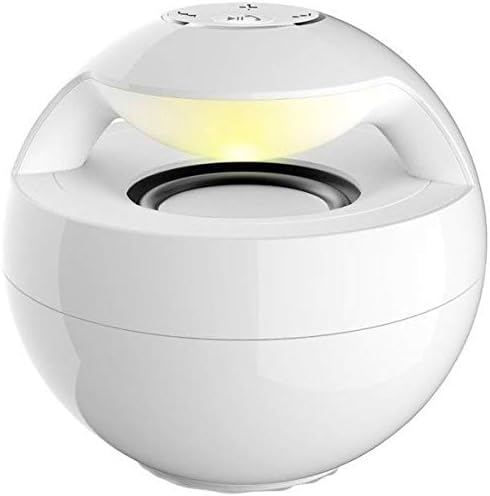
ചിത്രം 1: മുൻഭാഗം view of the AJ-69 V2.0 Portable Bluetooth Speaker, showcasing its spherical design and illuminated light ring.
ഫീച്ചറുകൾ
- Microphone Mini USB Port: Equipped with an omni-directional high-quality microphone for hands-free calls. The speaker is charged via the Mini USB Port.
- ഉയർന്ന നിലവാരമുള്ള ശബ്ദം: Delivers crisp and clear audio output.
- പോർട്ടബിൾ ഡിസൈൻ: Tiny and lightweight, making it easy to carry.
- ആധുനിക ശൈലി: Features an orb shape with a cool, modern aesthetic.
- ബ്ലൂടൂത്ത് കണക്റ്റിവിറ്റി: Bluetooth Version 2.0 EDR for wireless audio streaming with a working range of up to 10 meters.
- AUX Audio Port: Includes a 3.5mm audio cable port for wired connections.
- വിശാലമായ അനുയോജ്യത: Compatible with MP3, MP4 players, mobile phones, computers, laptops, tablets, iPods, and other devices with audio cable or USB ports.
പാക്കേജ് ഉള്ളടക്കം
പാക്കേജിൽ ഇനിപ്പറയുന്ന ഇനങ്ങൾ ഉണ്ടോ എന്ന് പരിശോധിക്കുക:
- 1 x AJ-69 V2.0 Portable Bluetooth Speaker
- 1 x 3.5mm ഓഡിയോ കേബിൾ
- 1 x മിനി യുഎസ്ബി കേബിൾ
സജ്ജമാക്കുക
1. സ്പീക്കറിൽ നിന്ന് നിരക്ക് ഈടാക്കുന്നു
Before first use, fully charge the speaker. Connect the supplied Mini USB Cable to the speaker's Mini USB Port and the other end to a USB power source (e.g., computer USB port, USB wall adapter). The charging indicator light will typically illuminate during charging and turn off or change color when fully charged.
ചിത്രം 2: പിൻഭാഗം view of the speaker, highlighting the Mini USB charging port and the 3.5mm AUX audio input port.
2. പവർ ഓൺ/ഓഫ്
- പവർ ഓണാക്കാൻ: Locate the power button (usually on the top or bottom of the speaker) and press and hold it for a few seconds until you hear an audible prompt or see an indicator light illuminate.
- പവർ ഓഫ് ചെയ്യാൻ: Press and hold the power button again for a few seconds until the speaker powers down.
3. ബ്ലൂടൂത്ത് ജോടിയാക്കൽ
- Ensure the speaker is powered on and in Bluetooth pairing mode (often indicated by a flashing LED light).
- നിങ്ങളുടെ ഉപകരണത്തിൽ (സ്മാർട്ട്ഫോൺ, ടാബ്ലെറ്റ്, ലാപ്ടോപ്പ്), ബ്ലൂടൂത്ത് പ്രവർത്തനക്ഷമമാക്കി ലഭ്യമായ ഉപകരണങ്ങൾക്കായി തിരയുക.
- Select "AJ-69" or a similar name from the list of found devices.
- Once paired, the speaker will usually provide an audible confirmation, and the LED indicator will stop flashing and remain solid.
- പാസ്വേഡ് ആവശ്യപ്പെടുകയാണെങ്കിൽ, "0000" (നാല് പൂജ്യങ്ങൾ) നൽകുക.
4. AUX കണക്ഷൻ
ബ്ലൂടൂത്ത് ഇല്ലാത്ത ഉപകരണങ്ങൾക്ക്, അല്ലെങ്കിൽ നിങ്ങൾക്ക് വയർഡ് കണക്ഷൻ ഇഷ്ടമാണെങ്കിൽ:
- Connect one end of the supplied 3.5mm Audio Cable to the AUX port on the speaker.
- Connect the other end of the 3.5mm Audio Cable to the headphone jack or audio output port of your device.
- സ്പീക്കർ യാന്ത്രികമായി AUX മോഡിലേക്ക് മാറണം.
പ്രവർത്തന നിർദ്ദേശങ്ങൾ
1. ഓഡിയോ പ്ലേബാക്ക്
- After successful Bluetooth pairing or AUX connection, start playing audio on your connected device.
- Use the volume controls on your connected device or the speaker's integrated controls (if available) to adjust the volume.
- Some speakers may have buttons for Play/Pause, Next Track, and Previous Track. Refer to the button layout on your specific unit.

ചിത്രം 3: മുകളിൽ view of the speaker, illustrating the control buttons for power, volume, and playback.
2. Hands-free Calls
- When a call comes in while connected via Bluetooth, the speaker will typically ring.
- Press the multi-function button (often the Play/Pause button) once to answer the call.
- Speak into the speaker's built-in microphone.
- കോൾ അവസാനിപ്പിക്കാൻ മൾട്ടി-ഫംഗ്ഷൻ ബട്ടൺ വീണ്ടും അമർത്തുക.
- To reject an incoming call, press and hold the multi-function button for a few seconds.
മെയിൻ്റനൻസ്
- സ്പീക്കർ വെള്ളം, ഈർപ്പം, കടുത്ത താപനില എന്നിവയിൽ നിന്ന് അകറ്റി നിർത്തുക.
- മൃദുവായതും ഉണങ്ങിയതുമായ തുണി ഉപയോഗിച്ച് സ്പീക്കർ വൃത്തിയാക്കുക. അബ്രസീവ് ക്ലീനറുകളോ ലായകങ്ങളോ ഉപയോഗിക്കരുത്.
- സ്പീക്കർ താഴെയിടുകയോ ശക്തമായ ആഘാതങ്ങൾക്ക് വിധേയമാക്കുകയോ ചെയ്യുന്നത് ഒഴിവാക്കുക.
- ദീർഘനേരം ഉപയോഗിക്കാത്തപ്പോൾ, സ്പീക്കർ തണുത്തതും വരണ്ടതുമായ സ്ഥലത്ത് സൂക്ഷിച്ച് ബാറ്ററിയുടെ ആരോഗ്യം നിലനിർത്താൻ ഇടയ്ക്കിടെ ചാർജ് ചെയ്യുക.
ട്രബിൾഷൂട്ടിംഗ്
| പ്രശ്നം | സാധ്യമായ പരിഹാരം |
|---|---|
| സ്പീക്കർ പവർ ഓൺ ചെയ്യുന്നില്ല. | Ensure the speaker is fully charged. Connect it to a power source using the Mini USB cable. |
| സ്പീക്കറിൽ നിന്ന് ശബ്ദമില്ല. | Check the volume level on both the speaker and the connected device. Ensure the speaker is correctly paired via Bluetooth or connected via AUX. Try restarting both devices. |
| ബ്ലൂടൂത്ത് വഴി ജോടിയാക്കാൻ കഴിയില്ല. | Ensure the speaker is in pairing mode. Turn off Bluetooth on your device and turn it back on. Delete "AJ-69" from your device's Bluetooth list and try pairing again. Ensure no other devices are currently connected to the speaker. Keep devices within the 10-meter range. |
| മോശം ശബ്ദ നിലവാരം. | Move the speaker closer to the connected device to reduce interference. Ensure the audio source is of good quality. Check the 3.5mm audio cable for damage if using AUX. |
സ്പെസിഫിക്കേഷനുകൾ
| മോഡൽ | AJ-69 (Item Model Number: 2724291970436) |
| റേറ്റുചെയ്ത ഇംപെഡൻസ് | 4 ഓം |
| സ്പീക്കർ വലിപ്പം | 2 ഇഞ്ച് |
| റേറ്റുചെയ്ത പവർ | 3W |
| ഫ്രീക്വൻസി പ്രതികരണം | 170Hz~15kHz |
| എസ്/എൻ അനുപാതം | ≥ 78 ഡിബി |
| അളവുകൾ | 95 x 95 x 90 mm (Product Dimensions: 9.6 x 11.8 x 11.8 cm) |
| ഭാരം | 216g (Product Weight: 372 g) |
| ബ്ലൂടൂത്ത് പതിപ്പ് | 2.0 EDR |
| പ്രവർത്തന ശ്രേണി | 10മീ |
| പോർട്ട് തരം | 3.5mm Audio Cable Port (AUX) & Mini USB Port |
| കണക്റ്റിവിറ്റി ടെക്നോളജി | വയർഡ്, വയർലെസ് |
| ഓഡിയോ put ട്ട്പുട്ട് മോഡ് | സ്റ്റീരിയോ |
| മൗണ്ടിംഗ് തരം | ടേബിൾടോപ്പ് |
| അനുയോജ്യമായ ഉപകരണങ്ങൾ | MP3, MP4, mobile phones, computers, laptops, tablets, iPod, Smartphone, Personal Computer |
വാറൻ്റിയും പിന്തുണയും
വാറന്റി വിവരങ്ങൾക്കും ഉപഭോക്തൃ പിന്തുണയ്ക്കും, വാങ്ങുന്ന സമയത്ത് നൽകിയിരിക്കുന്ന ഡോക്യുമെന്റേഷൻ പരിശോധിക്കുകയോ നിങ്ങളുടെ റീട്ടെയിലറെ ബന്ധപ്പെടുകയോ ചെയ്യുക. ഏതെങ്കിലും വാറന്റി ക്ലെയിമുകൾക്കായി നിങ്ങളുടെ വാങ്ങിയതിന്റെ തെളിവ് സൂക്ഷിക്കുക.