
1 പ്രധാനപ്പെട്ട സുരക്ഷാ വിവരങ്ങൾ
Please read this manual carefully before operating your air conditioner. Keep this manual for future reference.
- പ്രൊഫഷണൽ ഇൻസ്റ്റാളേഷൻ: Installation, maintenance, and repair must be performed by qualified service personnel. Improper installation can lead to electric shock, fire, or injury.
- വൈദ്യുതി വിതരണം: പവർ സപ്ലൈ യൂണിറ്റിന്റെ സ്പെസിഫിക്കേഷനുകളുമായി പൊരുത്തപ്പെടുന്നുണ്ടെന്ന് ഉറപ്പാക്കുക. കേടായ പവർ കോഡുകളോ പ്ലഗുകളോ ഉപയോഗിക്കരുത്.
- വെൻ്റിലേഷൻ: Do not block the air inlet or outlet of the unit.
- ജലവും ഈർപ്പവും: Do not expose the unit to direct water spray or excessive moisture. Do not operate with wet hands.
- കുട്ടികളും വളർത്തുമൃഗങ്ങളും: പ്രവർത്തന സമയത്ത് കുട്ടികളെയും വളർത്തുമൃഗങ്ങളെയും യൂണിറ്റിൽ നിന്ന് അകറ്റി നിർത്തുക.
- വൃത്തിയാക്കൽ: Always disconnect power before cleaning the unit. Use a soft, dry cloth for cleaning.
- റഫ്രിജറൻറ്: This unit uses R410A refrigerant. Handle with care and ensure proper ventilation during service.
2. ഉൽപ്പന്നം കഴിഞ്ഞുview
The AUX ASW-H12A4/LIR1 is a 12000BTU (1 Ton) wall-mounted split air conditioning system designed for both heating and cooling. It features fine air purification, a T1 compressor, and Wi-Fi connectivity (optional).
2.1 ഘടകങ്ങൾ
- ഇൻഡോർ യൂണിറ്റ്: Responsible for air intake, cooling/heating, and air discharge into the room.
- Unട്ട്ഡോർ യൂണിറ്റ്: Contains the compressor and condenser, responsible for heat exchange with the outside air.
- റിമോട്ട് കൺട്രോൾ: Used to operate the air conditioner's functions.

ചിത്രം 2.1: ഓവർview of the AUX Split AC system, showing the indoor unit, outdoor unit, and remote control.
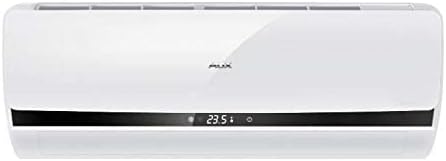
ചിത്രം 2.2: മുൻഭാഗം view of the AUX indoor unit, displaying its sleek design and digital display.
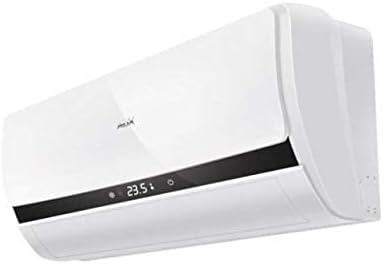
ചിത്രം 2.3: കോണാകൃതിയിലുള്ളത് view of the AUX indoor unit, highlighting its compact form factor and air vents.
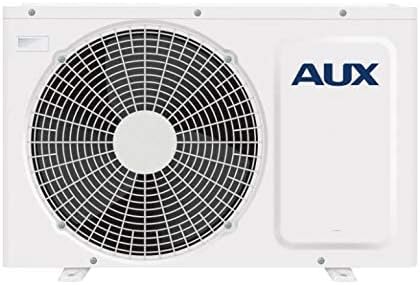
ചിത്രം 2.4: മുൻഭാഗം view of the AUX outdoor unit, showing the fan grille and the AUX branding.
3. സജ്ജീകരണവും ഇൻസ്റ്റാളേഷനും
Installation of this split air conditioning system requires specialized knowledge and tools. It is strongly recommended that you contact a certified HVAC professional for installation to ensure proper functioning, safety, and warranty validity.
3.1 പ്രീ-ഇൻസ്റ്റലേഷൻ പരിശോധനകൾ
- വൈദ്യുതി വിതരണം വോളിയം ആണെന്ന് പരിശോധിക്കുകtage and frequency match the unit's requirements.
- Ensure the installation location for both indoor and outdoor units allows for proper airflow and drainage.
- Confirm that the maximum communication length of 15 meters is not exceeded.
3.2 Professional Installation Steps (Summary for reference)
- Mounting the indoor unit securely on the wall.
- Installing the outdoor unit on a stable, level surface.
- Connecting refrigerant lines and electrical wiring between indoor and outdoor units.
- Performing vacuuming and refrigerant charging.
- Checking for leaks and testing the system.
4. പ്രവർത്തന നിർദ്ദേശങ്ങൾ
The air conditioner is primarily controlled via the wireless remote control. Ensure the remote control has working batteries.
4.1 അടിസ്ഥാന പ്രവർത്തനം
- പവർ ഓൺ/ഓഫ്: അമർത്തുക ഓൺ/ഓഫ് button on the remote control to start or stop the unit.
- മോഡ് തിരഞ്ഞെടുക്കൽ: അമർത്തുക മോഡ് ലഭ്യമായ മോഡുകളിലൂടെ സൈക്കിൾ ചെയ്യാൻ ബട്ടൺ:
- കൂളിംഗ് മോഡ്: For cooling the room. Cooling power: 2700 W.
- ചൂടാക്കൽ മോഡ്: For heating the room. Heating power: 2800 W. Minimum operating temperature for heating is -15°C.
- ഫാൻ മോഡ്: തണുപ്പിക്കാതെയും ചൂടാക്കാതെയും വായു പ്രചരിക്കുന്നു.
- യാന്ത്രിക മോഡ്: The unit automatically selects the operating mode based on the room temperature.
- ഡ്രൈ മോഡ്: മുറിയിലെ ഈർപ്പം കുറയ്ക്കുന്നു.
- താപനില ക്രമീകരണം: ഉപയോഗിക്കുക താപനില കൂട്ടുക/താഴ്ത്തുക ആവശ്യമുള്ള താപനില സജ്ജമാക്കുന്നതിനുള്ള ബട്ടണുകൾ.
- ഫാൻ വേഗത: അമർത്തുക ഫാൻ സ്പീഡ് button to adjust the fan speed (4 speeds available).
- സ്വിംഗ് പ്രവർത്തനം: ഉപയോഗിക്കുക ഊഞ്ഞാലാടുക button to adjust the direction of the airflow.
4.2 വിപുലമായ പ്രവർത്തനങ്ങൾ
- ടൈമർ പ്രവർത്തനം: The On/Off Timer allows you to set a specific time for the unit to turn on or off. Refer to the remote control's specific instructions for setting the timer.
- Wi-Fi Control (Option): If equipped with the Wi-Fi module, the unit can be controlled via a smartphone application. Consult the separate Wi-Fi control manual for setup and operation.
- Start ഷ്മള ആരംഭം: This function prevents cold air from blowing out when the unit starts in heating mode.
- മെമ്മറി പ്രവർത്തനം: The unit can memorize your preferred settings.
5. പരിപാലനം
പതിവ് അറ്റകുറ്റപ്പണികൾ നിങ്ങളുടെ എയർ കണ്ടീഷണറിന്റെ മികച്ച പ്രകടനം ഉറപ്പാക്കുകയും അതിന്റെ ആയുസ്സ് വർദ്ധിപ്പിക്കുകയും ചെയ്യുന്നു. ഏതെങ്കിലും അറ്റകുറ്റപ്പണികൾ നടത്തുന്നതിന് മുമ്പ് എല്ലായ്പ്പോഴും വൈദ്യുതി വിച്ഛേദിക്കുക.
5.1 എയർ ഫിൽറ്റർ ക്ലീനിംഗ്
The air filters should be cleaned regularly, typically every two weeks, or more frequently depending on usage and air quality.
- ഇൻഡോർ യൂണിറ്റിൻ്റെ മുൻ പാനൽ തുറക്കുക.
- Remove the air filters (Easy Clean Filter type).
- Clean the filters using a vacuum cleaner or wash them with lukewarm water (below 40°C).
- Allow the filters to dry completely in a shaded area before reinstalling them. Do not expose to direct sunlight.
- Reinstall the filters and close the front panel.
5.2 Other Filters
This unit features a deodorizing filter, filter with vitamin C, and an anion generator. Refer to your installer or service manual for specific maintenance or replacement instructions for these specialized filters.
5.3 ഔട്ട്ഡോർ യൂണിറ്റ് അറ്റകുറ്റപ്പണികൾ
The outdoor unit should be inspected periodically for obstructions (leaves, debris) around the fan and coils. This should ideally be done by a professional during annual servicing.
- Anti-ice formation system: The unit has a system to prevent ice formation on the outdoor coil during heating operation in cold weather.
6. പ്രശ്നപരിഹാരം
Before contacting service, please check the following common issues.
| പ്രശ്നം | സാധ്യമായ കാരണം | പരിഹാരം |
|---|---|---|
| യൂണിറ്റ് ആരംഭിക്കുന്നില്ല | വൈദ്യുതിയില്ല; റിമോട്ട് കൺട്രോൾ ബാറ്ററികൾ കുറവാണ്; ടൈമർ ഓഫാക്കി. | പവർ സപ്ലൈ പരിശോധിക്കുക; ബാറ്ററികൾ മാറ്റിസ്ഥാപിക്കുക; ടൈമർ ക്രമീകരണം റദ്ദാക്കുക. |
| ആവശ്യത്തിന് തണുപ്പിക്കൽ/താപനം ഇല്ല | Dirty air filters; Blocked air intake/outlet; Room too large; Doors/windows open. | Clean air filters; Remove obstructions; Close doors/windows. |
| അസാധാരണമായ ശബ്ദം | Loose parts; Unit not level; Refrigerant flow noise (normal). | Ensure unit is level; If noise persists and is unusual, contact service. |
| ഇൻഡോർ യൂണിറ്റിൽ നിന്ന് വെള്ളം ചോർന്നൊലിക്കുന്നു | അടഞ്ഞുപോയ ഡ്രെയിൻ ഹോസ്; തെറ്റായ ഇൻസ്റ്റാളേഷൻ. | Check and clear drain hose; Contact professional for inspection. |
| Self-diagnosis of malfunctions | Error code displayed on indoor unit. | Note the error code and refer to the service manual or contact customer support. |
ഈ പോയിന്റുകൾ പരിശോധിച്ചതിന് ശേഷവും പ്രശ്നം നിലനിൽക്കുകയാണെങ്കിൽ, ദയവായി യോഗ്യതയുള്ള സേവന ഉദ്യോഗസ്ഥരെ ബന്ധപ്പെടുക.
7 സ്പെസിഫിക്കേഷനുകൾ
| ഫീച്ചർ | സ്പെസിഫിക്കേഷൻ |
|---|---|
| ബ്രാൻഡ് | ഓക്സ് |
| മോഡൽ നമ്പർ | ASW-H12A4/LIR1 |
| ടൈപ്പ് ചെയ്യുക | Wall Split System |
| തണുപ്പിക്കൽ ശേഷി | 12000 ബി.ടി.യു |
| കൂളിംഗ് പവർ | 2700 W |
| ചൂടാക്കൽ ശക്തി | 2800 W |
| വൈദ്യുതി ഉപഭോഗം (തണുപ്പിക്കൽ) | 820 W |
| Power Consumption (Heating) | 770 W |
| ഇൻഡോർ യൂണിറ്റ് അളവുകൾ (WxHxD) | 70 × 28.5 × 18.8 സെ.മീ |
| ഇൻഡോർ യൂണിറ്റ് ഭാരം | 8 കി.ഗ്രാം |
| ഔട്ട്ഡോർ യൂണിറ്റ് അളവുകൾ (WxHxD) | 72 × 54 × 26 സെ.മീ |
| Unട്ട്ഡോർ യൂണിറ്റ് ഭാരം | 27 കി.ഗ്രാം |
| ശബ്ദ നില (കുറഞ്ഞത്/പരമാവധി) | 27 ഡിബി / 36 ഡിബി |
| ശീതീകരണ തരം | R 410A |
| ഘട്ടം | സിംഗിൾ-ഫേസ് |
| Max. Communication Length | 15 മീ |
| Air Flow (max) | 7.5 cu m / min |
| ഫിൽട്ടർ തരം | Easy Clean Filter, Deodorizing filter, Filter with Vitamin C |
| പ്രത്യേക സവിശേഷതകൾ | Inverter, Self-diagnosis, Anion generator, Anti-ice formation, Memory function, Warm start, Wi-Fi control (option) |
8. വാറൻ്റിയും പിന്തുണയും
This AUX air conditioner comes with a limited warranty. Please refer to the warranty card included with your product for specific terms, conditions, and duration. Keep your purchase receipt as proof of purchase.
For technical support, service requests, or inquiries regarding your warranty, please contact your local AUX authorized service center or the retailer from whom you purchased the product. Ensure to provide your model number (ASW-H12A4/LIR1) and serial number (if applicable) when seeking support.
For the most up-to-date information and support resources, please visit the official AUX webസൈറ്റ്.