
1. ആമുഖം
This manual provides essential information for the safe and efficient operation of your Touchstone Sideline Elite Smart 50-inch WiFi-Enabled Electric Fireplace. Please read all instructions carefully before installation and use to ensure proper function and to prevent potential hazards. This electric fireplace is designed for in-wall recessed installation, offering a modern aesthetic with customizable flame and heat settings.

Figure 1.1: The Touchstone Sideline Elite Smart 50-inch Electric Fireplace seamlessly integrated into a living space.
2 സുരക്ഷാ വിവരങ്ങൾ
Always adhere to basic safety precautions to reduce the risk of fire, electric shock, and injury to persons. Keep combustible materials, such as furniture, pillows, bedding, papers, clothes, and curtains at least 3 feet (0.9 m) from the front of the fireplace. Do not insert or allow foreign objects to enter any ventilation or exhaust opening as this may cause an electric shock or fire, or damage the fireplace. This appliance is hot when in use. To avoid burns, do not let bare skin touch hot surfaces. The glass front does not get hot enough to cause burns, making it safe for young children.
3 ഉൾപ്പെടുത്തിയ ഘടകങ്ങൾ
Your Touchstone Sideline Elite Smart 50-inch Electric Fireplace package includes the following items:
- ഇലക്ട്രിക് ഫയർപ്ലേസ് യൂണിറ്റ്
- റിമോട്ട് കൺട്രോൾ (2 AAA ബാറ്ററികൾ ആവശ്യമാണ്, ഉൾപ്പെടുത്തിയിട്ടില്ല)
- Faux Fire Log Set
- ക്രിസ്റ്റൽ മീഡിയ മായ്ക്കുക
- ഡ്രിഫ്റ്റ്വുഡ് മീഡിയ
- Drywall Anchors and Screws for installation

Figure 3.1: The fireplace comes with a log set, crystals, and driftwood for customizable aesthetics.
4 സ്പെസിഫിക്കേഷനുകൾ
| ഫീച്ചർ | സ്പെസിഫിക്കേഷൻ |
|---|---|
| ബ്രാൻഡ് | ടച്ച്സ്റ്റോൺ |
| മോഡലിൻ്റെ പേര് | Sideline Elite Smart 50'' 80036 |
| ഉൽപ്പന്ന അളവുകൾ (മൊത്തം) | 49.75" വീതി x 19.25" ഉയരം x 5.5" ഉയരം |
| Recessed Dimensions | 48 7/16" W x 18" H x 5 1/8" D |
| ചേമ്പർ വീതി | 50 ഇഞ്ച് |
| പവർ ഉറവിടം | AC |
| വൈദ്യുതി ഉപഭോഗം | 1500 വാട്ട്സ് |
| വാല്യംtage | 120V |
| ഹീറ്റ് ഔട്ട്പുട്ട് | 5000 ബ്രിട്ടീഷ് തെർമൽ യൂണിറ്റുകൾ (BTU) |
| ചൂടാക്കൽ കവറേജ് | 400 ചതുരശ്ര അടി വരെ. |
| ഇൻസ്റ്റലേഷൻ തരം | Wall Mount (Recessed) |
| പ്രത്യേക ഫീച്ചർ | 3 Prong Outlet, Hardwired Option, WiFi-Enabled |
| മെറ്റീരിയൽ | അലോയ് സ്റ്റീൽ, ഗ്ലാസ് |
| ഇനത്തിൻ്റെ ഭാരം | 55 പൗണ്ട് |
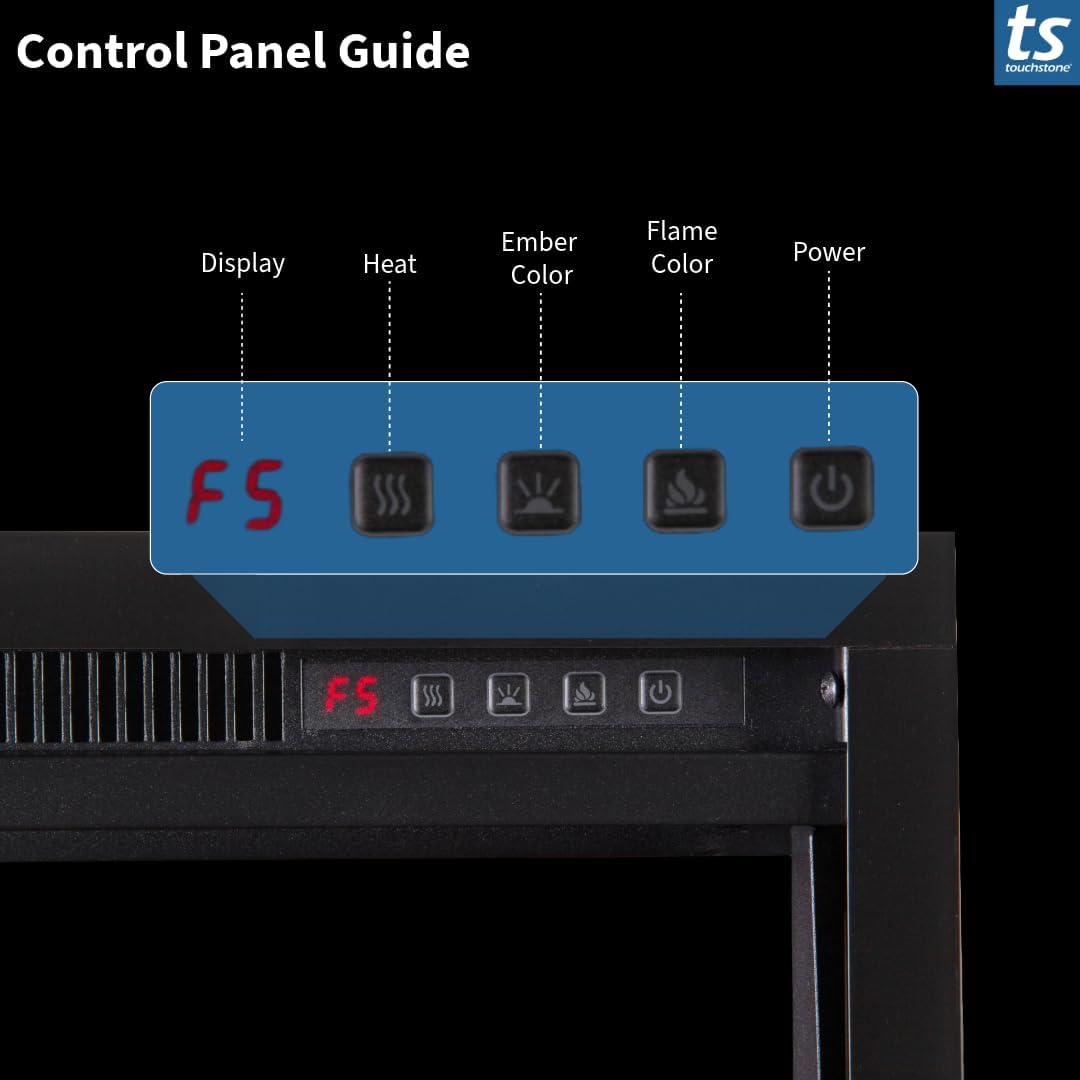
Figure 4.1: Detailed dimensions for planning your recessed installation.
5. സജ്ജീകരണവും ഇൻസ്റ്റാളേഷനും
The Touchstone Sideline Elite Smart 50-inch Electric Fireplace is designed for in-wall recessed installation. Careful measurement and preparation are crucial for a seamless fit.
5.1. സൈറ്റ് തയ്യാറാക്കൽ
- Measure Twice: Before cutting, verify the rough opening dimensions: 48 7/16" W x 18" H x 5 1/8" D.
- Ensure the fireplace is positioned at least 8 inches below the ceiling or any item mounted above it to allow for proper heat dissipation.
- Ensure a 120V power outlet is available within reach of the power cord, or prepare for hardwiring.
5.2. Recessed Installation
Follow the detailed instructions provided in the included assembly manual for cutting the wall opening and securing the unit. The fireplace can be plugged into a standard 3-prong outlet or hardwired by a qualified electrician.

Figure 5.1: The fireplace is designed for flush, in-wall recessed mounting.
Video 5.1: This video demonstrates the Touchstone Sideline Elite fireplace in a room setting, highlighting its aesthetic integration and recessed installation.
6. പ്രവർത്തന നിർദ്ദേശങ്ങൾ
Your Touchstone Sideline Elite fireplace offers multiple control options for convenience and customization.
6.1. റിമോട്ട് കൺട്രോൾ
The included remote control allows you to manage all fireplace functions from a distance. Ensure 2 AAA batteries are installed (not included).
- ശക്തി: Turn the fireplace ON/OFF.
- ജ്വാലയുടെ നിറം: Cycle through 6 flame color options.
- Ember Brightness: Adjust the brightness of the ember bed.
- Ember Bed Color: Cycle through 10 media color options.
- ടൈമർ: Set an automatic shut-off timer (1-8 hours).
- Hi/Low Heat: Toggle between high and low heat settings.
- തെർമോസ്റ്റാറ്റ്: Adjust the desired room temperature (68-88°F).
- Flame Speed: Change the speed of the flame effect (3 speeds).
- Flame and Fire Bed Intensity: Adjust the intensity of the flame and ember bed (5 settings).
6.2. നിയന്ത്രണ പാനൽ
The integrated control panel on the unit provides direct access to essential functions.

Figure 6.1: The control panel offers direct access to fireplace settings.
6.3. WiFi and Smart Device Control
The Sideline Elite Smart fireplace is WiFi-enabled and can be controlled via a dedicated mobile app or integrated with smart home devices like Amazon Alexa and Google Home. Refer to the separate WiFi setup guide for detailed instructions on connecting your fireplace to your home network and smart devices.

Figure 6.2: Control your fireplace using the remote, mobile app, or smart home devices.

Figure 6.3: Explore 6 flame colors and 10 media colors for 60 total combinations.

Figure 6.4: The flexible heating system provides warmth with timer and thermostat options.
Video 6.1: This video showcases the various features of the Touchstone Sideline Elite Smart Electric Fireplace, including flame effects and controls.
7. പരിപാലനം
പതിവ് അറ്റകുറ്റപ്പണികൾ നിങ്ങളുടെ ഇലക്ട്രിക് അടുപ്പിന്റെ ദീർഘായുസ്സും മികച്ച പ്രകടനവും ഉറപ്പാക്കുന്നു.
- വൃത്തിയാക്കൽ: Ensure the unit is turned OFF and unplugged before cleaning. Use a soft, damp പുറംഭാഗങ്ങൾ വൃത്തിയാക്കാൻ തുണി ഉപയോഗിക്കുക. അബ്രസീവ് ക്ലീനറുകളോ സ്പ്രേകളോ ഉപയോഗിക്കരുത്.
- വെൻ്റിലേഷൻ: Keep the heat vents located on the upper front area clear of any obstructions to ensure proper airflow and heating efficiency.
- ലൈറ്റ് ബൾബുകൾ: The flame effect uses LED technology, which typically does not require replacement.
8. പ്രശ്നപരിഹാരം
If you encounter any issues with your fireplace, refer to the following common troubleshooting steps:
- ശക്തിയില്ല: Check if the power cord is securely plugged into a 120V outlet. Verify that the circuit breaker is not tripped.
- ചൂടില്ല: Ensure the heat function is activated via the remote or control panel. Check the thermostat setting; if the room temperature is above the set temperature, the heater will not activate.
- ജ്വാല ഇഫക്റ്റ് ഇല്ല: Confirm the unit is powered on. Adjust flame brightness and color settings.
- റിമോട്ട് പ്രവർത്തിക്കുന്നില്ല: Replace the 2 AAA batteries in the remote control. Ensure there are no obstructions between the remote and the fireplace's sensor.
For persistent issues, please contact Touchstone customer support.
9. വാറൻ്റിയും പിന്തുണയും
Your Touchstone Sideline Elite Smart 50-inch Electric Fireplace comes with a limited warranty. Please refer to the warranty card included in your packaging for specific terms and conditions.
For technical assistance, warranty claims, or any questions regarding your product, please contact Touchstone Home Products customer support. Contact information can typically be found on the manufacturer's webസൈറ്റ് അല്ലെങ്കിൽ നിങ്ങളുടെ ഉൽപ്പന്ന ഡോക്യുമെന്റേഷനിൽ.