
VILTROX VL-500T 3 Packs Kit
VILTROX VL-500T 3 Packs Kit User Manual
10-Inch Bi-Color 2000LM LED Studio Round Light Kit
Brand: VILTROX | Model: VL-500T 3 Packs Kit
1. ആമുഖം
The VILTROX VL-500T 3 Packs Kit is an ultra-bright, bi-color LED edge light system designed for professional photography and video shooting. It features a unique honeycomb design for soft brightness and accurate color temperature, making it ideal for various specialized uses including child photography, portraits, and video shoots. The kit offers adjustable brightness and color temperature, along with flexible power supply options for both indoor and outdoor use.
2. ബോക്സിൽ എന്താണുള്ളത്?
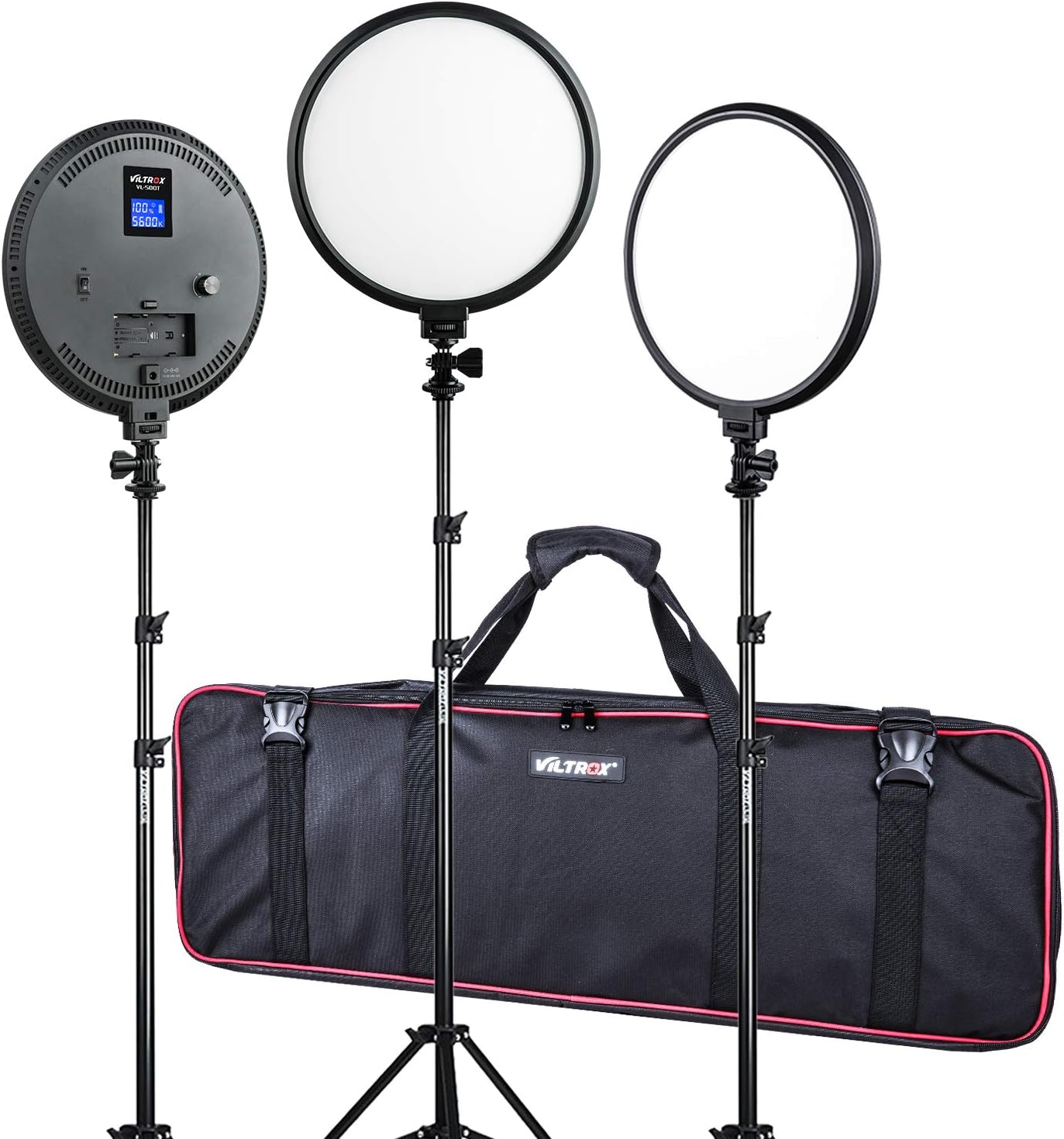
Your VILTROX VL-500T 3 Packs Kit includes the following components:
- (3) x 10-inch LED Round Lights
- (3) x 26-75 inch Light Stands
- (3) x Hot Shoe Adapters
- (3) x Light Power AC Adapters
- (1) x Carrying Bag

3. സവിശേഷതകൾ
- Ultra-Bright, Bi-Color LED Edge Lights: Adopts the newest LED honeycomb design, providing soft brightness and accurate color temperature.
- ക്രമീകരിക്കാവുന്ന വർണ്ണ താപനില: Features 3300K-5600K Tungsten / Daylight color temperature, allowing matching with other lights, ambient lighting, or creative color effects.
- ഡിമ്മർ നിയന്ത്രണം: Brightness is adjustable from 20% to 100% via dedicated control dials.
- ഉയർന്ന കളർ റെൻഡറിംഗ് ഇൻഡക്സ് (CRI): CRI of ≥95(RA)+ ensures accurate color reproduction.
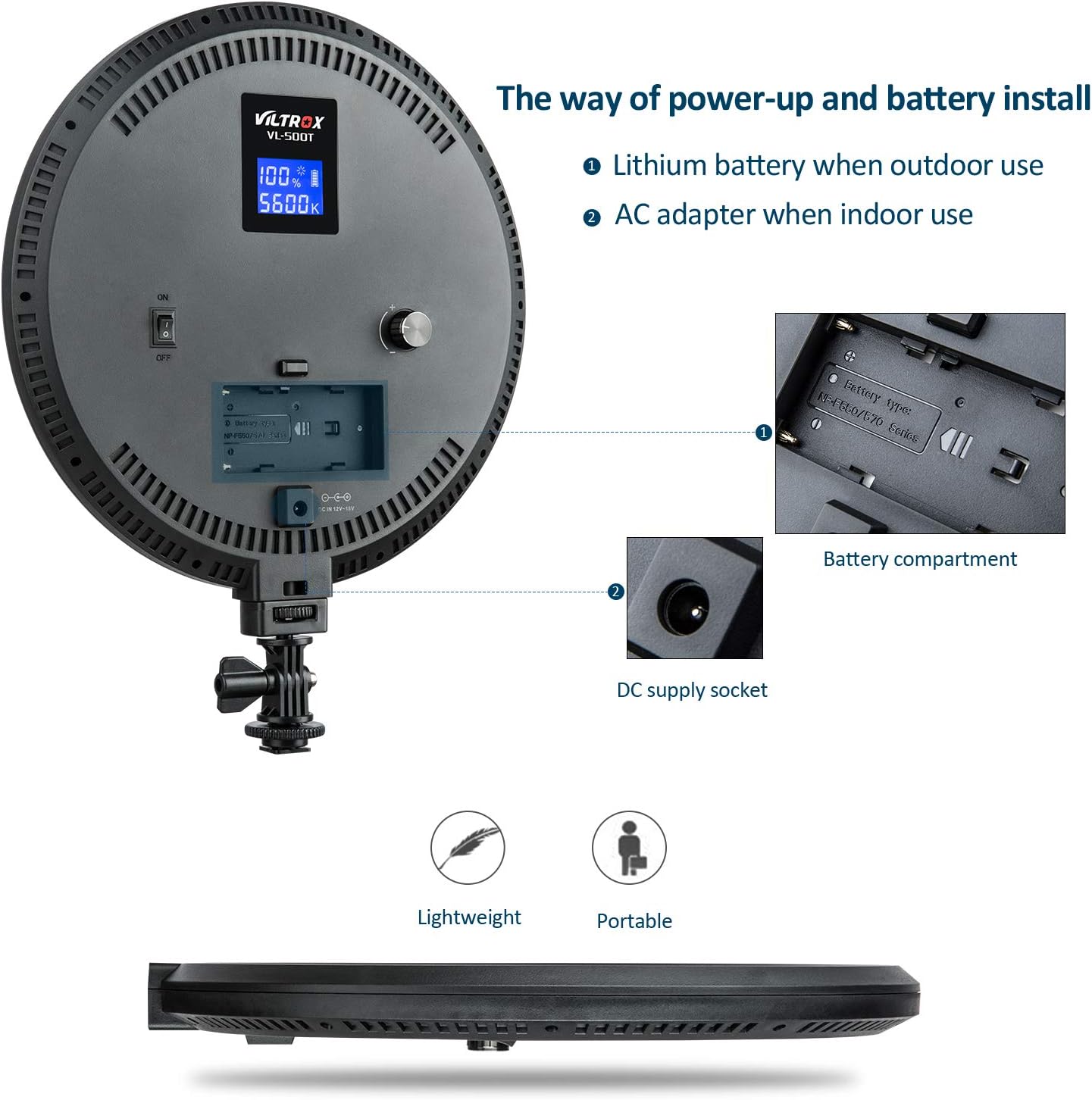
- ഡ്യുവൽ പവർ സപ്ലൈ മോഡുകൾ: Can be powered by NP-F series Lithium batteries for outdoor use or by the included AC power adapter for indoor use.
- LCD ഡിജിറ്റൽ ഡിസ്പ്ലേ: Shows battery capacity, brightness, and color temperature for precise control.
- ഭാരം കുറഞ്ഞതും പോർട്ടബിൾ: Designed for easy transport and setup.



4. സജ്ജീകരണം
- Assemble the Light Stand: Extend the legs of the light stand to form a stable base. Adjust the height to your desired level using the locking knobs.
- Attach the Light Unit: Securely mount the 10-inch LED round light onto the top of the light stand using the integrated mounting bracket and hot shoe adapter. Ensure it is tightened to prevent wobbling.
- പവർ കണക്ഷൻ:
- എസി പവർ: Connect the provided AC power adapter to the DC supply socket on the back of the light unit, then plug the adapter into a standard wall outlet.
- ബാറ്ററി പവർ: If using NP-F series Lithium batteries (not included), insert a charged battery into the battery compartment on the back of the light unit.
- സ്ഥാനനിർണ്ണയം: Place the assembled light kit in your desired location for optimal lighting. The round design provides a soft, even light distribution.


5. പ്രവർത്തന നിർദ്ദേശങ്ങൾ
- പവർ ഓൺ/ഓഫ്: Locate the ON/OFF switch on the back of the light unit and toggle it to the 'ON' position to power on the light. Toggle to 'OFF' to power it down.
- തെളിച്ചം ക്രമീകരിക്കുക: Use the dimmer control dial (typically a rotary knob) on the back of the light to adjust the brightness from 20% to 100%. Turn clockwise to increase brightness, counter-clockwise to decrease.
- വർണ്ണ താപനില ക്രമീകരിക്കുക: Use the color temperature control dial (another rotary knob) to change the color temperature between 3300K (warm, tungsten-like) and 5600K (cool, daylight-like).
- മോണിറ്റർ ക്രമീകരണങ്ങൾ: The LCD digital display on the back of the light will show the current brightness percentage, color temperature (in Kelvin), and battery capacity (if using battery power).
6. പരിപാലനം
- വൃത്തിയാക്കൽ: Use a soft, dry cloth to wipe the surface of the light unit and stand. Do not use abrasive cleaners or solvents.
- സംഭരണം: When not in use, store the light kit in the provided carrying bag in a cool, dry place away from direct sunlight and excessive humidity.
- ബാറ്ററി കെയർ: If using batteries, ensure they are fully charged before long-term storage and periodically recharge them to maintain battery health. Remove batteries if the light will not be used for an extended period.
- ശ്രദ്ധയോടെ കൈകാര്യം ചെയ്യുക: While durable, avoid dropping the light units or stands, and do not apply excessive force to the adjustable parts.
7. പ്രശ്നപരിഹാരം
| പ്രശ്നം | സാധ്യമായ കാരണം | പരിഹാരം |
|---|---|---|
| ലൈറ്റ് ഓണാക്കില്ല. | No power supply; battery depleted; power switch off. | Ensure AC adapter is properly connected or battery is charged and inserted correctly. Check if the ON/OFF switch is in the 'ON' position. |
| തെളിച്ചം ക്രമീകരിക്കാൻ കഴിയില്ല. | Control dial stuck or faulty. | Gently rotate the dimmer dial. If unresponsive, contact customer support. |
| Color temperature cannot be changed. | Control dial stuck or faulty. | Gently rotate the color temperature dial. If unresponsive, contact customer support. |
| അപ്രതീക്ഷിതമായി വെളിച്ചം മിന്നിമറയുകയോ മങ്ങുകയോ ചെയ്യുന്നു. | Low battery; unstable power connection. | Recharge or replace battery. Ensure AC adapter connection is secure and power outlet is stable. |
8 സ്പെസിഫിക്കേഷനുകൾ
- LED Bulb Quantity: 140 പീസുകൾ
- പരമാവധി. തെളിച്ചം: 2000LM (0.5m)
- ഇൻപുട്ട് വോളിയംtage: 8-15V (power not less than 28W), φ5.5*2.0mm
- ശക്തി: 25W
- പരമാവധി പ്രകാശം: 1550Lux/0.5m
- വർണ്ണ താപനില: Internal adjustable 3300K-5600K
- കളർ റെൻഡറിംഗ് ഇൻഡക്സ് (CRI): >95 (RA)
- തെളിച്ചം ക്രമീകരിക്കാവുന്ന: 20% ~ 100%
- Brightness Light Angle: 180°
- ഡിസ്പ്ലേ: LCD digit display (shows battery capacity/brightness/color temperature)
- അനുയോജ്യമായ ബാറ്ററികൾ: Sony NP-F970/F770/F570/F550 series
- അളവുകൾ: 270mm x 270mm x 24mm
- Weight (per light unit): 660 ഗ്രാം
- പാക്കേജ് അളവുകൾ: 33 x 12.99 x 4.88 ഇഞ്ച്
- Item Weight (total kit): 13.82 പൗണ്ട്
- ഇനം മോഡൽ നമ്പർ: VL-500T 3 Packs Kit
- നിർമ്മാതാവ്: ഷെൻസെൻ ജ്യൂയിംഗ് ടെക്നോളജി കമ്പനി, ലിമിറ്റഡ്.
- ആദ്യം ലഭ്യമായ തീയതി: 25 ജനുവരി 2019
9. വാറണ്ടിയും പിന്തുണയും
VILTROX products are manufactured to high quality standards. For warranty information, technical support, or service inquiries, please refer to the official VILTROX webസൈറ്റിൽ ബന്ധപ്പെടുകയോ അവരുടെ ഉപഭോക്തൃ സേവനവുമായി നേരിട്ട് ബന്ധപ്പെടുകയോ ചെയ്യുക. ഏതെങ്കിലും വാറന്റി ക്ലെയിമുകൾക്കായി നിങ്ങളുടെ വാങ്ങലിന്റെ തെളിവ് സൂക്ഷിക്കുക.
Official VILTROX Store: VILTROX Official Store on Amazon
Ask a question about this manual
Ask about setup, troubleshooting, compatibility, parts, safety, or missing instructions. Manuals+ will review the question and use this page’s manual context to help answer it.